Google Tag Gateway vs Server-Side Tagging is a common decision for teams tightening their GA4 measurement. Both bring tagging closer to your own domain. They solve different problems, though.
Google Tag Gateway for advertisers uses your first-party infrastructure- such as a compatible CDN, load balancer or web server - to serve Google tag scripts from your website’s domain and route eligible measurement requests. It does not, by itself, provide the event-processing controls of a server container. Server-side tagging adds a server container that you control. It can inspect, transform, enrich, filter and route event data before sending it to configured destinations.
This guide explains how each approach works, where they differ and when to use one or both. It focuses on implementation choices, infrastructure, maintenance, cost and measurement governance so you can select an approach that fits your current setup. Refer to GA4 guide to marketing performance for a step-by-step view of how GA4 data turns into better marketing decisions.’
Quick answer: Google Tag Gateway vs. Server-Side Tagging
Google Tag Gateway helps serve Google tag scripts through your website’s domain using compatible first-party infrastructure. Server-side tagging gives you greater control over how measurement data is processed and shared with configured destinations.
- Choose Google Tag Gateway for first-party Google tag delivery without requiring a separate server-side tagging container.
- Choose server-side tagging when you need to validate, filter, enrich or route event data.
- Use both when you need first-party tag delivery alongside server-side data processing.
What Is Google Tag Gateway?
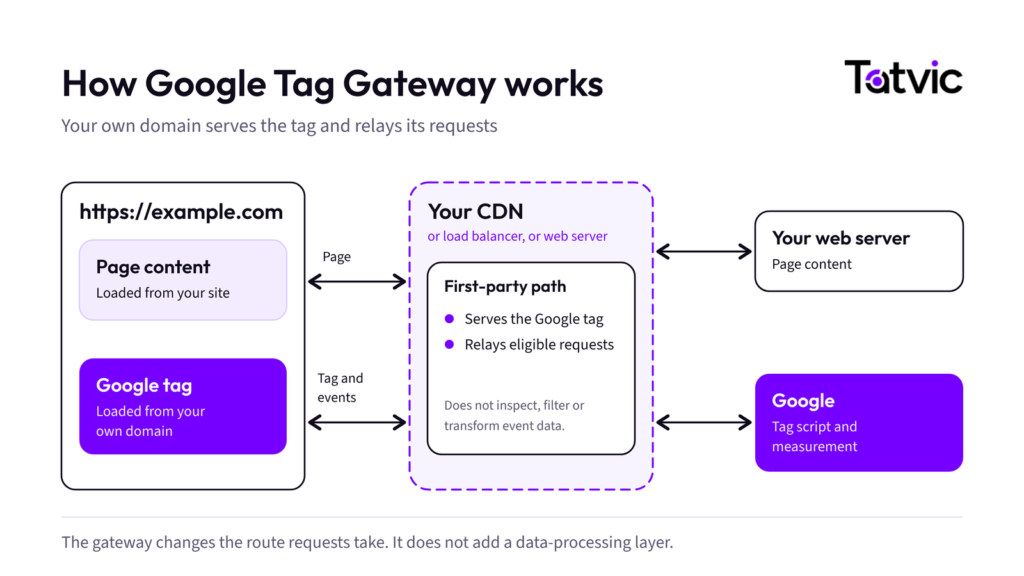
Google Tag Gateway for advertisers lets you deploy Google tags using first-party infrastructure hosted on your website’s domain. That infrastructure may be a compatible content delivery network (CDN), load balancer or web server. It changes how supported Google tag scripts are served and how eligible measurement requests are routed; it is not the same as a Google Tag Manager server container - Google Tag Gateway overview.
In a standard setup, the browser requests Google tag scripts from a Google domain and measurement requests are sent to Google services. With Google Tag Gateway, the website serves Google tag scripts from a first-party domain, and eligible measurement requests can use that first-party domain as part of the route to Google. The exact behavior depends on the setup method and infrastructure configuration.
The setup assumes an existing Google tag or Tag Manager container and compatible first-party infrastructure that can route requests to the required endpoints. Implementation effort depends on the CDN, load balancer or web-server configuration and the setup method selected. Follow Google’s current setup guide for path, routing and compatibility requirements: setup guide.
How Google Tag Gateway works
- A visitor opens your website.
- The page loads the Google tag from your first-party domain.
- The tag records interactions and creates measurement requests.
- Eligible requests pass through your CDN or load balancer.
- Google’s measurement services receive them.
The exact request flow depends on your gateway configuration and website infrastructure.
Key benefits of Google Tag Gateway
- First-party tag delivery: Google tag scripts load from your domain, not directly from a Google domain.
- Smaller infrastructure change: If you already have a compatible CDN or load balancer, you may not need a full tagging server.
- More durable measurement setup: First-party routing can support measurement durability. Results still depend on browser behavior, consent and implementation.
- Fits alongside your current tagging: You can add it to an existing Google tag or Tag Manager setup, subject to compatibility.
On its own, Google Tag Gateway does not provide the event-level validation, transformation, enrichment and destination-specific filtering available through a configured server-side Tag Manager container. It can be used independently for supported first-party tag delivery, or combined with server-side tagging when both delivery and processing capabilities are needed.
What Is Server-Side Tagging?
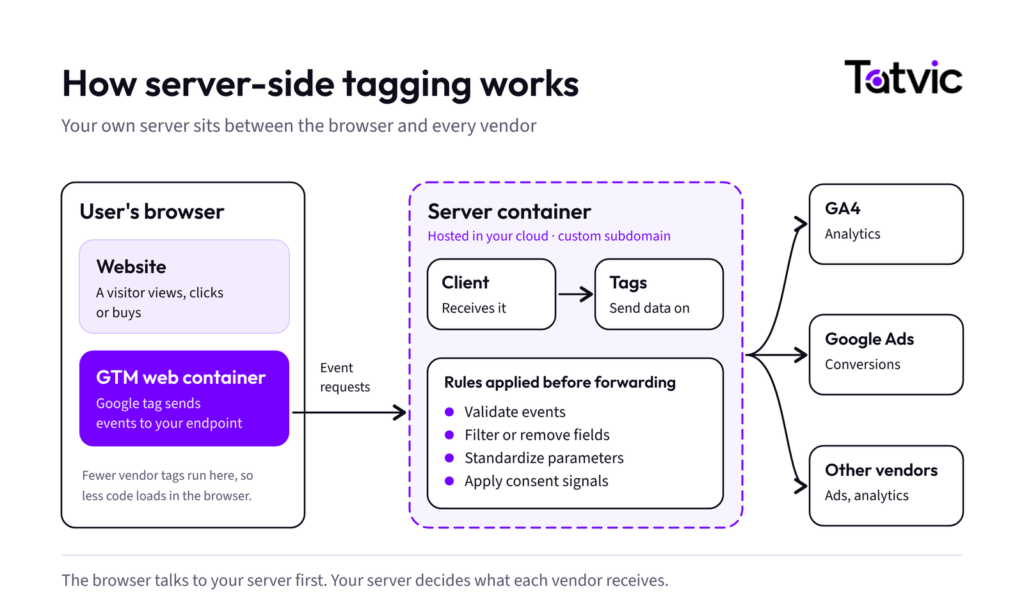
Server-side tagging moves measurement processing from the visitor’s browser to a server-side Google Tag Manager container. The tagging server can run on Google Cloud (including Cloud Run) or another supported environment you manage. The server receives requests, a client interprets them as events, and configured server tags process and forward those events to destinations. The capabilities depend on the clients, tags, permissions, policies and processing logic you configure for server-side tagging documentation.
In a typical client-side setup, the browser runs measurement tags and sends requests to the relevant platforms. With server-side tagging, the browser sends measurement data to your tagging server first; the server container can then process and route the data to configured destinations. This adds an infrastructure and governance layer, so it also adds hosting, monitoring and maintenance responsibilities.
How server-side tagging works
- A visitor views a product or submits a form.
- The web container and Google tag capture the interaction as a GA4 event.
- The event is sent to your server container endpoint.
- A client in the server container, such as the GA4 client, receives and parses the request.
- Server tags forward the data to GA4, Google Ads or other configured destinations.
Along the way, rules can validate, modify, enrich or filter the data. What is possible depends on your clients, tags, permissions and processing logic.
Key benefits of server-side tagging
- Control over data: You decide which fields each destination receives. Unnecessary information can be removed before it leaves your environment.
- Lighter pages: Google notes that fewer measurement tags in the browser means less code runs for each visitor.
- Cleaner, consistent data: Server rules can standardize event parameters and drop unwanted requests.
- First-party context: You can map a custom domain to the tagging server. Depending on the configuration, the server may set cookies with attributes such as HttpOnly. Cookie behavior and access depend on the implementation; this does not itself guarantee privacy compliance or complete measurement.
One caution applies. Server-side tagging does not bypass consent requirements or guarantee complete data. Consent signals, privacy rules and platform policies still apply.
Google Tag Gateway vs. Server-Side Tagging: Key Differences
Both approaches can support a first-party measurement architecture, but they operate at different layers. Google Tag Gateway primarily addresses tag delivery and eligible request routing; server-side tagging adds a configurable processing layer for incoming event data. They are not direct substitutes when server-side data transformation is a requirement.
| Comparison area | Google Tag Gateway for advertisers | Server-side tagging |
|---|---|---|
| Primary purpose | Serve Google tag scripts from a first-party domain and route eligible requests | Process and control measurement data in a server container |
| Core infrastructure | Compatible CDN, load balancer or web server; no separate server container is required for gateway-only use | GTM server container plus a deployed tagging server (for example, on Cloud Run or another supported environment) |
| Data processing | Does not provide server-container-style event processing on its own | Can validate, transform, enrich, filter and route events through configured clients, tags, triggers and variables |
| Tag delivery | Designed for first-party delivery of Google tag scripts and eligible request routing | Can support first-party delivery when configured for it; delivery and processing are separate design choices |
| Destinations | Focused on Google tag delivery and eligible measurement requests to Google services | Can send data to Google and other configured destinations, subject to tag support and configuration |
| Implementation effort | Often less extensive if compatible CDN/load-balancer infrastructure is already in place; routing and compatibility still need testing | Usually greater: server container setup, hosting, routing, security, testing and monitoring |
| Maintenance and operations | Ongoing review of CDN/load-balancer rules, paths, compatibility and measurement behavior; operational burden depends on existing infrastructure | Ongoing server updates, monitoring, capacity planning, incident response, security and configuration reviews |
| Cost and infrastructure | May use existing CDN/load-balancer capacity, but provider, traffic and configuration costs may still apply | May involve hosting, networking, logging, monitoring and operational costs; cost varies with traffic and architecture |
| Performance and redundancy | Can serve scripts through existing edge infrastructure; performance and reliability gains depend on configuration and should be validated | Can reduce browser-side measurement work, but server capacity and availability must be planned and measured |
| Best suited for | Teams prioritizing first-party Google tag delivery and request routing without needing server-container processing | Teams needing control over event data, data minimization, enrichment and distribution to multiple configured destinations |
| Can they work together? | Yes. Can serve scripts through a CDN while a separate path sends measurement data to server-side tagging | Yes. Processes data sent to the server container when routing is configured correctly |
The key takeaway: Google Tag Gateway changes how Google tags are delivered and how eligible requests travel through first-party infrastructure. Server-side tagging provides a server container where incoming data can be inspected, transformed and routed before it is sent to configured destinations.
Neither approach guarantees better accuracy, complete tracking, lower costs or faster pages in every environment. Outcomes depend on the implementation, infrastructure, consent configuration, browser behavior, traffic and validation. Measure performance and data quality before and after deployment.
Costs vary by deployment, traffic volume, region, infrastructure choices and operational requirements. Google Tag Gateway may use infrastructure you already pay for, but configuration or traffic costs can still apply. Server-side tagging can incur hosting, networking, logging, monitoring and maintenance costs. Do not rely on a fixed monthly estimate without checking current Google Cloud and provider pricing. For redundancy and capacity, follow the current deployment guidance for your traffic and architecture rather than assuming a universal instance count.
Google Tag Gateway or Server-Side Tagging: Which Fits Your Setup?
The right choice depends on your current tagging, technical resources and measurement goals.
Choose Google Tag Gateway when:
- You want Google tag scripts served through your website’s domain.
- You already use a compatible CDN, load balancer or web server.
- Your main goal is first-party delivery and routing for Google tags.
- You want a targeted improvement without building a full server-side environment yet.
Choose server-side tagging when:
- You need to inspect, filter or transform data before forwarding it.
- You want tighter control over what analytics and advertising vendors receive.
- Your setup involves several destinations and centralized processing.
- You need a flexible base for data governance, validation or event enrichment.
Server-side tagging also brings ongoing responsibilities. Your team must configure and secure the server, monitor availability, plan capacity and redundancy, manage costs, test changes, review data flows and maintain the setup over time.
Quick decision guide
| If your priority is… | Start with |
|---|---|
| Serving Google tags from my own domain, with compatible existing infrastructure | Google Tag Gateway |
| Minimal operational overhead and no need for event-level server processing | Consider Google Tag Gateway first, after checking compatibility and costs |
| Controlling, filtering or enriching event data before forwarding it to destinations | Server-side tagging |
| Both first-party Google tag delivery and server-side data processing | Both, with separate paths and careful routing |
Not sure which approach suits your stack? Tatvic’s Google Tag Manager services team can review your GA4 and Tag Manager setup, measurement needs and current infrastructure, then recommend the right tagging architecture.
Can You Use Google Tag Gateway and Server-Side Tagging Together?
Yes. Google documents supported configurations that combine Google Tag Gateway with a CDN and server-side Google Tag Manager. In a common arrangement, the CDN serves Google tag scripts from a first-party path while a separate measurement path forwards requests to the server container for processing. The exact paths and routing depend on your implementation. Google’s guide to Google Tag Gateway with a CDN and server-side tagging explains the setup in detail.
For example, a CDN may serve Google tag scripts through a path such as /scripts, while measurement data is sent through a separate path such as /metrics to the server container. The server container then applies the configured processing and routing rules before forwarding data. Keep the paths distinct and follow Google’s current implementation guide.
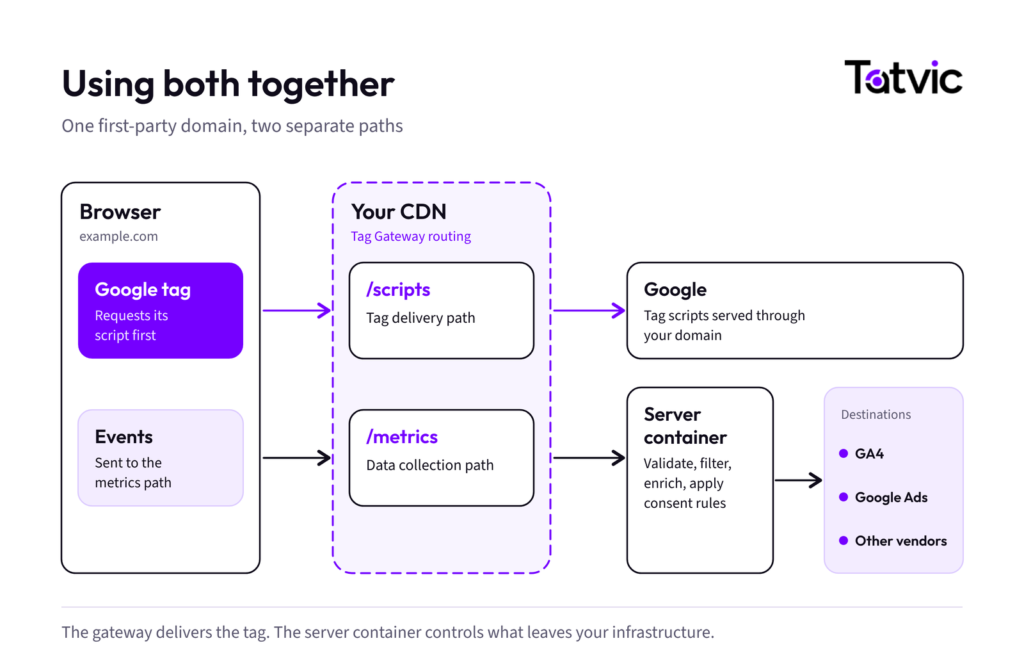
Google describes the combined setup as a way to pair first-party script delivery with server-side data control. Potential benefits depend on implementation and can include:
- Faster script delivery from your own domain.
- Less static-asset load on the server container.
- More durable measurement through first-party routing.
- Server-side control over data, with both containers managed in Tag Manager.
The trade-off is additional architectural complexity. Routing, domains, consent signals, access controls, monitoring and measurement endpoints need careful configuration and end-to-end testing.
Practical Example: Improving GA4 Measurement for an Ecommerce Store
Picture a hypothetical online store that tracks product views, add-to-cart actions, checkout steps and purchases in GA4. It has two goals. It wants Google tags served from its own domain, and it wants more control over the data sent to analytics and advertising platforms.
- With Google Tag Gateway: The team configures its CDN to serve Google tags from the store’s domain and route eligible requests.
- With server-side tagging: The team sets up a server container to validate events, standardize parameters, remove unneeded fields and forward the right data to GA4 and other tools.
- With both: First-party tag delivery and server-side processing work together, provided the routing is integrated correctly.
The next step is end-to-end validation. Confirm that events fire as expected, required parameters arrive, consent rules hold, and duplicate or missing events are investigated.
This example shows architectural differences only. It does not suggest that either option removes tracking discrepancies by itself.
What to Check Before You Implement
1. Consent and privacy
First-party tagging does not make tracking compliant on its own. Apply consent signals and data-sharing rules at every step of the flow. Our guide to implementing Google Consent Mode v2 covers the basics.
2. Event validation
Check event names, parameters, destination routing and duplicate firing. For GA4, use Tag Manager Preview, DebugView, Realtime reports and browser network requests.
3. Website performance
Measure the real impact instead of assuming an improvement. Compare script delivery, request timing and browser workload before and after the change.
4. Infrastructure and maintenance
Google Tag Gateway depends on compatible first-party infrastructure and correct routing rules; using an existing CDN may reduce the need for a separate tagging server, but it does not eliminate setup, testing or ongoing oversight. Server-side tagging requires hosting or managed infrastructure, monitoring, capacity and redundancy planning, security reviews and cost control.
5. Measurement consistency
Compare analytics and advertising data using the same event definitions, attribution settings, time periods and counting rules. Platform differences can persist after implementation.
A strong tagging strategy depends on the technology and on the governance around it.
Key Takeaways: Choosing the Right Tagging Setup
- Google Tag Gateway changes how Google tags are delivered. Server-side tagging changes how data is processed.
- Google Tag Gateway primarily changes Google tag delivery and the routing of eligible requests through first-party infrastructure.
- Server-side tagging adds a server container for configurable event processing, filtering, enrichment and destination routing.
- They can also be deployed independently for different needs or together when both first-party delivery and server-side data control are required.
- Choose based on your measurement goals, existing infrastructure, operational capacity and validated cost and performance requirements.
Need help evaluating your tagging setup?
Tatvic’s experts can review your GA4 measurement, Google Tag Manager implementation, event quality and tagging architecture. Get a GA4 Measurement Audit or explore Tatvic’s Google Analytics 4 Services to identify gaps and determine the right approach for your business.