GA4 Guide to Marketing Performance: Measure, Analyze & Optimize
Open any GA4 property and you will find plenty of data. Then someone asks which campaign produced last month’s qualified leads, and the room goes quiet.
More data did not make that question easier. GA4 becomes valuable when marketers can trust the numbers and use them to decide something. This GA4 guide shows how to get there: what to measure, how to read it, and how to act on it.
What Is GA4 and Why Does It Matter for Marketers?
Google Analytics 4 (GA4) is Google’s analytics platform for websites and apps. It records every user interaction as an event. Reports then show how people arrive, what they engage with, and which business-critical actions they complete.
For a marketer, the point is simple. You decide which actions count, and GA4 reports every channel, campaign and page against them.
Why GA4 for marketers is about decisions
Traffic reports count who showed up. Budgets are defended on what those people did next.
Traffic is context. Outcomes are the story.
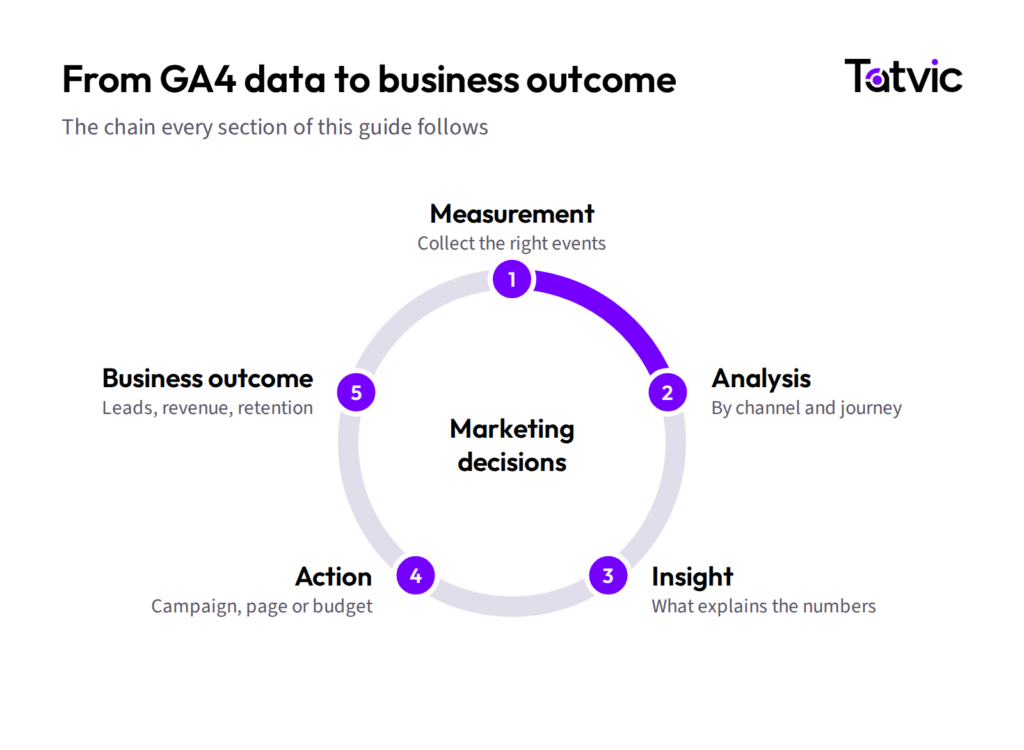
The rest of this GA4 guide follows one loop: measurement, analysis, insight, action, business outcome.
 GA4 vs. Universal Analytics: What Has Changed?
Universal Analytics (UA) stopped processing data in 2023, but its habits survive in plenty of reporting decks. So this part of the GA4 guide is about the shift in thinking, more than the feature list.
| UA-style question | GA4-style question |
|---|---|
| How many sessions and pageviews did we get? | Which business-critical actions did people complete? |
| Which goal fired in this visit? | What does the journey look like across visits, web and app? |
| Which channel got the last click? | Which channels contributed along the path? |
| How do I recreate my old dashboard? | Which questions does marketing need answered today? |
Underneath, GA4 moved from a session-centric data model to an event-based one, key events replaced goals, and attribution became data-driven by default. The lesson for marketers: build GA4 reporting around today’s questions, instead of rebuilding old UA reports.
Build a Strong GA4 Measurement Foundation
Installing the GA4 tag and calling it a measurement strategy is like buying a treadmill and calling it a fitness plan. The equipment is necessary. It is not the work.
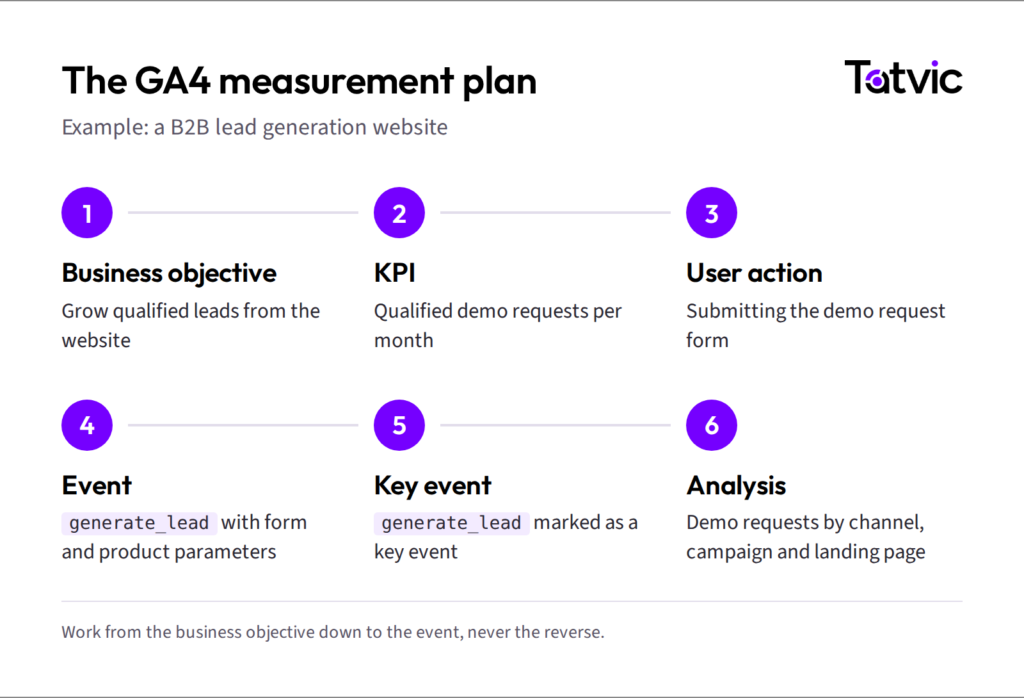
Start with a measurement plan
Work from the business objective down to the event, never the reverse. If an event cannot be traced back to an objective, question whether it needs to exist.
Make the data trustworthy
A decision is only as good as the data behind it. Five habits keep GA4 data trustworthy:
- Consistent naming: one event taxonomy, using Google’s recommended event names.
- Useful context: parameters and user properties that let you segment, such as form name or customer type.
- Clean campaign tagging: consistent UTM values, so GA4 campaign measurement does not collapse into “Unassigned”.
- Cross-domain measurement: wherever a journey spans domains, such as a separate checkout.
- Ownership: a named owner, a change log and a review schedule.
These habits are also what make a GA4 implementation auditable a year later.
What Should You Track in GA4?
Track the actions that map to a marketing objective, and very little else.
- Lead generation: form submissions, demo requests, phone clicks and qualified leads. They show which channels produce qualified leads.
- Engagement: downloads, video views, on-site search and newsletter signups. They show which content moves people towards an outcome.
- Ecommerce: product views, add to cart, checkout and purchase. They show where buyers leave the purchase path.
Google already defines recommended GA4 events for common actions. Use one, such as generate_lead or purchase, before inventing a name.
For GA4 lead tracking, the form fill is only the midpoint, so send CRM stages back to see which channel produces customers. For GA4 ecommerce tracking, read the sequence, because a fall between cart and checkout means something different from weak product-page engagement.
 In practice: The News Minute (+12% subscriptions)
“We track 72 events.” Good. Which five change a decision?
The News Minute had little visibility into how readers used its subscription prompts. Tatvic used GA4 insights to find the friction, then A/B tested fixes. As a result, subscriptions rose 12%.
Read The News Minute case study
GA4 Key Events vs. Conversions: What’s the Difference?
What are GA4 key events?
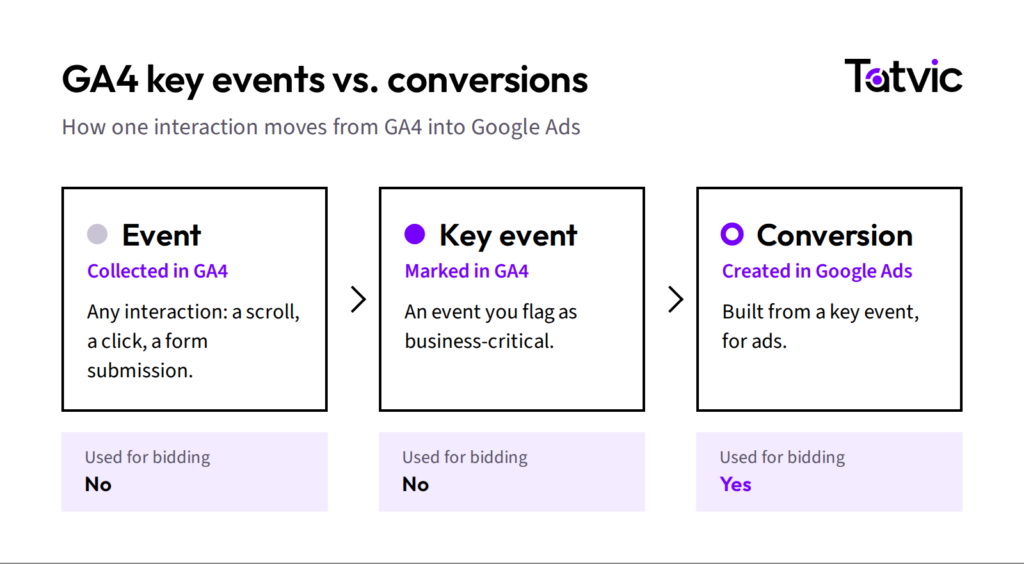
GA4 key events are the interactions you flag as business-critical, so every channel can be measured against them. Three terms do the work:
- An event records a user interaction, such as a contact form submission.
- A key event identifies an interaction that matters to the business. Here, you mark that form submission as key.
- A conversion carries those important actions into advertising and cross-channel conversion measurement. It can be used in Google Ads reporting and bidding where relevant.
Google renamed GA4 conversions to key events in 2024, to end the mismatch between Analytics and Google Ads numbers.
|
Key event |
Conversion |
|
|---|---|---|
| Question it answers | Which behavior matters, across every channel? | How does advertising perform against that behavior? |
| Where you use it? | GA4 reports and explorations | Advertising reports and Google Ads |
| Bidding |
Not used directly |
Can inform Google Ads bidding |
When everything is key, nothing is.
How to Set Up GA4 Conversion Measurement Marketers Can Trust
The goal is bigger than configuring one more key event. It is a conversion signal you would stake a decision on: judging a campaign, moving budget, assessing lead quality, or letting Google Ads bid on it.
Google Analytics conversion tracking now runs through key events, so all marketing conversion tracking depends on them. GA4 conversion tracking takes seven steps.
- Define the business outcome. A lead, a sale or a signup.
- Choose the event. Prefer a recommended event where one fits.
- Add event parameters in Google Tag Manager, such as form name and value.
- Mark the event as a key event in GA4.
- Validate in DebugView and the Realtime report, following Google’s key event guidance.
- Analyze key events by channel, campaign and landing page.
- Connect Google Ads and create conversions from the relevant key events.
How do you validate GA4 tracking?
Before a number reaches a budget meeting, confirm three things:
- The event fires once per action, with no duplicates.
- Parameters arrive with the expected values.
- Counts roughly match the CRM or order system.
A key event that has never been tested is a rumor with a dashboard.
Use GA4 to Measure Marketing Performance
The question behind every marketing review is simple: what did the traffic produce? GA4 marketing performance is read across four stages, and sessions are only the first.
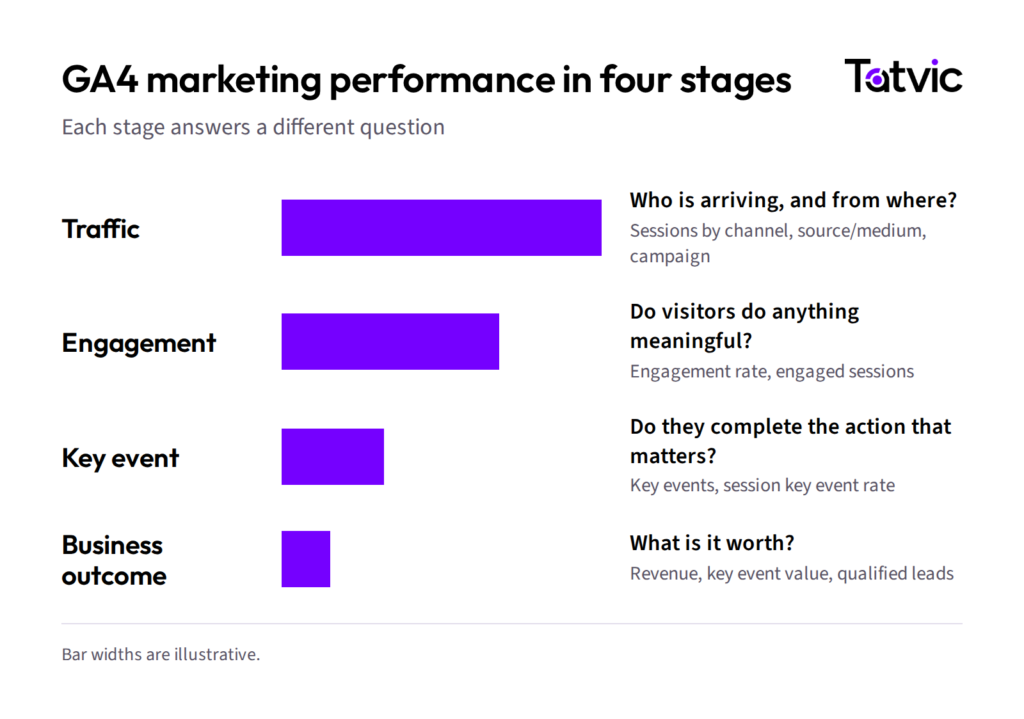
Here is a hypothetical example. Campaign A drives 50,000 sessions and 300 qualified leads. Campaign B drives 20,000 sessions and 500.
A traffic report celebrates Campaign A. An outcome report asks why Campaign B does more with less.
Run the same read by channel, campaign and landing page. However, if many sessions sit under Unassigned, fix campaign tagging first.
In practice: LiveMint (43% better performance score)
LiveMint lacked a measurement-led way to improve page experience. Tatvic helped build one, and its performance score improved by 43%.
Read the LiveMint case study
Use GA4 to Understand the Customer Journey
Users rarely convert in one neat session. They discover, compare, disappear and return. GA4 customer journey analysis starts from a business question, then picks the report.
| Business question | GA4 analysis |
|---|---|
| Where do users drop off? | Funnel exploration |
| What do users do before or after a page? | Path exploration |
| Which channels contribute to outcomes? | Acquisition and Advertising reports |
| Which touchpoints precede a key event? | Attribution paths |
| Do returning users behave differently? | Audiences and segments |
GA4 funnel analysis and path exploration
Funnel exploration shows where users leave a journey, and a device breakdown shows where to fix first. Path exploration, run backwards from a key event, shows what converters did beforehand.
Each drop-off you find is a hypothesis for A/B testing.
In practice: ThePrint (+58% reader contributions)
ThePrint could not see how readers moved through its contribution journey. GA4 dashboards showed the drop-offs, UX changes followed, and contributions grew 58%. Read the ThePrint case study
How to Use GA4 for SEO Performance
The SEO question worth asking is which pages contribute to outcomes. GA4 shows what visitors do after they land, while Search Console shows what happens before the click. Linked together, the GA4 Google Search Console reports cover both.
SEO traffic vs. SEO business impact
A page with 10,000 organic sessions is not automatically worth more than one that generates 100 qualified leads. GA4 SEO reporting should show that difference, page by page.
Review GA4 organic traffic three ways:
- Landing pages by key events: which organic pages produce outcomes, beyond visits.
- Engagement: low engagement on a busy page often signals an intent mismatch.
- AI assistants: visits from tools such as ChatGPT can appear as referrals. Group them to see what they produce.
GA4 Attribution: Understanding Which Marketing Touchpoints Matter
How does GA4 attribution work?
GA4 attribution assigns credit for a key event to the channels on the path that led to it. As elsewhere in this GA4 guide, the real question is a decision: where should the next slice of budget go?
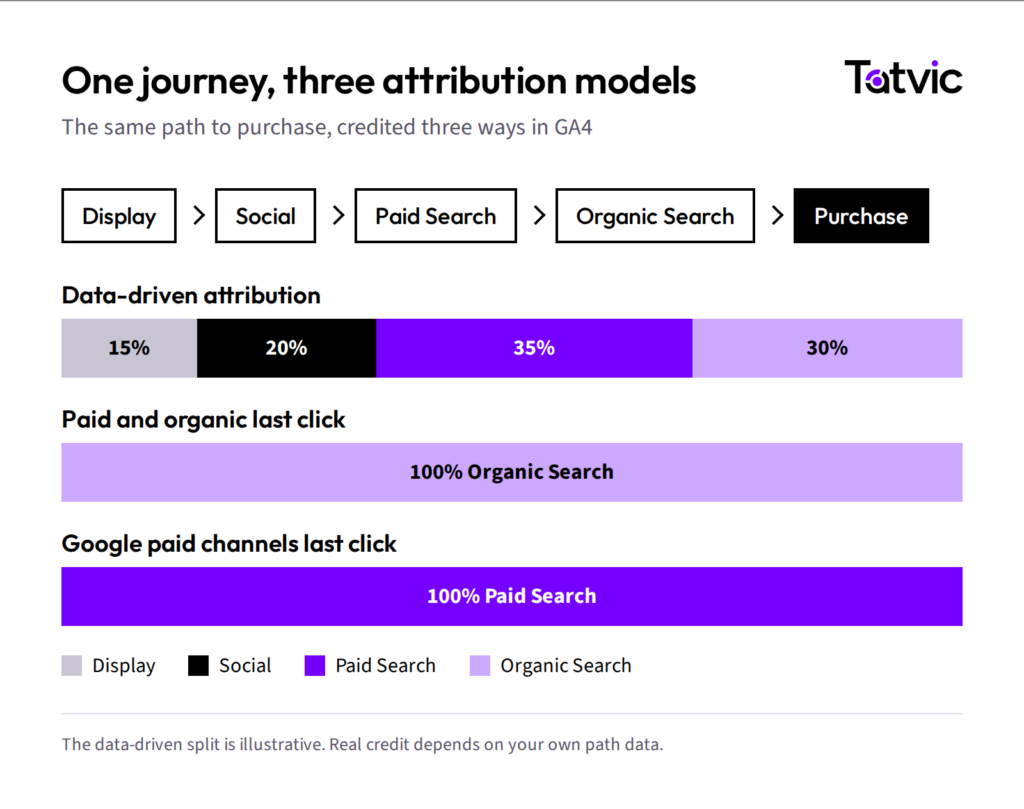 GA4 offers three attribution models:
- Data-driven attribution: the default. Credit follows your own path data.
- Paid and organic last click: all credit goes to the last non-direct channel.
- Google paid channels last click: all credit goes to the last Google Ads click.
Read attribution as evidence
One channel can show different totals in different reports. Acquisition reports credit the session’s source, while Advertising reports apply the attribution model.
Check the lookback window too, since a touchpoint outside it earns no credit. The Attribution paths report shows the full sequence. Even so, no model sees offline touchpoints or users who decline consent.
Treat attribution as evidence, never as financial truth. For large budget shifts, pair it with a wider measurement and attribution approach.
GA4 + Google Ads: From Measurement to Campaign Optimization
The GA4 Google Ads integration turns measurement into action. Key events become conversions, and conversions guide bidding. GA4 audiences, such as cart abandoners, become remarketing lists. Paid traffic can then be judged by outcome, alongside clicks and cost.
Why GA4 and Google Ads numbers differ
The two platforms rarely match, because attribution settings, counting rules and timing all differ.
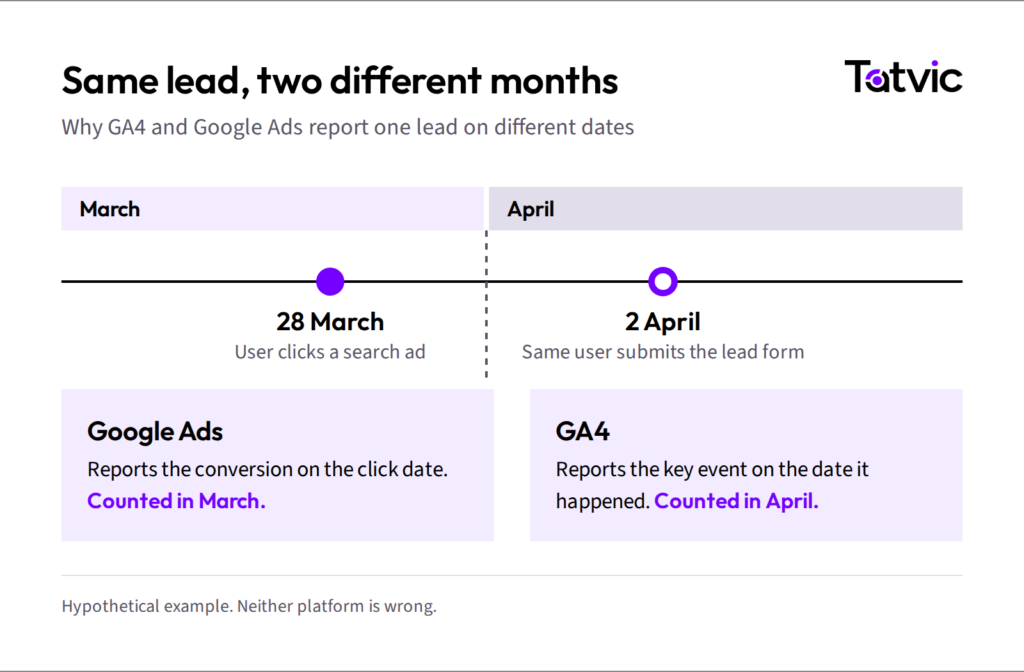
So agree which platform is the source of truth for which decision.
GA4 + BigQuery for Advanced Marketing Analytics
Most marketing teams do not need BigQuery on day one. It becomes necessary when GA4 marketing analytics must answer a question the interface cannot, such as whether a lead became revenue.
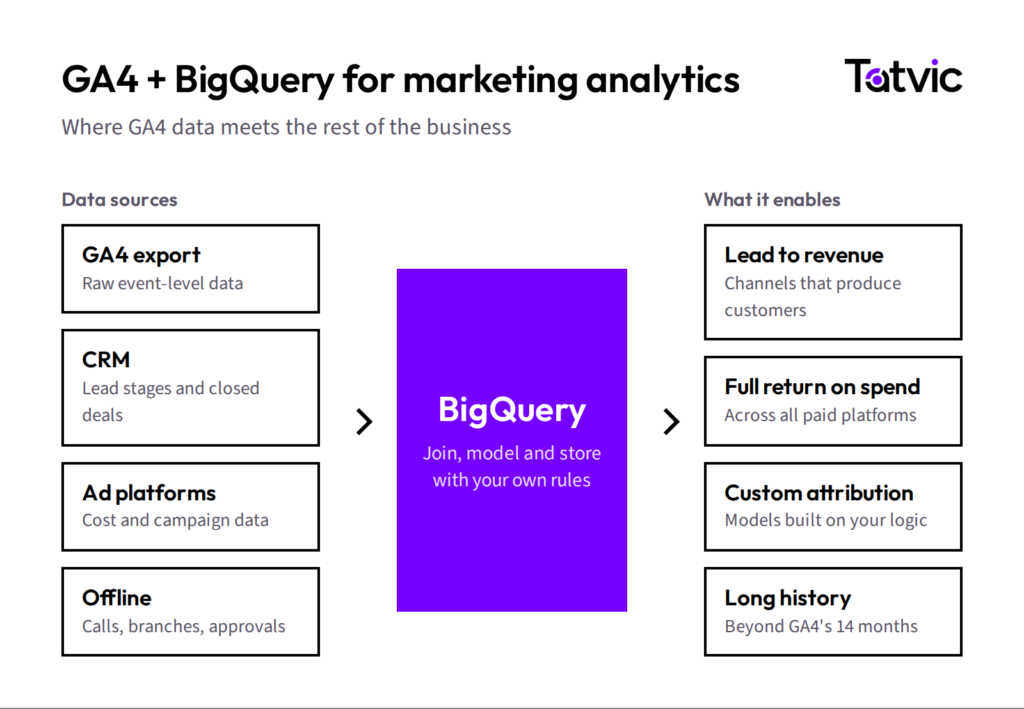
The GA4 BigQuery export sends raw, event-level data to Google’s data warehouse. One caution for GA4 data analysis in SQL: totals will not match the interface exactly.
GA4, Privacy and Data Quality
No GA4 guide can promise complete data. Trustworthy data means knowing where the gaps are.
When visitors decline analytics cookies, GA4 cannot observe them fully. With consent mode, behavioral modeling can estimate the gap once a property meets Google’s thresholds.
When two platforms disagree, do not start with “which one is wrong?” Instead, ask whether they share the same attribution rules, dates and definitions.
Tracking also breaks quietly. Therefore, good marketing performance measurement needs both implementation and governance.
Common GA4 Measurement Mistakes
Before using the GA4 guide checklist below, check your setup against these ten mistakes.
- Tracking everything. Many events, no definition of success.
- Making every event a key event. The rate stops meaning anything.
- Inconsistent naming. form_submit and Form Submit become two events.
- Skipping validation. Published does not mean correct.
- Ignoring parameters. Leads without context cannot be segmented.
- Reporting traffic only. Sessions rise while leads stay flat.
- Expecting GA4 and Google Ads to match. Gaps are normal.
- Treating attribution as truth. Credit is modeled.
- Ignoring organic outcomes. Rankings get reviewed, converting pages do not.
- Building dashboards first. Polish cannot rescue unreliable tracking.
GA4 Marketing Measurement Checklist
Use it to review a property or plan a new one.
Measurement
- Business objectives defined
- KPIs mapped
- Event taxonomy documented
- Recommended events implemented where appropriate
- Custom events documented
Key events
- Business-critical events identified
- Key events configured
- Lead and purchase events validated
- Duplicate events checked
Marketing
- UTM standards implemented
- Google Ads linked
- Relevant conversions configured
- Attribution reviewed
SEO
- Search Console connected
- Organic landing pages reviewed
- Organic key events measured
- Content-to-conversion performance analyzed
Data quality
- Realtime checked
- DebugView checked
- Parameters validated
- Cross-domain measurement reviewed where needed
From GA4 Data to Better Marketing Decisions
Everything in this GA4 guide leads here. Each illustrative row below moves from a metric to a decision, through the same five steps.
| Measurement | Analysis | Insight | Action | Business outcome |
|---|---|---|---|---|
| Paid sessions up, leads flat | Funnel by campaign and landing page | Visitors leave at the form | Shorten the form, then A/B test it | Cost per qualified lead |
| Organic traffic up, few qualified leads | Organic landing pages by key events | Growth sits on articles with no next step | Add pathways to product and demo pages | Qualified organic leads |
| Several channels in the conversion path | Attribution paths across models | Social starts journeys that search closes | Hold social budget, then test the change | Blended cost per outcome |
| Checkout completion falling | Funnel exploration by device | The drop is on mobile, at payment | Fix mobile payment, then retest | Completed purchases |
 In practice: ABP LIVE (+17% user engagement)
ABP LIVE saw readers leave after an article while its video library went underused. GA4 behavioral data shaped new article-to-video pathways, and user engagement improved by 17%.
Reporting tells you what happened. Analysis decides what to do next.
Page changes belong in a structured conversion rate optimization program, and analytics intelligence tools can automate the monitoring.
Key Takeaways From This GA4 Guide
More data is not the goal. Better marketing decisions from trustworthy measurement are. The loop this guide opened with is how you get there:
- Measurement: plan before the tag, and validate before the dashboard.
- Analysis: read traffic, engagement, key events and outcomes together.
- Insight: ask what explains the number, beyond what the number is.
- Action: end every report with a decision.
- Business outcome: name what you will monitor, then measure again.
How Tatvic Can Help With GA4 and Marketing Analytics
Describing that loop is easy. Running it every week, on data the whole team trusts, is the hard part.
That is where Tatvic works with marketing teams: measurement strategy, GA4 implementation, analytics, attribution, BigQuery and experimentation. The publishers in this GA4 guide are four examples, with more in our case studies.
Need help turning GA4 data into marketing decisions?
Explore GA4 and marketing analytics services or talk to our team.