Hello There!

Lorem ipsum dolor sit amet, consectetur adipiscing elit,

 About Dhwani Trivedi

Dhwani Trivedi works as a content strategist and inbound marketer for Tatvic. She devotes her time in making content that educates, engages, and addresses the most pressing inquiries of our target group. She draws her creative ideas from films, books, and other people.

Top-10 User Experience Fundamentals to Skyrocket Mobile Conversion Rate

Top-10 User Experience Fundamentals to Skyrocket Mobile Conversion Rate

In today’s mobile-first world, conquering the “thumb scroll” is no longer a luxury, it’s a necessity. With over 73% of web traffic originating from smartphones [source: Statista, mobile traffic share 2022], a seamless mobile user experience (UX) is the cornerstone of conversion rate optimization (CRO). 

But how do you transform your mobile app or website from finger-fumbling frustration to a conversion machine?

The answer lies in strategic fundamentals of user experience design that cater to the unique needs of mobile users. 

Here are Top-10 proven User Experience Fundamentals to Skyrocket Mobile UX and elevate your mobile conversion rates:

User Experience Fundamentals

1. Prioritize Speed: The Impatient User’s Ally

One of the very basic UX fundamental design principles is speed. Imagine waiting for a webpage to load on your phone. Frustrating, right? A slow mobile experience is a conversion killer. Studies show that a one-second delay in mobile load time can decrease conversions by 7%  [source: Kissmetrics, Impact of Website Loading Speed on Conversion Rate].

Here’s how to ensure a lightning-fast mobile experience by leveraging mobile conversion rate optimization services to speed up load times:

  • Image Optimization: 

Compress large images without sacrificing quality. Tools like TinyPNG can significantly reduce file size.

  • Minify Code: 

Eliminate unnecessary code elements like whitespace and comments to streamline page loading.

  • Mobile-Specific Caching: 

Implement caching strategies to store frequently accessed content locally on user devices, minimizing server load times.

2. Craft a Navigation Made for Thumb

CRO experts also called this principle one of the top conversion rate optimization fundamentals.

Complex desktop navigation menus become cumbersome labyrinths on mobile screens.  Here’s how to create a mobile-friendly navigation system with active assistance from mobile conversion rate optimization services:

  • The Hamburger Menu: 

This ubiquitous icon is a familiar friend for mobile users. Ensure it’s easily accessible and displays essential categories.

  • Prioritize Key Functions: 

Place frequently used functions like search bars, shopping carts, and account logins within easy thumb reach, typically at the bottom of the screen.

  • Limit Menu Levels: 

Deeply nested menus lead to user frustration. Aim for a flat or two-level navigation structure for optimal usability.


3. Embrace the Power of Touch-Friendly Design

Buttons, links, and forms designed for desktop mouse clicks become clunky on touchscreens. Here’s how to make your mobile interface finger-friendly by leveraging mobile conversion rate optimization services:

  • Increase Button Size: 

Ensure buttons are large enough for easy tapping, even with less-than-precise fingers. Aim for a minimum target area of 48dp x 48dp.

  • Ample Spacing: 

Provide generous spacing between clickable elements to avoid accidental taps.

  • Prioritize Functionality Over Aesthetics: 

While maintaining a visually appealing design, prioritize functionality. Large, clear buttons are more important than intricate details.


4.  Search that Doesn’t Make You Search (for the Search Bar)

A well-designed search bar is a mobile user’s lifeline. Here’s how to make yours shine with conversion rate optimization services:

  • Prominent Placement: 

Place the search bar in a readily accessible location, ideally at the top of the screen.

  • Auto-complete and Suggestions: 

Utilize auto-complete features and suggest relevant searches as users type to expedite navigation.

  • Voice Search Integration: 

Consider incorporating voice search functionality for a truly hands-free experience.


5.  Clear Calls to Action

Your call to action (CTA) is the final nudge that converts a browsing user into a paying customer.  Here’s how to craft compelling CTAs for mobile with the most efficient mobile conversion rate optimization services:

  • Strong Verbs, Clear Benefits: 

Use action-oriented verbs like “Buy Now” or “Sign Up” and couple them with clear benefits to incentivize user action.

  • Eye-Catching Design: 

Make your CTAs stand out with contrasting colours and clear text. Consider using a larger font size for optimal readability.

  • Strategic Placement: 

Position CTAs strategically at the end of product descriptions, near shopping cart icons, or after informative content.


6.  Simplify Forms: Less is More

Lengthy forms are a conversion roadblock. Here’s how to streamline your mobile form with conversion rate optimization services:

  • Collect Only Essential Information: 

Only request information essential for the user’s action. Consider offering guest checkout options for faster purchases.

  • Auto-fill Magic: 

Utilize auto-fill features to pre-populate fields with user data stored on their device.

  • Mobile Keyboard Optimization: 

Ensure forms are optimized for mobile keyboards, including larger input fields and clear labelling.


7.  Product Images: A Picture is Worth a Thousand Sales

High-quality product images are crucial for mobile conversions. Here’s how to optimize your mobile product imagery with efficient conversion optimization services:

  • Fast Loading Images: 

As discussed earlier, prioritize image optimization to ensure quick loading times.

  • Multiple Angles and Zoom Functionality: 

Showcase products from various angles and allow users to zoom in for detailed inspection.

  • High-Resolution on All Devices:

Ensure high-resolution images adapt seamlessly to different screen sizes.


8. Leverage the Power of User Reviews and Social Proof

Social proof is a powerful tool for building trust and influencing purchase decisions. Here’s how to leverage it on mobile:

  • Customer Reviews and Ratings: 

Display prominent customer reviews and ratings to add credibility and social proof.

  • Social Media Integration: 

Integrate social media buttons to allow users to easily share their experiences or favourite products.

  • User-Generated Content: 

Encourage user-generated content by featuring customer photos or reviews on your mobile platform.


9.  Master the Art of Mobile-Friendly Payment Options

A seamless checkout process is essential for mobile conversions. Here’s how to optimize your mobile payment options:

  • Multiple Payment Gateways: 

Offer a variety of popular payment methods like credit cards, digital wallets (e.g., Apple Pay, Google Pay), and buy-now-pay-later options.

  • Guest Checkout: 

Allow guest checkout options for faster transactions, especially for first-time buyers.

  • Secure Payment Environment: 

Ensure a secure payment environment with clear security badges and encryption protocols.


10. A/B Testing: The Continuous Improvement Engine

The mobile UX landscape is constantly evolving. Here’s how to stay ahead of the curve by adopting the following mobile conversion rate optimization services:

  • A/B Testing: 

Implement A/B testing strategies to compare different design elements, layouts, and CTAs. This data-driven approach helps you identify what resonates best with your mobile audience.

  • Heatmaps and User Session Recordings: 

Utilize heatmaps and user session recordings to gain valuable insights into user behaviour on your mobile platform. Analyze where users tap, scroll, and drop off to identify areas for improvement.

  • User Feedback: 

Actively solicit user feedback through surveys or in-app prompts. This direct feedback loop provides invaluable insights into user needs and preferences.


Conclusion: The Mobile-First Mindset

By prioritizing these 10 mobile user experience design fundamentals, you can create a user-friendly and conversion-focused mobile experience. Remember, a seamless mobile journey is no longer a competitive edge, it’s the table stakes in today’s mobile-first world. Embrace the power of mobile UX optimisation and watch your conversion rates soar!

How competitor analysis helps in creating better App UX design?

How competitor analysis helps in creating better App UX design?

Imagine pouring your heart and soul into building an app, only to discover later that it doesn’t resonate with users. Yikes! To avoid this scenario, a user-centric approach is crucial. But how do you ensure you’re solving a real problem for real people? This is where competitor analysis for enhancing App UX design comes into the picture.

Think of it like building a house. You wouldn’t just start throwing bricks together, would you? First, consider the neighbourhood - the existing infrastructure, the overall vibe, and what amenities are available or lacking.

Competitive analysis is like that blueprint, helping you understand the “neighbourhood” of your app - the existing players, their strengths and weaknesses, and any gaps in the market.

Why Competitive Analysis is Crucial for User-Centric Design

Let’s delve deeper into why competitive analysis is a must-do for creating a user-centric app:

1. Identify User Needs and Pain Points: 

By analyzing competitor apps, you’re essentially eavesdropping on real user experiences. You can discover what features users find valuable and what frustrations they encounter in existing solutions. This goldmine of information allows you to pinpoint unmet needs and tailor your app’s functionalities to address them directly.

For example, imagine you’re developing a language-learning app. Analyzing competitors might reveal that users find vocabulary building difficult but love the gamification elements in another app. By understanding this, you can focus on creating a robust vocabulary section while incorporating engaging game mechanics to keep users motivated.

2. Learn from Best Practices: 

The competitive landscape is a treasure trove of successful design patterns and interaction models. Studying what works well for your competitors allows you to borrow (with a twist, of course!) these elements and create a familiar and intuitive experience for your users. Think of it like learning from the successes (and failures) of others.

Imagine a competitor’s music streaming app has a fantastic layout for browsing playlists. By analyzing this, you can incorporate elements like clear genre categorization and visually appealing thumbnail previews into your own music app, giving users a head start on finding the music they love.

3. Discover Differentiation Opportunities:  

Competitive analysis isn’t just about copying; it’s about finding your unique selling proposition (USP). Analyze competitor weaknesses to identify areas where your app can excel. This could be through innovative features, a more streamlined user flow, or a superior visual design.

For example, analyzing fitness apps might reveal that many have complex workout routines but lack a strong social support system. This paves the way for your app to focus on creating a vibrant fitness community, allowing users to connect, share goals, and motivate each other.

4. Stay Ahead of the Curve: 

In the fast-paced world of apps, staying relevant is key. Competitive analysis helps you stay informed about the latest trends in your app category. By understanding what features are gaining traction and becoming user favourites, you can ensure your app remains current and competitive.

Imagine a competitor’s food delivery app introduces a “live order tracking” feature that proves to be a hit. By analyzing this trend, you can implement a similar feature in your app, keeping your users engaged and informed throughout the ordering process.

Building a Seamless Application UX Design: Three Steps to Success

Now that we’ve established the importance of competitive analysis, let’s explore how to translate it into a user-centric UX design:

1. Follow Industry Trends: 

Research popular apps in your category and analyze user reviews to understand what’s resonating with users. Identify common pain points and emerging trends. This knowledge will guide your design decisions and ensure your app feels fresh and relevant.

2. Conduct a SWOT Analysis: 

This powerful tool allows you to assess your Strengths, Weaknesses, Opportunities, and Threats. Analyze your competitors through this lens to understand their strengths and weaknesses (opportunities for you!). Identify the gaps in the market where your app can shine.

For example, a SWOT analysis of a competitor’s photo editing app might reveal a strength in easy-to-use filters but a weakness in advanced editing tools. This presents an opportunity for your app to cater to professional photographers by offering a robust suite of editing tools alongside user-friendly filters.

SWOT Analysis of Competitor's photo editing app.

3. Competitive Analysis: 

Now, let’s dive deeper into the nitty-gritty of analyzing competitor apps. Here are some key aspects to focus on:

  • Target Audience: 

Who are they targeting? Understanding your competitor’s target audience helps you determine if their approach aligns with yours. Are they aiming for casual users or professionals? This will influence your app’s overall design and functionalities.

  • Value Proposition: 

What problem are they solving for their users? Analyze how they communicate their value proposition and how it resonates with their target audience. What promises are they making, and how effective are they?

UX Competitive Analysis

Conclusion:

Competitive analysis helps you understand the app landscape, what users need, and where your app can excel. This empowers you to design a user-centric app that stands out from the competition.

How to get Google Maps API key for your Business? A Step-by-Step Guide (Video)

How to get google maps api for business?


Today, we’re excited to walk you through the process of creating a Google Maps API using Google Cloud projects. Whether you’re a seasoned developer or just starting, this comprehensive guide will equip you with the knowledge and tools you need to succeed.

Step1. Project Creation:

Begin by visiting console.cloud.google.com. Create a project within the Google Cloud console - a crucial step in building your Google Maps API.

Step2. Prerequisites:

Before crafting your API, ensure two prerequisites are met - your project is part of Google Cloud projects, and it’s linked to an active billing account. We’ll use our demo project, Tatvic, under the organization of tatvic.com, with Tatvic internal maps as an example.

Step3. Validating Billing:

Check your billing by navigating to ‘Billings’ to confirm it’s linked to your project. This connection allows seamless creation of the Google Maps API.

Step4. API and Services:

Navigate to the sidebar, go to ‘API and services,’ and click on it. Proceed to the library to create specific Google Maps API, such as the Google Maps JavaScript API.

(Note: Some APIs are pre-enabled in our demo project.)

Step5. Enabling Google Maps JavaScript API:

Click ‘Enable’ to activate this API.

Step6. Creating API Key:

To utilize the API, generate a key. Visit ‘Key and Credentials,’ create a credential, and select the ‘API key’ option. Share this key with your developers for utilization.

Step7. Adding Security Measures:

For additional security, restrict the API key. Set key restrictions for websites, limiting usage to specific domains, such as tatvic.com. This ensures API usage is restricted to designated domains only.

We currently have an unrestricted API key, but we want to limit it to Google Maps APIs only. Name it ‘Maps JavaScript API Key’ and save your changes.

Share the API key with your development team, and they’ll be ready to integrate it into your project.

Conclusion:

In conclusion, mastering the creation of Google Maps API using Google Cloud projects is a pivotal step for developers of all levels. By following this comprehensive guide and ensuring adherence to security measures, such as API key restrictions, you’ll be well-equipped to seamlessly integrate powerful mapping capabilities into your projects and enhance user experiences.

How to utilize Google Maps API for Business? (2024 Guide)

How to utilize Google Maps API for your Business?

One of the powerful tools that has revolutionized the way businesses interact with location data is the Google Maps Platform. With its versatile Application Programming Interface (API), developers can integrate the functionality of Google Maps seamlessly into their websites and applications, opening up a plethora of opportunities to enhance user experience and drive business growth.

Understanding the Google Maps API

The Google Maps API is a set of programming instructions that grants developers access to the wealth of data and functionality offered by Google Maps. From displaying interactive maps to finding directions and locating businesses, the API empowers developers to leverage Google’s extensive mapping capabilities within their digital platforms.

Key Features of Google Maps API

Key Features of Google Maps API

Google Maps API Feature 1: Map Display

Integrate dynamic and interactive maps into your website or application to provide users with a visual representation of geographic data.

Google Maps API Feature 2: Geocoding

Convert addresses into geographic coordinates (latitude and longitude) and vice versa, enabling precise location-based services.

Google Maps API Feature 3: Routing and Directions

Offer users accurate directions between multiple locations, complete with various transportation modes and real-time traffic information.

Google Maps API Feature 4: Places API

Access detailed information about millions of businesses, landmarks, and points of interest worldwide, facilitating location-based search and discovery.

Google Maps API Feature 5: Street View

Embed immersive street-level imagery into your application, allowing users to explore and navigate real-world locations virtually.

How to Leverage Google Maps API for Business? 

How to Leverage Google Maps API for Business?

One of the most common applications of the Google Maps API in the business realm is facilitating location-based services and enhancing customer engagement. Here’s how you can harness the power of Google Maps Platform to benefit your business:

1. Location-Based Marketing and Search:

Integrate the Places API into your website or mobile app to enable users to discover nearby businesses, restaurants, hotels, and other points of interest. Implement features like “find businesses near me” to provide personalized recommendations based on the user’s current location, driving foot traffic to local establishments.

2. Optimized Logistics and Fleet Management: 

For businesses involved in transportation or delivery services, leverage the Routing and Directions API to optimize route planning and streamline fleet management operations. Calculate the most efficient routes, considering factors such as traffic conditions, distance, and vehicle restrictions, to ensure timely deliveries and cost savings.

3. Enhanced Customer Experience: 

Embed interactive maps within your e-commerce platform to facilitate seamless location-based shopping experiences. Allow customers to visualize store locations, check product availability, and even reserve items for in-store pickup, thereby bridging the gap between online and offline shopping channels.

4. Geospatial Data Analysis:

Utilize the Geocoding API to enrich your business intelligence efforts by geocoding customer addresses, analyzing geographic trends, and visualizing spatial data. Gain valuable insights into customer demographics, market penetration, and competitor locations to inform strategic decision-making and marketing campaigns.

5. Real-Time Location Tracking:

Integrate the Google Maps API with your mobile applications to enable real-time location tracking and geofencing capabilities. Enhance safety and security for on-demand services, fleet tracking, or field service management, ensuring efficient resource allocation and timely responses to customer requests.

Getting Started with the Google Maps Platform

Getting Started with Google Maps Platform

Now that you’re aware of the myriad benefits offered by the Google Maps API for businesses, let’s explore how you can begin leveraging this powerful platform:

Step1. Sign Up for a Google Maps API Key

To access the Google Maps API, you’ll need to sign up for a Google Cloud Platform account and obtain an API key. This key serves as a unique identifier for your application and authenticates your requests to the API. Google offers a range of pricing plans, including a free tier for low-volume usage and scalable options for businesses with higher demands.

Check out our detailed video tutorial titled “How to Obtain a Google Maps API Key.” This video provides a step-by-step guide on acquiring the Google Maps API, making the process easy to follow and understand.

Step2. Choose the Right APIs for Your Needs

Evaluate your business requirements and select the appropriate Google Maps APIs that align with your objectives. Whether you need geocoding services, mapping capabilities, or location-based search functionality, Google offers a comprehensive suite of APIs to suit various use cases.

Step3. Integrate the API into Your Application

Follow the documentation and developer guides provided by Google to seamlessly integrate the chosen APIs into your website, mobile app, or backend infrastructure. Leverage SDKs (Software Development Kits) and code samples to expedite the development process and ensure compatibility across different platforms.

Step4. Customize and Enhance User Experience

Experiment with the myriad customization options available within the Google Maps API to tailor the user experience according to your brand identity and design preferences. Implement features such as custom markers, overlays, and styling to create visually stunning and intuitive interfaces that captivate your audience.

Step5. Monitor Performance and Scale as Needed

Regularly monitor the usage and performance metrics of your Google Maps API implementation using the analytics dashboard provided by Google Cloud Platform. Evaluate usage patterns, API quotas, and billing statements to optimize costs and scale your infrastructure as your business grows.

Conclusion:

In conclusion, the Google Maps Platform offers a wealth of opportunities for businesses to harness the power of location data and deliver compelling experiences to their customers. Whether you’re looking to enhance marketing efforts, streamline operations, or analyze spatial trends, the Google Maps API provides a versatile toolkit to address a wide range of business needs. By leveraging the capabilities of Google Maps Platform, businesses can unlock new avenues for growth, innovation, and customer engagement in today’s digital landscape. So, why wait? Start exploring the possibilities and embark on your journey towards location-powered success with Google Maps today!

What is the Mobile Application UX Design Process?

Mobile App UX Design Process

In today’s fast-paced digital world, the attention span of users has dwindled to a mere eight seconds. This challenging reality underscores the critical importance of exceptional mobile app UI/UX design to capture and retain users’ attention. 

In this blog post, we will delve into the intricacies of the mobile app UI/UX design process, explore modern design patterns, discuss the team requirements, and provide insights into the time and tools required for creating an impactful mobile app.

Mobile App UI/UX Design: A Crucial Element of Product Success

Users have become increasingly judgmental and discerning regarding the design of mobile applications. With just eight seconds to make an impression, not only does the design need to be visually appealing, but it must also ensure a seamless and engaging user experience. Balancing convenience and design becomes a matter of prime importance for user engagement in this fast-paced environment.

Understanding the Mobile App UI/UX Design Process: 

Mobile app design is an ongoing procedure encompassing both user interface (UI) and user experience (UX) components. The visual aesthetics and structural integrity of the app take center stage as UI/UX designers strive to deliver a product that is both easy to use and aesthetically pleasing. While UI design focuses on the look, UX design is all about functionality, creating a harmonious interplay that defines the user experience.

Mobile App UI/UX Design Process: Step by Step

1. Requirements Analysis:

The journey towards an outstanding mobile app design begins with comprehensive research. Understanding project needs, collaborating closely with product owners and business analysts, and delving into business logic and visual style set the foundation for success. High requirements ensure a laser focus on business specifications and differentiation from market competitors.

Mobile App UX Design Process: Step 1 - Requirements Analysis


2. Functional Specifications and Wireframing:

With requirements in hand, the designers define functionality and create user flows. Balancing security and usability, wireframing takes precedence to visualize the basic flow and core structure of the app. Wireframes lay the groundwork, detailing app and page layout designs, and navigation elements without delving into graphics, colors, or animations.

Mobile App UX Design Process: Step 2 - Functional Specifications and Wireframing

3. Visual Presentation Development: 

Visual communication becomes key in this stage, elevating user experience to new heights. Establishing a strong brand identity involves introducing a color scheme, typography, and other visual elements. The development of standardized components ensures consistency, with the option to use design systems for efficiency. Designers create UI components like buttons and search fields, gradually adding unique elements to complement the app’s design style.

Mobile App UX Design Process: Step 3 - Visual Presentation Development

4. Screen Design Process:

Combining graphic design and user interface layouts on displays is crucial to meeting users’ needs, capabilities, and tasks. Designers navigate the challenge of maximizing user experience across varying screen sizes while adhering to the specifications of different operating systems, such as iOS and Android.

Mobile App UX Design Process: Step 4 - Screen Design Process


The Team and Tools Behind Mobile App UI/UX Design

Success in mobile app UI/UX design is not a solo endeavour. A collaborative team effort, including product owners, business analysts, UI/UX designers, and developers, is essential. Additionally, leveraging the right tools streamlines the design process. Whether creating components from scratch or utilizing design systems like Material or Human Interface Guidelines, having the right tools at hand enhances efficiency and customization.

In Conclusion

In a world where eight seconds determine success or failure, mastering mobile app UI/UX design is non-negotiable. By following a meticulous design process, staying abreast of modern design patterns, assembling the right team, and utilizing the best tools, teams can create mobile apps that not only catch users’ attention but also provide a delightful and memorable experience. The eight-second rule becomes an opportunity rather than a challenge, propelling mobile app success in the competitive digital landscape.

What Do Top Influencers Say About the Importance of User Experience Design?

What is the Importance of User Experience Design? Experts Opinion

The term “UX” has not only become a buzzword but a transformative force, replacing the very essence of “Business” in the modern context. As we delve into the importance of User Experience (UX) design, it’s evident that the trajectory of businesses hinges on the delivery of exceptional user experiences. 

By the year 2032, a workforce exceeding 229,000 professionals in web development and digital interface design will shape the design and development landscape.

The shift towards prioritizing UX design is grounded in its high return on investment. A survey by Nielsen Norman Group revealed that companies, after redesigning for usability, experienced an average improvement of 75% in key performance indicators (KPIs), including conversion rates, traffic, user performance, and target feature usage.

Some of the top UX Design Influencers reflect the importance of the UX design that is shaping the current and future landscape of User Experience: 


1. Donald Norman: The Pioneer in Cognitive Science at Apple:

Donald Norman, a cognitive scientist at Apple, emphasized user empathy and accessibility, laying the foundation for placing the user first. Today, high-tech companies are investing significantly in UX, realizing the benefits of prioritizing user needs.

In an age where technology is ubiquitous and user expectations are at an all-time high, Norman’s foresight in prioritizing the user experience has become a beacon for contemporary businesses. The concept of user empathy involves understanding and aligning with the users’ needs, desires, and challenges. By doing so, companies can create products and services that not only meet functional requirements but also resonate with users on a personal and emotional level.

Accessibility, another key tenet emphasized by Norman, is crucial in an era where diversity and inclusivity are at the forefront of design considerations. Modern technology is used by individuals with varying abilities, and ensuring that products are accessible to all users is not just a legal requirement but a moral imperative.

Donald Norman: The Pioneer in Cognitive Science at Apple

2. Interaction Design Foundation - Looking at the Emotional Dimensions:

The insights from the “Interaction Design Foundation” shed light on the foundational principles of user interface design, emphasizing the often overlooked but crucial aspect of user satisfaction, particularly tied to the emotional dimensions of the user experience.

In the realm of user interface design, early standards such as ISO 9241 have outlined a comprehensive approach to evaluating interfaces. These standards identified three key elements: effectiveness, efficiency, and satisfaction. While the first two, effectiveness and efficiency, are commonly acknowledged and quoted in discussions around user experience, the speaker draws attention to the frequently underestimated importance of user satisfaction.

The emphasis on satisfaction in the context of the emotional aspect of user experience is significant. It transcends the traditional metrics of task completion and efficiency by recognizing that user satisfaction is intricately linked to the emotional responses and overall feelings that a user associates with an interface or product.

3. Jeff Gothelf - Bridging UX and Agile

Jeff Gothelf’s contribution has played a significant role in popularizing the integration of UX design with agile development. His book provides insights and practical techniques for incorporating user experience practices into the lean and agile frameworks. The central idea is to prioritize user feedback and collaboration, ensuring that design decisions are not only based on assumptions but are continuously validated through user testing and feedback loops.

By combining the principles of Lean UX with Agile methodologies, teams can create products that are not only efficient and effective but also align closely with user needs and preferences. The methodology promotes a user-centric approach to product development, aiming to reduce waste and enhance overall product quality.

4. Dan Saffer: Microinteractions Matter:

As the Director of Product Design at Flipboard, Dan Saffer emerges as a thought leader emphasizing the significance of micro-interactions in the realm of UX design. His book, aptly titled ‘Microinteractions,’ serves as a comprehensive guide offering practical insights and real-world examples to demonstrate how these seemingly small details can be the differentiator between a good and an outstanding user experience.

Daniel Saffer, an Interaction Design Lead at Smart Design, breaks down micro-interactions in a simple way. Here are the main parts:

  • Trigger: This is what starts an action. It can be something you do, like clicking a button, or something the system does, like a pop-up.
  • Rules: These decide what happens after the trigger. It’s like a set of instructions.
  • Feedback: This is how you know the action is happening. For example, when you click a ‘Pay Now’ button, the buzzing sound on your device is the feedback.

Loop and Modes: Sometimes, there are different ways to give feedback. If something goes wrong, like a page not found, a friendly error code could be the right feedback.

Understanding these elements helps make interactions on devices more user-friendly.

Main parts of micro-interactions

5. Sarah Winters: Shaping Content Design:

Sarah Winters, the founder of Content Design London, has made substantial contributions to the UX landscape by coining the term “content design” and spearheading the transformation of over 3,000 local government websites. Her work stands as a global benchmark for exceptional UX, content design, and accessibility.

  • Clear Language: Use straightforward language and avoid jargon for a transparent and user-friendly interface.
  • Simplicity is Key: Keep content simple to enhance accessibility for users.
  • Short Sentences: Break content into short, digestible sentences, as users typically read only about 20% of the text on a page.
  • Scannable Content: Format information into easily digestible pieces with ample breathing space for quick scanning by busy users.
  • Positive Example -  Gov.uk serves as an excellent example of implementing these principles effectively.

Source: https://www.gov.uk/cost-of-living

Conclusion:

As businesses increasingly recognize the pivotal role of UX in their success, these thought leaders provide invaluable insights, guiding us towards a future where user-centric design is at the core of every digital experience.

What is mobile app user experience (UX) design?

What is mobile app user experience (UX) design?

As we venture into 2024, the significance of creating seamless and engaging user experiences continues to redefine the way we interact with mobile applications. In this exploration, we unravel the essence of Mobile App UX Design and delve into how it has evolved over the years.

What does User Experience(UX) really mean in the mobile app? 

The critical component of User Experience(UX) in mobile app designs is user-centered design. This approach prioritizes the needs, preferences, and behaviors of the end-users throughout the design process. 

Mobile App User Experience Design refers to the art and science of crafting a digital environment that not only meets but exceeds the expectations of users, ensuring a smooth and intuitive interaction with the application. It encompasses the visual aesthetics, usability, and overall satisfaction derived from the user’s journey within the mobile app.

Various Aspects of Mobile(UX) User Experience:

Aspect Description
User-Centered Design Prioritizing the needs, preferences, and behaviors of end-users throughout the design process.
Visual Aesthetics The overall visual appeal of the app, including colors, fonts, icons, and overall design coherence.
Usability The ease with which users can navigate the app, complete tasks, and achieve their goals.
Interaction Design Designing intuitive and responsive interactions, including gestures, animations, and transitions.
Information Architecture Organizing and structuring content to facilitate easy navigation and comprehension of the app’s information.
Personalization Tailoring the app experience to individual users’ preferences, providing customized content and settings.
Accessibility Ensuring the app is accessible to users with disabilities, including considerations for screen readers and contrast.
Performance Optimization Optimizing app performance for quick load times, smooth transitions, and responsive interactions.
Feedback and Error Handling Providing immediate feedback for user actions and clear, informative error messages for error resolution.
Consistency in Design Maintaining consistency in visual elements, terminology, and interactions throughout the app.
User Testing Regularly testing the app with real users to identify issues, gather feedback, and refine the user experience.

This table outlines key aspects of mobile user experience, emphasizing the importance of user-centered design and various elements that contribute to creating a positive and effective mobile app UX.

Mobile Application User Experience(UX) Design Evolution Over the Years:

The evolution of Mobile App UX Design has been profound, reflecting the dynamic shifts in technology, user behavior, and design philosophies. In the early years, functionality took precedence over aesthetics, and user interfaces were often clunky and inconsistent. However, as the smartphone era unfolded, there was a paradigm shift towards creating user-centric designs.

The Rise of User-Centric Design:

Over the years, the focus of Mobile App UX Design shifted towards a user-centric approach. Designers began placing the end user at the forefront of the design process, emphasizing the importance of understanding user needs, preferences, and behaviors. This transition led to the integration of user research, personas, and journey mapping, ensuring that mobile apps were not only visually appealing but also aligned with the expectations and workflows of their target audience.

Responsive Design and Accessibility:

With the proliferation of diverse devices and screen sizes, the advent of responsive design became a pivotal milestone. Mobile App UX Design evolved to accommodate the varying dimensions of smartphones and tablets, ensuring a consistent and optimal user experience across different platforms. Accessibility also gained prominence, with designers incorporating features to make mobile apps inclusive for users with disabilities.

The Role of Technology:

Technological advancements, including augmented reality (AR), virtual reality (VR), and artificial intelligence (AI), have further transformed Mobile App UX Design. Integrating these technologies into mobile applications has opened new avenues for creating immersive and personalized user experiences. From AI-driven chatbots to AR-enhanced navigation, designers now leverage cutting-edge tools to elevate the overall user journey.

Looking Ahead to the Future of Mobile UX Design in 2024:

As we step into 2024, the trajectory of Mobile App UX Design is poised for continued innovation. The emphasis on personalization, seamless interactions, and anticipatory design will likely define the landscape. Designers will need to navigate evolving user expectations, emerging technologies, and the ever-changing digital ecosystem to create mobile app experiences that resonate and endure.

Best Examples of Great Mobile User Experience of 2024

 Mobile UX Example 1: Duolingo App

  • Source: Duolingo language-learning app
  • Key Features: Gamified learning experience, simple and engaging interface, personalized learning paths, and progress tracking.

Best Examples of Mobile User Experience Design for 2024 - Duolingo

Source: Duolingo

Mobile UX Example 2: Headspace App

  • Source: Headspace meditation app
  • Key Features: Clean and calming design, easy navigation, personalized meditation recommendations, and progress tracking.

Examples of Great Mobile User Experience for 2024: Headspace.

Source: Headspace

Mobile UX Example 3: Nike App

  • Source: Nike Training Club app
  • Key Features: Intuitive workout planning, personalized training programs, clear instructional videos, and progress tracking.

Examples of Great Mobile User Experience of 2024: Nike Training Club

Source: Nike

Mobile UX Example 4: Adobe Lightroom App

    • Source: Adobe Lightroom mobile app
    • Key Features: Powerful photo editing tools, intuitive sliders, synchronization with other devices, and seamless integration with Adobe Creative Cloud.

Examples of Great Mobile User Experience of 2024: Adobe Lightroom

Source: Adobe Lightroom mobile app

Mobile UX Example 5: Zalando App

    • Source: Zalando Fashion Shopping app
    • Key Features: Sleek design, personalized fashion recommendations, easy filter options, and a hassle-free checkout process.

Examples of Great Mobile User Experience of 2024: Zalando

Source: Zalando Fashion Shopping app

Mobile UX Example 6: ASOS App

    • Source: ASOS Fashion Shopping app
    • Key Features: Clean and intuitive design, personalized style recommendations, and easy tracking of orders.

Examples of Great Mobile User Experience of 2024: ASOS

Source: ASOS Fashion Shopping app

Mobile UX Example 7: Target App

    • Source: Target app
    • Key Features: Easy navigation, personalized deals and discounts, in-store shopping assistance, and multiple delivery options.

Examples of Great Mobile User Experience of 2024: Target app

Source: Target App

Mobile UX Example 8: Lululemon App

    • Source:  Lululemon App
    • Key Features: Streamlined shopping for activewear, personalized product recommendations, and a user-friendly checkout process.

Examples of Great Mobile User Experience of 2024: Lululemon App

Source: Lululemon App

In Conclusion:

Mobile App User Experience Design has undergone a remarkable transformation, evolving from functional interfaces to sophisticated, user-centric designs. The journey through the years reflects a commitment to enhancing user satisfaction and adapting to the complexities of an ever-changing technological landscape. As we stand on the cusp of 2024, the evolution of Mobile App UX Design continues to unfold, promising a future where user experiences are not just designed but thoughtfully crafted to delight and engage.

Tackling 2024’s Toughest eCommerce Lead Generation Hurdles with Proven Strategies!

tackling-2024-blog-img

In the fast-paced world of eCommerce, where opportunities are vast, challenges also abound. As the digital landscape evolves, so do the hurdles faced by big eCommerce players in the realm of lead generation. 

In this comprehensive guide, we’ll delve into the key challenges that demand immediate attention and strategic solutions. Let’s explore the data-backed insights that shed light on the top lead generation challenges facing big eCommerce businesses today.

1. Mobile Penetration: The Crossroads of Opportunity and Challenge

Mobile devices have become the primary gateway to the digital world, with a substantial impact on eCommerce. However, the challenge lies in optimizing the user experience for mobile platforms.

According to Statista’s Market Insights, mobile e-commerce sales reached $2.2 trillion in 2023 and now make up 60 per cent of all e-commerce sales around the world.

The share of mobile e-commerce in all e-commerce has been on a steady climb, up from just 56 percent in 2018 to an expected 62 per cent in 2027. The increase of mobile e-commerce sales themselves has been even steeper as the whole sector keeps expanding globally.

Why is Mobile Penetration difficult for e-commerce Players?

User Experience Optimization: Creating a seamless and intuitive mobile interface demands meticulous design and development efforts to ensure consistency across various devices.

Technical Challenges: Ongoing optimization is required to address issues related to website responsiveness, page loading speed, and compatibility with different operating systems and browsers.

Transaction Security Concerns: Building trust for mobile transactions necessitates robust security measures, including encrypted payment gateways and secure authentication process.

Limited Screen Space: Balancing comprehensive product information with a clean, uncluttered design poses a constant challenge due to the limited screen space on mobile devices.

Payment Gateway Integration: Seamless integration of diverse payment options and user-friendly checkout processes is crucial for encouraging mobile transactions.

Network Connectivity and Speed: Inconsistent mobile network conditions necessitate optimization to ensure optimal performance under varying connectivity scenarios.

Cross-Browser and Cross-Device Compatibility: Achieving uniformity across different devices, operating systems, and browsers requires regular testing and updates.

Consumer Behavior and Trust: Addressing concerns related to data privacy, secure payment processing, and overall reliability is essential for building trust in mobile transactions.

Technological Adaptation Costs: Adapting eCommerce platforms for mobile penetration involves significant financial investments in ongoing development, testing, and optimization.

Educating Users: Proactive efforts are needed to educate users and facilitate the transition to mobile shopping, as some may be unfamiliar or uncomfortable with the mobile purchasing process.

2. Lack of Digital-First Approach: Navigating the Shift

In an era dominated by digital experiences, an outdated approach can impede lead-generation efforts. Businesses that fail to embrace a digital-first mindset risk falling behind. 

Digital Infrastructure and Technology Integration: Invest in modern, scalable e-commerce platforms that enable seamless integration with digital tools and technologies. Ensure these platforms support mobile optimization, responsive design, and flexible customization.

Implement Robust Analytics: Leverage analytics tools to gather data on customer behavior, website performance, and sales metrics. Analyze this data to make informed decisions and continuously optimize the user experience. Analytics tool like GA4 can 

Embrace Cloud Technology: Utilize cloud-based solutions for flexibility, scalability, and accessibility. Cloud services enable smoother data management, improved website performance, and efficient collaboration among team members.

Adopt AI and Automation: Implement artificial intelligence (AI) and automation tools to enhance personalization, streamline processes, and provide proactive customer support. AI-driven insights can also inform marketing strategies and improve product recommendations.

Mobile Optimization: Given the increasing prevalence of mobile commerce, prioritize the optimization of your platform for mobile devices. Responsive design and a user-friendly mobile interface are critical for providing a seamless shopping experience.

3. Low User Engagement: Turning Clicks into Conversions

User engagement goes beyond the initial click; it involves creating an immersive and satisfying experience throughout the customer journey. This includes personalized content, targeted promotions, and a seamless navigation experience. To address low user engagement, eCommerce businesses need to focus on strategies that not only drive traffic but also encourage meaningful interactions, ultimately leading to increased conversions and customer loyalty. Here are few reason why there is a low user engagement.

Increasing Cognitive Load on Users: Simplifying the Shopping Experience:

The cognitive load placed on users during their online shopping experience plays a crucial role in determining whether they proceed to checkout or abandon their carts. A cluttered and confusing user interface can overwhelm potential customers, leading to frustration and a higher likelihood of bounce rates and abandoned shopping carts. To simplify the shopping experience, eCommerce businesses should prioritize intuitive design, clear navigation, and strategically placed calls-to-action. By reducing cognitive load, businesses can enhance user satisfaction, lower bounce rates, and improve the overall conversion rate.

Lack of Data-Driven Approach to CRO: Leveraging Insights for Growth:

Conversion Rate Optimization (CRO) is vital for maximizing the value of website traffic and turning clicks into meaningful actions. Many eCommerce businesses face challenges in this area due to a lack of data-driven strategies. Implementing a data-driven approach involves leveraging insights from user behavior, preferences, and interactions to make informed decisions. By utilizing analytics tools and customer data effectively, businesses can identify areas for improvement, optimize the user experience, and tailor marketing strategies to align with customer expectations. This data-driven approach enhances lead generation campaigns, resulting in improved conversion rates and sustained growth.

Unclear Value Proposition:

A value proposition serves as the foundation for successful eCommerce operations. An unclear value proposition can significantly contribute to drop-offs in the sales funnel, as potential customers may not grasp the unique benefits and value offered by a product or service. To address this challenge, eCommerce brands should articulate a concise and compelling value proposition that communicates how their offerings meet customer needs and differentiate them from competitors. A clear value proposition builds trust, attracts the right audience, and guides potential customers through the sales funnel with a clear understanding of the value they stand to gain.

4. Lack of Proper User Journey Analysis: Identifying Conversion Roadblocks

Understanding the user journey is critical for identifying bottlenecks in the conversion process. A study by [source] indicates that [percentage] of eCommerce businesses lack comprehensive user journey analysis. Conducting in-depth analyses of user interactions and behaviors can unveil insights that guide strategic improvements, ultimately increasing conversion rates.

5. No Culture of Experimentation: Embracing a Growth Mindset

Innovation and growth often stem from a culture of experimentation. Surprisingly, [percentage] of eCommerce businesses lack a structured approach to experimentation, as reported by [source]. Cultivating a mindset that encourages testing and learning allows businesses to adapt to evolving consumer preferences and stay ahead of the competition.

Conclusion

In the ever-evolving landscape of eCommerce, addressing these lead generation challenges is imperative for sustainable growth. By leveraging data-backed insights, adopting a digital-first approach, and cultivating a culture of experimentation, big eCommerce players can navigate these challenges and unlock new avenues for success. It’s time to turn these challenges into opportunities and pave the way for a thriving future in the world of digital commerce.

Black Friday Website Optimization Checklist for D2C Brands

Black Friday, the craziest and most lucrative shopping day of the year, is on the horizon.  It’s that time of year when daily sales hit their peak.

Black Friday, the shopping extravaganza that it is today, has a fascinating history. It originated in the United States and traditionally marks the day after Thanksgiving. This day has long been considered the unofficial start of the holiday shopping season. The term “Black Friday” is believed to have originated in the early 1960s when retailers started using it to describe the bustling shopping crowds that thronged stores, turning their accounting books from “red” to “black,” signifying profitability.

I want to skip the content and wish to download the Checklist.

Black Friday has evolved into a shopping phenomenon, especially for Direct-to-Consumer (D2C) brands. These brands have been achieving remarkable sales figures year after year during Black Friday.

Though a borrowed concept, the Black Friday Sales has gained relevancy in India as well.

Activewear D2C brand BlissClub saw its website traffic rise by 3x, and orders witnessed a 4x jump during its ongoing Black Friday sale event. Alkaline drink brand EVOCUS also saw its sales increase by 300 percent, and almost 80 percent of its sales came from GenZ and millennials. According to Business Line

The Role of an Optimized Website:

Now, here’s the kicker. While many brands participate in Black Friday sales, what sets the best apart from the rest is having a website that’s finely tuned. An inefficient or disorganized website can cost you a significant chunk of sales. Imagine a potential customer clicking on your website but facing slow loading times or difficulty finding products. Frustrated, they leave, and you lose a sale.

The Customer’s Wishlist and the Importance of an Optimized Website:

Black Friday isn’t just a big day for brands; it’s equally significant for customers.

People eagerly await this day to fulfill their wishlists and purchase gifts for the holiday season. With so many shoppers on the prowl, your website must be optimized to offer the best customer experience. It’s not just critical; it’s essential to ensure that your potential buyers find what they want quickly, purchase smoothly, and leave satisfied.

With our extensive experience helping various brands like Fern N Patel and Titan Eye+, we’ve compiled a checklist that’ll set you up for a successful holiday season. It covers everything, from the basics to some advanced strategies.

As our way of giving back, we’re offering the first 100 downloads of our checklist for free. It’s like a cheat sheet for boosting your website’s Black Friday performance.

Tatvic is here to help you make smart, data-driven decisions. Trusted by businesses worldwide, we’re your partner in online success.

Get set to guide your shoppers toward ‘Conversions’ this Black Friday. Together, let’s set new records and make this year unforgettable!”

What Is a Customer Data Platform (CDP)?

What Is a Customer Data Platform (CDP)?


Wouldn’t it be wonderful if every customer followed a linear path when making a purchase? Imagine a scenario where a customer becomes aware of your brand, considers your offerings, and confidently makes a purchase, all in one seamless journey without any distractions or competition.

Sounds ideal, right?

However, the reality is that customer behaviour is far from linear. Online shoppers navigate through various touchpoints, from websites and blogs to social media and physical retail stores, creating a complex web of interactions.

In this article, we’ll explore the power of customer data platforms (CDPs) and how they can help businesses effectively manage and leverage customer journeys. Let’s dive in!

Make Informed Business Decisions with a Customer Data Platform(CDP)


A customer data platform (CDP) is a software application that collects data from numerous touch points and organizes it into a single, comprehensive customer database. Businesses can significantly enhance their marketing and customer service efforts using CDP services across various platforms.

Let’s illustrate this with an example. Imagine you own an online business with a strong social media presence. Your customers can contact you through various channels like Facebook, Instagram, email, or your website.

With CDP services, you can effortlessly gather information from all these touchpoints, consolidating it into a user-friendly customer profile. This profile will provide insights you can utilize on platforms like Facebook ads to create highly targeted marketing campaigns.

These data-driven insights provide businesses with several benefits. 48% of advertisers report a better understanding of the customer journey, while 50% consider enhanced reporting and measurement as the most significant CDP benefits.

What are the Different Kinds of Customer Data?

To understand how a customer data platform works, it’s essential to familiarize yourself with the various types of customer data that are crucial for businesses. Here are the four main kinds of customer data that CDPs collate:

1. Identity Data:

Identity data is the fundamental information that helps businesses identify their customers. It includes their names, ages, genders, addresses, phone numbers, and social media profiles, among other essential details.

By leveraging identity data, businesses can create detailed customer profiles and personalize their communication effectively.

2. Descriptive Data:

Descriptive data provides a more holistic picture of your customers. While descriptive data varies from business to business, it typically includes a customer’s career details such as their industry, title, income, and lifestyle information such as type of home, vehicle, etc.

It may also include family information and subscription habits. These details help companies tailor their offerings to suit their customers’ needs and preferences better.

3. Behavioral Data:

Behavioral data helps businesses understand how customers interact with their organization. It includes quantitative information about actions, reactions, and transactions.

This data includes the number and type of products purchased or returned, abandoned carts, click-throughs, website visits, product views, customer service interactions, etc.

Analyzing this data allows businesses to gain insights into customer engagement and tailor their strategies accordingly.

4. Qualitative Data: 

Qualitative data are non-numeric data. They include information about customer motivation, how they discovered your brand, their opinions on your product and services, etc.

These data points add depth to customer profiles by identifying their preferences, such as favourite colours, foods, fashion, etc. They help businesses understand customers on a more personal level.

How does Customer Data Platform (CDP) work for Customer’s Data Activation?

A Customer Data Platform (CDP) consolidates the different types of customer data and offers a complete view of each customer. By making this data easily accessible, businesses can use it effectively for marketing purposes.

How Does Customer Data Platform Activate Customer Data and Optimize Marketing Spending?

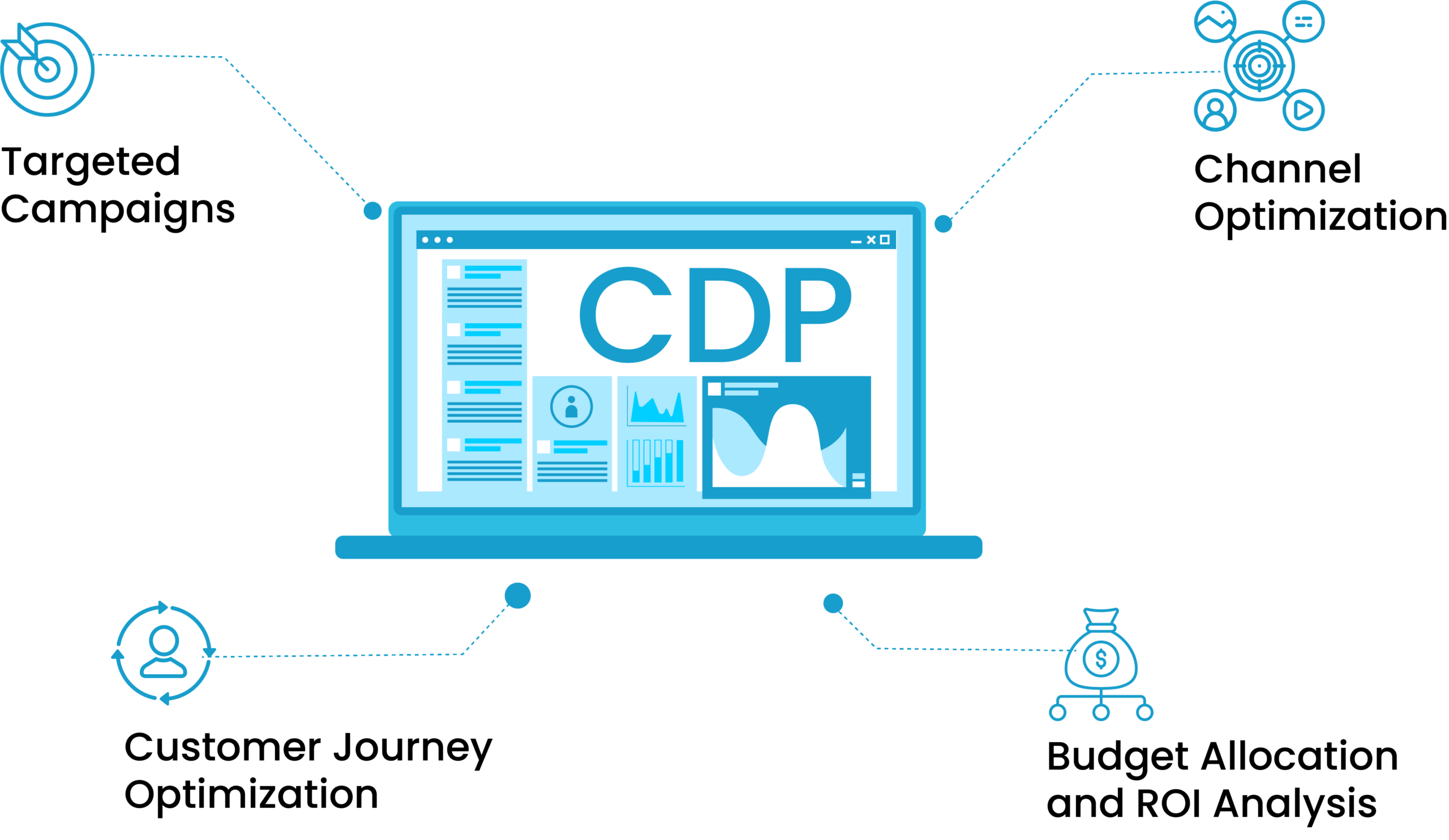
Here are the tips on how a CDP services helps to activate customer data and optimize marketing spending:

1. Targeted Campaigns:

Businesses can create highly targeted marketing campaigns only when they understand their customers deeply. CDPs foster customer understanding by segmenting customers based on their characteristics and past interactions so companies can personalize their messaging and offers.

This targeted approach increases the effectiveness of marketing campaigns and reduces wasted resources on reaching irrelevant audiences.

2. Channel Optimization:

CDPs analyze customer data to identify the most effective channels for customer engagement. Businesses can allocate their marketing budget wisely by determining which channels-such as email, social media, or mobile-have the highest impact.

This ensures that resources are focused on channels that yield the best customer engagement and conversion results.

3. Customer Journey Optimization:

Businesses can map the customer journey using CDP data and identify key touchpoints and motivational information. This insight allows them to optimize their marketing spending by strategically investing in activities that significantly influence customers to convert.

CDP data also help them understand where customers are in their journey so they can deliver relevant messaging that motivates them to convert.

4. Budget Allocation and ROI Analysis:

CDPs also provide insights into the performance of marketing campaigns. Businesses can analyze customer interactions, conversions, and revenue generated and measure the ROI of their marketing efforts.

This information provided by the CDPs helps them make informed decisions about budget allocation, ensuring that marketing spending is directed towards initiatives that yield the highest ROI.

Unlock the Potential of Your Data with a Customer Data Platform

In today’s data-driven world, the importance of customer data platforms for businesses cannot be overstated. As customer journeys and data complexity continue to evolve, the significance of CDPs services is expected to grow even further in the coming years.

The success of your business relies on how well you know your customers. 78% of data leaders believe that businesses must have real-time data. By investing in a reliable customer data platform, you can make informed business and marketing decisions based on real-time, up-to-date customer insights.

If you’re ready to move to the next step of personalizing customer experiences, a customer data activation platform is the right tool for you.

Bot Icon
Bot Icon

Tatvic Bot

Explore About Tatvic and Services