Hello There!

Lorem ipsum dolor sit amet, consectetur adipiscing elit,

What is the Mobile Application UX Design Process?

Mobile App UX Design Process

In today’s fast-paced digital world, the attention span of users has dwindled to a mere eight seconds. This challenging reality underscores the critical importance of exceptional mobile app UI/UX design to capture and retain users’ attention. 

In this blog post, we will delve into the intricacies of the mobile app UI/UX design process, explore modern design patterns, discuss the team requirements, and provide insights into the time and tools required for creating an impactful mobile app.

Mobile App UI/UX Design: A Crucial Element of Product Success

Users have become increasingly judgmental and discerning regarding the design of mobile applications. With just eight seconds to make an impression, not only does the design need to be visually appealing, but it must also ensure a seamless and engaging user experience. Balancing convenience and design becomes a matter of prime importance for user engagement in this fast-paced environment.

Understanding the Mobile App UI/UX Design Process: 

Mobile app design is an ongoing procedure encompassing both user interface (UI) and user experience (UX) components. The visual aesthetics and structural integrity of the app take center stage as UI/UX designers strive to deliver a product that is both easy to use and aesthetically pleasing. While UI design focuses on the look, UX design is all about functionality, creating a harmonious interplay that defines the user experience.

Mobile App UI/UX Design Process: Step by Step

1. Requirements Analysis:

The journey towards an outstanding mobile app design begins with comprehensive research. Understanding project needs, collaborating closely with product owners and business analysts, and delving into business logic and visual style set the foundation for success. High requirements ensure a laser focus on business specifications and differentiation from market competitors.

Mobile App UX Design Process: Step 1 - Requirements Analysis


2. Functional Specifications and Wireframing:

With requirements in hand, the designers define functionality and create user flows. Balancing security and usability, wireframing takes precedence to visualize the basic flow and core structure of the app. Wireframes lay the groundwork, detailing app and page layout designs, and navigation elements without delving into graphics, colors, or animations.

Mobile App UX Design Process: Step 2 - Functional Specifications and Wireframing

3. Visual Presentation Development: 

Visual communication becomes key in this stage, elevating user experience to new heights. Establishing a strong brand identity involves introducing a color scheme, typography, and other visual elements. The development of standardized components ensures consistency, with the option to use design systems for efficiency. Designers create UI components like buttons and search fields, gradually adding unique elements to complement the app’s design style.

Mobile App UX Design Process: Step 3 - Visual Presentation Development

4. Screen Design Process:

Combining graphic design and user interface layouts on displays is crucial to meeting users’ needs, capabilities, and tasks. Designers navigate the challenge of maximizing user experience across varying screen sizes while adhering to the specifications of different operating systems, such as iOS and Android.

Mobile App UX Design Process: Step 4 - Screen Design Process


The Team and Tools Behind Mobile App UI/UX Design

Success in mobile app UI/UX design is not a solo endeavour. A collaborative team effort, including product owners, business analysts, UI/UX designers, and developers, is essential. Additionally, leveraging the right tools streamlines the design process. Whether creating components from scratch or utilizing design systems like Material or Human Interface Guidelines, having the right tools at hand enhances efficiency and customization.

In Conclusion

In a world where eight seconds determine success or failure, mastering mobile app UI/UX design is non-negotiable. By following a meticulous design process, staying abreast of modern design patterns, assembling the right team, and utilizing the best tools, teams can create mobile apps that not only catch users’ attention but also provide a delightful and memorable experience. The eight-second rule becomes an opportunity rather than a challenge, propelling mobile app success in the competitive digital landscape.

Elevate Your iOS App Design with Pro Guidelines for 2024

ios app design guidelines

“Design is not just what it looks like and feels like. Design is how it works.” - Steve Jobs

9 million iPhones were sold by Apple in 2023 only in India. This figure signifies the tech giant’s market dominance and its revolutionary impact on the technology world. Pioneering innovations and a relentless pursuit of intuitive design have positioned Apple as a beacon of transformation in the digital landscape. This impressive success story underscores the iPhone’s global appeal and emphasizes the growing need for advanced iOS app design to meet the expectations of an expanding and diverse user base.

Amidst this surge in iPhone sales, the critical role of usability in iOS app design has never been more crucial. In the era of fleeting consumer attention spans and a highly competitive app market, the need for apps that provide an engaging, intuitive in-app experience from the very first interaction is imperative. Apple’s legacy of transformation urges developers to focus on creating apps that are not only visually appealing but also adaptable, user-centric, and capable of delivering a seamless user journey.

Here are a few design guidelines for your app to stand out amongst the 1.8 Million apps on the App Store- fighting over visibility. (Ref.)

Apple serves the designers and developers with a comprehensive set of guidelines and actionable directives to carry forward the essence of the brand and create a cohesive, consistent, and homogeneous experience in the iOS universe.

❝Best practices by Apple (Ref.)

How to design a perfect app for iPhone?  

Great iPhone experiences integrate the platform and device capabilities that people value most. To help your design feel at home in iOS, prioritize the following ways to incorporate these features and capabilities.

  • Help people concentrate on primary tasks and content by limiting the number of onscreen controls while making secondary details and actions discoverable with minimal interaction.
  • Adapt seamlessly to appearance changes - like device orientation, Dark Mode, and Dynamic Type - letting people choose the configurations that work best for them.
  • Support interactions that accommodate the way people usually hold their devices. For example, it tends to be easier and more comfortable for people to reach a control when it’s located in the middle or bottom area of the display, so it’s especially important to let people swipe to navigate back or initiate actions in a list row.
  • With people’s permission, integrate information available through platform capabilities in ways that enhance the experience without asking people to enter data. For example, you might accept payments, provide security through biometric authentication, or offer features that use the device’s location.❞

iOS App Design Guidelines for 2024:

recommended IOS APP design Guidelines for 2024

1. Understanding and following iOS Human Interface Guidelines (HIG):

  • Apple’s HIG provides fundamental principles and best practices for designing iOS apps. It is not just about the directives by Apple but absorbing the essence and philosophy that drive Apple’s design ethos. These guidelines are instrumental in creating apps that feel native in the iOS ecosystem.
  • Design with the iOS hallmark of clean lines, minimalism, and a focus on negative space.
  • Emphasize consistency, clarity, depth, and deference to content.

2. Prioritizing User Experience (UX):

  • Centre your design approach around intuitive navigation and seamless interactions, ensuring minimal cognitive load for users.
  • Gather a deep understanding of your target audience through user research, and consistently iterate your design based on user feedback and testing.
  • Utilize specific iOS app UX navigation elements like the tab bar and navigation bar. These elements are fundamental to iOS app design patterns, offering a familiar and intuitive navigation experience for users accustomed to how to design iPhone apps.

3. Leverage Native UI Elements for Consistency: 

  • Utilize iOS’s native UI components to maintain design consistency and leverage user familiarity with the platform. This approach not only speeds up the development process but also ensures your app feels integral to the iOS experience.

4. Responsive Design for Different Screen Sizes:

  •  Design adaptive layouts that scale seamlessly across various iOS devices.
  •  Consider different screen sizes, resolutions, and orientations during design to offer a uniformly excellent experience whether on an iPhone, iPad, or other iOS devices.

5. Optimize Typography and Readability:

  • Choose legible fonts and ensure text is easily readable against its background. 
  • Ensure sufficient contrast between text and background for optimal visibility.
  • Proper typography is crucial for user accessibility and can significantly enhance the overall user experience.

6. Simplify Navigation and Content Layout:

  • Use visual hierarchy to present information clearly, making sure the most critical content is prominent.
  •  Streamline navigation with intuitive gestures and clear hierarchies to help users find what they need without unnecessary complexity.

7. Incorporate Gestures and Interactions:

  • Integrate iOS’s unique gesture controls thoughtfully, enhancing user interaction without overwhelming them. Gestures should feel natural and intuitive, complementing the overall user experience.
  • This includes understanding iOS-specific touch targets and gestures, a key aspect of iOS app design patterns.
  • Provide feedback for user actions to enhance usability and responsiveness.

8. Design for Accessibility:

  • Ensure inclusivity by designing for users with disabilities. Build your iPhone app with accessibility as a forefront consideration.
  • Adhere to accessibility guidelines for text size, colour contrast, and VoiceOver support ensuring your app is navigable and readable for everyone. 

9. Create a Comprehensive Style Guide:

  • Maintain consistency across the app by adhering to the established style guide.
  • Create a comprehensive style guide that covers all aspects of your app’s design, including color palette, typography, and UI elements. This guide will ensure consistency across your app, reinforcing your brand and making the app more visually appealing and recognizable.

10. Iterative Design and User Feedback:

  •  Adopt an iterative approach to design, where user feedback plays a crucial role. 
  • Continuously test and refine your app based on real-world usage to ensure it meets user needs and expectations effectively.
  • Conduct iterative design cycles based on user feedback and analytics.
  • Utilize prototyping tools for rapid iteration and user testing to validate design decisions.

11. Use Layering and Depth in iOS App Design:

  • Employ layering and depth in your iOS app design to create structure and hierarchy. This approach is a distinguishing feature of iOS app UX design, offering a subtle yet effective way to organize content.

12. Prioritize Content in iOS App UX Design:

  • A content-first approach is vital in iOS app UX. This principle ensures that design decisions are driven by user needs, an important aspect of UX user testing.

Some of the features of iOS Design Experience:

IOS Features

Keeping all the UX and Behavioral guidelines in mind, when you begin to design your app, you need to understand the fundamental device characteristics and patterns that distinguish the iOS experience from that of Android or other OS. Using these characteristics and patterns to take informed design decisions can help you develop an app or game that iPhone users appreciate. (Ref.)

❝Display: The iPhone has a medium-size, high-resolution display.

Ergonomics: People generally hold their iPhones in one or both hands as they interact with them, switching between landscape and portrait orientations as needed. While people are interacting with the device, their viewing distance tends to be no more than a foot or two.

Inputs: Multi-touch gestures, onscreen keyboards, and voice control let people perform actions and accomplish meaningful tasks while they’re on the go. In addition, people often want apps to use their personal data and input from the device’s gyroscope and accelerometer, and they may also want to participate in spatial interactions.

App interactions: Sometimes, people spend just a minute or two checking on events or social media updates, tracking data, or sending messages. At other times, people can spend an hour or more browsing the web, playing games, or enjoying media. People typically have multiple apps open at the same time, and they appreciate switching frequently among them.

System features: iOS provides several features that help people interact with the system and their apps in familiar, consistent ways:

Conclusion:

Designing an iOS app that delights users requires a meticulous approach, integrating both aesthetic appeal and functional efficiency. By adhering to the iOS app design guidelines outlined above, developers and designers can create compelling experiences that resonate with users. Remember, successful iOS app design is not just about following trends but about understanding user needs and crafting experiences that exceed expectations.

If you have any questions or need assistance with iOS app design, feel free to reach out to our team of experts. Unlock the full potential of your iOS app and captivate your audience with unparalleled design excellence.

Display & Video 360 (DV360) vs Google Ads: Which Platform Drives Better ROI for Your Marketing Strategy?

Display & Video 360 (DV360) vs Google Ads - Tatvic

There’s constant buzz in the marketing world: Should you invest in Google Ads or level up with Display & Video 360 (DV360)?

Which platform truly fits your business needs?

In today’s ever-evolving digital advertising landscape, businesses must make strategic choices about where and how to invest their media budgets.

Two of the most powerful tools in the Google advertising ecosystem: Google Ads and Display & Video 360 (DV360) which offer distinct advantages depending on your goals, team structure, and marketing maturity.

Let’s delve into the dynamic world of programmatic advertising and explore the unique capabilities of these two formidable platforms. This isn’t just a technical comparison, actually it’s a decision-making framework based on strategy, scale, precision, and sophistication.

Whether you’re a startup seeking fast conversions or an enterprise brand aiming for full-funnel media domination, this guide will help you make an informed, results-driven choice.

So, grab your favorite brew and settle in as we decode DV360 vs Google Ads through the lens of real-world performance, platform depth and expert insights from pioneers like Tatvic, who help brands maximize impact through both platforms.

Difference Between Google Ads and Display & Video 360 (DV360)

Choosing between Google Ads and Display & Video 360 (DV360) depends on your business goals, budget and desired reach.

While Google Ads offers a more straightforward entry into digital advertising and is ideal for quick-to-launch, search-intent campaigns.

Display & Video 360 (DV360) brings enterprise-level programmatic capabilities and expansive inventory access and is built for brands looking to run data-rich, multi-channel strategies at scale.

Understanding the unique strengths of each can help you plan smarter, more effective campaigns.

Below is a detailed comparison to help you decide which platform aligns better with your marketing objectives.

Major Difference Between Google Ads and Display & Video 360 (DV360)
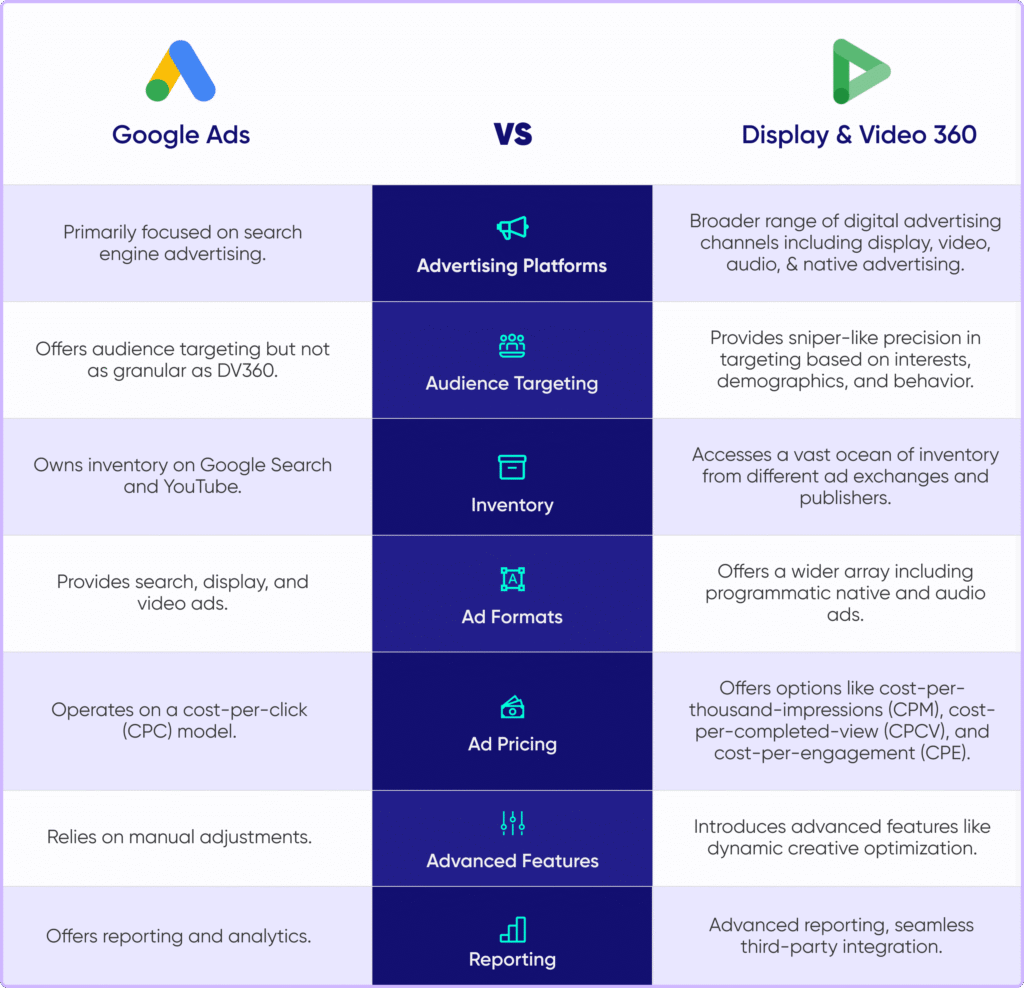
Major Difference Between Google Ads and Display & Video 360 (DV360) - Tatvic


In-Depth Comparison: Google Ads vs DV360 Capabilities Across Targeting, Inventory, Formats and Performance

When evaluating Google Ads vs DV360, it’s essential to look beyond surface-level differences.

This in-depth comparison explores how each platform performs across key dimensions like: audience targeting, ad inventory, creative formats, pricing models and campaign optimization.

Whether you’re scaling a full-funnel programmatic strategy or focusing on search-driven performance, understanding these capabilities will help you choose the right platform.

Backed by Tatvic’s real-world expertise, this guide helps decode which solution fits your business goals best.

Let’s Dive Into Feature-by-Feature Showdown of Google Ads vs DV360

1. Advertising Platforms: Search-Powered Precision vs Multi-Channel Mastery

When it comes to selecting the right digital advertising platform, your brand’s growth trajectory and marketing objectives play a critical role.

Google Ads is often the go-to for businesses looking to capture high-intent audiences at the moment of search.

It shines in performance-driven campaigns where quick conversions and measurable ROI are key.

Core Channels of Google Ads include:
  • Google Search: Ideal for capturing demand through keyword-triggered text ads
  • Google Display Network (GDN): Great for remarketing and brand awareness through static visuals
  • YouTube: Powerful for video storytelling, both skippable and non-skippable formats

On the other side, Display & Video 360 (DV360) which is a part of the Google Marketing Platform (GMP), caters to marketers aiming for scale, sophistication, and full-funnel campaign orchestration.

Google  DV360 is built to unify media buying across:
  • Programmatic Display
  • In-stream and Out-stream Video
  • Digital Audio Channels (e.g., Spotify, podcasts)
  • Native Advertising across premium publisher sites
  • Connected TV (CTV) and OTT platforms

Unlike Google Ads, which is laser-focused on intent and conversion, DV360 empowers brands to build awareness, drive consideration and nurture leads across multiple touchpoints and devices.

Tatvic, a Google-certified partner, enables brands to tap into DV360’s full potential through both managed and self-serve models.

2. Audience Targeting: Practical Reach vs Precision Targeting

Effective advertising starts with reaching the right audience.

Both Google Ads and DV360 offer powerful targeting capabilities, though with very different scopes.

Google Ads provides robust yet practical targeting options for advertisers aiming to capture immediate intent.

Customer Segments Present in  Google Ads:
  • Demographics (age, gender, household income)
  • In-market audiences actively researching products or services
  • Custom intent audiences tailored to specific keywords or URLs
  • Remarketing to users who have previously interacted with your site or app

These features work well for SMBs and performance marketers focused on lower-funnel conversions and immediate ROAS.

However, DV360 unlocks the next level of audience intelligence by integrating data from across the digital ecosystem, making it a game-changer for enterprise-level personalization and multi-touch campaigns.

With DV360, you can:
  • Seamlessly ingest first-party data from GA4, CRM systems or CDPs
  • Access third-party data from industry leaders like Oracle, BlueKai and Lotame
  • Build lookalike audiences based on your highest-converting users
  • Leverage custom affinity segments based on nuanced interests and behaviors
  • Activate real-time contextual triggers, such as weather conditions, device usage, location, or even app engagement

The result?

Hyper-personalized advertising that adapts to user context in real time-driving higher engagement, lower cost per acquisition, and better lifetime value.

With Tatvic’s DV360 Managed Services, brands can go beyond basic segmentation to build hyper-personalized programmatic experiences that convert.

3. Inventory Access: Limited Network vs Programmatic Universe

When it comes to digital ad placements, inventory access can make or break your campaign’s reach and performance.

This is where the core difference between Google Ads and Display & Video 360 (DV360) becomes abundantly clear.

Google Ads provides access to a highly effective but relatively limited inventory network that includes:
  • Google Search: for keyword-targeted search ads
  • Google Display Network (GDN): a vast collection of over 2 million websites and apps
  • YouTube: the go-to platform for video advertising

While this network offers solid visibility within the Google ecosystem, it restricts your ability to scale beyond Google’s owned and operated platforms.

DV360, on the other hand, opens the floodgates to a truly programmatic advertising universe.

It enables advertisers to reach audiences across 80+ global ad exchanges, giving you access to inventory that extends far beyond Google’s walled garden.

With DV360, you can get enhanced inventory & secure placements on:
  • Premium publishers via Private Marketplace (PMP) deals and Programmatic Guaranteed (PG) campaigns
  • Streaming and audio platforms like Spotify, Hulu, and Pandora
  • Top-tier media outlets including The New York Times, Forbes, and CNN
  • Emerging channels like Connected TV (CTV), Digital Out-of-Home (DOOH), and gaming environments

This breadth of inventory empowers brands to deliver consistent messaging across multiple consumer touchpoints, from mobile and desktop to smart TVs and beyond.


4. Ad Formats: Essentials vs Advanced Creativity

When it comes to grabbing consumer attention, the format of your ad can be just as impactful as the message itself.

Both Google Ads and Display & Video 360 (DV360) offer powerful creative capabilities but the depth and flexibility of those formats vary significantly.

Supported Ad formats in Google Ads :
  • Text-based search Ads: ideal for capturing intent on the Google Search Network
  • Standard display banners: used across websites within the Google Display Network (GDN)
  • YouTube video Ads: including skippable, non-skippable, and bumper formats for awareness or engagement

These formats are highly effective for lower-funnel performance campaigns, where the focus is on driving immediate clicks or conversions based on user intent.

DV360, however, is where creative storytelling meets advanced technology. As part of the Google Marketing Platform, DV360 enables advertisers to build immersive, interactive, and context-aware experiences across a diverse set of channels.

Supported Ad formats in Display & Video 360 (DV360):
  • Rich HTML5 creatives - interactive, dynamic, and responsive formats for higher engagement
  • Shoppable video ads - turn video into a direct purchase experience by embedding product feeds
  • Audio and podcast ads - ideal for reaching users during screen-free moments on platforms like Spotify
  • Native ads and immersive mobile formats - seamlessly blend into app environments and content feeds
  • Connected TV (CTV) and OTT - deliver cinematic experiences on large screens via smart TVs and streaming devices

This expansive creative suite empowers brands to deliver personalized, cross-device narratives that adapt to where and how their audience is consuming content.

With Tatvic’s DV360 Self-Serve and Managed Services, you also gain access to expert creative consulting, dynamic ad production and real-time performance optimization, ensuring every format is used to its fullest potential.

In short, Google Ads is great for essential outreach, while DV360 is built for brands ready to scale their storytelling across every screen and format.


5. Pricing Models, Bidding & Strategic Flexibility

Budget efficiency is a cornerstone of any successful digital campaign and the pricing model you choose directly impacts your ROI.

Google Ads Bidding or Price Options:

Google Ads offers simplified, Performance-driven Pricing or Bidding Options  such as:

  • CPC (Cost Per Click): Pay when someone clicks your ad
  • CPM (Cost Per Mille): For display impressions, though options are relatively limited

This model is suitable for advertisers focused on immediate, measurable actions like lead generation or eCommerce conversions.

Display & Video 360 (DV 360) Bidding or Price Options:

DV360, on the other hand, unlocks a wider pricing architecture with strategic depth, giving you far greater flexibility to align spend with business goals.

It supports:

  • CPM, CPCV (Cost Per Completed View) and CPA (Cost Per Acquisition)
  • Viewability-based bidding: Ensure your ads are actually seen
  • Dynamic CPM (dCPM): Real-time bid adjustments based on user behavior
  • Custom bidding logic powered by BigQuery: Create advanced rules that optimize for KPIs like scroll depth, engaged time, or product interactions


6. Creative Optimization: A/B Testing vs Dynamic Personalization

Great creative drives engagement but what’s even better is creative that evolves with your audience.

Google Ads enables basic creative testing through:
  • Responsive search and display ads - Rotate headlines, descriptions, and visuals for automated A/B testing
  • Limited personalization capabilities based on device or location

While effective for foundational optimization, this approach lacks deeper dynamic flexibility.

DV360 brings advanced creative personalization to the forefront through:
  • Dynamic Creative Optimization (DCO): Automatically customize ads in real-time based on user data
  • Rule-based personalization: Tailor content to time of day, device, geographic location, or product availability
  • Automated ad variant generation: Integrate with product feeds or CRM data to scale personalized experiences


7. Reporting & Attribution: Basic Analytics vs Unified Insights

When it comes to understanding performance, not all analytics are created equal.

Google Ads Offers Accessible Reporting On:
  • Clicks, impressions & conversion rate
  • Device performance and basic demographic data
  • Primarily relies on last-click attribution, which may not reflect the true path to conversion

DV360, as part of the Google Marketing Platform, offers enterprise-grade measurement and a unified data ecosystem.

Dv360 Offers Reporting On:
  • Multi-touch attribution via Campaign Manager 360: Understand the full conversion journey
  • Custom data pipelines to BigQuery: For advanced segmentation and predictive analysis
  • Visual dashboards through Looker Studio: Monitor KPIs in real-time
  • Behavioral insights via GA4: Tie campaigns back to website engagement, scroll depth, or micro-conversions


8. Brand Safety & Transparency Controls

In today’s digital ecosystem, brand trust is non-negotiable.

Ensuring your ads appear in safe, relevant environments is critical to maintaining brand integrity.

Google Ads provides essential safety features like:
  • Category and content exclusions
  • Basic keyword-level filtering for display ads
However, DV360 raises the bar on brand safety and media transparency with enterprise-grade protections, including:
  • Pre-bid brand suitability filters to avoid undesirable inventory before bidding
  • Third-party verification integrations with tools like MOAT, IAS, and DoubleVerify
  • Site allow/block lists, keyword exclusions, and viewability thresholds
  • Compliance enforcement for ads.txt and app-ads.txt to combat domain spoofing


When to Use Which Advertising Platform: Ideal Use Cases

Use Google Ads When:

  • You’re focusing on search-driven lead generation
  • You have a smaller team or limited programmatic experience
  • Your goal is local/regional awareness or lower-funnel conversions

Example:

-> Local Retail Chain needs high-CTR promotions near store locations → Use Google Ads

Use  Display & Video 360 (DV 360) When:

  • You require multi-channel, large-scale reach
  • You want programmatic deals and diverse formats
  • Your team wants to optimize for brand + performance KPIs simultaneously

Example:

-> Local Retail Chain needs high-CTR promotions near store locations → Use Google Ads

-> B2B SaaS Firm: Wants IP-based targeting and account-based marketing → Use DV360 PMP Deals + LinkedIn Audiences

Tatvic’s Expertise in Display & Video 360

As a pioneer in DV360 programmatic advertising, Tatvic offers:

  • DV360 Self-Serve access for agile internal teams
  • Managed DV360 services for brands that require hands-on optimization
  • Hybrid execution models where Tatvic leads strategy, and the client’s team executes campaigns

Real Results from Tatvic’s DV360 Deployments:

EdTech Brand: 3.2x higher installs vs Facebook using YouTube + OTT

Luxury Retailer: 5.1x ROAS using PMP + high-income affinity segments

Fintech App: 38% CPA reduction and 2.7x CTR via DCO + GA4 insights

Final Verdict: DV360 vs Google Ads

If your goals are tightly performance-driven with a lean team and budget, Google Ads offers a solid foundation.

If you’re aiming for enterprise-level precision, premium inventory, and deeper insights, Display & Video 360 (DV360) is your best bet.


Google Ads vs Display & Video 360 (DV360): Detailed Comparison

Aspect Google Ads Display & Video 360 (DV360)
Ad Inventory Scope Access is limited to Google-owned properties such as Google Search, YouTube, Google Display Network (GDN), Gmail, and some partner sites. Offers expansive reach through 80+ premium ad exchanges and SSPs, including non-Google inventory like Hulu, Spotify, The New York Times, and connected TV apps.
Targeting Options Standard targeting features like keywords, location, device type, demographics, and basic custom audiences. Advanced targeting capabilities: custom affinity, first- and third-party data, contextual targeting, time/weather-based triggers, and predictive modeling using Google Cloud integrations.
Ad Formats Supports core formats: search text ads, responsive display, YouTube video ads, Shopping ads, and app install formats. Enables high-impact creatives: rich media, audio ads, programmatic native, dynamic creatives, connected TV ads, podcast ads, and shoppable video experiences.
Audience Segmentation Basic audience segmentation using Google’s native insights and user behavior. Retargeting is possible but limited in depth. Deep segmentation using GA4 integration, CRM onboarding, lookalike modeling, third-party data providers (e.g., BlueKai, Oracle), and sequential storytelling.
Campaign Management Primarily manual with support for Smart Bidding and automation through Performance Max or responsive ad formats. Highly automated with machine learning-powered optimization, custom bidding algorithms, and centralized campaign management across media types.
Cross-Channel Reach Primarily focuses on Google ecosystems: Search, YouTube, and GDN. Full-funnel, omnichannel capabilities: run campaigns simultaneously across desktop, mobile, CTV, digital out-of-home (DOOH), audio streaming, and in-app environments.
Real-Time Bidding (RTB) Restricted to auctions within Google’s native ad space. True programmatic RTB environment across multiple SSPs and DSPs. Also includes access to Private Marketplace (PMP) and Programmatic Guaranteed deals.
Programmatic Capabilities Limited-includes Smart Display and Performance Max campaigns but lacks full customization or deal-based buying. Enterprise-grade programmatic access with deal-based buying (PG, PMP), integration with DV360 APIs, and custom algorithms via BigQuery.
Pricing Models CPC (Cost Per Click), CPM (Cost Per Mille), CPA (Cost Per Acquisition), CPV (Cost Per View), Maximize Conversions, and Target ROAS. Offers advanced pricing flexibility: CPM, vCPM, CPCV (Cost Per Completed View), dCPM (Dynamic CPM), Programmatic Guaranteed pricing, and custom bidding strategies.
Creative Optimization Limited A/B testing and ad customization through Responsive Ads. Supports Dynamic Creative Optimization (DCO) using data feeds, product inventory, real-time triggers, and user behavior to generate hyper-relevant ads.
Reporting & Attribution Standard performance reporting with Google Ads dashboard. Attribution often based on last-click model or simplified conversion paths. Offers robust reporting via Campaign Manager 360, BigQuery, GA4, and Looker Studio. Enables multi-touch attribution (MTA) and custom data pipelines for deep analytics.
Brand Safety & Compliance Basic controls-category exclusions, placement blocking, and limited fraud detection. Enterprise-grade brand safety: pre-bid verification, integrations with IAS, MOAT, and DoubleVerify, site list curation, viewability thresholds, and ads.txt enforcement.
Best Suited For Small to mid-sized businesses focused on intent-based marketing, search advertising, and quick performance visibility within Google’s environment. Large-scale advertisers, enterprise brands, and agencies looking for multi-channel media buying, deeper data integration, programmatic control, and creative flexibility.


Still uncertain?

Let Tatvic guide you ->>

With over a decade of programmatic experience, we’ll help you unlock the full power of DV360 on your terms.


What are the Mobile UX Design Principles?

In the rapidly evolving world of mobile apps, user experience (UX) is king. 

A study by Forrester shows that a well-designed UX can increase website conversion rates by up to 400%.

From intuitive navigation to seamless interactions, the fundamentals of app UX play a pivotal role in attracting, retaining and converting users.

But what are the key factors to consider in 2024? How can app owners ensure their app provides an exceptional user experience?

This article delves into understanding the fundamentals that can help you take your app to new heights.

What Is Mobile UX Design?

Mobile UX design is a crucial phase in mobile app development, focusing on crafting intuitive experiences within the app for end users.

According to the Interaction Design Foundation, mobile UX design is defined as:

“Mobile UX designs are interfaces for hand-held and wearable devices. Designers focus on accessibility and efficiency to optimize these on-the-go interactions.”

The primary goals include creating a user-friendly interface with a mobile app to enhance overall accessibility and efficiency, ultimately driving more conversions and increasing user retention.

The Importance Of User Experience (UX) In App Design:

User experience (UX) has become a crucial factor in determining the success of a mobile app. A well-designed app with a seamless and engaging user experience can not only attract users but also keep them coming back for more.

In 2024, with the increasing competition in the app market, it’s more important than ever to prioritize UX in app design. 

Main reasons why app UX is so important:

1. User Retention and Loyalty:

A well-crafted UX enhances user satisfaction, promoting continued app usage and ultimately fostering lasting loyalty to the brand.

2. Heightened Conversion Rates and Trust:

A user-friendly mobile experience not only streamlines the path to purchase, boosting conversion rates but also instils trust. Easy navigation and interaction build user confidence, increasing their willingness to engage with the app.

3. Elevated App Ratings, Positive Reviews, and Visibility:

Satisfied users recommending the app contribute to an improved Net Promoter Score (NPS) and enhanced ratings on app stores. This dual impact fosters a positive user perception, elevating the app’s visibility and credibility in the digital marketplace.

4. Competitive Advantage:

A superior UX design is crucial for differentiation and customer retention in a highly competitive app market.

5. Technical Support Cost Reduction:

Seamless UX design minimizes technical support costs by ensuring easy navigation and comprehensive user understanding, optimizing resource management.

Difference Between Mobile App vs Mobile Website UX:

Difference Between Mobile App vs Mobile Website UX

Category  Mobile App Mobile Website
Usability: Tailored Design for Mobile Users vs. Adapted Web Experience  Crafted with a mobile-first approach, the application user experience is tailored for seamless interactions on smaller screens, ensuring intuitive gestures and navigation. Users can expect a smoother journey with fewer distractions and optimized layouts, enhancing usability and efficiency. Adapted from a standard website, the mobile version may sacrifice some usability due to constraints like screen size and navigation adjustments. Users might encounter challenges in navigating through the site, potentially leading to a less intuitive experience compared to a purpose-built mobile app.
Value: Enhanced User Engagement vs. Broader Accessibility By focusing on a limited set of features and functionalities, mobile apps aim to foster deeper engagement with users. The streamlined interface and targeted interactions can lead to heightened user immersion, potentially resulting in increased business value through enhanced user loyalty and satisfaction. With a broader scope catering to a diverse audience, mobile websites aim for widespread appeal. However, accommodating a wider range of content and functionalities may dilute user engagement, requiring users to navigate through additional layers and potentially compromising the overall user experience.
Findability: Learning Curve vs. Intuitive Navigation Unique interfaces tailored to specific app categories may require users to undergo a learning curve to familiarize themselves with the navigation and functionality. However, once users adapt, the app’s specialized design can enhance findability by streamlining access to relevant content and features. Leveraging familiarity from its desktop counterpart, mobile websites offer a more straightforward navigation experience. Users benefit from existing knowledge of website layouts and conventions, facilitating easier findability and navigation through familiar structures.
Accessibility: Inclusive Design vs. Dependent on Main Website Designed with a deep understanding of diverse user needs, mobile apps prioritize accessibility by incorporating features like customizable text sizes, alternative input methods, and screen reader compatibility. This commitment to inclusivity ensures a smoother and more accommodating interface for users with varying abilities and preferences. Accessibility on mobile websites is contingent upon how well the main website is adapted for mobile viewing. The level of accessibility may vary depending on the extent to which mobile-specific considerations are integrated, potentially resulting in inconsistencies and limitations for users with accessibility requirements.
Reach: Development Approach Impact vs. Platform Agnosticism The reach of a mobile app depends on its platform compatibility, with some apps targeting specific platforms (iOS/Android) and others opting for cross-platform development. While platform-specific apps may have a narrower reach, they can offer tailored experiences optimized for each platform’s unique capabilities. Boasting universal accessibility across various devices and platforms, mobile websites offer a broader reach compared to platform-specific apps. Users can access the website from any device with a compatible web browser, minimizing barriers to entry and maximizing potential audience reach.

Conversion-Focused Principles - 

1. Improved Usability (Dropbox): 

Simplifying an app’s interface can significantly enhance usability. Dropbox is an excellent example, where the focus on core functionalities and a clean interface reduces cognitive load, making it more user-friendly and increasing user engagement.

2. Consistent Branding (Airbnb): 

Consistent branding across an app reinforces brand identity. Airbnb achieves this through consistent use of color schemes, typography, and imagery, creating a seamless and recognizable brand experience for users.

3. Performance Enhancements (Amazon App): 

Optimizing app performance can lead to enhanced user engagement. Amazon’s mobile app, known for its fast loading times and smooth transitions, demonstrates how performance improvements can contribute to a better user experience and increased trust in the app.

4. Personalization (Netflix): 

Personalized experiences can foster stronger user connections. Netflix personalizes content recommendations based on individual viewing histories, keeping users engaged and increasing subscription loyalty.

5. Improved Usability (Dropbox App): 

A key principle in UX design is simplifying the user interface to enhance usability. The Dropbox mobile app exemplifies this principle. It focuses on core functionalities like file storage, sharing, and collaboration in a clean, straightforward interface. This design choice reduces the cognitive load on users, making the app intuitive and easy to navigate. As a result, users can efficiently perform tasks, leading to increased satisfaction and engagement with the app.

6. Consistent Branding (Airbnb App): 

Consistent branding across an app is crucial for creating a cohesive user experience. The Airbnb app demonstrates this by maintaining a uniform color scheme, typography, and imagery that align with its brand identity. This consistency ensures that users have a seamless experience, whether they are browsing properties, checking their bookings, or exploring new travel experiences. Such branding consistency reinforces Airbnb’s identity, instilling trust and recognition in users.

7. Performance Enhancements (Amazon Shopping App): 

Optimizing app performance is essential for user retention. Amazon’s Shopping app is a prime example, where performance improvements such as faster loading times, smooth navigation, and quick response to user actions contribute significantly to a positive user experience. Users benefit from quick access to product searches, seamless browsing, and efficient checkout processes. This focus on performance not only enhances user satisfaction but also builds trust in the app’s reliability.

8. Personalization (Netflix App): 

Personalization in UX design involves tailoring the app experience to individual user preferences. Netflix’s mobile app excels in this area by using sophisticated algorithms to recommend shows and movies based on user’s viewing history. This level of personalization makes the app more engaging for users, as they are presented with content that aligns with their interests, leading to longer session times and increased loyalty.

9. Effective Call-to-Action (CTA) (Duolingo App): 

The design of CTAs in an app is critical for guiding user actions. Duolingo, a language learning app, uses CTAs effectively by placing them strategically within lessons to encourage users to continue learning or explore additional features. The CTAs are designed with vibrant colors and clear language, making them stand out and easy to understand. This approach ensures that users are continually engaged and guided through their language-learning journey.

10. Ongoing Testing and Optimization (Tinder App):

Continuously testing and optimizing an app is vital for maintaining user interest and increasing conversions. The Tinder dating app is known for its regular updates and feature testing. They often experiment with different functionalities, interface designs, and algorithms to improve user matching and engagement. This commitment to ongoing improvement keeps the app fresh and relevant, thereby retaining user interest and increasing engagement.

11. Loading Speed (Google Maps App): 

The speed at which an app loads is a crucial factor in user satisfaction. Google Maps is renowned for its quick loading times, despite the complexity of its features. Fast loading ensures that users can quickly access maps, navigation, and location information, which is essential for an app that is often used on the go. This efficiency minimizes frustration and enhances the overall user experience.

12. Balanced CTA Design (Spotify App): 

The design of CTAs should be a balance between visibility and subtlety. Spotify’s mobile app achieves this balance by using CTAs that are visible and well-integrated into the overall design. The CTAs guide users to subscribe, discover new music, or create playlists, all without being intrusive. This careful design encourages user interaction while maintaining a pleasant aesthetic, contributing to a higher conversion rate.

The Dos and Don’ts of App UX conversions/engagement -

The Dos and Don’ts of App UX conversions/engagement.

Do’s
1. Prioritize User Experience (UX) The success of a mobile app hinges on its ability to provide a seamless and enjoyable user experience. This means designing interfaces that are not only visually appealing but also intuitive and easy to navigate. For example, consider the Uber app, which provides a straightforward interface for users to book rides in 5 to 6 minutes max.
2. Focus on Visual Hierarchy A well-structured visual hierarchy is essential for guiding users through the app’s content. By organizing elements in a logical order of importance, users can quickly understand the app’s layout and find what they need. Take, for instance, the Instagram app, where the central feed of images takes precedence, followed by navigation tabs and interactive elements such as buttons and comment boxes.
3.  Optimize for Mobile Devices Mobile app design must consider the diverse range of devices users may utilize. This includes accommodating different screen sizes, resolutions, and processing capabilities. 
4. Ask Users Feedback Incorporating feedback mechanisms allows users to voice their opinions and concerns about the app’s usability and functionality. This can be achieved through surveys, ratings, or reviews, providing valuable insights for improving the app over time.

 For instance, the Zomato app prompts users to leave reviews and ratings after ordering any, allowing them to share their experiences with other restaurants and their drivers ultimately helping them, understand their users and their needs better.

5. Study User Behavior By analyzing user behaviour, developers can gain valuable insights into how users interact with the app. This data can inform design decisions and help create a more user-centric experience. For example, Google Maps tracks user location and search history to personalize recommendations and improve navigation accuracy.
6. Consider Touch Targets The size and placement of touch targets greatly impact the usability of a mobile app. Ensuring that touch targets are large enough and appropriately spaced can prevent users from making errors and enhance overall usability. For example, the Gmail app features large, easily tappable buttons for composing emails and navigating between folders.
Dont’s
1. Overcrowd the Screen: Overloading the screen with too many elements can overwhelm users and make it difficult for them to focus on essential tasks. Avoid cluttering the interface and prioritize simplicity and clarity instead.
2. Use Inconsistent Design Elements Inconsistencies in design elements can confuse users and disrupt the flow of navigation. Maintain uniformity in visual styles, layouts, and interactions throughout the app to provide a cohesive user experience.
3.  Overload Users With Notifications While notifications can be a valuable tool for engaging users, bombarding them with excessive notifications can lead to frustration and annoyance. Strike a balance between providing timely updates and respecting users’ attention.
4. Overuse Animated Elements While animations can enhance the interactivity and visual appeal of an app, using them excessively can slow down performance and distract users from essential content. Use animations sparingly and purposefully to avoid overwhelming users.
5. Keep the Clutter A cluttered interface can make it challenging for users to find what they need and navigate the app effectively. Remove unnecessary elements and streamline the design to create a more intuitive and user-friendly experience.
6. Ignore the Competition Monitoring competitors’ strategies and innovations can provide valuable insights and inspiration for improving your app. Stay informed about industry trends and user preferences to stay competitive in the market.

The future of app UX trends

  • Artificial Intelligence (AI): 

AI is transforming UX with personalized, interactive experiences and ethical design. Example: Spotify leverages AI for tailored music recommendations, increasing user engagement and retention, thus impacting users’ engagement and subscription.

  • Accessible Design: 

Emphasis on inclusivity in design is growing. Example: Microsoft’s Seeing AI app assists visually impaired users by describing surroundings, enhancing accessibility and broadening user reach, potentially leading to increased conversions. 

Read the following documents to understand  Android apps and iOS app accessibility guidelines.

  • Interactive Animation: 

Engaging in animations enhances user interaction. Example: Headspace uses animations for a calming, engaging experience, which can increase user satisfaction and ultimately lead to user engagement.

  • Immersive AR/VR Experiences: 

AR and VR are creating more immersive experiences. Example: AR and VR innovations, like Apple Vision Pro, enhance immersion by seamlessly integrating with Apple devices. This empowers users with captivating AR experiences, augmenting real-world environments and offering haptic feedback, guiding users effortlessly through enhanced app interactions.

  • Typography: 

Effective typography is crucial for usability and aesthetics. Example: Medium’s app focuses on clean, readable typography, which can enhance content consumption and lead to increased engagement and conversions.

  • Data-Driven Design and Hyper-Personalization: 

User data informs design for personalization. Example: Netflix personalizes content recommendations based on user data, increasing user engagement and retention, which can ultimately lead to higher conversion rates.

  • Voice User Interface Design and Integration: 

Designing for voice interfaces is growing. Example: Google Maps integrates Google Assistant for voice-guided navigation, providing a convenient and hands-free experience for users, potentially increasing conversions by facilitating easier navigation.

Conclusion: 

In 2024, user experience (UX) remains a critical factor in app design. By prioritizing user-centred design principles, conducting user research, optimizing navigation and information architecture, considering different devices and screen sizes, incorporating impactful visuals, conducting usability testing and gathering user feedback, ensuring accessibility, and keeping up with future UX trends, app creators can create captivating and conversion-optimized experiences for their users.

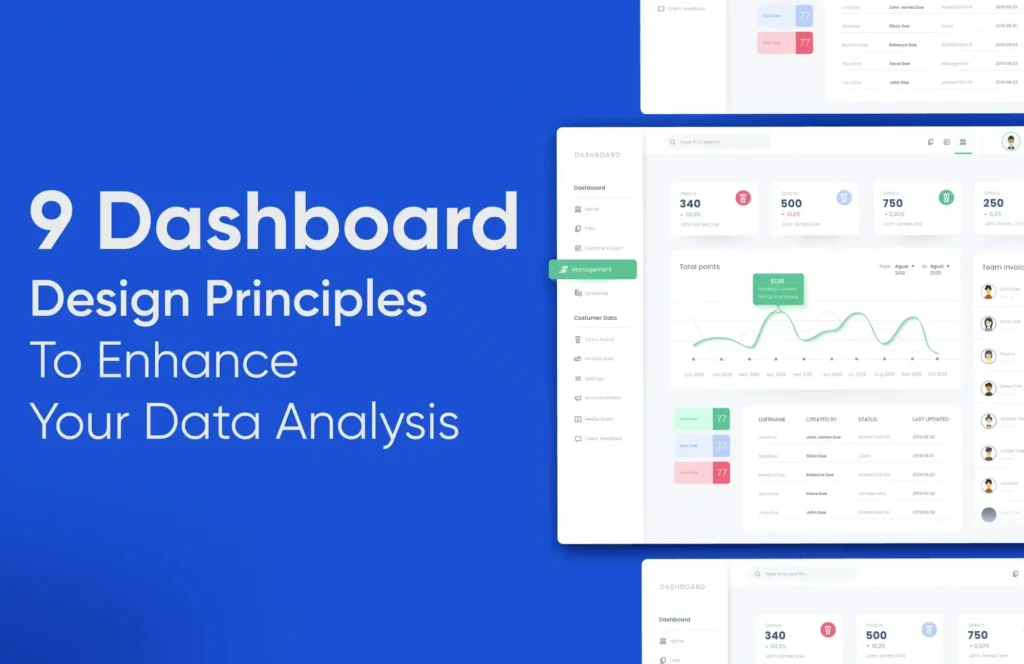
9 Dashboard Design Principles for Enhanced Data Analysis

9 Dashboard Design Principles for Enhanced Data Analysis

The amount of data collected and processed daily is rising exponentially. You have data for various digital frontiers such as user interactions, business performance, sales and revenue, internal operations, inbound and outbound logistics, finances, marketing activities, and more. Making sense of this data is important for your business to sustain and grow. Especially, if you are a digital business owner, you cannot afford to miss out on relevant patterns and trends in this data.

Dashboards are great for visualizing data points when you have a plethora of data and don’t know where to exactly start. Data analysis will only make sense when you visualize what is being told by the data. The narrative of the data points cannot be evident by looking at them discreetly in your analytics software or spreadsheets. Moreover, complex correlations and causations are of great importance for businesses to make decisions. 

“Identifying patterns and effective data consumption is also necessary for businesses to forecast growth. After all, your data can either make or break your business.” 

Whether you’re a data analyst, a business owner, or a CRO Specialist, a well-crafted data analytics dashboard will help you transform your data into actionable insights. It would serve as a compass in the ocean of data. But, like any spellbinding craft, designing a remarkable dashboard requires careful planning, a deep understanding of your audience, and a dash of creativity.

You might have seen a lot of business dashboards with multiple purposes. The catch is designing a dashboard that can answer your or your stakeholders’ questions rather than just randomly thrown charts and figures. The OG dashboards are clear, intuitive, and user-friendly. 

Here are my 10 pointers to develop the best dashboard design for your websites or app data that not only answer business questions but also tells effective stories. 

1. Define the target audience of your dashboard and all the involved stakeholders -

Define the target audience of your dashboard and all the involved stakeholders.

Before you start scribbling on the paper, it is necessary to take a moment and think about who will be using your dashboard. Identify the involved stakeholders and note down the kind of questions for which they would want answers. Understanding your audience’s needs and goals is fundamental for dashboard creation. It should not be the case that you design something and nobody wants it. 

The game of data is delicate and working efficiently with it is quite necessary. Pinpointing the correct target audience will help you decide the exact metrics to use for data representation and will help you avoid misrepresentation. 

You can start by jotting down all the people who would use the dashboard against all the inferences they would require as per their role. For instance, a C-suite executive might be more interested in knowing the business metrics like Revenue Generated, Sales Growth, and other financials. Whereas for a marketing manager, the performance of marketing campaigns, ROAS, and ROI on marketing spending would be of primary concern. On the other hand, the Project Managers would like to understand the status and goals of projects.

Your to-do list for this section is as follows:

  • Identify all potential dashboard users, including executives, managers, and team leads.
  • Clearly define the roles, responsibilities, and goals of each stakeholder.
  • Conduct interviews to gather insights into stakeholders’ expectations and questions for the dashboard.
  • Prioritize and align information needs with stakeholder roles, focusing on critical metrics.
  • Develop user personas for visualization of preferences and specific data interests.

2. Set your narrative before you get to design the dashboard - 

One dashboard might not answer everything and that is alright! 

However, you need to create stories that you want to narrate to each of the segments in your target audience through your dashboard. Establish this narrative before beginning to design the dashboard. Set specific Key Performance Indicators (KPIs) that will generate value for your dashboard users and will help you set the narrative. 

Your dashboard should not be a generic data dump with random facts and figures with no alignment with the business story whatsoever. This is where you finetune the questions that you had written down for each segment of the audience. 

Let us assume that you are creating an executive-level dashboard for upper management. You might want to answer these questions through your dashboard:

  1. What is the revenue for this quarter? What is the QoQ, and YoY growth?
  2. What are the top-selling products and/or services? 
  3. Which product/service categories are performing well and which need attention?
  4. What is the Customer Lifetime Value (CLTV)?
  5. What is the Retention Rate of the website? What is the Recurring Revenue?
  6. Which products/services/categories are bringing the highest recurring revenue?

… and many more.

Write down all the relevant metrics for the same and the chart types that might suit the best to your narrative.

Your to-do list for this section is as follows:

  • Establish the narrative for your dashboard before starting the design.
  • Fine-tune questions for each audience segment, aligning with business objectives.
  • Identify specific Key Performance Indicators (KPIs) to drive value for users.
  • Avoid creating a generic data dump; ensure alignment with the established narrative.
  • Define relevant metrics and choose suitable chart types for visualization.
  • Focus on executive-level metrics for upper management dashboards.
  • Continuously review and refine the narrative, KPIs, and selected metrics.
  • Confirm that insights generated are actionable for informed decision-making.

3. It should tell a story and the narrative should not break -

It is important for any story that the narrative does not break. As mentioned multiple times earlier, you might digress from the story while designing your dashboard. This may lead you to overload the dashboard with everything possible as you might not want to miss out on anything. This may not be a good thing as you may lose out on the true essence of the dashboard. Conclusively, try to stick to your narrative. There might be changes later on but building an MVP (Minimum Viable Plot) of the story is necessary.  

Secondly, you will deal with the data points a lot throughout the dashboard development process but your end users will not be as familiar with it as you are. This might lead to a gap between what you are trying to communicate and what they understand. To prevent this, add context for each page on your dashboard and all the relevant graphs or data points. This will help the user understand what you are trying to say and what they are looking at. However, keep the context to a minimum. Remember that data visualization is at the heart of this process. 

Your to-do list for this section is as follows:

  • Maintain a cohesive narrative throughout the dashboard design.
  • Focus on building a Minimum Viable Plot to avoid overload.
  • Add context to pages, graphs, and data points for user understanding.
  • Balance detail and simplicity in data visualization.
  • Prioritize clear and meaningful visual representation.
  • Continuously refine the dashboard in alignment with the narrative.
  • Design for user-friendly communication with a diverse audience.
  • Keep contextual information concise to prevent overwhelming users.

4. Use charts that make sense and don’t just fill up the page -

Use charts that make sense and don’t just fill up the page.

Clarity and conciseness are the most important factors for an effective dashboard. As discussed earlier, you cannot simply add visualizations for the sake of it. Choosing the correct metrics is very important but choosing the correct visualization is an art too. 

There is a lot at stake and many things you will want to convey like the time series data, uplifts or downfalls of certain metrics, comparisons, numerical values, and a lot more. 

Avoid using charts like pie charts that can distort data perception due to differences in area vs. length. Scientifically, length is perceived better during visual comparison than area. Select visualizations that best represent the information.

For instance, while designing a business dashboard, you might have the urge to add a pie chart showcasing the distribution of revenue sources along with the trendline and maybe a bar graph for comparison. However, you may use a hybrid chart with bar graphs and trendlines combined to save space and a more comprehensive view. Alternatively, you can just omit the pie chart, and the bar graph and the trendline should suffice. 

Remember, the purpose of the dashboard is to not look pretty but to convey meaningful insights. 

Your to-do list for this section is as follows:

  • Prioritize clarity and conciseness in dashboard design.
  • Avoid adding visualizations for the sake of it; choose metrics and visualizations thoughtfully.
  • Select visualizations that best represent the information; avoid charts like pie charts that can distort data perception.
  • Consider the purpose of each chart, whether it’s showcasing time series data, uplifts, comparisons, or numerical values.
  • Choose visualizations that convey meaningful insights rather than focusing solely on aesthetics.
  • For instance, in a business dashboard, opt for hybrid charts combining bar graphs and trendlines for a comprehensive view.
  • Remember, the goal is not just to make the dashboard look pretty but to effectively convey insights.

5. Don’t dump everything on one page. Sectionize the whole dashboard and every section should have at least one takeaway -

Avoid clutter by breaking the dashboard into sections. You should create different pages for different clusters of data with each page talking about a specific KPI or a group of metrics. For instance, if you are creating a business performance dashboard, dedicate one page to marketing performance, one for revenue metrics and trends, and one for web performance metrics. This will give your dashboard a cleaner layout and the narration will be effective and concise for each of the pages. For page-wise sectionizing, you should make sure that each section provides only one takeaway. A single chart should not be used to portray different parts of the stories. If one chart depicts revenue trends for a specific product then the web performance metrics should not be a part of this chart. 

Each page or section should have a clear purpose and at least one key takeaway. This segmentation helps users digest the data more effectively.

Your to-do list for this section is as follows: 

  • Avoid clutter by sectionizing the dashboard, and dedicating pages to specific KPIs or metric clusters.
  • Create different pages for distinct data categories, like marketing performance, revenue metrics, and web performance.
  • Ensure each section provides only one takeaway; avoid using a single chart for multiple parts of the story.
  • Maintain a clear purpose for each page or section with at least one key takeaway.
  • Sectionization enhances the dashboard’s layout and helps users digest data more effectively.

6. Keep in mind the Gestalt Principle -

Remember, people forget easily! No matter how engaging the content might be if it is not structured properly or grouped logically, 

Add the point about short-term cognition. 

Apply Gestalt Principles to your design, particularly the principle of short-term cognition. This principle states that people perceive and understand information more easily when it’s organized and structured logically. Maximize the data-pixel ratio and reduce cognitive load.- Avoid Clutter. Utilize proximity to group-related elements, ensure visual consistency with similarity, and create smooth, flowing designs with continuity. Leverage closure to form cohesive data representations and establish clear focal points for user attention. Maintain simplicity, balance, and alignment for a visually cohesive and intuitive dashboard. Regularly gather user feedback for ongoing refinement and optimization.

Prioritize data presentation over unnecessary embellishments. Minimize clutter, as cognitive overload can hinder understanding. Every visual element should contribute to data comprehension.

Your to-do list for this section is as follows:

  • Apply Gestalt Principles, especially short-term cognition, for logical data organization.
  • Maximize data-pixel ratio, reduce clutter, and maintain simplicity for improved comprehension.
  • Use proximity, visual consistency, and closure to create cohesive data representations.
  • Establish clear focal points and balance for an intuitive dashboard design.
  • Prioritize data presentation over embellishments to minimize cognitive overload.
  • Regularly gather user feedback for ongoing refinement and optimization.

7. Use colors sparingly and don’t obsess too much with design aesthetics -

Employ colors purposefully and sparingly. Colors should enhance data interpretation and not overwhelm the dashboard with design aesthetics. Ensure that color choices consider accessibility and do not hinder users with color blindness.

When designing your dashboard, prioritize clarity and functionality over ornate aesthetics. Colors should serve a purpose, aiding in data interpretation rather than distracting from it. Assign colors meaningfully, maintaining consistency throughout the dashboard for a cohesive visual experience. Opt for a limited color palette to prevent visual clutter, and ensure readability by testing color choices against backgrounds. Remember, the primary focus is on creating a user-friendly interface that facilitates effective data analysis and decision-making.

Your to-do list for this section is as follows:

  • Employ colors purposefully and sparingly for enhanced data interpretation.
  • Prioritize clarity and functionality over ornate aesthetics in dashboard design.
  • Assign colors meaningfully, maintaining consistency for a cohesive visual experience.
  • Opt for a limited color palette to prevent visual clutter and ensure readability.
  • Test color choices against backgrounds for accessibility and readability.
  • Focus on creating a user-friendly interface for effective data analysis and decision-making.

8. Your dashboard layout should be consistent on different devices or different viewports -

Your dashboard layout should be consistent on different devices or different viewports.

Ensure a smooth and accessible user experience by maintaining a consistent dashboard layout across various devices and viewports. A responsive design that adapts to different screen sizes and resolutions promotes usability and accommodates users with diverse accessibility needs. Consistency in layout enhances user familiarity, allowing individuals to effortlessly navigate the dashboard regardless of whether they are using a desktop, tablet, or mobile device. Prioritize responsiveness to create an inclusive experience for all users, considering different abilities and preferences.

Design the dashboard layout to be consistent across various devices and viewports. Users should have a similar experience whether accessing the dashboard on a desktop, tablet, or mobile device.

Your to-do list for this section is as follows:

  • Ensure a smooth user experience by maintaining a consistent dashboard layout across devices.
  • Prioritize responsiveness for usability and accessibility on diverse screen sizes.
  • Enhance user familiarity with a consistent layout across desktop, tablet, and mobile devices.
  • Create an inclusive experience considering different abilities and preferences.
  • Design the dashboard for a similar user experience on various devices and viewports.

9. Design for accessibility- Color Blindness -

Go beyond color considerations and design your dashboard with a broader focus on accessibility. Provide alternative text for images, use descriptive link text, and ensure a logical and intuitive navigation flow. Pay attention to font size and readability, allowing users to adjust text as needed. Ensure interactive elements are accessible via keyboard navigation, and use ARIA (Accessible Rich Internet Applications) landmarks to aid screen readers. By incorporating a comprehensive accessibility approach, you create a dashboard that is usable and user-friendly for individuals with varying needs and abilities.

Ensure your dashboard is accessible to all users, including those with disabilities. Consider issues like color blindness and provide alternative text for images and charts to make the dashboard usable for all.

Your to-do list for this section is as follows:

  • Design your dashboard with a broad focus on accessibility, going beyond color considerations.
  • Provide alternative text for images, use descriptive link text, and ensure logical navigation.
  • Pay attention to font size and readability, allowing users to adjust text as needed.
  • Make interactive elements accessible via keyboard navigation.
  • Use ARIA landmarks to aid screen readers for a user-friendly experience.
  • Ensure your dashboard is accessible to all users, including those with disabilities like color blindness.

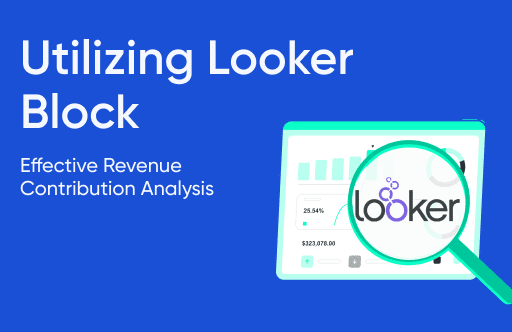
Utilizing Looker Block for Effective Revenue Contribution Analysis

In today’s data-driven business landscape, understanding the factors driving your revenue is key to making informed decisions and optimizing your operations. Looker Block for Revenue Contribution Analysis

Revenue Contribution Analysis with Looker is a powerful technique that enables you to decode the various factors contributing to your total revenue. 

By gaining insights into the channels, product categories, device categories, or geographic regions that play a pivotal role in your revenue generation, you can fine-tune your strategies based on the analysis for maximum profitability.

This Article address:

  • The significance of Revenue Contribution Analysis in shaping your business strategy 

What are “Blocks” in Looker BI?

Looker Blocks are pre-built templates or modules within the Looker data platform that streamline and simplify common data analysis tasks. They contain pre-configured data models, dashboards, and visualizations tailored to specific business needs or analytics use cases.

Looker Blocks enables users to quickly generate insights and reports without extensive coding or data modeling expertise, accelerating time-to-insight and enhancing decision-making capabilities. 

These blocks cover various areas such as revenue analysis, customer segmentation, marketing attribution, and more, providing a foundation for users to build upon or customize according to their specific 

The Significance of Revenue Contribution Analysis in Business Strategy:

Revenue Contribution Analysis is all about breaking down your revenue into its components to understand which elements are the most significant contributors. It allows businesses to identify key factors such as Users, Conversion Rate, Cart Size, and Average Price that play a pivotal role in revenue growth.

Doing Revenue Contribution Analysis in Looker is a streamlined process that leverages the platform’s analytical capabilities. Looker seamlessly integrates data & allows for a comprehensive analysis of Users, Conversion Rate, Cart Size, and Average Price and its effect on revenue.  To understand this relationship better and take a deep understanding of the same, we have built the Looker Block that enables us to make data-backed decisions.

An Overview of Tatvics’ RCA Block in Looker:

This Looker block focuses on analyzing the impact of changes in specific key drivers on e-commerce revenue. Within this framework, we represent Revenue as the product of four essential factors:

Revenue = Users x Conversion Rate x Cart Size x Average Price

Here:

  • Users represent the total number of visitors to our website.
  • Conversion Rate indicates the percentage of visitors who make a purchase.
  • Cart Size refers to the number of products in a cart during a transaction.
  • The average price represents the mean revenue generated per product.

With the help of the LMDI growth decomposition method, we estimate revenue change over any period. Analyzing Revenue Change with LMDI in Looker: To estimate revenue change over any period, Looker and the Looker Block employ the LMDI (Logarithmic Mean Divisia Index) growth decomposition method. It breaks down the change in revenue as follows:

Δ Revenue = Δ(Users) + Δ(Conversion Rate) + Δ(Cart Size) + Δ(Average Price

This equation identifies and quantifies the contributions of each driver to revenue growth, allowing businesses to pinpoint the areas with the most significant impact on their bottom line.

Benefits and Potential Insights from Using Tatvics’ Revenue Contribution Analysis Block in Looker:

Looker is a modern data platform that allows organizations to harness the power of their data. Integrating Revenue Contribution Analysis with Looker can offer multiple benefits and insights.

1. Deep Data Analysis: 

Identifying the root cause of issues is crucial for making effective changes. Looker can help you go beyond surface-level metrics and uncover hidden patterns in your data. This can lead to a better understanding of campaign performance, customer behaviour, and overall marketing effectiveness. 


2. Data-driven Actions:

Once you have deeper insights, you need to translate them into actionable steps. Looker can help you pinpoint exact problems and identify the most impactful actions to take. This data-driven approach can lead to more successful marketing campaigns and improved ROI.


3. Planning Marketing Campaigns:

Proactive planning is essential for successful marketing. Looker’s predictive capabilities can help you anticipate potential issues before they arise and adjust your campaigns accordingly. This can save you time, money, and resources in the long run.


4. Integration:

Breaking down silos is key to maximizing data utilization. Looker’s integrations with various platforms like Slack allow you to share insights instantly and facilitate real-time collaboration within your team. This can lead to quicker decision-making and faster reaction times.


5. Embedding:

Making data readily accessible is crucial for informed decision-making. Looker’s embedding features allow you to put dashboards and specific data points directly into the tools your team uses most. This ensures everyone has access to the information they need when they need it.

Overall, these features showcase how Looker can be a valuable tool for marketing teams by providing deeper insights, driving data-driven decisions, and facilitating proactive planning and collaboration.

Here are some additional questions you might consider:

What specific marketing challenges are you currently facing?
What data sources do you have access to?
How do you envision using Looker to improve your marketing efforts?

By understanding your specific needs and goals, Tatvic can provide more tailored advice on how Looker can benefit your marketing team.

In conclusion, Revenue Contribution Analysis with Looker Blocks transcends conventional data analysis, offering a simplified yet comprehensive approach to revenue understanding.

How to Optimize Programmatic Advertising with Key Ads Metrics?

How to optimize Programmatic Advertising with key Ad Metrics?

Marketing metrics and analytics insights are quantifiable ways to track performance. They are vital marketing measurement tools to ensure how well campaigns are Progressing toward Key Performance Indicators (KPIs) and give a clear picture of whether a campaign’s marketing strategy is a success or not. 

Selection of suitable metrics may vary from one campaign to another but to effectively measure the success of programmatic advertising, it is crucial to understand the right metrics and leverage analytics to gain valuable insights. 

These metrics vary based on the Funnel that your Campaigns are trying to activate.

Key Programmatic Advertising Metrics:

1. Impressions, Reach, and Frequency

To directly measure the effectiveness of the campaigns, Programmatic Managers refer to metrics known as impressions, Reach, and Frequency which are fundamental to digital Marketing. They indicate how often an ad is displayed on the web page with the total number of unique people who see your ad and no. of times those unique people see your ad respectively. If your goal is to create Brand awareness, these are the metrics you should measure.

2. Click Through Rate(CTR) And View Through Rate(VTR)

CTR is the percentage of people who click on your ad out of everyone who is exposed to it whereas VTR is the percentage of people exposed to your ad who watched the complete video out of the total people exposed to it. A high CTR or VTR suggests that your ad resonates with the audience and drives them to take action. These are vital to determine the effectiveness of the creative and messaging of your ad. Needless to say, if driving engagement or product consideration is your goal it is imperative to 

3. Conversion Rate

Conversion Rate is the percentage of users who complete desired action after clicking on the ad i.e. - Purchasing from the website, filling out the form, or signing up for the newsletter. Any Action can be defined as a conversion event while setting up the campaign. If growing the bottom of your funnel is the goal, Conversion Rate is the metric that should be looked out for

4. Cost per Mile(CPM) And Cost per Click(CPC)

CPM is the cost an advertiser has to pay to the publisher for every thousand impressions served for their ads. while CPC is the cost that an advertiser pays to the publisher every time a user clicks on the ads These two metrics are optimal for measuring cost-effective outcomes and smart budget allocation of the campaign.

5. Cost per Action or Cost per Acquisition(CPA)

CPA  is the cost incurred by an advertiser to get the user to perform a determined action or complete a conversion [i.e. Purchase an Item or Sign up for a newsletter]. It is one of the most important metrics that measures the cost-effectiveness of the advertisement campaign

6. Return on Investment and Return on Ad spends (ROI and ROAS)

ROI and ROAS are the ultimate measure of success in programmatic advertising. ROI measures the total return from overall investment while ROAS measures the revenue generated from specific ad campaigns. ROAS considers revenue while ROI considers net profit. 

Analytics Insights:

1. Audience Segmentation

Audience segmentation analysis is one of the most crucial factors in analyzing and optimizing the campaign toward the goal. Advertiser can optimize audience segments based on their demographics, interest, geographics, and behavior that can resonate the best with the products and services that drive results. 

An advertiser can analyze audience profiles and geographic distribution to discover new audiences that have similar characteristics to existing audiences with lower overlap and target ideal geographic locations for the audience selected to drive better results in programmatic advertising

2. Time and day and Technology analysis

Time and day analysis can be done to avoid wasteful spending. An advertiser can define day and time segments according to local or advertiser time zones and apply them to the campaign for the ad to serve when chances of achieving the campaign objective are high. Also, technology analysis can be done based on device, browser, carrier&ISP, and connection speed. These two insights are very important for avoiding wasteful spending and achieving cost-effective output in programmatic advertising

3. Experiment and A/B Testing

Experimentation and A/B testing are key to optimizing the programmatic campaigns. We can take one or more variables and test which variable performs better for our goal. A variable can be anything like an audience, creatives, web page, etc. By doing this, we have the best variable combination that ultimately drives the success of programmatic advertising

Conclusion:

In programmatic advertising, success is measured through a combination of different metrics and analytics insights. By continuously analyzing these Key Primary Metrics and Analytics Insights, the Advertiser can make data-driven decisions and optimize the campaign that drive better results that lead to the ultimate success of programmatic advertising

Bot Icon
Bot Icon

Tatvic Bot

Explore About Tatvic and Services