Hello There!

Lorem ipsum dolor sit amet, consectetur adipiscing elit,

10 Indispensable UX Heuristic Principles for driving high conversions

By incorporating heuristic evaluation into the CRO process, we bridge the gap between data-driven analysis and the need for quick, actionable insights. This dynamic combination allows us to make informed decisions that lead to significant improvements in conversion rates, user satisfaction, and overall business success.

As a CRO expert, I highly recommend integrating heuristic evaluation into your optimization strategy. Embrace the power of this efficient methodology and witness the transformative impact it has on your website’s user experience and conversion rates.

What is ‘Heuristic Evaluation’?

Heuristic evaluation is a process of measuring the usability of the user interface based on specific predetermined rules; the website/ app can be examined by the rules and report the issue.

Here the term usability is related to how a user perceives your website in terms of affordance, discoverability, learnability, flexibility, efficiency, speed and user control. The application of these components in a good manner will become necessary to improve the overall conversion rate.

If we apply this evaluation process to early-stage prototypes, it will be more beneficial for developing a good system. Because heuristics developed after years of experimentation on various types of e-commerce, business, blogs, and news websites. 

As a result of all these experiments, A model was developed that will evaluate what will work for a system conversion rate optimization. The model has certain rules of thumb that we can apply depending on the type of website and perform an A/B test to measure the conversion rates.

Heuristics Principles & Their Application

There are multiple rules of heuristics in which 10 general principles are widely used, first proposed by Jakob Nielsen in 1994, Depending upon the purpose of the website or app, some of the principles can be removed. We can understand the application of these principles with examples.

1. Visibility of System Status

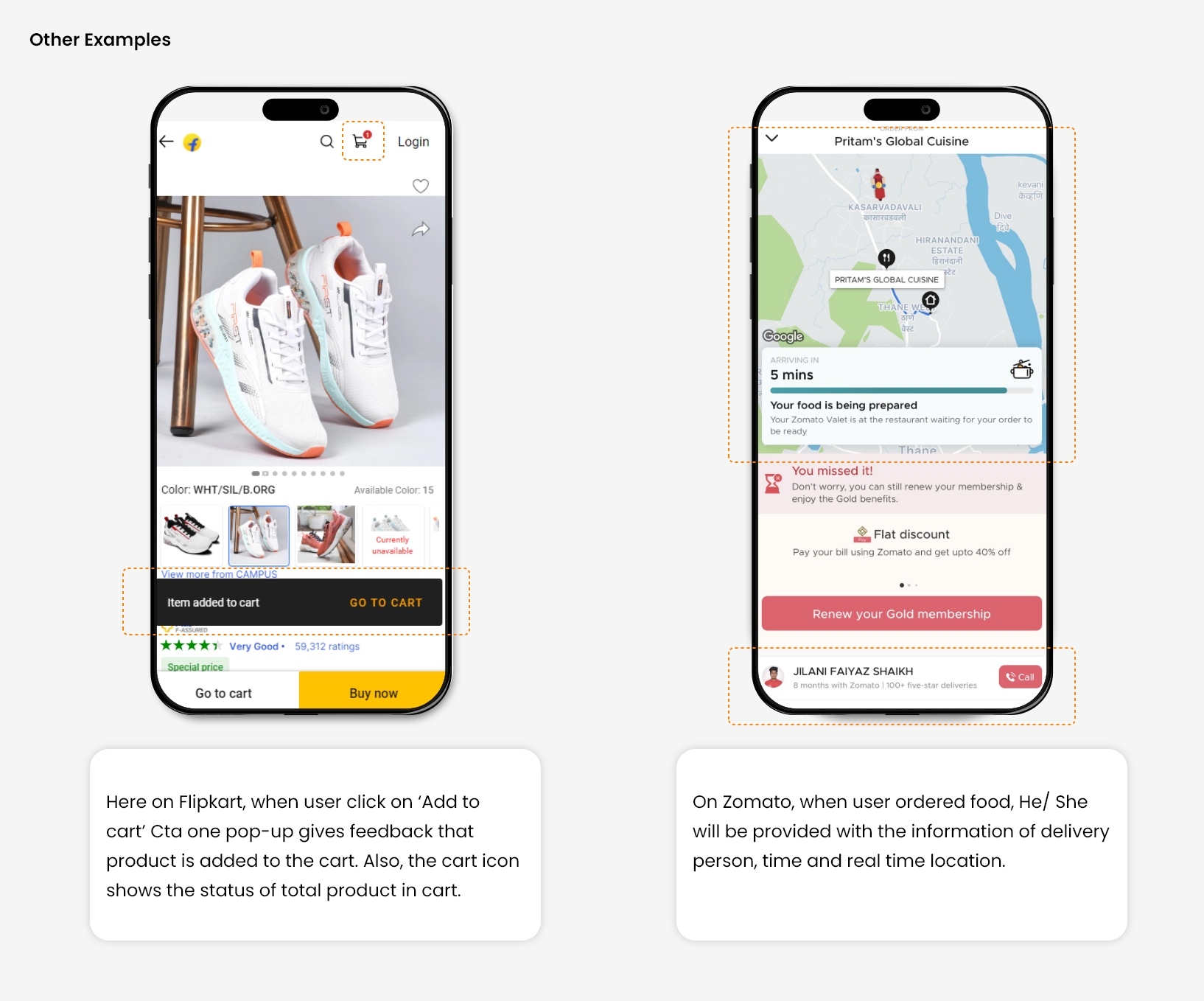
The system should give real-time information to the user about what is going on in the system with appropriate feedback. The user always expects clear communication in advance before taking any further action. 

Also, the system is not allowed to take any action on its own without prior notice to the user. The crystal clear information will increase the trust of the brand/ website, which is necessary for a user to take better decisions. 

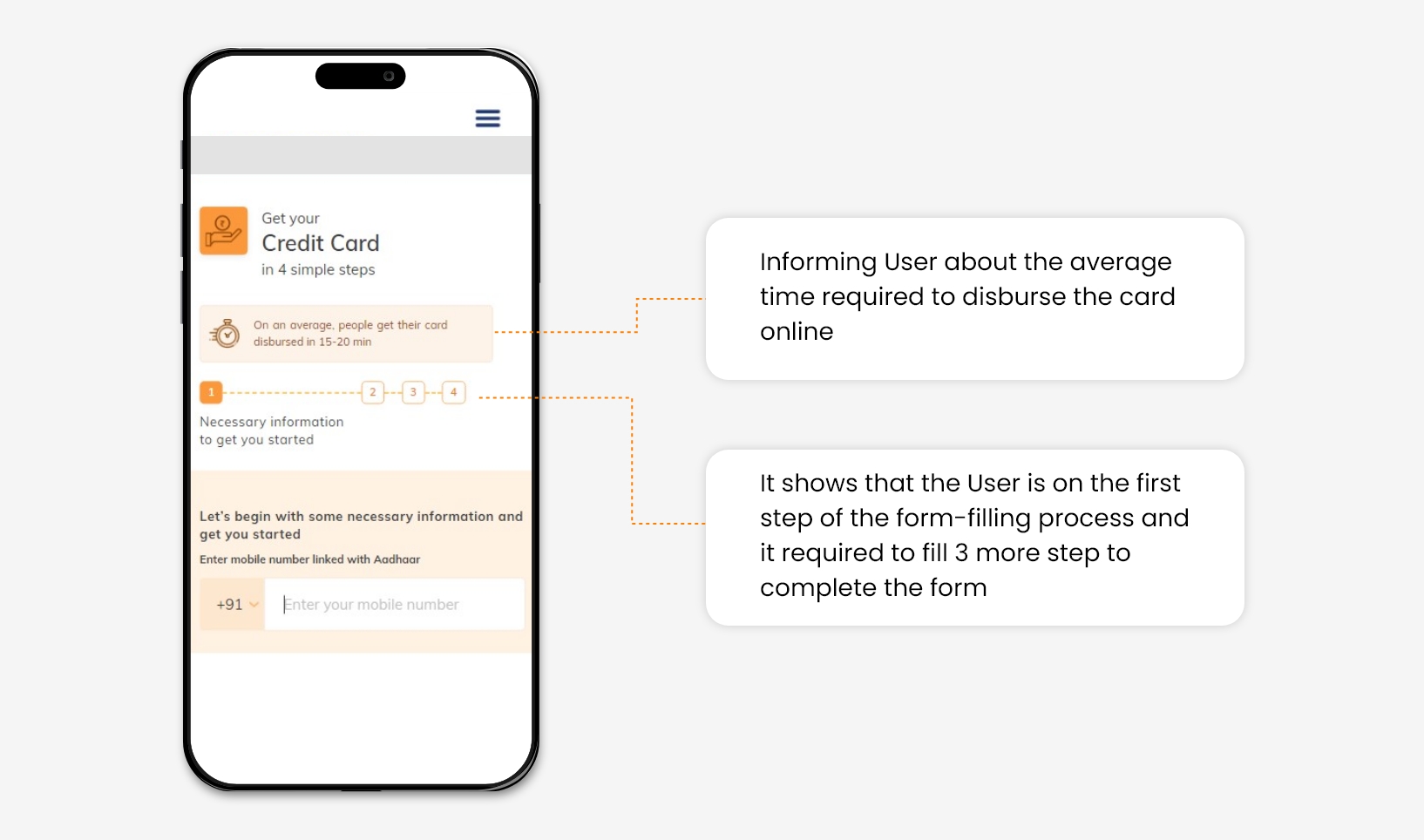
For example, In a bank credit card application form. The user is provided with real-time information about form filling status.
Source   Source

2. Match between the system and the real-world

Design should speak about its purpose in the user’s language. If you design something, its language, iconography, and images can seem perfect for you and your colleagues, but that is not always true, it might be confusing for your end user.

The information delivered in the form of real-world conventions is more persuasive and easy to understand for a user without any language barriers. 

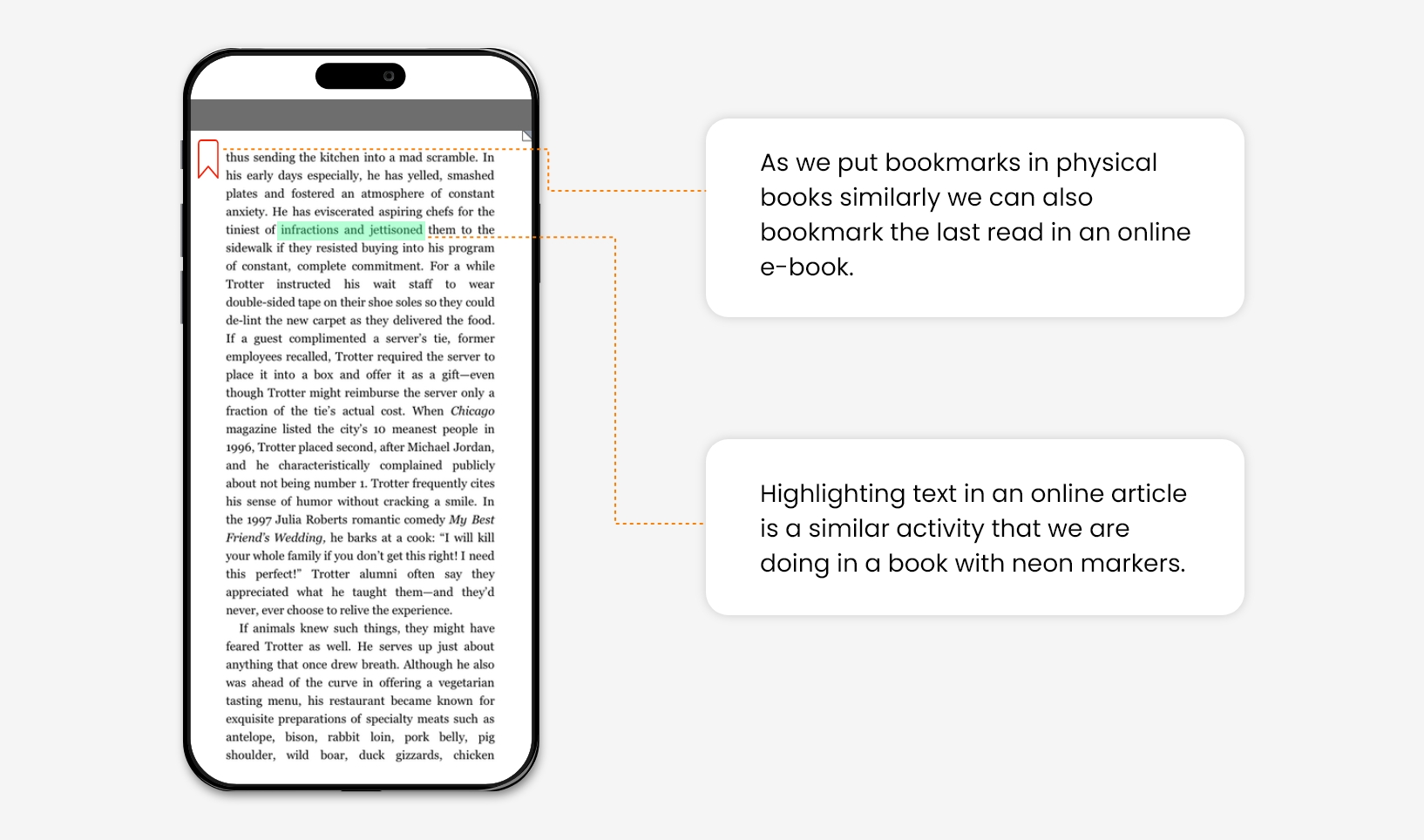
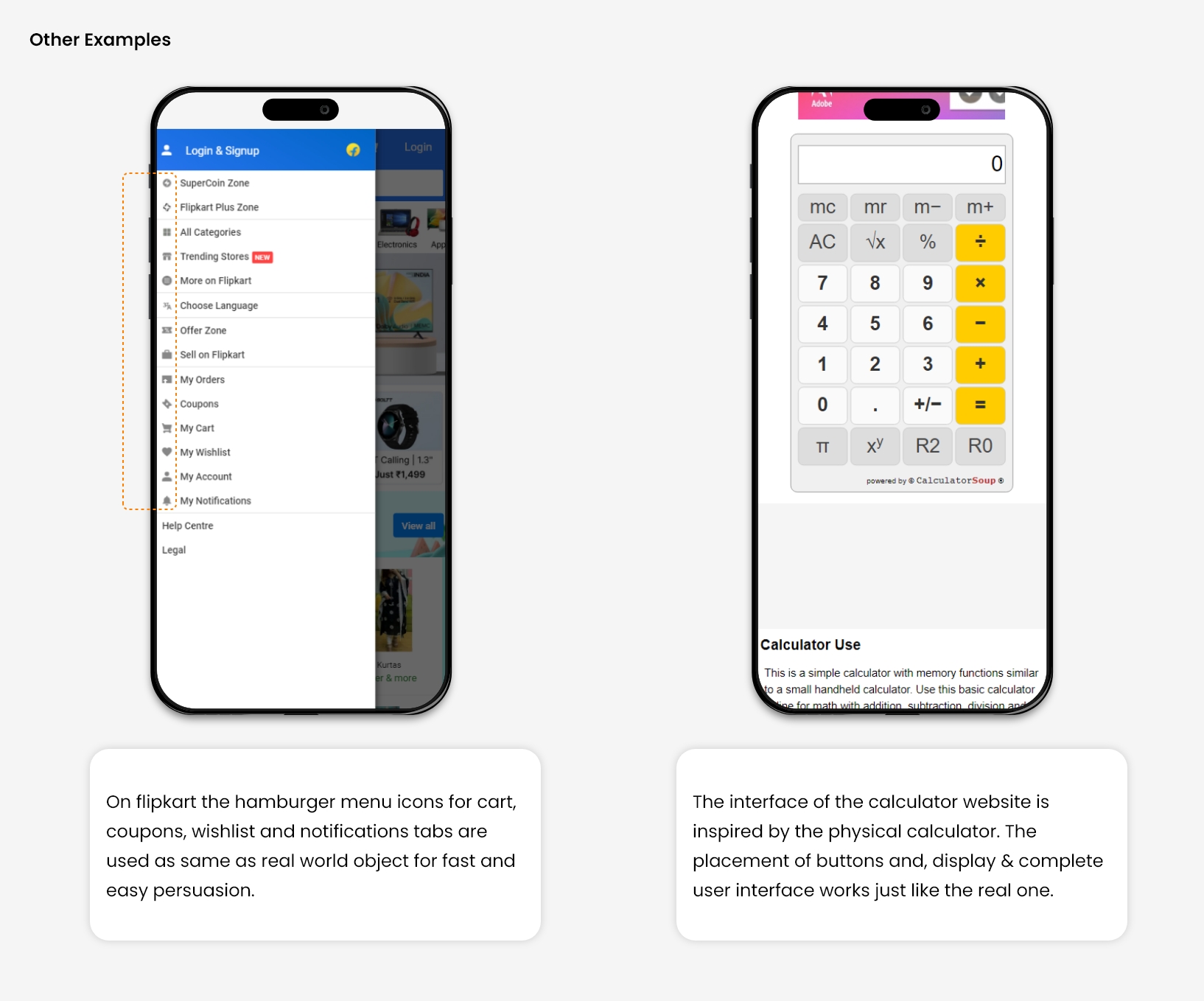
For Example, We can bookmark pages and highlight the texts in e-book apps as we do in physical books.
Source      Source

3. User Control & Freedom

If you are writing something with a graphite pencil, An Eraser will help to erase it, In case you have written something by mistake. Eraser gives you the control to correct your written text. 

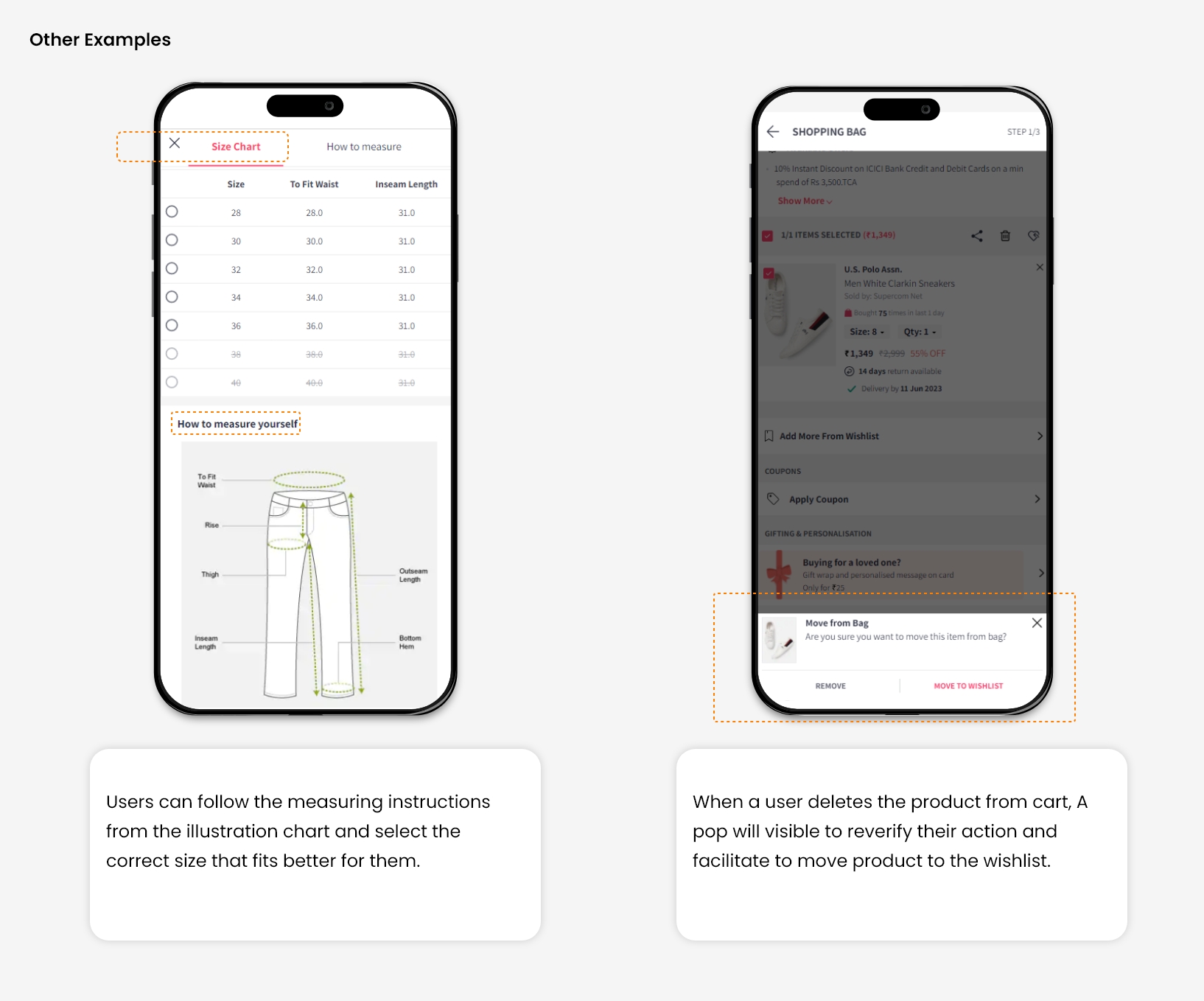
In the digital world, Several times, users perform actions by mistake, so they always want control to correct them. In such a situation, users should provide a clear exit or solution without getting stuck to avoid frustration. 

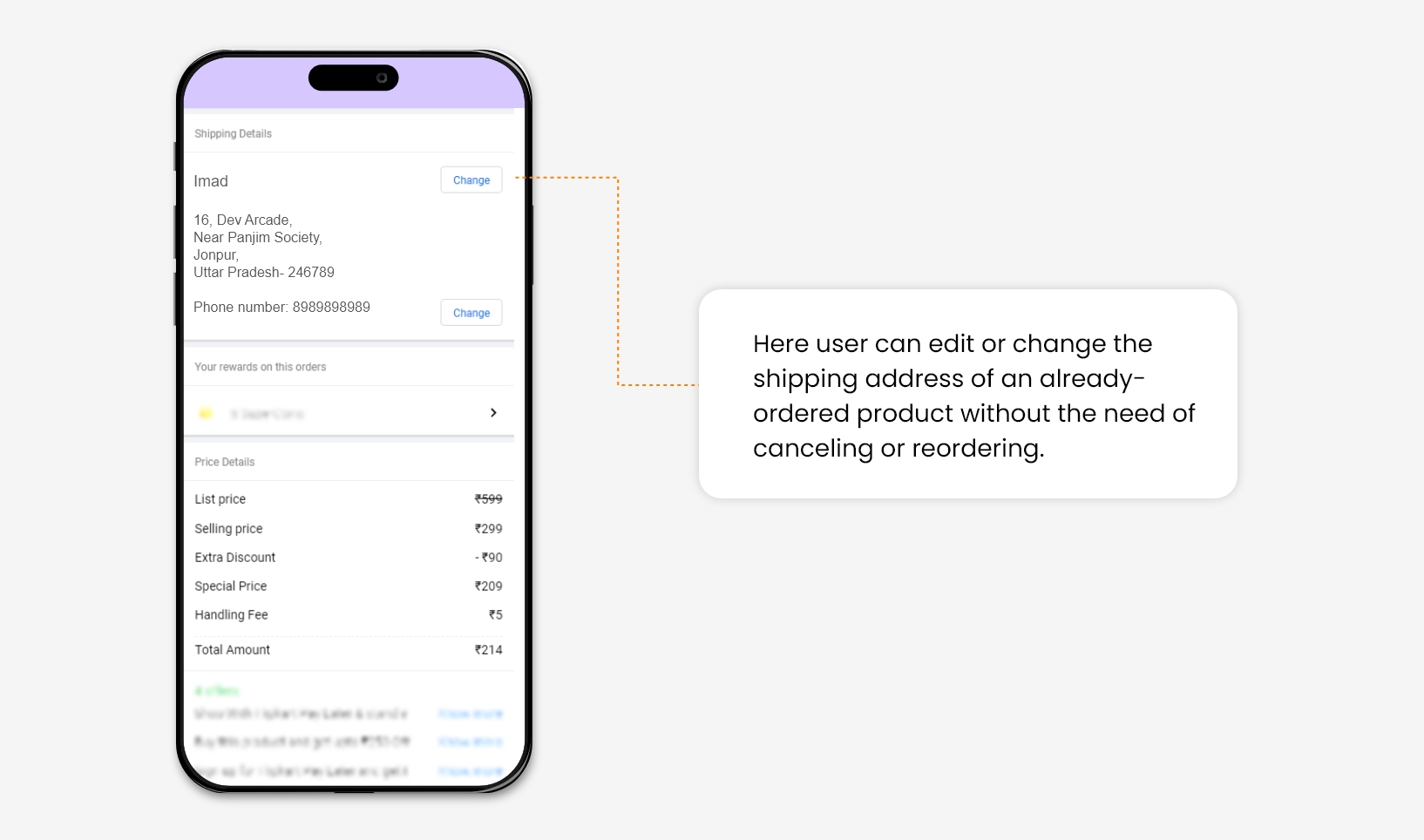
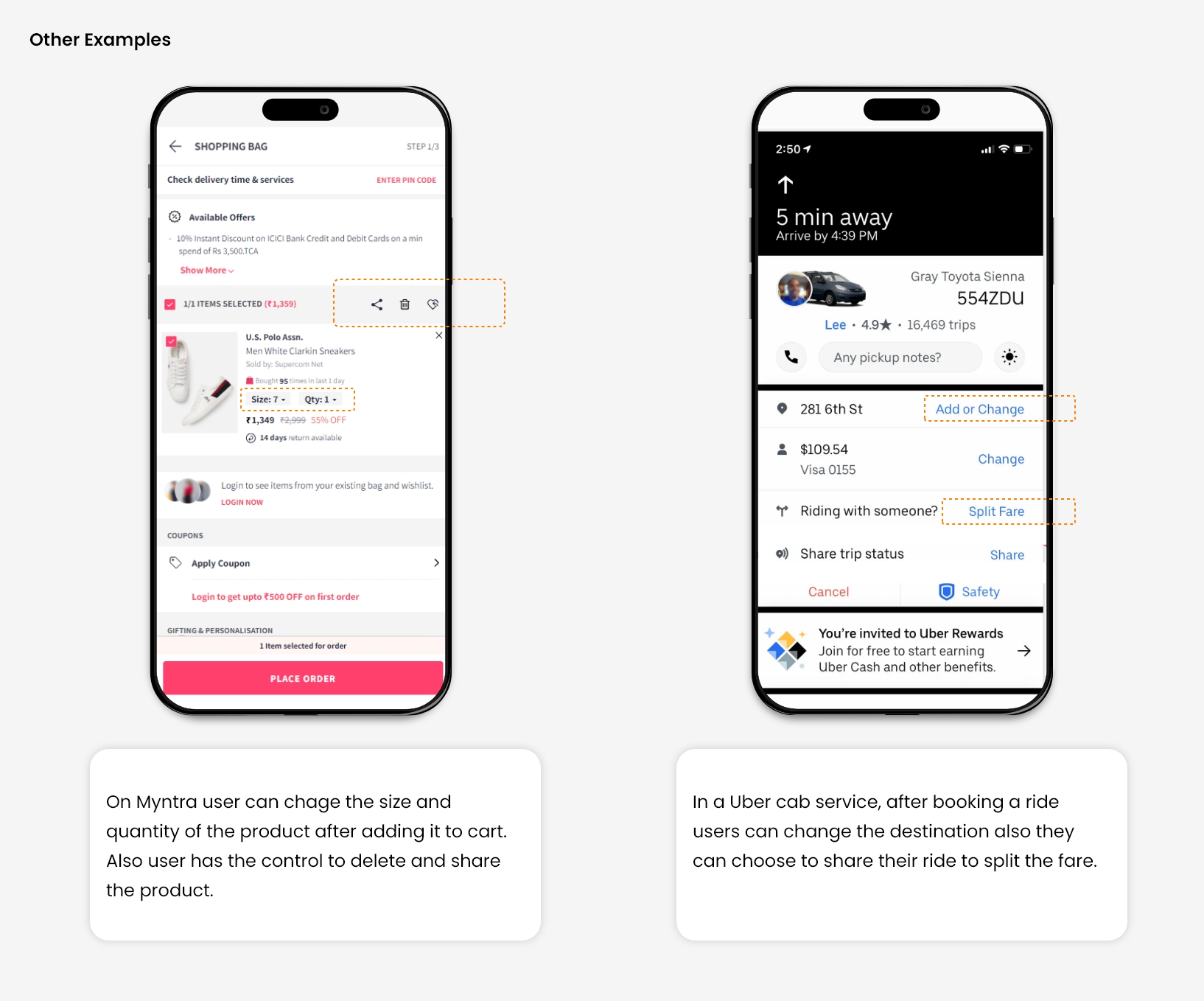
For Example, On an e-commerce website, many times, users save multiple addresses in their address book, which increases the chance of selecting the wrong address during checkout. So it becomes necessary to give control to the user for changing shipping address after making a successful order.
Source    Source

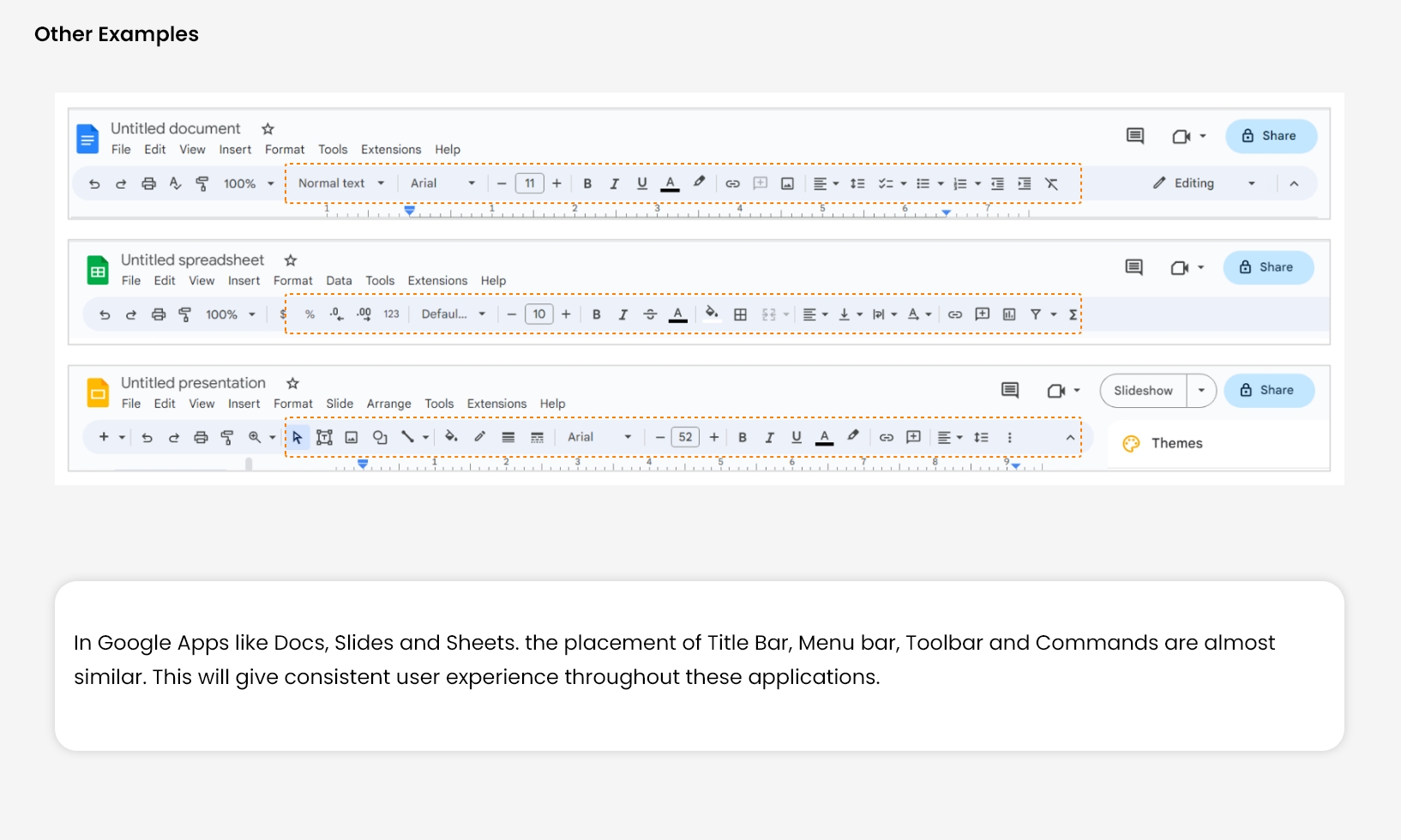
4. Consistency and Standards

This principle very much relates to Jacob’s Law of UX design. It states that users always spend more time on other websites than yours. 

So they always expect the discoverability of elements and functionality of your website should work in the same way as that work on the other website. 

Users developed this behaviour on their own, Through their years of exploration of different websites. It helps them to perceive different elements or find specific functionality on a landing page with ease.

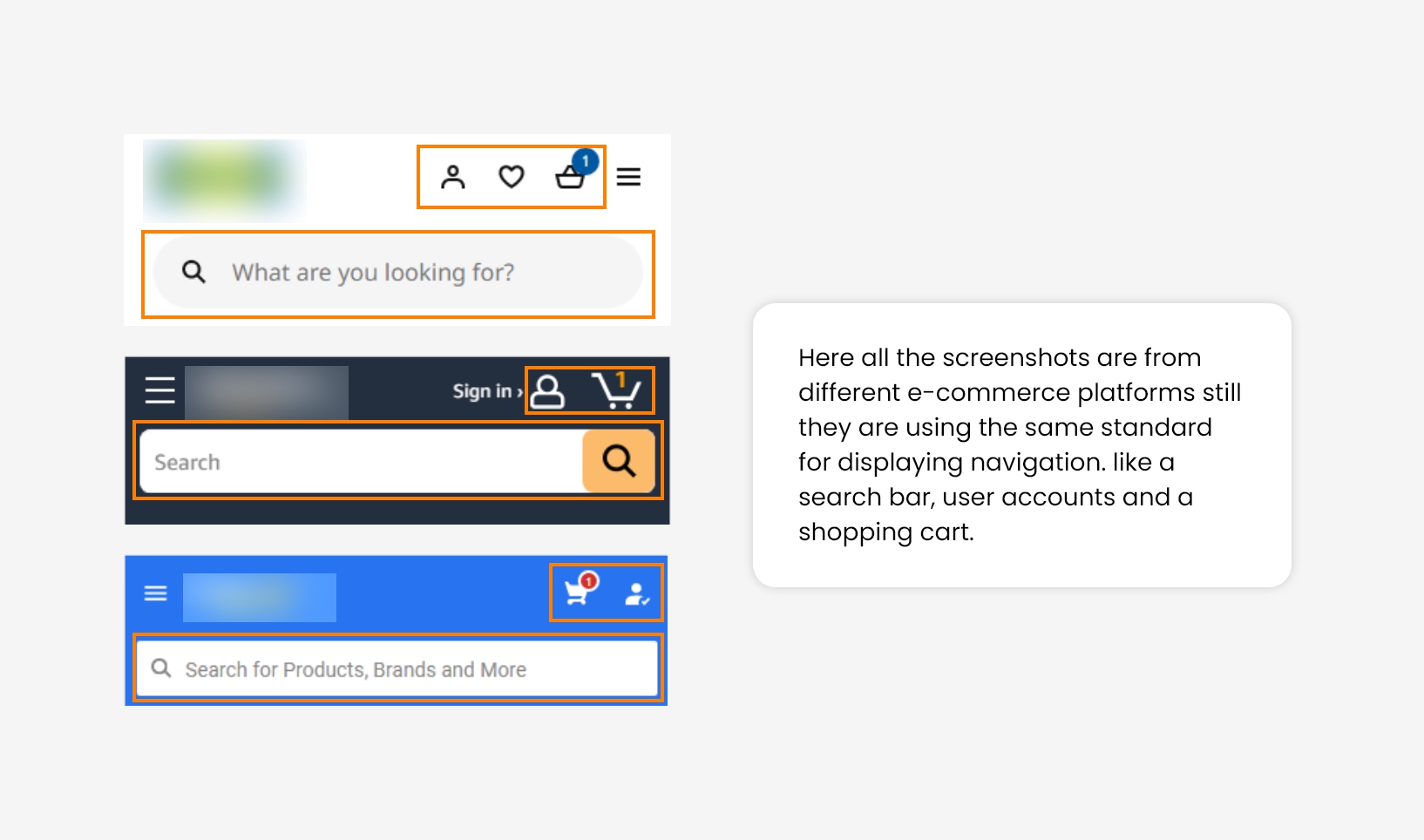
For Example, Most e-commerce websites use the same standard for showing navigation elements. We have observed that maintaining consistency across websites will reduce user bounce rates at first glance.
Source

5. Error Message

Error messages are important to warn users prior to their action, but good design always aims to prevent problems from occurring in advance. 

If the user commits any error or attempts something wrong, who will take responsibility for this? User or Designer? 

So, the answer is Designer. He designs the system in such a way that it becomes easy for a user to commit the error. The conclusion is that the System is always designed in a way that it becomes less prone to errors.

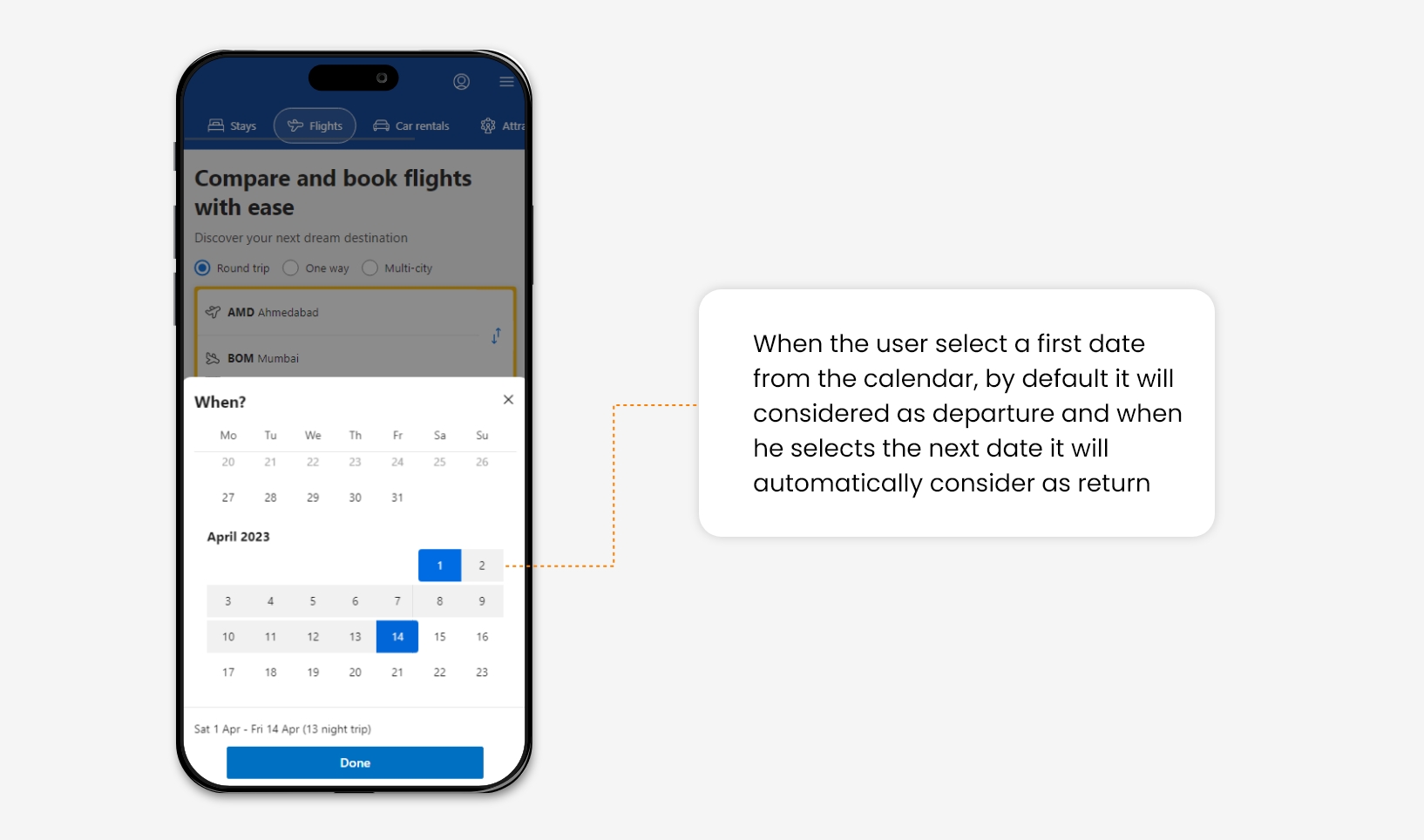
For Example, On flight booking websites, many times, the user makes the mistake of selecting the return date before the departure date. For a good user experience, a constraint can be added in the calendar that can avoid users from selecting any redundant date range.
Source      Source


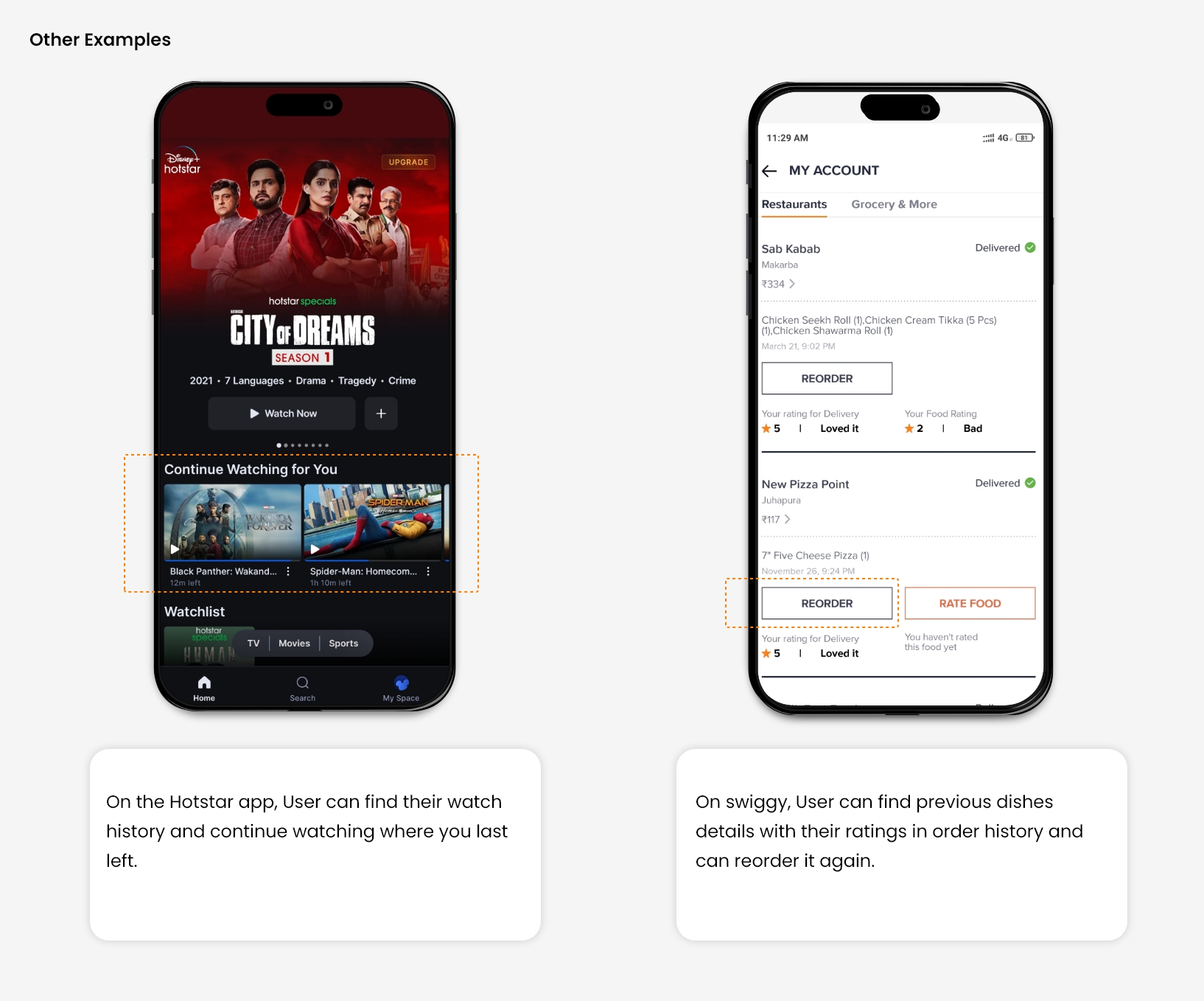
6. Recognition rather than recall

While people cannot remember every detail of an event, they are capable of retaining specific parts. However, the act of recalling information can be burdensome on the memory.

Designers need to reduce the user’s memory load by making images, elements, and options visible at first glance.

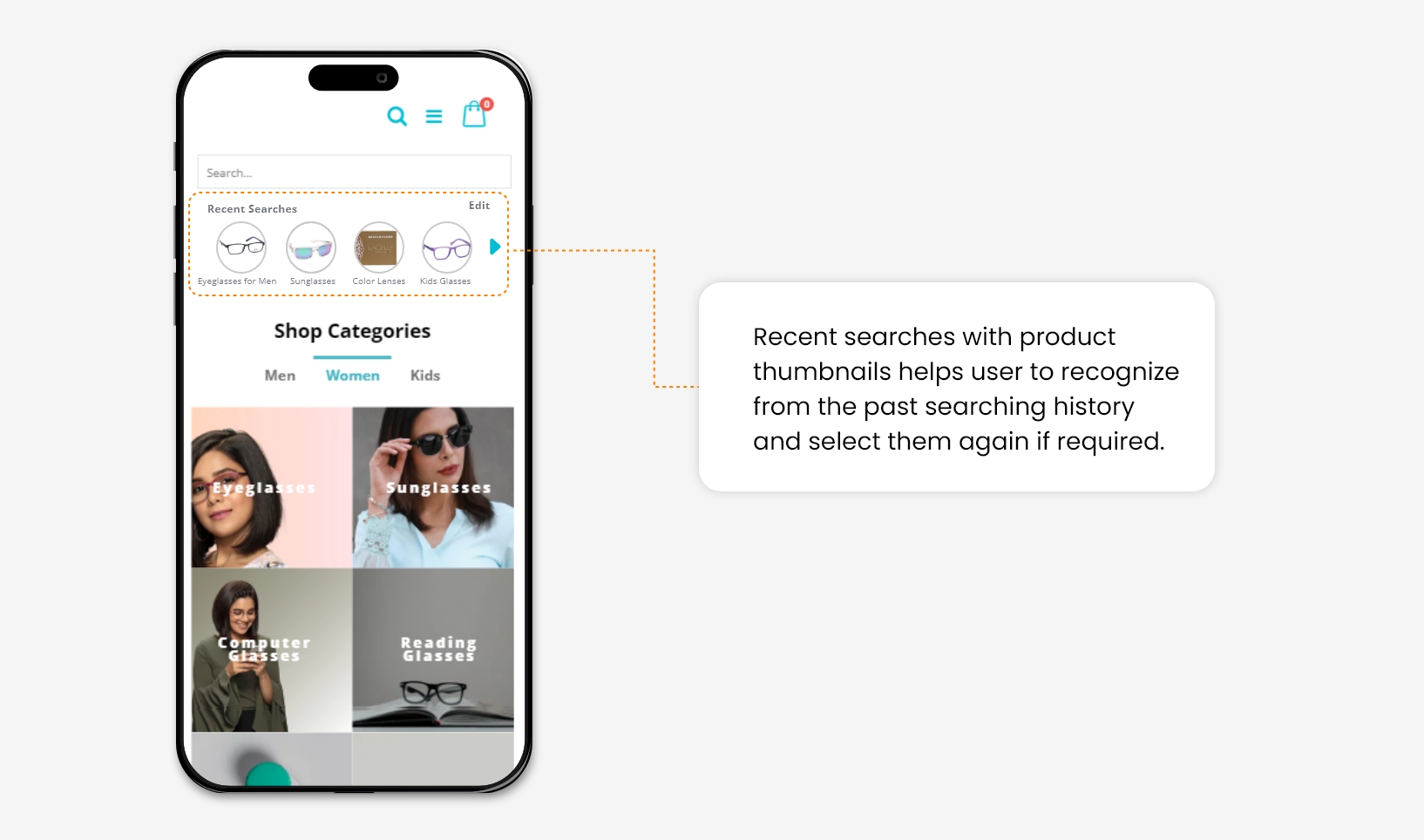
For Example, Once people search for a product on an e-commerce site and leave it. When they return and try to search again, it will be good to show them their search history. Because they are most likely to buy things from it that increases the website conversion rate.
Source    Source

7. Flexibility and efficiency of use

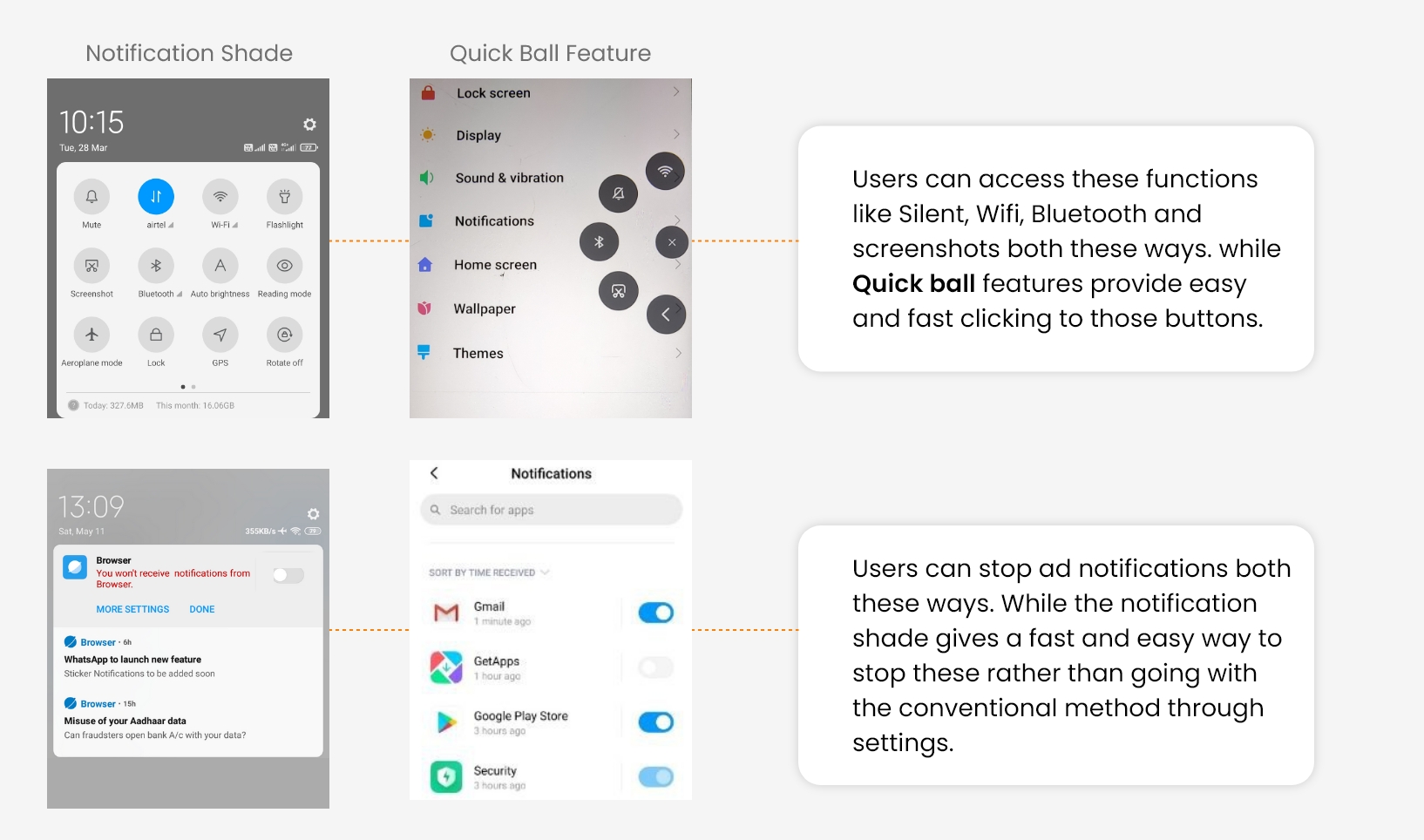
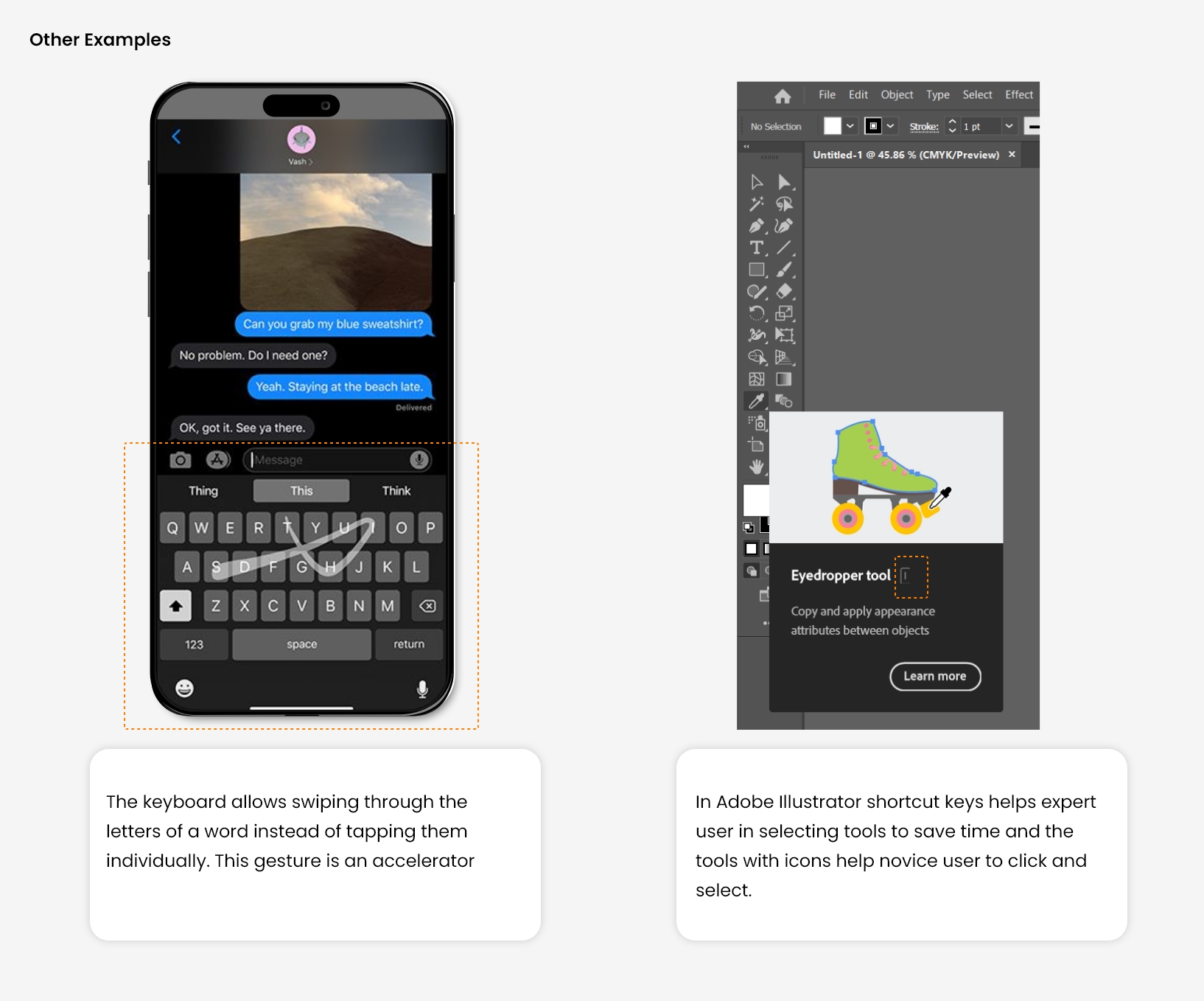
There is always two types of user, Novice and Expert. The expert user wants some facility that speeds up their work, like shortcut keys. 

Where a new user wants a simple and easy functionality, the designer needs to cater to both segments of Users so they can work efficiently. Also, provide the facility of personalization and customization as per user need.

For Example, In mobile UI design, different quick access (Shortcuts) is provided for fast and easy navigation throughout the UI. It will save the user time and improve their overall experience.
Source

8. Aesthetic and minimalist design

Many time system contains lots of elements and information In which, some of the contains are irrelevant and rarely used. Such content distracts the user’s focus from the relevant and necessary information. 

As a result, the user will not be going to perform the task that you are supposing from him. So, Before designing, you need to prioritize the visibility of primary and secondary elements on your landing page or interface.

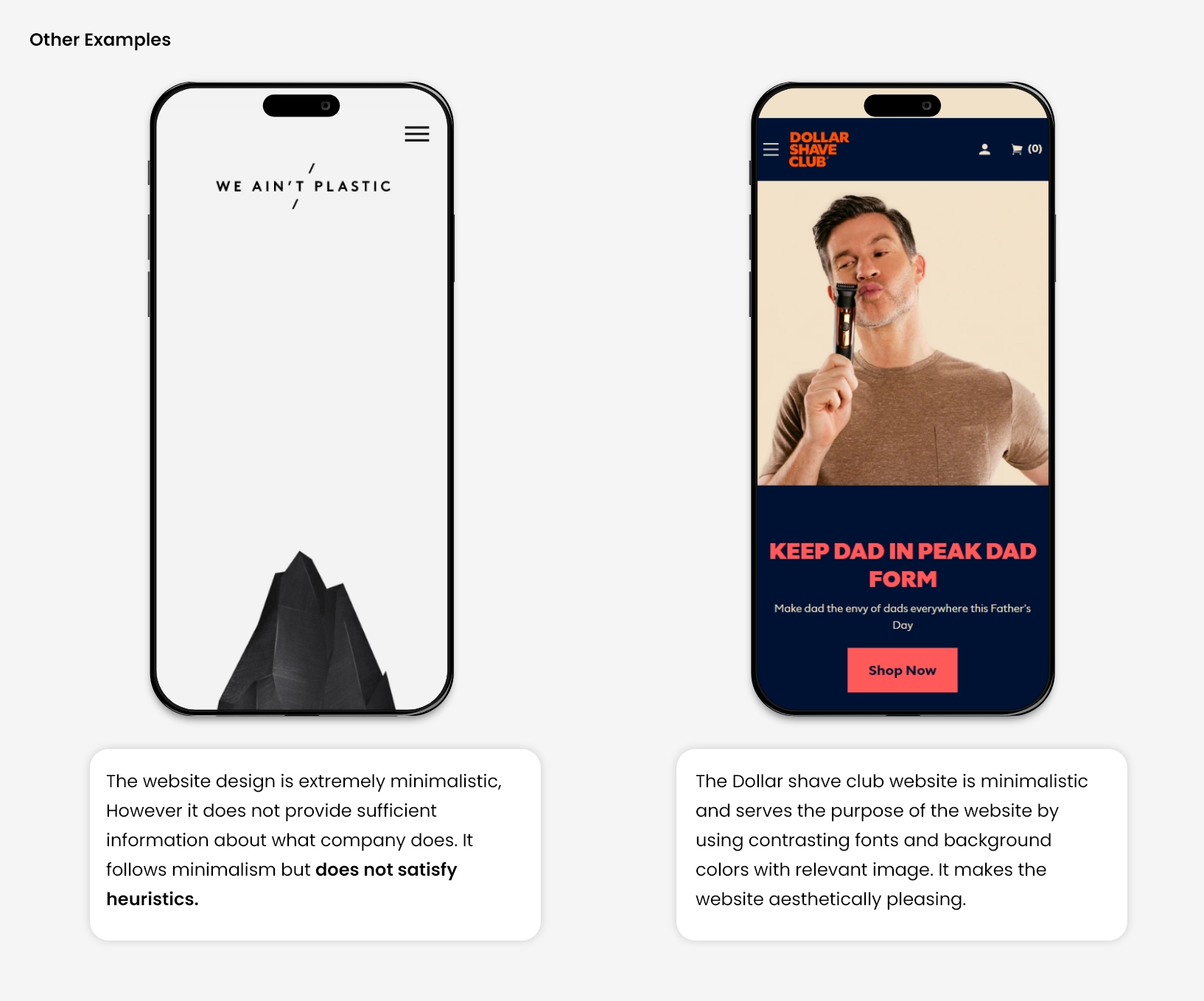
Let, An interface that showcases only minimalistic design but does not contain relevant information and visa-versa, a page with relevant information not presented aesthetically will not be considered a good heuristic approach. 

A good design would be well-presented information with the use of design and gestalt principles.

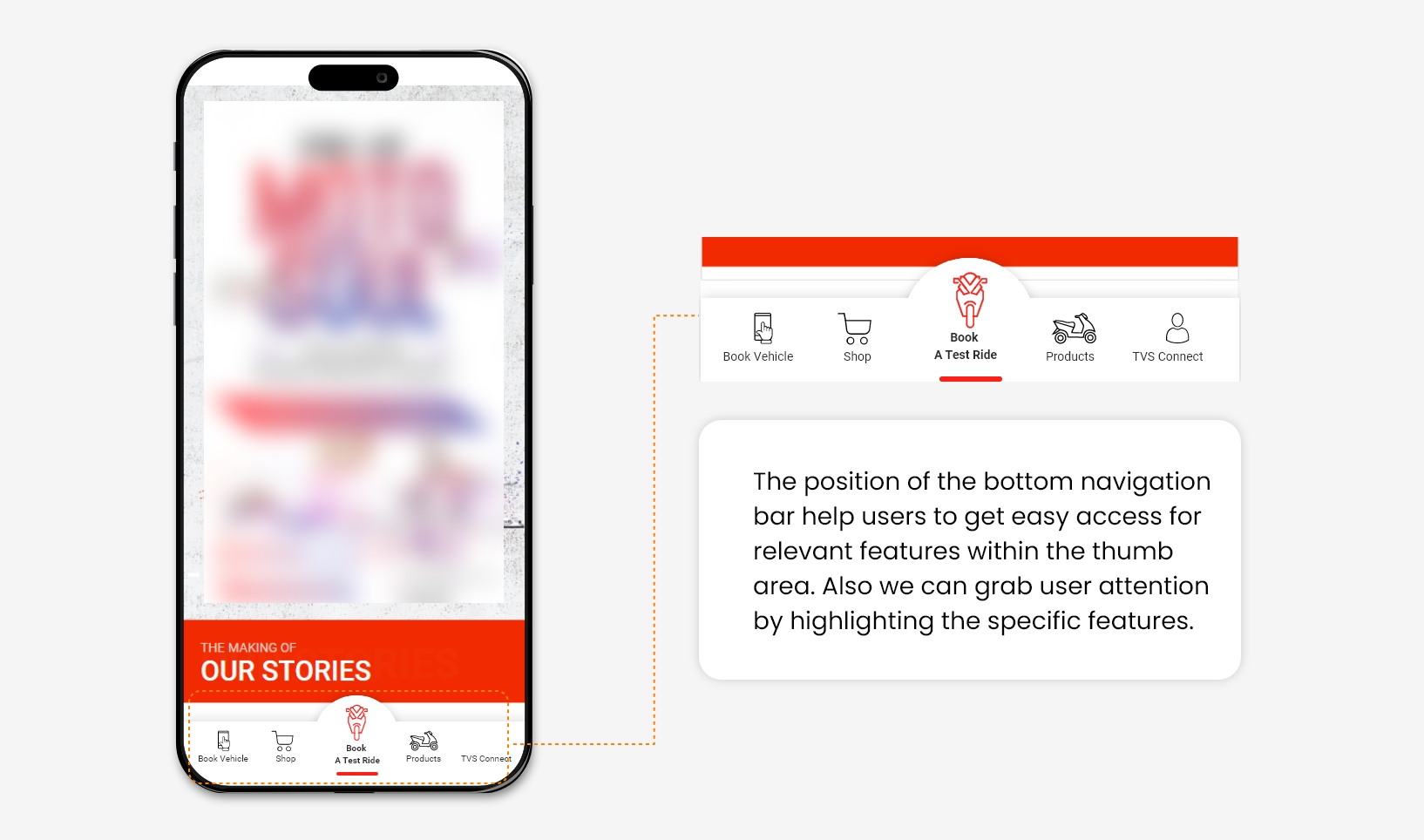
For Example, Giving a Navigation bar on the App at the bottom rather than on top with the most relevant options will help users discover specific buttons quickly.
Source   Source

9. Help users recognize, diagnose, and recover from errors

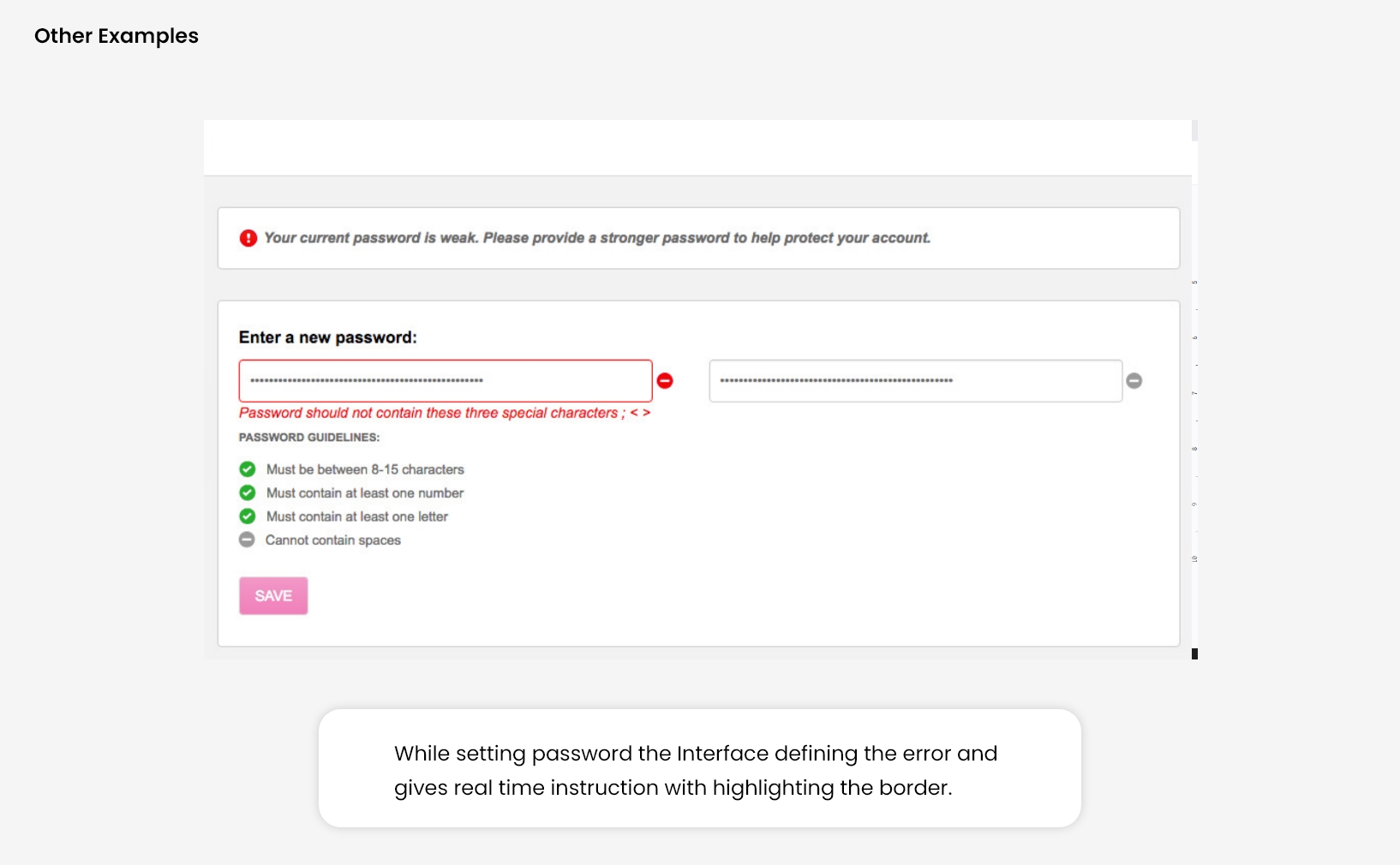
Design should always focus on minimizing user errors. Still, due to some design problems or any functionality issue, the user will get stuck in some error. Now it’s the designer’s responsibility to give a complete and simple direction to resolve it to recover.

When a user makes a mistake and doesn’t get any feedback to solve it, they would most likely skip the task they were supposed to perform. Also, showing custom-written error messages is a good practice rather than system-generated error messages with code like ’404’.

Hence, Error messages are always kept in a simple language, which can be easy to perceive and also suggests a constructive solution to resolve.

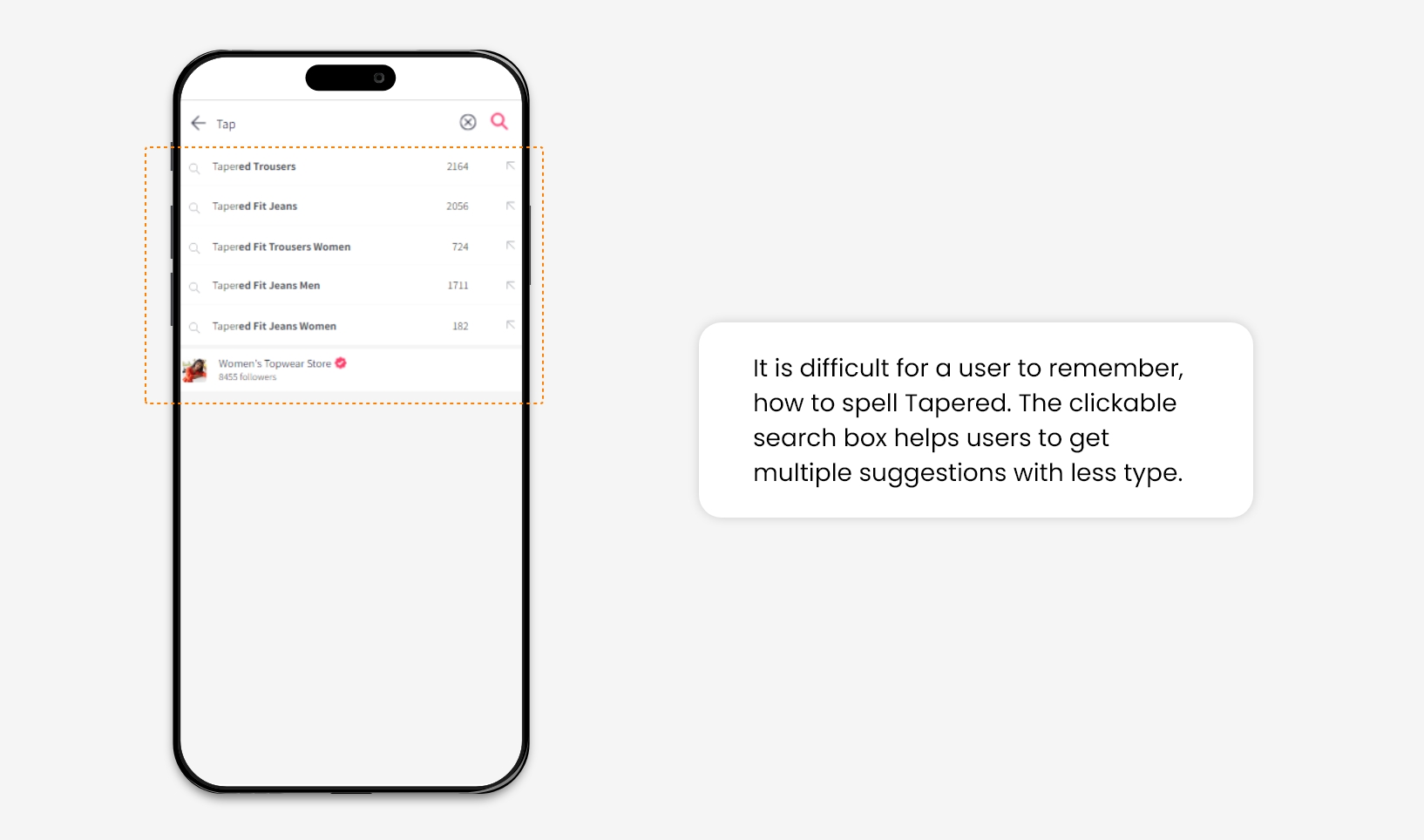
For Example, On an e-commerce website, sometime user forgot the specific keyword of the product for which they are looking to browse or purchase. The search option facilitates multiple suggestions once they initiate typing, which helps the user to recall the product’s actual name.
10. Help and Documentation

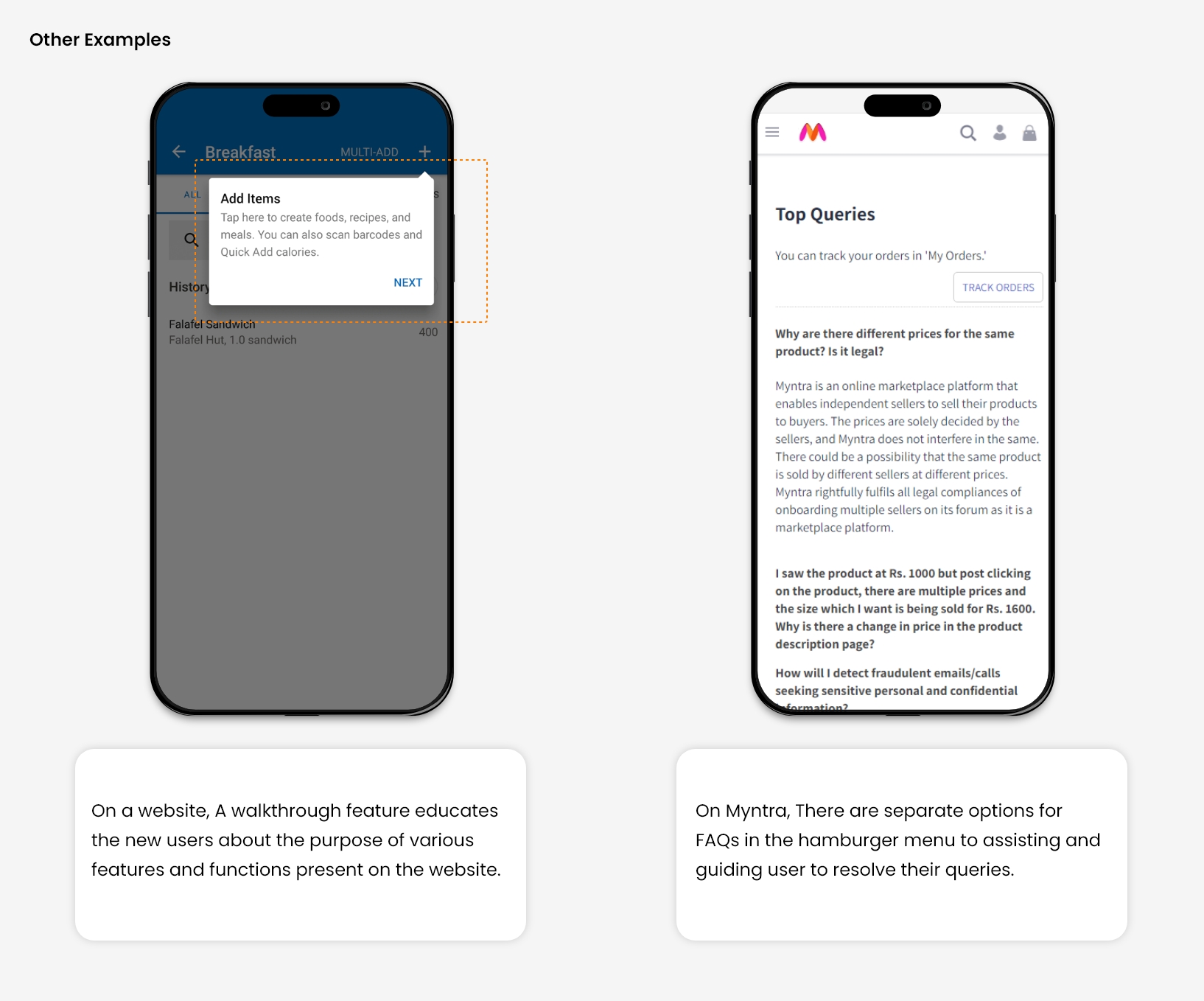
Designing a system in such a way that it becomes self-explanatory. It won’t need any additional explanations. However, It is good to help users by providing relevant documentation to accomplish their tasks.

There are two types of help one is Proactive, and the other is Reactive. Both this type of help is widely offered at different online platforms. 

Proactive help focuses on preventing issues in advance. It provides help to the user before he/ She encounters a problem. It is intended to make users familiar with the interface by showing some tips, suggestions, and training tutorials. 

While Reactive help stands for helping users when they have already encountered a problem and seeking a quick solution, it includes some advisory documentation, videos, and well-segregated videos for specific issues that are easily accessible.

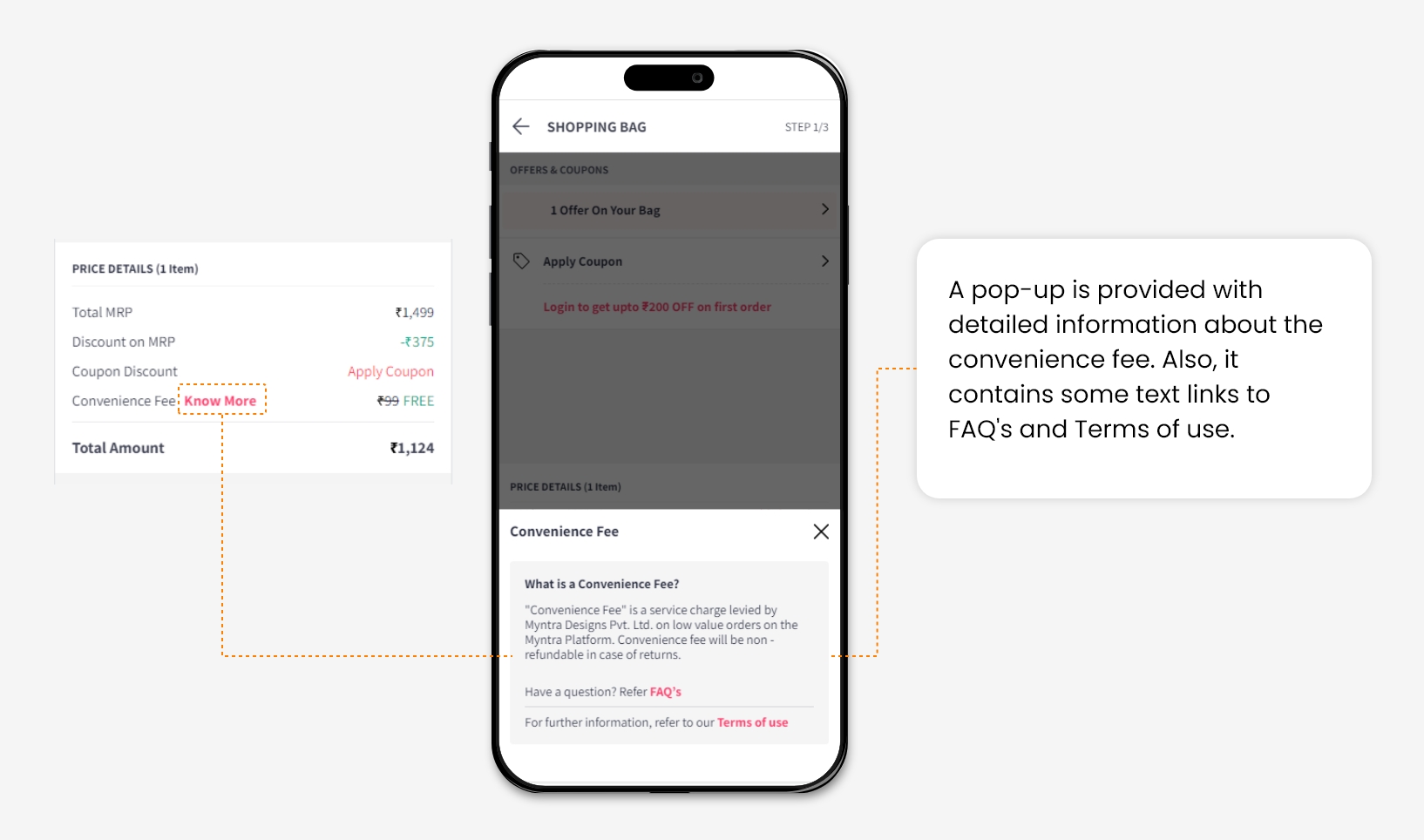
For Example, At the checkout page of an e-commerce shopping website, a convenience fee is charged. So It is necessary to inform users why it is supposed to be included in the Total amount. By clicking on “Know More’,  A task-specific help document will be provided.
Source

Conclusion

All these minor changes can enhance user experience and help us to increase user engagement on your website.

In many A/B tests, we have applied changes according to heuristics and observed that consideration of all these principles while designing the website interfaces gives better results in increasing the Overall conversion rate of the website.

Conversion funnel leaks: Here is what you need to know and do

A “conversion” refers to the specific action or goal that a business wants a customer to complete. It can vary depending on the business objectives and can include actions such as making a purchase, signing up for a newsletter, filling out a form, downloading an app, or subscribing to a service. Essentially, a conversion is when a potential customer successfully takes the desired action that aligns with the business’s goals. The conversion rate is often used as a metric to measure the effectiveness of marketing campaigns or the overall success of a website or landing page in achieving these desired actions.

What is Conversion Funnel?

A conversion funnel is a conceptual framework used in marketing and sales to describe the journey that a potential customer goes through before making a purchase or completing a desired action. It represents the process of converting a visitor into a customer.

The conversion funnel typically consists of several stages, each representing a step in the customer’s journey. While the specific stages may vary depending on the business and industry, here are the common stages of a conversion funnel:

  1. Awareness: In this stage, the awareness of your services, brand or product increases among potential customers.
  2. Interest: Once aware, potential customers develop an interest in your offering. They may engage further by visiting your website, reading content, watching videos, or subscribing to your newsletter.
  3. Desire: At this point, potential customers are ready to make a decision. They evaluate the value, pricing, and benefits of your offering compared to competitors. This stage often involves actions like adding items to a cart, initiating a trial, or requesting a quote.
  4. Action: The final stage is when the potential customer takes the desired action, such as making a purchase, signing up for a service, or subscribing to a membership. This action signifies the conversion from a prospect to a customer.

AWARENESS STAGE (How to TELL People?)

The awareness stage is the first stage in the conversion funnel, where potential customers become aware of a particular problem, need, or opportunity they have. In this stage, users start recognizing your brand even if they may not be familiar with your product.

Sometimes people drop off from the stage for various reasons. Some of them include:

  1. Lack of interest: People may not find your product or service relevant or compelling enough to explore further. They may not see the value it offers or perceive it as a solution to their needs.
  2. Poor targeting: If your marketing efforts are not reaching the right audience or are targeting individuals who are not interested in your offering, they are likely to lose interest and drop off.
  3. Ineffective messaging: If your messaging fails to communicate the unique benefits or value proposition of your product or service, potential customers may not see a reason to engage with your brand further.

To avoid drop-offs in the awareness stage and keep potential customers engaged, you can implement the following strategies:

  1. Targeted marketing: Ensure that your marketing efforts are well-targeted to reach the right audience who are more likely to be interested in your offering. Understand your potential customers and tailor your message and channels accordingly.
  2. Compelling content: Use engaging content.Provide information, insights, or solutions that addresses users pain points and interests, making them more likely to stay engaged and if possible, get their details to reachout later with offers or reminders.
  3. Personalization: Curate your messaging and content based on user preferences, demographics, etc. Personalization can make your brand feel more relevant and increase the likelihood of capturing and retaining their attention.
  4. Clear value proposition: Clearly communicate the unique benefits and value your product or service provides. Highlight how it solves problems or improves the lives of your potential customers, making them more interested in exploring further.
  5. Consistent brand presence: Maintain a consistent and cohesive brand presence across various channels. This helps build brand recognition, credibility, and trust, increasing the likelihood that potential customers will continue engaging with your brand.
  6. Retargeting: Implement retargeting strategies such as displaying relevant ads to people who have previously shown interest in your brand. This reminds them of your offering and can help re-engage potential customers who may have dropped off initially.

INTEREST STAGE (How to get others to CARE?)

The interest stage, also known as the consideration stage, is the second stage in the conversion funnel. At this stage, potential customers have moved beyond the awareness stage and have developed a genuine interest in your brand, product, or service. They are actively considering and evaluating your offering as a potential solution to their needs or desires

People may drop off from the interest stage for several reasons. Here are a few common factors:

  1. Lack of engaging content: If the content you provide during the interest stage is dull, uninformative, or fails to capture their attention, potential customers may lose interest and move on.
  2. Lengthy or complicated information: If the information you provide is overly long, complex, or difficult to understand, it can overwhelm potential customers and discourage them from exploring further.
  3. Lack of personalization: If you fail to personalize the content or communication during the interest stage, potential customers may not feel a strong connection to your brand and lose interest.

To keep potential customers engaged to avoid drop-off at this stage, you can use below strategies:

  1. Engaging and relevant content: Create encouraging and informative content that addresses their interests, needs, and pain points. You can present this information formats such as articles, videos, infographics, or interactive content to keep them engaged.
  2. Clear and concise information: Break it down into easily digestible chunks, use bullet points or visual aids to enhance understanding, and highlight the key benefits or features of your product or service.
  3. Personalization: Tailor your content and communication to individual preferences whenever possible. Leverage data and insights to deliver personalized recommendations, offers, or messages that resonate with the interests and needs of potential customers.
  4. Interactive experiences: Offer interactive experiences such as quizzes, assessments, or demos that allow potential customers to actively engage with your brand and gain a better understanding of your offering.
  5. Provide social proof: Incorporate customer testimonials, case studies, or reviews that showcase the positive experiences of existing customers. This can build trust and credibility, encouraging potential customers to remain interested in your brand.
  6. Prompt for further action: Encourage potential customers to take the next step in the customer journey by providing clear calls to action. This can include inviting them to sign up for a free trial, attend a webinar, or explore more in-depth resources.

DECISION STAGE (How to get them to WANT what you offer?)

The decision stage, also known as the evaluation stage or intent stage, is a stage in the conversion funnel where potential customers have moved beyond the initial interest and consideration phases. During this stage, they are actively evaluating and comparing different options to make a final decision before taking action

People may drop off from the decision stage for several reasons. Here are a few common factors:

  1. Lack of perceived value: If potential customers don’t see the value or benefits of your product or service, they may lose interest and drop off. They may not feel convinced that your offering can effectively address their needs or provide a solution.
  2. Concerns about price or affordability: If potential customers perceive your product or service as too expensive or if they have concerns about affordability, they may hesitate to move forward and drop off.
  3. Competitor comparisons: Potential customers might compare your offering with that of your competitors. If they find better options elsewhere or if they perceive stronger value propositions from competitors, they may abandon their desire to pursue your offering.

To avoid drop-offs at the desire stage and maintain the interest and intent of potential customers, consider the following strategies:

  1. Clear and compelling value proposition: Clearly communicate the unique value and benefits of your product or service. Highlight how it solves specific problems or fulfills desired outcomes for potential customers. Emphasize the unique features, advantages, or qualities that differentiate your offering from competitors.
  2. Address objections and concerns: Proactively address common objections and concerns potential customers may have. Provide transparent information about pricing, discounts, or payment options. Offer reassurances or guarantees to address any sort of doubts or fears they may have.
  3. Offer incentives or promotions: Providing incentives, discounts, or limited-time offers will  create a sense of urgency in users mind and motivate them to take the desired action. This can help put aside any price-related concerns and encourage them to take desired action.
  4. Personalized nurturing: Create your communication and follow-up efforts to the needs and preferences of potential customers. You can send personalized emails, recommendations, or relevant content to keeps them engaged and nurture their desire for your offering.
  5. Streamline the purchase process: Keep the purchase process is simple, intuitive, and user-friendly. Minimize or remove any friction or obstacles that users may encounter in their journey. A smooth and seamless purchase experience can help prevent drop-offs.

ACTION STAGE (How to PULL the trigger? )

The action stage, also known as the conversion stage, is the final stage of the conversion funnel where potential customers take the desired action that aligns with the goals of the business. It is the culmination of their journey through the funnel, where they move from being a prospect to becoming a customer or taking the intended action.

Here are a few common reasons why people might abandon the action stage and some strategies to avoid it:

  1. Complexity or inconvenience: If the action process is overly complicated, time-consuming, or inconvenient, potential customers may abandon it. Simplify the process as much as possible, minimize the number of steps required, and ensure it is easy to navigate and complete.
  2. Technical issues or errors: Technical glitches, website errors, or payment processing issues can frustrate potential customers and lead to abandonment. Regularly test your website, payment systems, and any other tools involved in the action stage to ensure they are functioning properly.
  3. Lack of trust or security concerns: If customers have concerns about the security of their personal information, payment details, or the overall credibility of your business, they may hesitate to proceed with the action. Display trust indicators such as security badges, testimonials, and clear privacy policies to alleviate concerns and build trust.
  4. Unexpected costs or hidden charges: Surprising customers with additional costs, fees, or hidden charges during the action stage can cause frustration and lead to abandonment. Be transparent about pricing and clearly communicate any additional costs or fees upfront.
  5. Insufficient incentives or value proposition: If potential customers don’t perceive sufficient value or incentives to take the desired action, they may be less motivated to complete it. Clearly communicate the benefits, unique selling points, and any incentives or rewards associated with the action to enhance its perceived value.
  6. Lack of follow-up or confirmation: Failing to provide timely confirmation or follow-up communication after the action can leave customers uncertain about the success of their transaction or action. Send immediate confirmations, order details, or onboarding instructions to reassure customers and keep them engaged.

To avoid drop-offs at the action stage and improve conversion rates, consider implementing the following strategies:

  1. Streamline the process: Simplify and streamline the action process, making it as quick and easy as possible for customers to complete. Remove any unnecessary steps or form fields and provide clear instructions along the way.
  2. Optimize for mobile: Ensure that the action process is mobile-friendly and responsive. Many customers prefer to make purchases or take actions through their mobile devices, so a seamless mobile experience is crucial.
  3. Provide multiple payment options: Offer a variety of payment options to accommodate different customer preferences. This can include credit/debit cards, PayPal, digital wallets, or other popular payment methods.
  4. Display trust indicators: Establish trust by prominently displaying security badges, customer reviews, testimonials, and any relevant certifications that demonstrate the credibility and reliability of your business.
  5. Offer live chat or customer support: Provide accessible customer support during the action stage to assist customers with any questions or concerns they may have. Live chat, phone support, or responsive email support can help address issues in real-time.
  6. Continual testing and optimization: Regularly monitor and analyze the action process to identify any points of friction or drop-offs. Conduct A/B testing, user testing, and performance analysis to continually optimize the process and minimize obstacles.

In conclusion, experiencing conversion funnel drop-off can be a challenging hurdle to overcome, but armed with the right knowledge and strategies, you can turn the tide in your favor.

Why is audience analysis the first step toward website optimization?

A high-performing website is the cornerstone of a successful marketing campaign, offering a multitude of benefits that can drive remarkable results. It has the potential to generate a higher return on investment for your advertising spend, elevate brand awareness, and foster trust among your target audience. However, achieving such success requires more than a simple redesign or content revamp; it necessitates comprehensive website optimization beyond surface-level changes.

The ultimate objective of website optimization is to provide your target audience with a user experience that naturally guides them through the conversion funnel, progressing seamlessly from awareness to conversion.

This is precisely where Audience Analysis can help you understand your target audience’s intent and behavior, helping you to frame your website optimization strategy more effectively.

What is Audience Analysis?

Decoding your Audience: 

”Understanding your audience through data for a successful CRO program.

Audience analysis in a CRO program refers to the process of gathering and analyzing data about the target audience to gain insights into their demographics, preferences, behaviors, and needs. It involves studying the characteristics and behavior of your website visitors or users to understand their motivations, pain points, and decision-making processes.

What are effective methods for conducting “Audience Analysis” to achieve website optimization success?

1. Defining the Elements that create value for the Users:

“Users visit your website with the intention of finding a Value”

It is important to identify the elements that truly provide value to your users and understand their engagement. It is vital to align these elements with the goals and objectives that users have when they visit your website. Remember that users browse your website with the intention of gaining value.

These values could be subjective and might change depending on the industry that you represent. Bain and Company have compiled a list of elements that create value for the users looking at specific solutions, industry-wise. These could be useful to set up the expectations for your CRO program. 

Let us take an example of the Life Insurance Industry. What are the elements that create value for the users while they are interacting with an Insurance business’ website?

Here, some general conclusions could be:

  • Elements like Quality and Variety of insurance plans are important for potential customers. 
  • It is important that your website provides access to reliable and true information in order to reduce anxiety about purchasing the plan that suits the best for them. 
  • The process should be simple and time-saving too. All in all, it should be hassle-free! 

Lastly, it is important that the users have the incentive to choose your brand over others, be it through competitive prices or other monetary incentives.

Once we define elements of value for the specific industry, it is important to identify which values are evident on your website and which the ones that are missing. 

This approach allows for targeted improvements instead of aimlessly guessing what works and what doesn’t. For instance, if we discover that catalog browsing lacks intuitiveness, we know that enhancing the browsing experience and improving the overall user experience (UX) can guide users through the conversion funnel.

By understanding user expectations and conducting experiments, we can determine the effectiveness of implementing these value-driven elements on your website. 

This iterative process not only helps you optimize the user experience but also enables continuous verification and refinement of your website optimization strategy.

2. Decoding Your Traffic:

Your website analytics provides valuable insights into the amount of traffic your website receives. However, it’s equally crucial to determine the devices through which users interact with your website: desktop or mobile web versions. This information directly highlights which version requires your immediate attention for optimization. By prioritizing the version that aligns with user preferences, you can enhance the user experience and drive better results.

You can then identify what is the proportion of returning users vs. new users. This will help you understand the retention rate of your website. If you have a higher influx of new users but very few returning users then it can be seen that your website is not able to engage the audience as much as it should, owing to a lower retention rate. This indicates a lack of engagement on your website and a gap in user experience. This could further be analyzed for Mobile users and Desktop users. 

Let us take an example to understand how to go about decoding your traffic:

Quick observations from these data points:

  • Here we can observe that out of 5.16 million users that visit the website, around 3.98 million (77.11%) users visit the mobile web version. 
  • It is indicative that working on optimizing the mobile experience would provide better ROI for your conversion optimization efforts. 
  • It is also observed that the number of new users is significantly higher than the number of returning users for a specific time duration. 
  • This indicates that the retention rate for the website is lower. 

So, even if your website acquisition is powerful and you are burning loads of your money on ad spend, inefficient engagement will lead to higher drop-offs and fewer returning users, stagnating your Returns on Ad Spend (ROAS) and overall Revenue. 

Here, the same trend of fewer returning users is observed for Mobile and Desktop devices. This means that both versions of the website require optimization. However, one thing you need to check is: if the users may not be returning to the website but are making a transaction on the first visit then this also creates value for the brand as it indicates that the website is able to prompt the users to make a purchase on the first go (which is usually not the case with most of the websites). 

Conversion Rates (CVR) for these different categories of users come into the picture here. If CVR is also lower for these new users, with fewer returning users in the first place, then it is a serious issue of draining potential users and prompt intervention is required for the website. 

Consecutively, the next step is to identify Conversion Rates (CVR) for these different segments of users. It is to identify if the potential customers are bleeding out of the system and if you are losing out on the untapped revenue. 

From the CVR data matrix, we can see:

  • The Conversion Rate (CVR) for new users is extremely low for both mobile and desktop experiences. 
  • Most of these users are not returning back to the website, this indicates a huge potential that is missed in this unoptimized user experience. 

From earlier insight, we know that the majority of the users are visiting the mobile web version of this website and a relatively lower Conversion Rate indicates that the quadrant that receives the most visitors; New Users on Mobile Web is overlooked and requires urgent action. This too sets a direct pathway towards expectation setting for the CRO Program for this brand.

The Conversion Rate for returning users on mobile is also much lesser than that of the desktop. This concludes that the overall user experience is to be improved for the mobile version.  

Next up, we drill down into the acquisition channels for these users. It is important to identify where are the users actually coming from on your website. This is to identify the effectiveness of your marketing efforts or your SEO efforts. 

Let us assume that your paid campaigns are giving you off-the-chart impressions but there’s no significant uplift in the number of conversions or overall revenue. Your Return on Ad Spend (ROAS) still remains lower while your Customer Acquisition Cost (CAC) rises rapidly due to all the marketing spending. 

This not only reflects on your revenue but also affects the brand image because a huge chunk of visitors to your website choose not to make a transaction and there is a good chance that you might not see them again on your website. So, gauging if your marketing efforts are working in tandem with your website experience becomes important.  

Carrying on to the example that we had earlier, if we get the data of the acquisition split for these users for a specific time duration and observe the Conversion Rate then we will get to see how are these different channels performing. 

  • These are broadly categorized into 3 categories: 
    1. Organic 
    2. Direct 
    3. Paid+Others.

It is broadly observed that the Conversion Rate (CVR) for users coming from the Direct channel is the highest for both the mobile and desktop experiences; it can be speculated from the data that due to brand awareness and pre-association with the brand, Direct users convert better than others. 

It can also be concluded that the intent for Direct users is higher on this website and, hence, providing them with a customized, tailored-for-them experience would create value for them and would lead to better conversions. 

Next up, Conversion Rate (CVR) for organic users is pretty low for this website compared to the higher traffic it receives. Higher organic traffic reflects higher brand awareness, effective Search Engine Optimization (SEO), better Search Engine Results Page (SERP) rankings, and more relatable content. Now it becomes important to cater to this audience because the intent of these users is also higher to obtain a solution for their pain points. They have put in effort to search for the solution you offer and have then come to your website. So, for organic users, solution-oriented targeting could be more helpful. 

Lastly, the segment that you spent the most money on for acquisition- Paid Traffic. From the data, it is seen that the Conversion Rate (CVR) for the paid traffic is intermediate between organic and direct traffic. However, to increase the Conversion Rate for this traffic is quite necessary to increase ROAS vis-à-vis the revenue. So, defining content and design strategy in a way that targets this audience also becomes important. 

From this exercise, we can drill down about users coming from which channels convert better and what all strategies can be adopted in order to increase the conversions for different channels where gaps are observed. This will also help you understand how to distribute your money: whether in Ad Spends, SEO, or personalization efforts. Conclusively, this will set a pathway for your business narrative on the website and content strategy for the website. 

3. Understanding User Demographics

Other important metrics to observe while conducting your audience analysis are the demographic details of your visitors. It is to answer the questions: who are the users that come to your website? What are the top locations from where they are accessing your website? Answers to these questions will help you create an ideal persona for the user that visits your website.

This is a crucial exercise because to customize or personalize the website experience for your audience, you ought to know them! Learnings from these data points help you understand user interaction on your website on a more granular level. 

For instance,  here in the figure, we can see that more male users are visiting the website than female users. The majority of the visitors are between the age group of 25-34 years. The highest traffic comes from the city of Mumbai in India. So, my ideal user in this case is the one that falls into all these categories. While other user segments are also important, this ideal user is the one for whom you should customize your website.

Creating user personas to target the majority of your audience is an important and mandatory exercise to optimize the user experience on your website and; at the same time, to also build and expand your brand. 

This will tell you the exact users that interact with your business website and, hence, a better understanding of your potential customers. 

Here is a sample of user personas that might help you get started. It has a much more detailed outlook than represented here including the personal attributes of the users and more but to get afoot into the exercise this should suffice too.

What tools, methodologies, and techniques can be used for audience analysis?

The data you need to analyze the dimensions and metrics mentioned above for your audience analysis would be available in your analytics software embedded in your website such as Google Analytics, Adobe Analytics, or any other. If there is no analytics software embedded in your website then I highly recommend that you do that on priority to optimize your business today. Tatvic has a Google Analytics offering, I would recommend checking it out to understand your business better! Connect with us to begin tracking your website data.

Additionally, to get a better insight into the user behavior of these users you can use tools like Hotjar, Microsoft Clarity, Crazy Egg, and others to get mouse tracking data or for heatmaps and scroll maps. This will also inform you about your page performance. 

User testing and direct or indirect feedback could also be beneficial in analyzing your website behavior. If you have the budget then I would recommend conducting User Testing in multiple phases for different sections of the website so as to get first-hand feedback on the user experience on your website. This could be done through simple tools like Google Forms and Google Meet or Zoom, etc. There are also advanced tools available but then again it depends on the amount of capital you wish to spend and your budget. 

User surveys and polls on your website could also be powerful ways to get raw insights about what people think of the user experience of your website. Not all visitors to your website will fill out these surveys or polls but, then again, these are cheaper alternatives to User Testing and could give you rich insights. APIs or online add-ons are available in the market at cheaper rates but you can also hard-code the same from your back-end if you have the bandwidth and resources.

Lastly, you can perform user affinity mapping/clustering or keyword analysis to understand user expectations. However, I believe these are too granular insights for a general overview. So, again, these could be performed if you have the bandwidth or resources.

Conclusion:

Through comprehensive audience analysis, you can uncover valuable insights that set the stage for creating a high-performing website that meets the needs of your audience and fosters long-term success.

Maximizing User Engagement with GA4: A quick practical guide

Maximizing User Engagement with GA4: A quick practical guide

In our last blog, we explored how GA4 acquisition reports are helpful for marketers and businesses to understand from where their users are coming. Once the users come across your website, It becomes very important to analyze how they are engaging with your website. 

What is user engagement in ga4?

GA4  engagement reports focus on what users do once they arrive on your site. User engagement duration is the time someone spends with your web page in focus or app screen in the foreground, which allows you to measure when users actively use your site or app. Engagement reports are mainly divided into five categories: 

  • Overview
  • Events
  • Conversions
  • Pages and Screens
  • Landing page.

Each of these reports provides different insights into user behavior on your website or app, helping you to understand how people are engaging with your content and what you can do to improve their experience. By using these reports together, you can gain a comprehensive understanding of your website or app’s performance and make data-driven decisions to optimize your online presence.

1. GA4 Engagement Overview Report:

The Overview report in GA summarizes how users are interacting with your website by compiling data from various reports, such as the Events report, Conversions report, Pages and Screens report, Landing pages report, and user activity on time and user stickiness. 

This report gives you a big picture of how engaged users are with your site’s content and tells a story about their behavior. The report is made up of individual cards that provide a summary of engagement data, making it easy to understand and use. Overall, the Overview report is a useful tool for gaining insights into user engagement on your website.

Engagement > Overview

2. GA4 Engagement Events Reports:

The Event report is a complete picture of how users are interacting with your website. This report shows both existing events that are automatically collected and custom events that are implemented to track user interactions. The report shows how many times each event was triggered by users and how many users triggered a particular event. This information helps you understand which actions are most performed by the user. Overall, the Event report is a useful tool for gaining insights into user behavior and optimizing your website or app for better engagement. This report could be considered the most insightful report for understanding the below questions:

  • How are users engaging with the website content?
  • How many users have performed particular activities on a website?
  • Which section of your website is the most explored section?

Engagement > Events

The main focus of this report is on the specific activities that users are performing. For instance, there’s an event called “navigation_menu_click”, which shows how users interact with the navigation menu. Once you click on this or any event, you can access the parameter section and demographic details with respect to the selected event.

How tracking these events is helpful for businesses?

  • Identify the most and least-performing interactions: This report is useful to identify the least-performing content and optimise it to make it more user-friendly.
  • Improve user engagement: By identifying, how users are interacting with content, businesses can make data-driven decisions to improve user experience.
  • Optimizing marketing campaigns: With the help of events such as purchase, in_app_purchase, etc., Businesses can have clarity on how their campaigns are performing in terms of revenue.
  • Conversion tracking: Events can be used for conversion tracking, such as form submission, purchase, subscription, etc., with the help of which, businesses can make data-driven decisions and optimise conversions by identifying which events led to conversions.

To explore how you can utilize these events more effectively, Follow this link and make the best out of these events.

3. GA4 Engagement  Conversions Report:

The core of engagement reports is conversions. Conversions are the most important user interactions. This report will be visible once an event is marked as a conversion. An editor or admin role is required to mark an event as a conversion. You can mark up to 30 events as conversions.

Admin > Property > Events

Once the event is marked as conversion, It will be visible under the conversions report after a few hours. Clicking on the event will redirect you to further details of the conversion, which includes details regarding channels through which conversions are happening. This will also give you a count of conversions (which is calculated on the basis of the conversion counting method).

Engagement > Conversions > Selected Conversion

As conversions are the interactions that businesses want users to perform the most; this report is the most insightful report of this section. This is a clear picture of the conversions trend, how conversions are happening and how they are contributing to ROI.

4. GA4 Engagement Pages & Screens Report:

As the name suggests, this report is insightful for identifying the most and least visited pages and screens. This report is useful for analysing the trends of visited pages, how much time users spend on these pages, and how many conversions are happening.

By analysing important metrics like avg engagement time, businesses can evaluate their pages and make data-driven decisions to improve user experience. The engagement rate metric in GA4 is the percentage of engaged sessions on your website or mobile app. It is also helpful to identify the most interactive pages and screens. Some of the important questions that otherwise go unnoticed are answered by this report: 

  • On which part of the website the highest conversions are happening?
  • Which pages are most visited but least interacted with?
  • Which pages are least visited but generate the highest revenue?

Engagement > Pages and Screens

5. GA4 Engagement Landing Page Report:

GA4 landing Page is the first page visited by the user while initiating the session. This report is useful to analyse the count of sessions initiated via which landing page and how much time users are spending on the website while visiting these landing pages. Below are the important questions that are answered with the help of this report:

  • Which pages are visitors landing on the most?
  • How long are visitors staying on the website when coming through specific landing pages?
  • Which landing pages are leading to the highest conversion rates?
  • Which traffic sources are leading visitors to the landing pages?
  • How does the performance of landing pages vary by device or location?
  • Are there any patterns in visitor behavior on landing pages that can inform website optimization efforts?

Once you analyse the landing page, you can optimise your landing pages to develop a high converting landing page or campaign redirections to create a highly converting ad campaign accordingly. The most interesting fact is that the landing page is the first touch point through which you can keep your users engaged.

Final Thoughts:

GA4 provides a lot of data about how users are coming and engaging with the website. Engagement reports in GA4 specifically give you insights into how users are interacting with your website or app, including what pages and screens they are visiting, which events they are triggering, and how many conversions are being made.

In the next part of this series, we will dive deep into the Conversions report in GA4 to get a better understanding of driving business growth. So, keep an eye out for the next blog.

Looker vs Power BI vs Tableau: Which BI Tool Wins in 2024?

In today’s data-driven business landscape, organizations are constantly seeking ways to gain valuable insights and make informed decisions. Business Intelligence (BI) tools play a crucial role in transforming raw data into meaningful visualizations and reports.

Looker BI, Power BI, and Tableau are three popular BI tools that offer powerful capabilities for data analysis and visualization.

In this blog post, we will you can get the exact comparison between Looker BI vs Power BI vs Tableau in 2024: 

Feature/Aspect Looker BI Power BI Tableau
Ownership Owned by Google Owned by Microsoft Owned by Salesforce
Primary Focus Data exploration and big data analytics Interactive data visualization Advanced data visualization
Data Handling Handles large datasets efficiently Good with moderate to large datasets Exceptional with large datasets
Integration Integrates well with Google Cloud and other Google products Strong integration with Microsoft products like Azure, SQL Server Wide range of data source connections and integrations
Ease of Use User-friendly with a learning curve for LookML (its modelling language) User-friendly with a familiar interface for Microsoft users Intuitive and user-friendly; preferred for its visualizations
Customization High level of customization through LookML Customizable dashboards and reports; less coding required Highly customizable with strong visual analytics
Collaboration Good collaboration features, especially within the Google ecosystem Strong collaboration features within the Microsoft ecosystem (like Teams integration) Strong collaboration capabilities and community support
Pricing Based on a custom pricing model Offers both a free version and a premium version Generally considered to be on the pricier side
AI and ML Integration Good integration with Google’s AI and ML tools AI capabilities through Azure and Power Platform Advanced analytics but less focus on AI/ML compared to others
Mobile Support Good mobile support Excellent mobile app and support Good mobile support with interactive dashboards
Reporting Advanced reporting capabilities with a focus on SQL-based queries Comprehensive reporting tools, easy export options Strong in reporting and data storytelling

Choosing the right BI Tool?

Choosing the right Business Intelligence (BI) tool is a crucial decision for any organization. With a wide range of options available in the market, it’s essential to consider your specific business needs and goals. 

The right BI tool can empower your organization with valuable insights, drive data-informed decision-making, and enhance overall business performance. When evaluating BI tools, factors such as ease of use, scalability, data integration capabilities, visualizations, collaboration features, and customer support should be considered. 

However, modern Business Intelligence (BI) has evolved far beyond its traditional role of data visualization and collaboration. While these aspects remain crucial, today’s BI tools offer a wide range of advanced functionalities and capabilities. Modern BI tools are designed to handle large and complex datasets, enabling businesses to extract insights and make data-driven decisions more effectively. 

They incorporate advanced analytics techniques such as predictive modelling, machine learning, and artificial intelligence to uncover hidden patterns and trends in data.

Advantages of Looker BI:

Looker BI addresses the needs of organizations with a large user base. It offers enterprise-scale adoption and establishes governance for key metrics. With Looker, you can ensure consistency and accuracy in reporting across your organization. One of the key advantages of Looker is its self-service content creation capability. Users can leverage a shared underlying logic, ensuring consistent data and insights throughout the organization.

A cloud-native approach enables easy access to analytics. Looker provides robust sharing, scheduling, and alerting functionalities, allowing you to efficiently distribute reports and insights to relevant stakeholders at the right time. This ensures that decision-makers have access to up-to-date information and can take timely action. Looker also seamlessly integrates with existing tools and workflows, giving you the flexibility to incorporate analytics into your existing processes. Additionally, Looker allows you to create embedded BI and analytics experiences, enhancing the user experience for your customers and partners.

The Looker BI Advantage -

  • Addresses the needs of organizations with a large user base.
  • Offers enterprise-scale adoption
  • Establish governance for the key metric 
  • Ensure consistency and accuracy in reporting across the organization.
  • Self-service content creation capability.
  • Users can leverage a shared underlying logic, ensuring consistent data and insights.
  • A cloud-native approach enables easy access to analytics
  • The platform offers robust sharing, scheduling, and alerting functionalities,
  • Users can efficiently distribute reports and insights to relevant stakeholders at the right time. 
  • Ensure that decision-makers have access to up-to-date information and can take timely action.
  • Enterprises can access historical data and gain real-time insights 
  • Seamlessly integrates with existing tools and workflows
  • Integrate with other business systems or embedding analytics within applications,
  • Looker BI provides the flexibility to incorporate analytics into existing processes.
  • Ability to create embedded BI and analytics experiences

Power BI and Tableau: Beautiful Visualizations and User-Friendly Tools:

Power BI and Tableau are renowned for their ability to create stunning visualizations. Both tools excel in presenting data in a visually appealing and interactive manner, making it easier for users to interpret and analyze information. They provide drag-and-drop exploration capabilities, allowing users to manipulate and explore small subsets of data by simply dragging and dropping fields. This creates custom visualizations and enables analysis from different angles.

Both Power BI and Tableau are well-suited for handling smaller datasets that can fit in memory, similar to spreadsheets. This provides fast and responsive exploration and analysis capabilities. Tableau Desktop, in particular, offers the advantage of being downloadable and runnable on a laptop within minutes, making it convenient for personal use and individual analysis.

Both tools are also suitable for creating one-off ad hoc visualizations or reports. Users can quickly build and design visualizations to address specific questions or explore particular data scenarios without extensive development or coding.

Which Tool Should You Choose?

When deciding between Looker BI, Power BI, and Tableau, it’s essential to consider your specific business needs and use cases. Looker BI is an excellent choice if you require customized visuals, collaborative dashboards, and a single source of truth. It offers top-of-the-line customer support and a browser-based interface that simplifies implementation and usage.

If you are already invested in the Microsoft ecosystem, Power BI might be the best fit for your business. Power BI seamlessly integrates with other Microsoft tools and provides a familiar user experience for Microsoft users. Introducing another tool may lead to confusion and increased costs.

Tableau is known for its impressive visuals and intuitive platform for analysts and business users alike. If you prioritize elegant visualizations and want a user-friendly tool, Tableau is worth considering.

What are the factors to consider in BI tools like Looker BI for your organization?

1. Data Complexity:

If your organization deals with large and complex datasets, a modern BI tool can handle the volume and variety of data more efficiently. It can enable advanced analytics techniques to uncover valuable insights and patterns that may not be easily accessible with traditional tools.

2. Self-Service Capabilities:

Modern BI tools often offer self-service functionalities, allowing business users to explore data, create reports, and generate insights without heavy reliance on IT departments. If empowering business users with data exploration and analysis is a priority, a modern BI tool may be a good fit.

3. Advanced Analytics:

If your organization aims to leverage advanced analytics techniques such as predictive modelling, machine learning, or artificial intelligence, a modern BI tool can provide the necessary capabilities. These tools integrate advanced analytics functionalities, enabling you to derive deeper insights and make more accurate predictions.

4. Real-Time Data Access:

Modern BI tools seamlessly integrate with various data sources, including cloud platforms, databases, and third-party applications, allowing real-time data access. If your business requires up-to-date insights for timely decision-making, a modern BI tool can provide the necessary connectivity and access to real-time data.

5. Scalability and Future Growth:

Consider your organization’s scalability needs and growth trajectory. Modern BI tools are often designed to handle increasing data volumes and user demands. If your organization anticipates significant growth or expansion, adopting a modern BI tool can support your future scalability requirements.

6. Cost Considerations:

Evaluate the cost implications of implementing a modern BI tool. While they offer advanced features and capabilities, they may come at a higher cost compared to traditional tools. Assess the potential return on investment (ROI) and weigh it against your budget constraints.

Ultimately, the decision to go for a modern BI tool should align with your organization’s specific goals, data requirements, and growth plans. It’s important to thoroughly assess your needs, explore available options, and consider the long-term benefits and potential challenges before making a decision.

Getting Started with Looker BI:

If you decide that Looker is the right tool for your organization, you can follow these four basic steps to get started:

  1. Determine if your data is analytics-ready: Conduct an audit of where your data is stored and what formats are used. Consider a data strategy project if needed.
  2. Understand your company’s BI needs and use cases: Partner with key stakeholders across the business to understand how they currently use analytics and what features they need in a BI tool.
  3. Review compliance and data governance concerns: Discuss compliance and data governance concerns with stakeholders and involve technology leaders in the discussion to establish an enterprise-wide stance.
  4. Partner with a trusted resource for a smooth implementation: Engage with consultants who have hands-on experience with Looker to ensure a faster and simpler transition. They can guide you through the process and transfer the necessary knowledge to make the most of Looker.

If you still have questions about whether Looker is the right choice for your organization or if you’re ready to get started with Looker, you can reach out to our team for further assistance.

Conclusion:

In conclusion, choosing the right BI tool for your business is a critical decision. Looker BI, Power BI, and Tableau all offer unique advantages and capabilities. Looker excels in addressing the needs of organizations with a large user base, providing self-service content creation and seamless integration. Power BI and Tableau are renowned for their beautiful visualizations, drag-and-drop exploration, and user-friendly interfaces.

By carefully considering your organization’s requirements and evaluating the features and benefits of each tool, you can make an informed decision that aligns with your business goals. 

Google Analytics(GA4) User Acquisition v/s Traffic Acquisition: Comparison Guide

GA4 is the latest version of the popular analytics platform, Google Analytics. With machine learning at its core, GA4 offers amazing features through which businesses and marketers can gain comprehensive insights about their web and app users.

We are planning to unlock the power of GA4 and understand how It is helpful to optimize business strategies for acquisition, engagement, and conversions and also showcase the exact difference between Google Analytics(GA4) User Acquisition v/s Traffic Acquisition reports.

How to leverage Acquisition reports in GA?

The acquisition is the first phase of the user’s lifecycle and is considered to be the most crucial stage of the lifecycle. The most challenging and critical stage of any business is to drive more traffic to the website. In GA4, acquisition reports are divided into four categories:

1. Google Analytics(GA4) Overview Report -

Overview reports provide a comprehensive and detailed overview of user behaviour and traffic acquisition. These reports are instrumental in gaining a deeper understanding of how users reach a website and their level of engagement. 

By linking Google Ads or Search Console with GA4 property, users can further enhance their analysis by accessing additional acquisition reports in addition to the default one. 

These additional reports offer valuable insights and visualizations that aid in comprehending the various channels through which users are acquired and how they interact with the website.

Acquisition-Overview
Acquisition > Overview

2. Google Analytics(GA4) User Acquisition Report -

The user acquisition report provides a comprehensive overview of how new users are accessing a website or app. By default, the report is organized based on the first-user default channel group, which can be further customized using first-user source and first-user medium dimensions.

The default channel grouping categorizes traffic sources based on predefined rules, allowing users to analyze their data in a more organized manner. Across various Analytics reports, data is presented according to this default channel grouping, which includes commonly recognized traffic sources such as Paid Search and Direct access. 

The User Acquisition report serves as a highly valuable tool for gaining profound insights into the initial sources that drive user acquisition for a website or app. 

It provides answers to critical questions such as 

  • How are new users discovering the website for the first time?
  • What is the level of user engagement with the site?
  • Which campaigns are performing the best or low in terms of acquiring new users?

Furthermore, this report also sheds light on the number of conversions achieved by new users and the total revenue generated by them. By leveraging the data and insights from the User Acquisition report, businesses can optimize their marketing strategies and make informed decisions to enhance user acquisition, engagement, and overall revenue.

The User Acquisition report offers users a wealth of invaluable insights regarding the sources that drive user acquisition, enabling them to optimize their marketing strategies effectively.

This report primarily focuses on the initial traffic source that directs users to the website or app. It serves as an exceptionally informative resource for answering key questions such as:

  • How do new users discover the website or app for the first time?
  • What are the patterns and extent of new user engagement with the website or app?
  • Which campaigns demonstrate the highest and lowest effectiveness in acquiring new users?
  • How many conversions are attributed to new users?
  • What is the total revenue generated by new users?

By leveraging the comprehensive data and insights derived from the User Acquisition report, businesses can make informed decisions and refine their marketing strategies to maximize user acquisition, enhance user engagement, and ultimately drive higher revenue.

Google Analytics(GA4) User Acquisition Report
Acquisition > User Acquisition

The user-acquisition report uses the first-click attribution model. It gives all credit for the conversion to the first-clicked ad and corresponding keyword. For any user, the value of this dimension will remain the same. For example, A user is initiating his first session with a Paid Search and further sessions with Organic Search, Direct Visits, etc. For this user, the first user default channel will always remain as Paid Search. The metrics that are visible in this report are only for new users for the selected date range.

3. Google Analytics(GA4)Traffic Acquisition Report -

The Traffic Acquisition report provides a comprehensive analysis of how traffic is being directed to a website or app. By default, the primary dimension of this report is the session default channel group, which can be further customized by incorporating other session dimensions. 

The main focus of this report is to examine the traffic sources that initiate user sessions on the website or app. This report proves to be highly valuable in gaining insights into the following key aspects:

  • How are users initiating their sessions on the website or app?
  • How are users engaging with the website or app across different data sources and with varying patterns of traffic?
  • Which campaigns are performing the best or the worst in terms of user engagement?
  • What is the overall engagement rate of all users?
  • What is the total revenue generated by all users?

Leveraging the Traffic Acquisition report enables businesses to make data-driven decisions to enhance user experience, increase revenue, and achieve their desired goals.

Google Analytics(GA4)Traffic Acquisition Report
Acquisition > Traffic Acquisition

The traffic acquisition report uses the last-click attribution model. It gives all credit for the conversion to the last-clicked ad and the corresponding keyword. For any user, the value of this dimension will be session-scoped. 

For example, A user is initiating his first session with a Paid Search and the second session with an Organic Search. For this user, sessions will be attributed to both channels accordingly. The report will be populated only for users who visited the website for the selected date range.

The conversions under this report will be attributed to the sources with which the session was initiated. The same calculation applies to other metrics as well. For the given example, If the user is performing a conversion in the second session, the report will look like this:

Session default channel group Users Sessions Conversions
Paid Search 1 1 0
Organic Search 1 1 1

4. Google Analytics(GA4) Google Ads campaigns report -

This report shows you how your Google ads are performing and how your Google ad campaigns are driving traffic and conversions. This report will get populated if Google ads are linked with GA4 property or with the help of proper UTM tagging.

Google Analytics(GA4) Google Ads campaigns report
Acquisition > Traffic Acquisition

If this report is not visible under the acquisition report, the same can be added with the help of the library - An editor or Admin role is a pre-requisite. 

This report includes dimensions and metrics based on Google Ad campaigns, and for some of them, dimensions like Google Ads Clicks, Google Ads cost, and Google Ads cost per click,  linking Google Ads with GA4 is a pre-requisite.

How do these reports help you to improve your acquisition strategy?

GA4’s acquisition reports offer valuable insights that enable data-driven decision-making and optimization of acquisition strategies. These reports provide answers to critical questions and facilitate corrective actions in the following areas:

a) Traffic Sources:

By analyzing these reports, you can gain a comprehensive understanding of the channels and campaigns that are driving traffic to your website. For instance, if you’re running ad campaigns to acquire new users, you can determine which campaigns are performing better and make informed decisions accordingly.

b) Cost vs Conversions:

These reports help you calculate the return on investment (ROI) of your app and web campaigns, allowing you to allocate your resources effectively. If certain campaigns are underperforming, you can make necessary adjustments to your campaign strategies.

c) SEO Improvements:

Analyzing organic user data helps identify the performance of landing pages and keywords. This information assists in making timely and appropriate decisions to improve SEO strategies and enhance organic traffic.

d) Targeted Campaigns:

By combining insights from acquisition reports with GA4 demographics and interest data, you can easily target relevant audiences. This approach facilitates the acquisition of interested users to your website, resulting in improved engagement and conversions.

What is the difference between Google Analytics (GA4) User Acquisition v/s Traffic Acquisition?

Feature User Acquisition Traffic Acquisition
1). Primary Focus How new users discover the website/app How traffic initiates user sessions
2). Key Questions Answered a). Source of new user discovery a). Source of session initiation
b). New user engagement level b). User engagement across sources
c). Performance of campaigns for new users c). Performance of campaigns for engagement
d). Conversions from new users d). Overall user engagement rate
e). Revenue from new users e). Total revenue from all users
3). Attribution Model First-click attribution Last-click attribution
4). Channel Grouping First-user default channel group Session default channel group
5). Customization Options First-user source and medium dimensions Session dimensions
6). Value Scope Remains constant per user Session-scoped for each user
7). Conversion Attribution Attributed to first-clicked ad/keyword Attributed to last-clicked ad/keyword
8). Example Scenario The user’s first session is always the basis Sessions attributed to different channels
9). Metrics Visibility Only for new users in the selected date range For all users in the selected date range
Conclusion:

In conclusion, GA4 empowers businesses to focus on high-performing channels and enables precise audience targeting. It provides an abundance of data about user acquisition and engagement. Additionally, GA4’s customization options allow you to add dimensions and metrics based on specific business requirements, providing flexibility and tailored insights. Stay tuned for the upcoming parts of this series, where we will delve into the analysis of user engagement using GA4’s engagement reports.

Bot Icon
Bot Icon

Tatvic Bot

Explore About Tatvic and Services