Hello There!

Lorem ipsum dolor sit amet, consectetur adipiscing elit,

Launched Multi Profiles feature for Google Analytics Excel Plug-in

How to update Tatvic Excel Plug-in

Recently, we had some excellent clients who have been demanding a unique feature that reduces the time for analysts who manages larger accounts with more profiles.

The request was to have the ability to extract multiple profile data within one query. The use case was:

“I manage about 38 countries’ dashboards within one Google Analytics accounting with 38 profiles dedicated for each country. I have to compare visits, time on site, etc all the time and the only way to do it is via creating many more queries in the Excel plugin- Is there a better way “

And we said “yes”. We figured that if we allow the country name to be extracted from the list of profile names written in Excel, we can pass that in our query and have it extracted from Google Analytics.

Here is a quick video representing the same.

In addition to this, we also have worked out a similar solution for the advanced segment. For e.g., if you have 10 advanced segments that you would like to compare for their performance against the same metrics, you can do the same as described in the above video for profiles.

As we continue to build more features, we are more committed to listening to ideas that you are looking forward to automating, please feel free to reach out to us if you have any feedback or feature requests for the Tatvic google analytics excel plug-in.

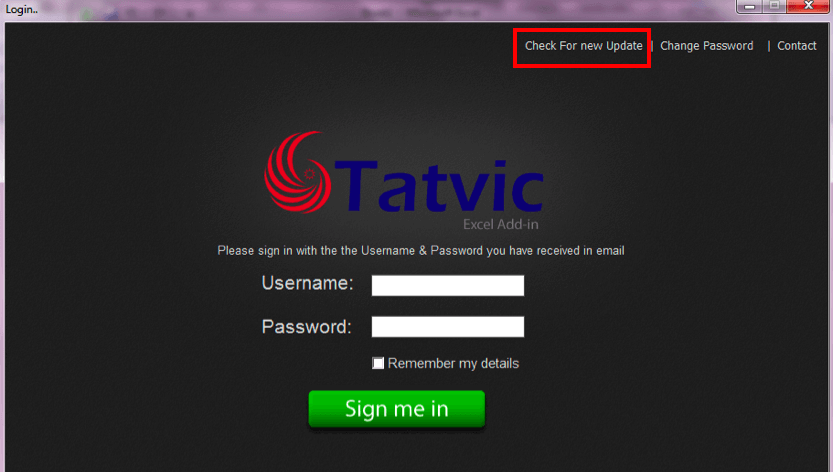
Note: To use this feature, you’ll need to update your Tatvic Excel plug-in. Here’s how to do it:

  1. Before logging in to the tool, click on “Check for update”.

    How to update Tatvic Excel Plug-in

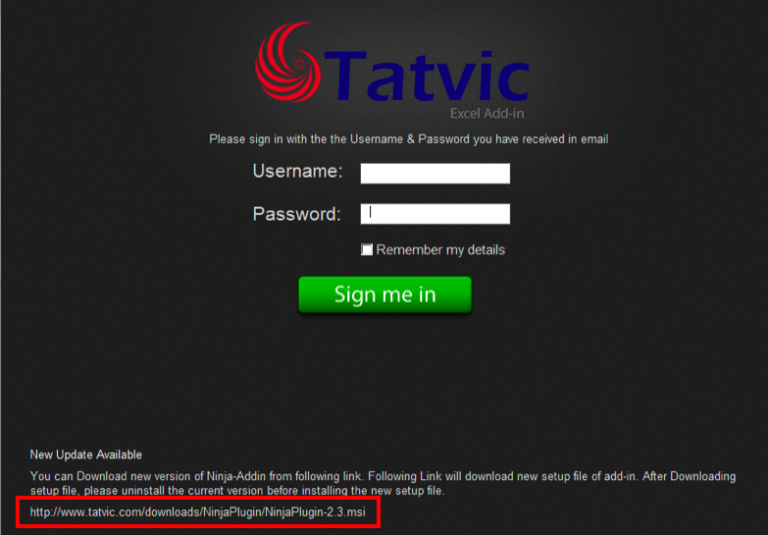
  2. Click on the link that appears at the bottom of the tool.

How to update Tatvic Excel Plug-in

Done, enjoy the feature now.
Thanks again!

Scroll Tracking Implementation for Async Google Analytics Snippet

Event category of scroll tracking

We’re building websites with the prospect to provide essential information to visitors in the form of content i.e. videos, facts, statics, and many more, etc with the intention of converting that visitor either to buy something from the website or to subscribe to the newsletter.

Sometimes what happens is that we aren’t aware of the content consumption capacity of visitors. Regardless we provide all the avail content to visitors on a single page then It becomes too long a page with 3 -4 scrolls.

Now here the problem arises either how to get information about visitor’s content engagement or how visitors engage with the page that has 2 -3 scroll-long content. This analysis is mandatory to get an insight into the content engagement of visitors or how visitors look at the content in the 2nd or 3rd fold of the page.

With the help of scroll tracking implementation for google analytics, based on that analysis website owners can re-organize content placement to increase content engagement of the website.

Scroll Tracking Implementation for Google Analytics

I have developed a jquery based script that would help to identify % page viewed, % page scroll, and the page fold user is in.

Instructions to use:

  1. Please download scrolltracking.js
  2. Include the code block as shown below.
    <!-- your default google analytics tracking code -->
    <script type="text/javascript">
    var _gaq = _gaq || [];
    _gaq.push(['_setAccount', 'UA-XXXXXXX-X']); //replace your profile id
    _gaq.push(['_trackPageview']);
    (function() {
    var ga = document.createElement('script'); ga.type = 'text/javascript'; ga.async = true;
    ga.src = ('https:' == document.location.protocol ? 'https://ssl' : 'http://www') + '.google-analytics.com/ga.js';
    var s = document.getElementsByTagName('script')[0]; s.parentNode.insertBefore(ga, s);
    })();
    </script>
    
    <!-- include the jquery library reference -->
    <script type="text/javascript" src="http://ajax.googleapis.com/ajax/libs/jquery/1.3.2/jquery.min.js"></script>
    
    <!-- include scrollscript.js reference -->
    <script type="text/javascript" language="javascript" src="scrolltracking.js" ></script>

See it in action:

  1. Scroll tracking as Event Category

    Event category of scroll tracking

  2. pv|ps|pf as Event Action

    Event action of scroll tracking

  3. Event Values

    Event value of scroll tracking

Scrolltracking.js would attach a function to scroll changes on the document. So whenever the user scrolls down it’ll collect the following values as “pv|ps|pf” with a non-interactive flag.

  • pv - maximum % page viewed by the user.
  • ps - maximum % page scrolled by user.
  • pf - maximum page fold user viewed.

Here all the values measured and tracked in GA would be the maximum value of %page viewed, %page scrolled and page fold user was in. So we can identify how much content is viewed by users on a given page. If a user lands to page and goes to another page without scrolling. It’ll track default values “X|0|1” in GA where “X” is % page viewed (user viewed some portion) and 0% page scroll and 1 as page fold.

Note:

  • This script works with jQuery versions greater than 1.3.2 and tested with Chrome, firefox, internet explorer 8
  • You can exclude information if you don’t want to track any of the values pv (% page viewed), ps (% page scrolled), or pf (page fold) - You’ll need to update the script.

Ruling the 3 seconds rule for improving usability of your website

mproving usability of your website

mproving usability of your website


What’s this 3 seconds rule for web?

Just Google it and you’ll get plenty of blog posts about it.

Basically, it matches with the 5 seconds rule for food. The way a dropped food is considered stale after 5 seconds, it happens for a new user on any website. Studies say that a new user spends only 3 seconds on a site to find what he wants, and hops on to another. Obviously no site wants to be the one. You can achieve this by improving usability of your page/website.

From Google, you’ll get a lot of tips for achieving this. But it’s important to know the methodology to get the page ready for 3 seconds rule. I will get in to why these tips are important and good practices for them.

Speed, the first and the best

There’s no reason why a new user will stay on a page if it takes beyond 3 seconds to load. You’ve got just 3, the more you save, the more convincing you can do. Improving usability is not limited to changing the design. While designing or re-designing, make sure that your page is on diet!

Focus on the first fold, it can make it, or break it!

The user will make his first decision to stay on the site by seeing whatever he can on his screen without scrolling down. The first fold is the only place to justify those 3 seconds. Other things work to keep the user on the page for more time towards the sale or conversion.

In the first fold:

Now, let’s talk about things to take care of in the first fold.

  1. Pleasant design

    After landing on the page, looks is the first thing to create interest. Visuals talk better than words. A cool looking and (especially) working design builds a trust in user’s mind that there’s a good company behind this website. Would you buy a Rolex watch from a hawker? Vibrant colors, big fonts, neat & clean layout, and optimum usage of white space are things to take care of while designing. Here’s a design I liked while surfing randomly today:

betternow

What’s in it for me factor

This question is there in every user’s mind from the moment he gets on a page. This question can be answered via many elements. e.g., tagline, headline, main communication, an enticing banner or just a logo, or by all of them. The list is below:

  1. Clear messaging
  • Prominent logo - The company logo is the identity. It has to be the first thing to be seen on the page. A well-designed and prominent logo tells a story.
  • Simple and crisp tagline - Sometimes, an intuitive tagline is enough to keep the user glued for more stuff. Check this tagline from Zendesk. The moment you land on the page and locate the logo, you see the purpose of the website right there.
  • Easy to understand headline - Headlines are great things to extend the tagline. Sometimes, it does the job of tagline as well. It can be a one-liner, or max. 2. 37signals does this job perfectly. It doesn’t need the tagline with this communication:

  1. Main communication

    This element communicates website’s business. This can either be the headline itself, or a good looking banner with 2-3 lines.

    Checkout a clear headline which works as tagline/headline/what’s in it for me factor.

  1. What does it offer

    You can either talk about the benefits first as the what’s in it for me factor, then explain product features, or directly explain the product as what’s in it for me factor.

    The page for iPhone communicates both points 4 & 5 above together, smartly with big product images. The product has such strong features, that it’s enough to get clicks.

  1. Call to action

    A great call-to-action does the job of extending those 3 seconds directly towards sale/conversion. If your call-to-action on the page is something like “Go” or “Submit”, then it’s better to have no call-to-action. An abstract call-to-action is a strict no. It’s not just a button; it should be used to explain what’s inside.

See the above design. Call-to-action is the brightest thing on the page, with “Free Download” message and OS requirements.

Just take care of these tips to make the user stay for more or perform an action. Yes, it’s important to follow other tips but the thing above should be on priority to beat the 3 seconds rule.

Beyond 3 seconds

After those 3 seconds, these are the things to take care of to get the user to start the shopping process, know more about the service, or at least stick for more time and come back again.

  • Building trust - After earning some trust in 3 seconds, it’s time to build it by these elements:
    • Testimonials
    • Product features
    • Celeb quotes
    • Social proof
  • Next steps - Now get the user to do more by serving more material to perform next actions towards the sale:
      • How it works
      • Why…
      • Pricing plans

Improving usability should be a primary thing for all website owners before spending in ad campaigns to get more visits. It’s great to generate thousands of ad clicks to the page/website, but even 1% improvement in conversion rate or bounce rate can save a lot of money to buy more visits!

Bot Icon
Bot Icon

Tatvic Bot

Explore About Tatvic and Services