Hello There!

Lorem ipsum dolor sit amet, consectetur adipiscing elit,

 About tatvic

Tatvic, a Google Premier Partner, empowers industry leaders with end-to-end Data & Marketing Analytics, leveraging Cloud, Analytics, Maps, and AI/ML for data-driven insights and future-proof digital growth.

GA4 attribution - what’s the buzz?

Businesses constantly look to optimize their advertising campaigns as they are heavily banking on digital marketing platforms for revenue impact. The data-driven attribution model is key to the game plan. What’s working, What’s impacting the bottom lines?  Which channels/touchpoints are contributing to conversions? It is an always-on discussion in the marketing war rooms.  

Google Analytics, one of the largest used tools for data and analysis, is the source of understanding and leveraging ‘Attribution’. Historically, the “Last non-Direct click” attribution model core to Universal Analytics leads to a large redistribution of traffic into other channels that may have actually come back via Direct as a result of a “last interaction” model. That’s where Google Analytics 4, the new ML-based tool is helping out with its enhanced attribution model - ‘Cross-channel Data-driven Attribution.’ 

Universal Analytics 360 is based on the last non-direct click attribution model by default. It provides an option to choose different models temporarily within multi-channel funnel reports but it’s limited to those sets of reports. On the other side, GA4’s default model is data-driven attribution but it also provides an enhanced feature where you can change the model from Property Settings. This will ensure deeper and actionable insights since all your conversions and revenue reports will be based on the same model most appropriate for your business.

As Google evolves its analytics tool, you should understand how the transition from last-click interaction attribution to data-driven attribution will impact the performance statistics associated with your website or app.

What is Data-driven attribution?

Data-driven attribution uses an algorithmic machine learning model to assign credit through the customer journey and evaluate both converting and non-converting paths. With Data-driven attribution, businesses receive more actionable information about their marketing campaigns; giving a broader view of which channels are contributing to the conversions.

This helps marketers make better decisions around where to invest their resources and improve campaign performance throughout the funnel.

The algorithm of how data-driven attribution works is still a black box, but, it is still likely a better option to understand the impact of multiple touchpoints in the user journey. Hence, It is the most preferable model If you’re looking to measure impact across multiple channels.

Previously, using DDA was possible only in GA 360 properties with a certain set of limitations which is not the case anymore and you can now practically use it in the standard version of GA4 as well. In fact, as mentioned earlier, it’s the default model.

How Data-driven attribution affects Reporting in GA4?

Changing the attribution model in GA4 will apply to both historical and future data. There are two key reports in GA4 when getting started with DDA. The first one is the Model Comparison report which allows you to compare different attribution models in GA4.

Model comparison report

As seen in the above screenshot, with the Cross-channel last click model, the revenue generated by Paid Search is 4.3 million while it is 5.2 million in the case of the Data-driven model. The last click model ignores direct traffic and attributes 100% of the conversion value to the last channel that the customer clicked through before converting. Data-driven attribution, on the other hand, analyzes the available path data to develop conversion rate models for each of your conversion events

The second report is the Conversion Path report which provides a visualization of early, mid, and late touchpoints, depicting the user journey. The data visualization at the top of the report displays data as calculated by the Cross-channel Data-driven attribution model. You can use the attribution model drop-down to view the data visualization using a different attribution model.

Conversion path report - data visualization


Conversion path report - data table


This report mainly has two sections: the data visualization and the data table. The data visualization helps you quickly see which channels initiate, assist, and close conversions. The data table shows you the paths users take to complete conversions, along with the following metrics: Conversions, Purchase revenue, Days to conversion, and Touchpoints to conversion.

Why Data-driven attribution?

Let’s start off with an example scenario. Say you’re a brand that sells T-shirts and John is a prospective customer looking to buy a new T-shirt.

example-scenario

  • He searches on Google for “T-shirts” and lands on your website.
  • He then starts searching further and views some products on your website from a google ad.
  • He still doesn’t decide on what to buy but sees some display ads that remind him that he needs to buy a T-shirt.
  • He later searches for the exact T-shirt he saw in one of the ads, clicks on your shopping ad, and purchases the same.

The question is, what channel or campaign gets credit for the same?

Deep diving into how other attribution models will assign credit for John’s purchase will help us understand how data-driven attribution gives true weightage to all your channels in the user journey.

Cross-channel attribution models
Default Channel Grouping  Last Click First Click Linear Position-based Time Decay Data-driven attribution
Organic Search - 100% 25% 40% 10% 20%
Paid Search - - 25% 10% 15% 15%
Display - - 25% 10% 25% 35%
Paid Shopping 100% - 25% 40% 50% 30%

The figures are used here as an example only.

Prepare for the Future with Data-driven attribution in GA4

Google’s data-driven attribution model has the potential to revolutionize how we measure marketing effectiveness. It promises to help digital marketers make more accurate decisions about where to allocate their resources. Its unique features provide businesses with an edge by giving them a more accurate view of how their marketing efforts impact their bottom line. 

If you have still not adopted it, now is the time to start planning for  Google Analytics 4. 

With its powerful Data-Driven Attribution model, you can take your marketing to the next level and gain a more accurate understanding of the role played by various touchpoints to promote conversions for your business. 

What is Frequency Capping and Why is it Important in digital ads?

In advertising campaigns, frequency determines the number of times the same consumer will be exposed to an advertisement in a certain time frame. 

Setting an effective advertising frequency can help us to reach new audiences effectively, establish brand consistency, protect users from irritating ads and also save money for the Advertiser.

What is Frequency Capping?

Frequency capping is a technique that limits the no. of times each ad is shown to individual users in a given day, week, or month. It can also be called impression capping. Frequently showing the same ads or having a high frequency of ads can make ads less attractive to users. It can cause users to become less interested in reading or clicking ads, as a result, interaction and engagement subsequently drop. It affects your ROAS also.

It is a way to manage how many times advertiser ads appear in front of an individual. Most online platforms have simple ways to manage ad frequency at multiple levels which allows advertisers to control the ad shown to the users and reduce media waste.

For Example: Display & Video 360

In DV360, this platform allows advertisers to cap/control the frequency capping on multiple levels. There is the campaign level, insertion order, and line item level, where we can set the frequency as per advertiser and client requirements.

The main difference is that there is control at multiple levels, and advertisers can opt for many options as per their campaign needs like a lifetime of the campaign, months, weeks, days, etc.

In the above image as an example, at the campaign level, we can set the frequency capping according to the requirement of the campaign/client. At first, we as a campaign manager set the frequency capping lifetime of the campaign at the campaign level.

In the above image as an example, at the insertion order level, I could cap my frequency to 4 exposure per week.

Now in the above image at the line item level, we can limit that specific audience to see up to 2 exposures in a day. We can also set the frequency capping in a month, week, day, hour, or minute as per the campaign requirement. 

Refer to Below Image:

It measures how many times someone in the target audience has interacted/served an ad to them. As digital marketing platforms are very dynamic and the ad frequency helps to know about the campaign’s effectiveness. Many advertisers are focused on building campaigns that encourage users to recall the brand and engage with it, rather than just counting clicks or impressions. Ad frequency helps advertisers know how many users were reached & how many times.

Ad Frequency can be determined by a simple formula:

(Frequency formula)
(Frequency formula)

The above formula has been used for a long time, but it becomes less reliable when applied to the digital advertising world. It has become very difficult to measure the ad frequency accurately, as the number of devices an average person uses has increased day by day. So, Implement the frequency cap based on best practice or your experience because it may vary by industry, on our specific target audience, the message we want to share, etc.

Why is Frequency Capping Important?

Every advertiser wants to promote their product and services on digital platforms, but overexposing the ad to the same audiences is not advisable. Also if a user checks the website once or twice, it doesn’t mean he/she should then see the advertiser’s ads all the time. As a result, this practice can cause decreased campaign performance. And sometimes even results in users completely ignoring the ads, also known as banner blindness which leads to generating bad impressions in the minds of the audiences.

Every ad campaign has a goal. It could be getting x number of conversions, clicks, or installs. If a single user sees 5 to 10 impressions a day without converting, then it’s not good for any advertisers. The advertiser is still paying for these wasted impressions. Thus limiting the number of times a visitor/user sees a particular ad can save the advertiser money. Which also increases the campaign ROI and causes low CTR.

The Pros of High Frequency:

Gaining high frequency increases the possibility of our messages sticking in the audience’s memory. Despite this, it also provides some additional benefits.

  • Frequent messages allow us to build relationships with customers/users.
  • Repetition helps to establish our brand, creating associations between our messages and our company.

The Cons of High Frequency:

  • High frequency will be expensive
  • High frequency can annoy users by seeing the same messages or ads repeatedly.

What should be the ideal frequency?

The optimal/ideal frequency cap will be different for digital advertisers with different goals. Generally, there is no thumb rule because every ad, every campaign, and every business/industry is different. In Display and Video 360, we can run 2 types of campaigns:

  1. Branding Campaign
  2. Performance Campaign

In these 2 types of campaign basis, we can set the frequency capping as per the KPI or client requirement.

For example:

If our ad campaign has the purpose of generating brand awareness, the no. of ad impressions will have to increase so that our ad doesn’t get lost in this digital competitive world. The more a person interacts with our ad, the more they’re going to recall our brand. In a branding campaign, the frequency cap will differ as per the campaign goal. But the best practice would be setting 4-7 per day at the line item level when we start the campaign.

But in a performance campaign where the advertiser’s goal is a conversion with spending less, it is recommended to set the frequency cap to 2-3 per day in line item level (Display & Video 360).

Frequency Cap Based Audience:

In Display & Video 360 there are many programmatic audiences targeting features based on that we as an advertiser not only find/target the right audience but also take action and understand based on the user’s intent.

So in the audience section, there are Activity-based audiences that allow advertisers to build audiences based on user activity across the campaigns. These audiences are of two types.

One is the Frequency Cap Audience where we can exclude users based on the number of impressions served across the campaign, deals, and inventory. It removes the audience that is not relevant to the business or if you don’t want to target right now;

Frequency cap-based audience means - if a user crosses your campaign did ‘n’ no. Of impressions that didn’t click or clicked; would you want to showcase an ad to them again and again?? We can decide what ‘n’ can be 20,40,50 or 100. That particular criterion is as imp as targeting criteria. So if a user through a particular IO or LI has done ‘n’ impression, we can exclude them from the campaign within a max duration of 30 days. This audience doesn’t include Trueview ads or video ads.  This is for (display, video, install, Gmail, true-view, and audio)

Frequency Capping Audiences gives us better control over user exposure to our campaign by negatively targeting users.

Here’s how frequency capping audience works:

At the campaign level, we specify a list of an Insertion Order or Line Items where we want to exclude the frequency capping audience, along with an impression limit. Once a user has reached the impression limit, they will be added to the frequency-capping audience list.

Step-1

Navigate to campaign level >  navigation panel.

Click on Audiences> All Audiences> New Audience>  First-party data.

First-party data > Activity-Based Audiences.

There are two types of audiences available in ‘Activity Based Audiences’. [Select the Audience Frequency Cap option from it].

Step-2

Audience frequency capping is available at both IO and LI levels. 

Set the specific impression frequency cap for relevant IO/LI’s.There are two options available for setting the frequency impression cap:- [Greater than>], [Greater than Equal To >=]

Audience frequency capping

Frequency Capping Best Practices.

There is no magic answer for the best practice of frequency capping. Setting a frequency cap for online advertising campaigns is always recommended in most situations unless the goal is bombarding users with ads. The optimal ad frequency is very hard to determine and may depend on the type of campaign, campaign objective, and the available inventory. 

Best practices are

  • Set frequency caps at all levels - Campaign, IO, and LI to build frequency as required. Setting it at all 3 levels helps in better control
  • Use a broader audience if the lesser frequency is to be built but use a narrow audience when more frequency is to be built
  • For performance, campaign frequency should be controlled by showing the ads multiple times might not lead to conversions but is a waste of spending while branding campaigns start building reach and frequency from the beginning to induce brand recall among customers. But keep in mind bombarding the user with a lot of ads leads to frustrated users/blocking of ads so find out your ideal frequency based on your industry

Case Study: How does Tatvic help a real estate client wanting to promote their app, and build a frequency of 6 in two months using DV360?

Tatvic took up the challenge of building a frequency of 6+ using the DV360 platform. Below is the process followed and took optimizations steps to meet the frequency goal:

  • Allocated the highest budget to YouTube Line-Items to build reach as well as Frequency 
  • The campaign was strategized in such a way that each building was the focus during the initial phase of the campaign and the focus was shifted to frequency building once enough reach was built as per the plan. This helped in effective reach and frequency building.
  • Skippable 10s videos were run to build audiences and line items based on those audiences (viewer lists) were created to build frequency Skippable ads increased the size of the viewer list and the viewer list helped build frequency at a faster rate
  • More than 50% of the budget was allocated to users who have already seen the ad has helped with building the frequency at a faster pace
  • At an overall level, focusing on Bumpers and Skippable Line Items helped with increasing the frequency and size of the viewer list respectively
  • Strategies like google audiences, and Channel List helped in increasing reach initially. Post that audiences and channels were optimized to build more frequency.
  • Individual cities-based optimizations and layering of keywords and placements were done to reduce the pace of reach and increase the frequency
  • CPMs were optimized based on the phase of the campaign so to build reach and frequency
  • Starting CTV LIs also helped increase frequency.

All the above steps helped in achieving the frequency of 6+

Conclusion:

In conclusion, Frequency capping can help manage your advertising efforts because it limits the number of times a user sees an ad, which ensures that your ads won’t be annoying and therefore won’t lose your clicks. Keeping your costs in check and improving  ROAS. 

Do let us know if you want to know more about Frequency Capping and its impact on your campaign efficiency. 

Rise of data privacy challenges and how Digital Marketers can respond

Today’s consumers have a heightened awareness of their digital privacy and are demanding brands that treat them with trust and respect. As a result, many businesses have chosen to abandon data collection or limit the amount they collect.

Denying access to data can make it difficult for businesses to meet compliance standards, analyze target audiences, or create content relevant to customers. However, in some cases, these restrictions may be necessary given the growing concerns about data privacy and consumers’ demand for greater control over their personal information.

Consumers are becoming more aware of, and uneasy about, data collection in their daily lives. In fact, you’re probably one of those consumers on your day off. According to a survey in late 2019, 97 percent of consumers are somewhat or very concerned about protecting their personal data. This widespread apprehension about the collection and use of consumer data is set to change the marketing world.

Regardless of how you choose to handle your company’s data collection policies, it’s important that you understand how this affects your brand and its ability to compete in today’s market. This article covers everything you need to know about changing consumer preferences and data privacy as a business owner - along with some tips on how you can adapt your business practices accordingly.

What is Data Privacy & Why is it Important for Digital Marketers Today?

Simply expressed, data privacy in this digital era is a right that refers to consumers’ ability to choose how third-party firms and organizations utilize their personal information. Personal, demographic, and financial information are just some of the them that may get revealed if data is not regulated effectively. While this foresightedness assists marketers in creating more tailored experiences, many consumers are increasingly concerned that their privacy is being compromised heavily.

According to recent research by Gartner, Almost one-fifth of marketers report that privacy compliance is their primary concern across all marketing channels. It’s intuitive to see why: a marketer’s capabilities to collect and derive insights at a rapid pace are negatively impacted, and some of their previous marketing technology investments are rendered obsolete. In fact, 73% of marketers are seriously worried that privacy issues will adversely affect their analytics efforts.

However, analytics is only half the story. Marketers are the guardians and custodians of a company’s brand image, and ignoring privacy concerns out of choice or necessity may have a negative impact on their brand value. According to studies, misusing user data can have serious repercussions for an organization, with roughly 8 out of 10 customers willing to abandon a brand if their data is used without their knowledge. Marketers are now trapped between a rock and a hard place, with consumer opinions on one side and analytical prowess on the other.

Consumer Data Privacy: A Changing Environment

In recent years, the data protection and privacy landscape have evolved tremendously. While some consumers and thought leaders have been addressing the need for data privacy for a decade or more, it wasn’t until 2016 that a set of data privacy legislation known as GDPR was introduced in the European Union. Once it was enacted in 2018, enterprises were required to offer EU users to opt-in to the collection of personal data, triggering a slew of copycat legislation around the world. Later the same year, the California Consumer Privacy Act (CCPA) was enacted, outlining additional privacy rights for California residents.

Many of this legislation was triggered by a sequence of data privacy crises affecting consumers, such as the controversial Cambridge Analytica affair. These events exposed the general public to how their data was always being retained and used in ways they may not approve of, eroding consumer trust and pushing some enterprises to reexamine how they access, acquire, manage, and leverage sensitive consumer data.

The following enterprises have taken significant steps in recent years to limit access to consumer data:

  • In 2021, Apple brought about a paradigm shift by restricting tracking on iPhones. As a result, the Big Four tech companies have lost $278 billion.
  • Tracking cookies are now restricted by default in Firefox.
  • DuckDuckGo, a search engine that endorses increased privacy for its users, has seen a 65 percent increase in traffic, with a significant spike near the end of 2018.
  • To handle privacy concerns, Google released a new version of Google Analytics & it will phase out third-party cookies for Chrome over the second half of 2023, giving everyone a year and a half to figure out how to adjust.

With these changing environments of Consumer Privacy & paradigm shifts in restrictions of tracking & deprecation of the 3rd Party Cookies, businesses will encounter the following Challenges/Hurdles in Tracking User Data

Challenges due to Changing Landscape

Reduced Data Reliability*: 41% of marketers believe that their biggest challenge will be tracking the appropriate data.

Increased Spends*: 44% of marketers anticipate that they will need to boost their spending by 5% to 25% in order to meet the same goals as in 2021.

Reduced Reach^: About 80% of advertisers rely on third-party cookies. Without them, those advertisers would have to find a new technique to reach their customers and prospects online.

Reduced Personalization: Limited browsing information will make it challenging for advertisers who rely on third-party cookies to customize advertising.

Reduced Experiments: Advertising companies that rely on third-party cookies will struggle to implement fundamental features like A/B testing and frequency capping.

Reduced Performance Measurement: Analytics and attribution based on third-party cookies will be much less effective.

*Source-Hubspot, *Source-Epsilon

Thinking of Solutions to tackle these hurdles?

(Build 1st P Data through Site-wide  tagging & consent mode, Enhanced conversions, and Conversion modeling)

To address privacy concerns and obstacles in the post-3P cookie era, here are some must-haves.

1. Build Strong Foundations of 1st Party Data Effectively through the following Techniques

  • Site-wide Tagging
    • What is it?
      • Invest in a strong tagging infrastructure that helps you make the most of the data consumers share with you when they engage with your website and lets you accurately measure your campaign performance. 
    • How does it work?
      • To incorporate in your strategy, advertisers just need to place the Google tags (gtag.js) on every page of the website through their web development team.
  • GTM’s Consent Mode:
    • What is it?
      • When users don’t give consent to store cookies, GTM’s Consent Mode will automatically modify the relevant tags on the website so that they do not read or write cookies for the specified purposes (Advertising or Analytics), but instead, measure conversions on a more aggregate level. 
  • How does it work?
    • The Following screenshot shows how it works & another subsequent screenshot helps in understanding where it can be enabled in GTM UI under Admin Access.
User Journey Paths with Cookie Consent Options


GTM UI showcasing option of enabling Consent Mode
GTM UI showcasing the option of enabling Consent Mode

2. Google’s Enhanced Conversions for Web

  • It comes as no surprise that the measuring environment is evolving in light of recent privacy changes. We used to live in a world of fully visible data, such as cookies and device IDs. However, increased user privacy expectations have resulted in further privacy legislation and cookie restrictions, redefining how the ad industry monitors conversions.
  • What is it & How does it Work?
    • Enhanced Conversions for the web enables conversion tags to hash customer data by a one-way hashing algorithm called SHA256  generated by advertisers on their conversion page, such as an email address, and then match it against hashed Google logged-in data. The following Screenshot helps in understanding where it can be enabled in Google Ads UI under the Conversions tab
Google Ads UI showcasing option of enabling Enhanced Conversions
Google Ads UI showcasing the option of enabling Enhanced Conversions

3. Google’s Conversion Modelling

  • What is it?
    • Advertisers encounter a gap in their measurement and lose visibility into user routes on their site when cookies are not there. They can no longer immediately link user ad interactions to conversions, regardless of whether the users are repeat visitors or came from sponsored or organic traffic sources. To assist bridge this gap, Google introduced Conversion Modelling. Using a privacy-first approach will assist marketers in preserving online measurement capabilities.
  • How does it work?
    • Conversion Modeling focuses on observable data gaps caused by cookie consent laws. The missing attribution paths will then be filled in by Google’s ML models using observable data for user journeys when users have given their agreement to the use of cookies. This improves the accuracy and completeness of the picture of advertising expenditures and results while also honoring user preferences for consent.
    • More conversion insights are gained by using modeling to probabilistically recover links between ad interactions and conversions that would otherwise go unattributed, allowing campaigns to be optimized and the factors influencing sales can be better understood.

4. Increase the Concentration of high-quality content.

Until now, marketers’ primary focus has been on matching content to precise metrics/audiences. This is where switching to a broader focus on quality content is very critical. Instead of trying to address the messaging needs of a large number of smaller groups, you should have ads and creative content that cater to the needs of many consumers at once. This will allow you to adjust to a “messaging for many” strategy/cohort-based strategy.

5. Increase the frequency of advertising and communication

Again, the evolution of digital marketing and privacy will necessitate adaptation to changing circumstances. Instead of relying on a single message that immediately strikes a chord with your target customer, it is critical to increasing ad and communication frequency for a more well-rounded approach.

For example, instead of showing the same ad repeatedly, you may need to shift to several ads with different perspectives.

While the specifics of how this will work best remain to be seen, it is an important factor to remember.

6. Embrace integrated brand metrics

It will be crucial to fine-tune your integrated brand metrics in order to survive these transitions and prepare for what comes next.

What exactly does this mean?

It entails taking a macro-level approach for campaign effectiveness rather than a micro-level approach.

Essentially, you will require to stop focusing on whether individual campaigns were effective or not and begin to analyze all aspects of your marketing strategy, such as

  • Overall ad spend.
  • ROI.
  • Customer satisfaction and happiness.

The greater your ability to see the big picture, the easier it will be to improve your overall message on a high level.

7. Incorporate Transparency and Compliance in your Strategy

As we saw after the GDPR’s rollout, it is extremely crucial to include transparency and compliance in your personal data collection strategy.

While you may not always have control over this, as with Apple Devices or Meta Platforms, there are some elements on your website that you do have control over.

Make sure your privacy policies and other guidelines, for example, are easily accessible on your website. And provide numerous opportunities for users to opt-in or out of specific things.

The clearer you are about these procedures, it’s more likely you to build mutual trust with consumers & on the other side of the coin you’ll be less likely to face a complaint or monetary fine later on.

8. Switch to offers

Instead of relying on specific individuals’ consent for sharing generic data, provide them with something of value in exchange.

Assume you want to learn about customer satisfaction after a website visitor makes an online purchase or schedules an appointment. When the process is complete, send them a survey in which they will be asked for specific information. They will receive a coupon code for a discount on their next purchase in exchange for their time and honest answers.

This type of offer places the customer in control of the decision. They do not have to opt-in to share the data; instead, they can click a checkbox that allows them to opt-out, out & can decline the entire offer.

The main purpose of this type of offer is to help the company collect data, not to actively acquire new customers. These types of offers can be useful for generating data that helps with product development, testing new features, or collecting demographic information. They are also helpful for collecting data that can be used for retargeting purposes.

  • The need of the hour is to see this as a new opportunity and act smartly.
  • Tatvic is at the forefront of changing dynamics and answer if you have more queries. We feel that there is a  New Era of Digital Advertising post paradigm shift of deprecation of 3P cookies. Contact us here for further details/solutions.
 

5-Google E-commerce Shopping Ads campaign optimization tips

Google Shopping ads, also known as Product Listing Ads (PLA), are a form of ad that appears at the top of search results in a retailer-specific box. Google rolled out this ad format back in 2010 and it has been steadily growing in popularity ever since. Today, these types of ads are essential for many leading brands as it plays an important part in their strategies for improving brand awareness and increasing sales!

When it comes to implementing eCommerce advertising tactics on Google, the success of all campaigns isn’t guaranteed. While the team at Tatvic has deep experience, there are always multiple dimensions at play.  Each campaign begins on tested hypotheses, and it quickly learns optimization for effective ROIs 

If you have an online eCommerce Google Shopping campaign but want to make it even more effective, we’re sharing proven strategies that will help improve your return on ad spend (ROAS). Of course, every business is different, but if one has the best chance of these strategies working for your shop, here are a few proven pointers.

As an e-commerce marketer, these 5 tips have provided great ROI for my clients, time and time again.

1. Enhance your product feed to help your Shopping ads stand out

When it comes to Google Shopping campaigns, eCommerce business owners don’t cut corners. These are the first products that customers see when searching for items, and if your results look anything less than professional, you could be missing out on clicks.

When most people think about optimizing their Google Shopping ads, they focus on their campaigns, bid strategy, and execution. While this is important, we’d argue that the more significant wins actually come from optimizing your merchant center feed.

  • Use high-quality, product-first visuals.
    Why: Close-up product shots with white backgrounds make it easy for customers to see product details, helping you drive more engagement. 
  • Ensure your product data is accurate and up-to-date.
    Why: Accurate data is key to ensuring your ads showcase the information your customers are looking for. Upload rich product descriptions and update product prices and availability if they change often.
  • Cater to consumers’ demand for convenience.
    Why: Shoppers are increasingly looking for great deals, fast delivery times, and easy returns. Use annotations to stand out to them when they’re looking for convenient ways to purchase.
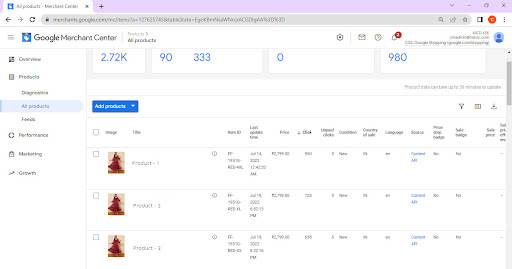
Google merchant center: Products List
(Google merchant center: Products List)

2. Use Dynamic Remarketing 

Remarketing allows you to show ads to people who have previously visited your website or used your mobile app. Dynamic remarketing takes this a step further. It lets you show previous visitor’s ads that containing products and services they viewed on your site. These ads are targeted with specific items visitor was browsing before so it can help create leads and sales by bringing back previous visitors to complete what they started.

More reasons to use dynamic remarketing

  • Ads that scale with your products or services: Pair your feed of products or services with dynamic ads, scaling your ads to cover your entire inventory.
  • Simple, yet powerful feeds: Create a basic .csv, .tsv, .xls, or .xlsx feed. The Google Ads product recommendation engine will pull products and services from your feed, determining the best mix of products for each ad based on popularity and what the visitor viewed on your site.
  • High-performance layouts: Google Ads predicts which dynamic ad layout is likely to perform best for the person, placement, and platform where the ad will show.
  • Real-time bid optimization: With enhanced CPC and conversion optimizer, Google Ads calculates the optimal bid for each impression.

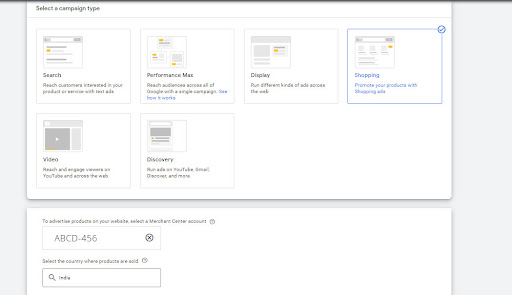
select-campaign-type

3. Use Ad Scheduling

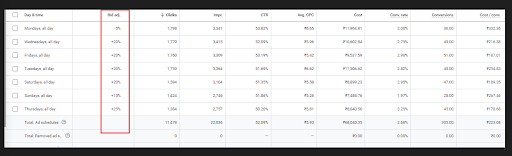
Ad scheduling is something no busy marketer can afford to overlook. It may not always be effective right off the bat but learning about what works for your business and using data for guidance will give you a more targeted approach that in turn can boost your ROI in the long term. We’ve seen from experience that creating separate campaigns with different schedules tied to different targeting criteria can be beneficial because it allows you to target specific audiences at their most favorable times. It’s very useful if you’re promoting two different products or brands because each product or brand can get maximum exposure during its respective optimal timeframe. To get the most out of your campaigns, you can also apply bid modifiers to them. By knowing how well your ad performs at different hours of the day, you can pay more for traffic during high converting days/times - or decrease bids on days/times when conversions falter.

Ad scheduling
(Ad scheduling )

4. Use Location Targeting

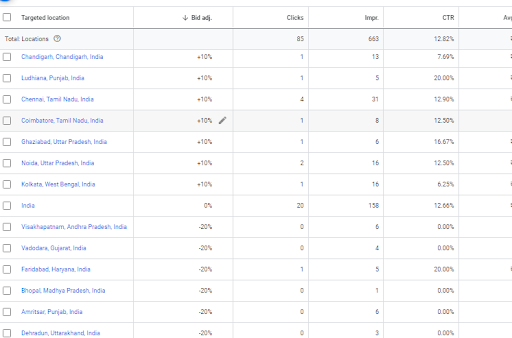
Select the geography view to see how your campaign performs by countries, regions, metro areas, cities, or any other location available. Once you have determined what regions are performers, you can apply geo-targeting bid modifiers to adjust for higher bids from top-performing areas, and lower bids from poor performers. You can exclude the locations which are not bringing any sales. This way you give more budget to the top-performing city and can improve your sales.

Target bid adjustments are a great way to help ensure that you’re running the most profitable campaigns. You can use this feature to change bids based on the search results location, including country, state, city, postcode, and other factors important to your business like traffic and days of the week.

  • Specify where you want your ads to be shown 
  • Allow the campaign to run for at least a few weeks
  • Access the locations report to assess how each bid is performing
  • Adjust bids based on results

5. Use Device Targeting

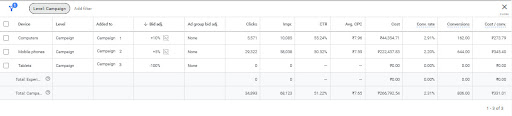
The Google AdWords performance can be broken by Desktop, Mobile, and Tablet. Google breaks down your performance into three categories of devices. Each device has different results. It is important to understand this breakdown because that means that you may get different types of results based on the type of device where your ads are viewed.

Adjusting bids on the basis of device type is a powerful way to design Google AdWords campaigns that perform more efficiently. While you may be ignoring more economical options, like Cost Per Click, by using this method you’re targeting your ads at specific types of devices rather than wasting money with AdWords ads on devices where they won’t draw as much visitor attention as they should. Make sure your team/contractor is knowledgeable about which group(s) of devices a customer’s most likely to use depending on the type of website (gaming or news site for example).

device-targeting

Summing It Up

Hopefully, these 5 tips have helped you learn what it takes to be successful.

To recap, 5 tips are:

  1. Enhance your product feed to help your Shopping ads stand out
  2. Dynamic Remarketing 
  3. Ad Scheduling
  4. Location Targeting
  5. Device Targeting

If you have any other ideas on how to increase sales from Google ads, share them with us in the comments below. Consider sharing this post if you found it valuable with your peers!

If you would like to get in touch with us regarding our marketing consulting services, or if you might be of assistance to anyone looking for digital marketing or social media management you can contact us from here.

Interpreting Marketing Data Couldn’t Get Easier: Introducing GA4 Custom Insights

Interpreting-marketingdata


The marketing industry is ever-evolving and there is a heap of data collected every minute of a day. We are surrounded by a ton of information from varied sources but have no idea how to put them into action. This is precisely what GA4 is designed for - to help us gain insights from our data on our conditions relevant to our business. Do not wait and plan your migration and/or set up with us today.

A lot of exceptional features of GA4 have been covered in our blog series, like Data exploration, Subproperties, and Predictive Audiences. Let’s look at another powerful feature of GA4 this time - Custom Insights.

With GA4 custom insights, we can now generate insights and uncover anomalies for those metrics that may otherwise go unnoticed. How does this directly help you? By providing expert recommendations on what to do next based on the insights and eliminating the need to spend hours going through mountains of data yourself. Custom Insights in GA4 lets you utilize the power of machine learning along with your data-driven skills.

Types of Insights:

1. Automated Insights:

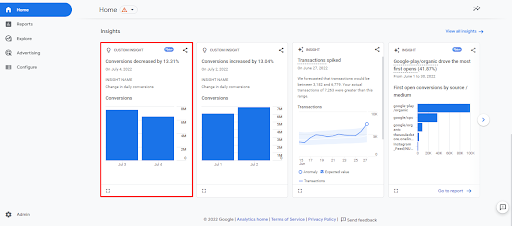
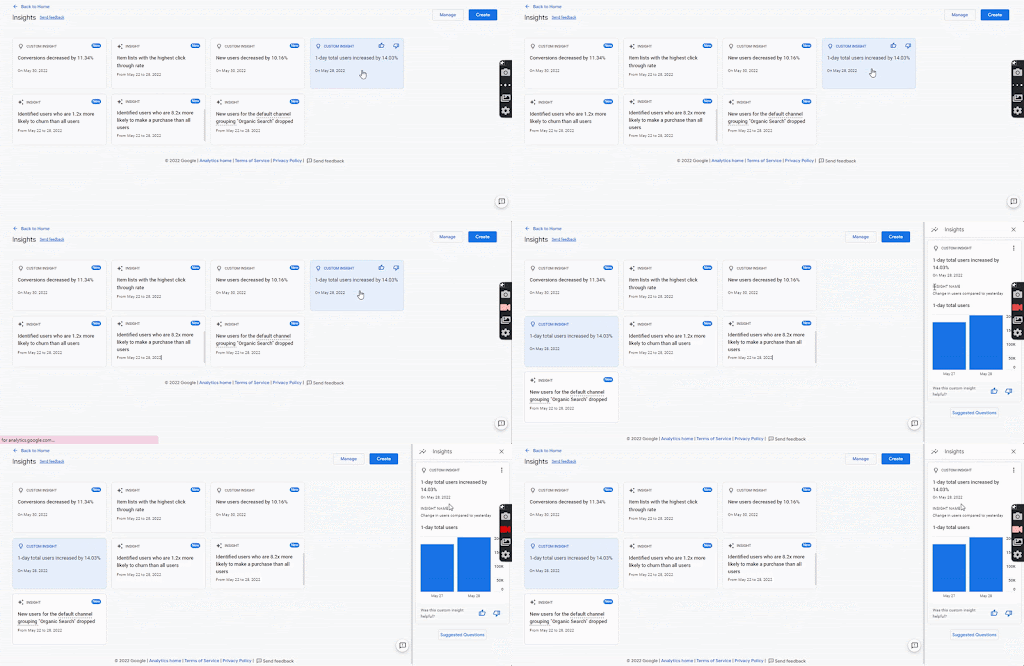
Automated insights are the built-in Analytics intelligence that detects unusual changes or emerging trends in collected data and notifies you accordingly. The Insights dashboard in the GA4 console visualizes the trends for important metrics based on machine learning.

Insights Dashboard - Home Page

2. Custom Insights:

Custom Insights is also based on Analytics Intelligence that detects changes but on conditions that you will define. The insights are visible on the Insights dashboard when the user-defined conditions are triggered. You can optionally receive notification alerts on your email while creating custom insights if your user id has property-level access.

Apart from using Custom Insights for data quality, they can also be used to quickly and accurately answer everyday questions about your data. Like how Organic Search is performing compared to Paid Search and what conversion events are driving the most conversions this week compared to last week. Custom Insights can be informative and can provide early or emergency warnings for anomalies in your data.

The configuration limit for Custom Insights is 50 per property so it becomes important to use these slots strategically. It is not recommended to create Custom Insights for every metric but the ones important to your business.

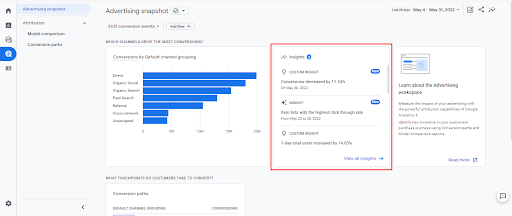
These insights once automated will be visible on the bottom of the home page and the advertisement snapshot.

To see a full list of insights, manage insights, or create new custom insights, click View all insights. You need Editor or Analyst level access to create or edit custom insights. Follow this link for steps to create custom insight.

Insights Dashboard - Home Page


Insights Dashboard - Advertising Snapshot


The Insights dashboard shows a summarised view of all recent automated and custom insights. Click on the card to see more details for any specific insight. Every time you interact with an insight card, Analytics Intelligence learns which one is important to you and sorts these cards accordingly.

Insights Dashboard - Detailed View

Some Use Cases

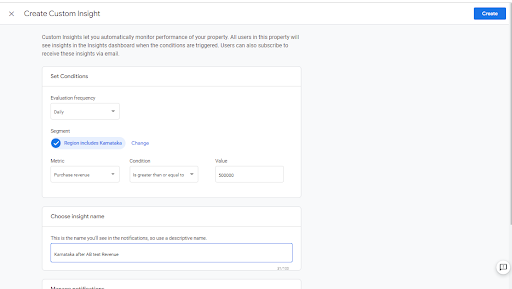
1.   Let’s say you are running an experiment for Karnataka users and your daily Karnataka revenue is around 3 lakhs which you are now expecting to reach 5 lakhs. You can utilize Custom Insights to receive a notification once your revenue for Karnataka users goes 5 lakhs or beyond.

Screen to create Custom Insights


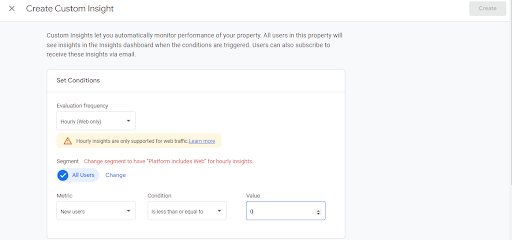
2.   Consider a scenario where you have launched a campaign and expecting a good number of new users per hour. You could create a Custom Insight for Anomaly Detection for Hourly New users so that the system intimates you as soon as there are 0 users recorded for an hour. This helps you take instant action and rectify any issues that might be causing the drop.

Screen to create Custom Insights


3.   You are running a remarketing campaign on users who have added products to your cart but never purchased. This is a high-intent audience and you are expecting a good number of purchases in the next 15 days.

While you do have an option to create Custom Insight on Conversions, the default setting allows you to configure it for all Conversions and not a specific Conversion event (purchase event in our case).

Quick Hack:

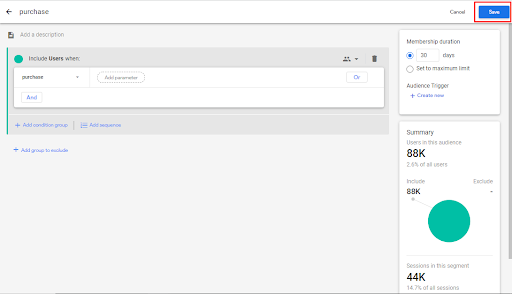
The audience feature in GA4 allows you to segment your users based on the dimensions, metrics, and events. Let’s create one to achieve our case

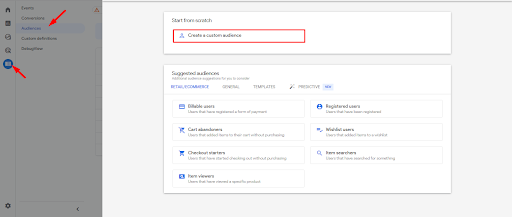
  • Navigate to Configure >> Audiences and click on “New Audience” in the top right corner.
  • Click on Create a custom audience

  • Create a purchase audience and select the purchase event
Screen to Create a Custom Audience


  • Now head back to your Custom Insight configuration and use this audience as a segment to create purchase event-specific Custom Insight as below:
Screen to create Custom Insights

Conclusive Thoughts

We hope that along with collecting data, you will explore GA4 for its insightful features and use Custom Insights to its full capabilities. The data is here, you just need to create insights and review them to make data-driven decisions. Custom Insights is also very helpful in monitoring positive changes and tracking issues. 

So how are you planning to use this powerful feature of GA4? Let us know in the comments section and reach out for any questions.

Facebook Ads for eCommerce: Top 10 Strategies to Market and Retarget Audiences


Table of Contents

  • Facebook Ads for eCommerce
  • How to Choose the Right Facebook Ad campaign objective?
    • Drop-offs in eCommerce Funnels: How are they reduced?
  • Which Facebook Ad Strategies can help Scale eCommerce Business campaigns
  • How to Remarket or Retarget Audiences
    • Facebook Ads Hacks For Increasing Remarketing Audiences

The Indian eCommerce industry that observed stagnant growth pre-covid; is all set to grow by 84% to $111 billion by 2024. The pandemic proved to be a blessing in disguise as there is an immense increase in the number of eCommerce stores in recent times. 

And while the competition is growing, everyone may be wondering: How can Facebook Ads grow their eCommerce business?

Facebook Ads for eCommerce

Among various digital platforms, Facebook has proved to be an effective and incredible tool for eCommerce businesses when done right. These platforms are extremely effective for brand awareness and conversions. This article will help you identify the best optimization strategies to scale up your eCommerce business. 

Did You Know?

Facebook has now enabled the ‘shop’ section for Indian users to help customers buy products directly from there. Whereas, the Instagram shop feature is not currently available in India. It is only available for brands that have been selected as ‘Managed Clients’ by Facebook depending on their brand popularity, transparency, and ad content.

How to Choose the Right Facebook Ad campaign objective?

Marketing Funnel with AIDA principle

Each campaign has different KPIs (Key Performance Indicators) and deliverables. According to their performance parameters, campaigns fall under different levels of marketing funnels. 

1.  Awareness: In this funnel, businesses educate their prospects about key offerings and value propositions. They promote their brands or products in such a way that fulfills the ‘Awareness’ funnel. 

To achieve this pre-buzz, the Facebook platform has different campaign objectives such as Brand Awareness, Reach

This objective optimizes the campaign on the following events Ad-recall lift, Reach, and Impressions. The communication at this funnel should aim to portray the unique features of products, key service deliverables and focus on ‘selling’.

2.  Interest and Desire. At this level, businesses try to seek the prospects’ attention by creating engaging content and creating a desire to make purchases.

To increase the post-engagement, Facebook platform has different campaign objectives such as Traffic, Engagement, App Installs, Lead generation, Messages, and Video views.

You can optimize the campaign on the following events Link Clicks, Daily Unique Reach, App Installs, Post-Engagement, ThruPlay, Leads, and Page views.

3.   Action or Conversion. At this level businesses drive customers to take action by mentioning clear CTA’s (Call To Action) on Facebook Ads. They advertise with promotional content (such as discounts, offers, and benefits). 

To improve and enhance conversions, Facebook has different campaign objectives such as Conversions, Catalog Sales, and Store Traffic. 

You can optimize the campaign on the following events- Conversion, Value, Conversion events, and Impressions.

Drop-offs in eCommerce Funnels: How are they reduced?

eCommerce Conversion Funnel

Conversion rate” is the percentage of site visitors that take the desired action. Final conversion events (Purchases, leads) are preceded by Macro and Micro conversions (Page view, View content, Add2cart). To track conversion on Facebook, Facebook Pixels are implemented on the website.

Funnel Drop Offs:-

(a)  Add to Cart Rate: This indicates the % of visitors who placed at least one item in their cart during the session after visiting the product detail page. 

Ways to Optimize Add2Cart Rate: Add more customer reviews on product pages, offer discounts to first-time consumers, and introduce a live chatbot.

(b)  Cart abandonment rate: This indicates the % of the audiences who add items to an online cart but abandon the cart before completing the purchase.

Ways to Optimize Cart abandonment Rate: Mention clear CTA’s (Call To Actions). Include details like ‘Free Shipping’ and ‘Checkout Discount Code’ in the Description. Use the current product price rather than the listed price in catalog creative format and send persistent reminders of Cart contents.

(c)  Initiate Checkout rate: This indicates % the visitors who proceeded to the checkout page after adding an item to the cart. 

Ways to Optimize Initiate Checkout Rate: Allow default guest checkouts wherein the customers are not required to create accounts before checkout. Avoid latent and hidden charges. Use creatives that are attractive and have clear communication. Optimize the page loading time and segregate device-wise targeting and the user interface. Mention the CTA that has a sense of urgency.

(d)  Checkout conversion rate: This refers to the % of users who begin the checkout process, then complete it over a given time. 

Ways to Optimize Checkout conversion Rate: Simplify the checkout process. Add multiple checkout buttons. Secure the checkout process. Minimize details to fill in the checkout form, and Skip the mandatory sign-up.

What Facebook Ad Strategies can help you scale your eCommerce business?

Full Funnel-Facebook Ads Optimization Strategies

Prospecting Audiences

The audiences that aren’t aware of your business and products. Hence, they fall in the Top Funnel of marketing where businesses need to be aware of their existing offerings. You can target such audiences in the Facebook Ads manager using specific targeting methods, such as

1. Interest audiences 

Target them based on their personas, liking, interests, and behavior. Facebook collects ‘consumer insight data’ from the user’s personal information or activities performed on the platform to create these audience segments. These insights are available under the ‘Audience Insights’ and ‘Facebook Analytics’ sections of Ads manager. Facebook recommends targeting prospecting audiences when businesses want to drive traffic to their website with low CPCs (Cost per click).

2. Lookalike Audiences 

These are built upon the similar characteristics of our existing seed audiences (audiences that have already interacted with the brand or business). The seed audiences are the ‘Custom audiences’ created from Facebook Pixels. Pixel audiences are the First-party data audiences collected by Facebook from the ‘Meta Sources’ (Facebook, Instagram, Messenger) and ‘Own Sources’ (Website, Apps, Customer List, Offline activities).

Facebook Ads Hacks For Increasing Prospecting Audiences:-

  • Brands can target two completely unrelated interests and reflect the same in their ad copies. This has been observed to get more CTR. 
  • Brands can narrow down their interest targeting with the ‘Must Have’ option, where they can select the interest that is necessary or must for their business. (Like ‘Online shopping’ for their eCommerce business)
  • ‘Saved Audiences’ cannot be excluded from any audience set. Hence, analysing the ‘Audience overlapping rate’ is necessary to reduce the chances of the same ads being shown to the repeated user. (Example:- Interest audiences are a subset of Open audiences)
  • Different Ad sets can be created targeting different Interest audiences. For example, for eCommerce business, the interests that could be targeted are- 
    • Bargain Hunters (Interested in Discount and sales)
    • MediaNEnt (Interested in Entertainment, movies, web series)
    • EcommNLabel (Interested in Fashion and Designer brands)
    • CompDress (Interested in Direct competitor’s offerings)
  • ‘Lookalike Audiences’ can be further narrowed down by adding additional interest, age, and geography targeting.
  • Multiple ‘Lookalike audiences’ can be added in a single set unlike ‘Saved audiences’ which can’t be merged. The decision to add various LAL audiences in the same ad set should be taken based on their potential audience reach.
  • Ideally 1%-2% Lookalike audience should be used because it has relatively more similarities and the audiences are narrow. Whereas  >3% Lookalike Lookalike creates a vague and unrelated audience.
  • Lookalike of value-based custom audiences have always been successful in generating higher ROAS or Return on Average spent.
  • Different ad sets can be created for LAL audiences. Some of the LAL audiences that can be useful for an eCommerce business are as follows:-
    • LAL of website visitors
    • LAL of customer list (Converted and purchased audiences)
    • LAL of Add2cart audiences, Initiate Checkout audiences.

How to Remarket or Retarget Audiences 

This includes targeting the audiences that have already interacted with the business and are aware of the business offerings. Specific targeting methods that can be used in Facebook ads manager to approach such audiences are:-

  1. Use Custom Audiences which are created through Facebook Pixels. The pixels implemented on the website help in identifying the users that had visited your website. Or viewed content, abandoned specific products, initiated checkout, and made final purchase. The pixel also identifies the one that has dropped off in the middle of the funnel. So, we can retarget them from the point where they left off by creating different custom audiences.

Facebook Ads Hacks For Increasing Remarketing Audiences:-

    1. Use ‘Dynamic Remarketing’ to retarget the audience with the particular product they left while making the final purchase. The campaign objective that needs to be selected for it in Ads manager is ‘Catalog sales’. Shopify (or any CRM) feed needs to be linked at the campaign level.
    2. Always select the ‘Product Tag’ feature for Dynamic Ads. In dynamic ads, the creatives will take the product name and price from the feed. Also, the Landing URL is dynamic to the specific product detail page.
    3. Different creative tools can be used in the catalog such as the use of Frame (Brand, discount), and strikeout price (in sale catalog). This can help to connect with the users more.
    4. The use of a proper ‘Primary Text’ and ‘Headline’ is very important in Dynamic Remarketing and Remarketing campaigns. The primary text should have a sense of urgency and should induce the users to complete the pending purchase’. An example of one of the Primary texts that are used in ads is:-
      • “We Know You’ve Been Eyeing These Products, So let’s Continue From Where You Left Off ❤”
    5. There is also an option to ‘Upsell’, or ‘Cross Sell’ in Dynamic Remarketing campaigns which help to promote products to customers who have made certain purchases or abandoned one because of price. 
    6. ‘Custom combination’ of products can also be done in Dynamic Remarketing for specific audiences as per their interaction with the category of products.

Hence…

It is imperative to have a strong and measurable strategy when advertising on Facebook. So the business gets the most value out of it.

Also, a high engagement and conversion rate is observed for brands where they have created ads that are highly targeted. They can be based on the demographic characteristics, interests, and online behavior of their business’ ideal customers.

Get a Filtered Reporting View of Your Data with GA4 360 Subproperties


It’s been a while since Google announced a new version of Analytics - describing it as the new default version of its famous data collection and web traffic analysis tool. In case you are new to GA4 - check it out, what it is and why it is so important!). The existing Universal Analytics version will expire by July 2023, so now is the time to migrate to GA4 to have at least one year of data on the new property.

GA4 360 Subproperties Feature

GA4 360 enables premium features compared to a standard GA4 property. One such feature is Subproperties. This allows you to customize the structure and data distribution of your parent property in order to meet data & user governance needs. Let’s understand subproperties in detail, how to create them, pricing, usefulness, and detailed comparison with GA 360 views.

What are Subproperties?

In GA4 360, subproperties allow the administrators to manage filtered data and settings i.e., integrations, audiences, and custom dimensions at a subproperty level. Subproperties will enable you to replicate some of the functionality of Views in Universal Analytics. Let’s dig deeper to understand the hows and whys of a Ga4 360 subproperty.

About GA4 360 Subproperties

GA4 Subproperties
GA4 Subproperties

A subproperty is a property that gets its data from the source property. The data in a subproperty is mainly a subset of the data processed in the source property. The subproperty can be used primarily for:

  • Controlling the user access to data
  • Creating a filtered property based on the events from the source property

How to Create and Edit Subproperties?

The process to create a subproperty in GA4 is simple and hassle-free. You can simply navigate to the Admin section and click on the Subproperty option in the Admin section, all you need to do is follow these steps and you are all set and the sub-property is created. The sub-property is created on the basis of the filters Include/ Exclude events filters from a list of the available dimensions list. Once the sub-property is created, you can edit the filters and the setting options available in the admin panel.

Steps for GA4 Subproperties

Once the subproperty is created, the next question is “Can we delete or restore the subproperty?” The answer to this is, Yes. To delete a subproperty:

  1. Click Admin.
  2. In the Property column, click Subproperty management.
  3. In the row for the subproperty, click More > Move to Trash.

Deleted subproperty will be accessible in Trash for the next 35 days, after which Google Analytics will delete it permanently.

What is the Cost for a GA4 360 Subproperty?

The cost of events in each subproperty is one-half the cost of the events in the source property, per the terms of your GA4 360 contract. You are not charged for source-property events that you filter out per the configuration of the subproperty.

How are the GA4 360 Subproperties Useful?

Unlike Views in GA360, subproperties in GA4 are full-fledged properties. They have their individual settings at the property level for integrations for Google Ads, audiences, custom dimensions, Google Signals, and others. Administrators can choose whether the subproperties are centrally administered or locally controlled. 

You can create a sub-property if you need a filtered reporting view. Or if you want to give access to a subset of the data collected in the source property to some users. And then each subproperty can have its own Google Ads linking, exporting its own set of audiences (which are more relevant for a specific region, for example) and can be better managed overall in terms of separate yet integrated datasets.

For example: 

Let’s say you own a global food chain; due to data governance issues, you shouldn’t be sharing the Global property’s data with the regional teams. In this case, you can simply create a subproperty that filters the data for India so that an individual region does not have access to others’ data. In this way, the users for India property can target the users through Google Ads creating

Create multiple subproperties

Is GA4 360 Subproperties Replacing the Views in GA360?

No, subproperties in GA4360 are not replacing the views in GA360. They can substitute views to some extent but are not a complete replacement. 

Here’s how the GA4 360 subproperties are different from Views in Google Analytics 3:

Description Universal Analytics Views GA4 Subproperties
Product Linking Can be done only at the property level and not at the view level. It will remain the same for all the views Different Product Accounts can be linked to different sub-properties
Data Import Can be done only at the property level and not at the view level. It will remain the same for all the views Each sub-property will have separate Data Import limits
Audience Can be done only at the property level and not at the view level. It will remain the same for all the views Create audiences for each sub-property
Filters There are various filters available like search & replace, lower case, Advance filters, etc. All are available at the view level There are just the event-based filters available for GA4 sub-property
Custom Definitions You can create up to 200 CDs in GA3 You can create 125 events scoped CD and 125 User scoped CD
Goals/ Conversions You can configure goals at the view level You can mark events as Conversions at the sub-property level

Hence…

Sub-properties in GA4360 help to create a branched property out of a global source property. This will act as an individual view where you could control the data access to certain groups of users. You should create GA4 360 subproperties if you have data governance and need a separate reporting property as per business KPIs. This ensures that different teams or partners, like advertising agencies, can access the data they need following your policies. Cheers to data analysis but with privacy and security at the highest priority! Have a sneak peek into the Why You Should be Migrating To Google Analytics 4. Now! (Infographic) 

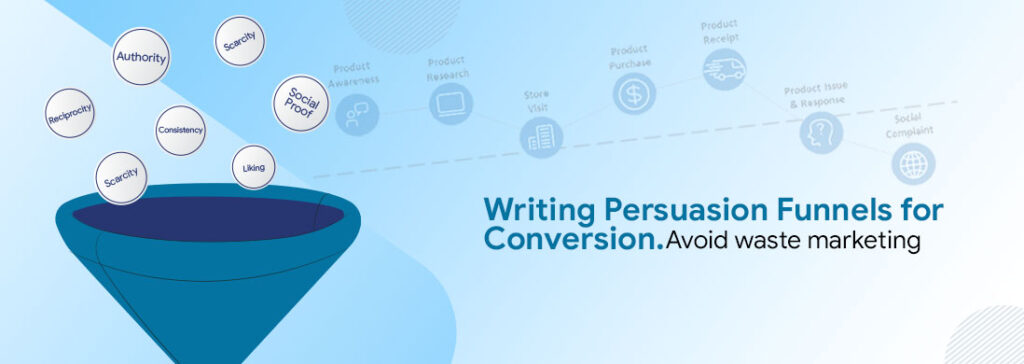
What is Conversion Copywriting? How to do Copywriting for Conversion?

The popular worldview is, Conversion Optimization equals UX/UI.

Well, perhaps it’s not! In addition to UX/UI, the good news is that you can do a bit, quite more in fact. As we all know, to be more effective, you need to attract attention, and keep it long enough to nudge the user for the desired action.

And looks alone can’t be the only factor. What else then?

Why not try conversion copywriting?

But persuasive conversion copywriting isn’t easy. However, if you understand the correct principles of persuasion, you can eliminate the guesswork. Create those elusive landing pages that have people lined-up to take action.

Check Out: Few Important Tips to Improve your Contact Us page

How do Conversion Copywriting or Persuasion Funnels Work?

It refers to writing copy for conversions that have a particular conversion goal in mind. A copywriter working on conversion copywriting focuses on a single action and uses familiar words, phrases, and value propositions to persuade readers to act. This is done, for example, on landing pages, product descriptions, ads, and other calls to action.

Conversion copywriting is an essential skill for any growth marketer to develop. It is a tactic that has gained high traction in improving marketing effectiveness

So, if you ask, how to write a copy that converts! The best answer is: A compelling copy must do several things as soon as a visitor arrives at a website. Such as engaging them, communicating their unique selling proposition, and, most importantly, garner trust so that they will take the next step and convert.

A Conversion writer might test several versions of the work, conduct user research, and interact heavily with product teams. This is because they find the most effective ways to create a useful copy

In this post, we’ll cover how to craft an effective conversion copywriting. Prepare a clear headline for your website or landing page, tactics for deciding on the words themselves, proving they’re doing their intended job, and how “logical leaps” should define what copy goes on a page. 

Just in case you’re wondering what the conversion copywriting formula is!

Conversion copywriting differs from other forms of copywriting in that it requires the skills of a good storyteller, but also has a strong focus on numbers and metrics. 

Conversion rate is calculated by the percentage of visitors who take a desired action on your site, (for eg. purchase or signing up to an email newsletter or so). If we put it this way, an an eg. if you have 1,000 unique visitors and 100 sign up for your product mailing list then you have a 10% conversion rate (100/1,000 = 10%).

Setting your conversion copywriting goals

Before you get started, it’s important to set goals. A goal is a specific objective that you want to achieve by a certain time (and hopefully with a certain level of success).

As a conversion copywriting example, if I was writing a copy for an eCommerce store selling t-shirts, one of my goals would be “increase sales.” But the goal isn’t the result-it’s just a step along the way. The result is actually when we’ve reached our goal: in this case, higher sales.

Here are some Conversion Copywriting Goal examples:

Example: Setting your conversion copywriting goals

Copywriting for Conversion: Creating Unique Selling Proposition

In the world of marketing and sales, a unique selling proposition or USP is a compelling benefit that sets your product apart from its competitors.

Why does this matter? Because it allows you to stand out from the crowd and convert more visitors into customers.

Here are some examples of good USPs:

Example: Creating Unique Selling Proposition


Here are some steps to creating your own:

  • Come up with a few different benefits that your product offers that other similar products don’t have.
  • Brainstorm how you can frame these benefits in a way that makes them compelling to potential customers-make sure they’re specific, relevant, and easy to understand.
  • Narrow down your ideas so that there’s only one main benefit in each paragraph or section of copy-you want each part of the page to be focused on just one thing!

Examine Your Competition

The first step to drafting a great conversion copywriting is understanding who you’re writing for. You may be familiar with the phrase “target audience,”. This can mean different groups for different businesses. To get an idea of what your target audience might be like, try and understand their workday, pain points, and stage of their journey associated with our solution. 

What queries do they have? Which specific keywords are associated with those queries? And which business/brand owners are solving their current needs with what content and campaigns. Take a closer look at how well each competitor ranks compared with one another using tools like SEMrush or Ahrefs

Create content answering those questions. What, how, when, where….and who. The story is woven to create a narrative. Engaging and believable enough to nudge them from a state of being unaware, to aware, engage, consider, and trust to take action - a conversion.

Apply Cialdini’s Six Principles of Persuasion

According to Cialdini, six key elements affect shortcuts in decision-making, particularly concerning purchasing and consumption decisions. 

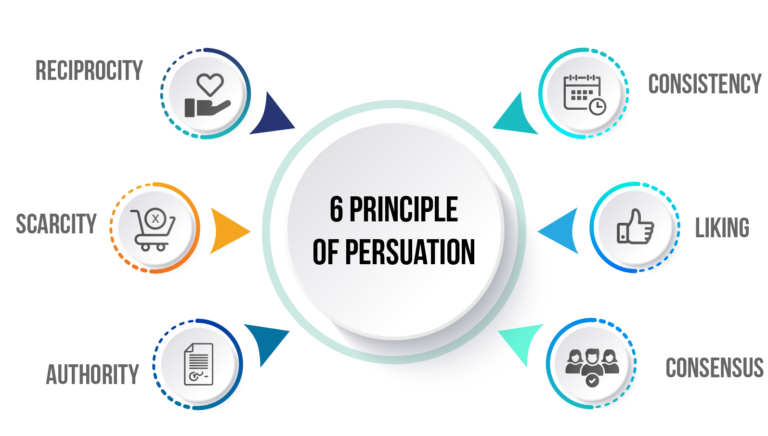
The six key principles Cialdini identified are reciprocity, scarcity, authority, commitment and consistency, liking, and consensus (or social proof). 

The main message that he delivers is that if you understand these six principles, then you can use them to your advantage. To persuade others to take a specific action or buy a particular product.

Throughout his work, he emphasizes the widely accepted concept that decision-making is effortful, so individuals use a lot of rules of thumb and heuristics (shortcuts) when deciding what to do, what to say, or how to act.

Conversion Copywriting: Cialdini’s Six Principles of Persuasion

The Importance of Creating a Call to Action

The call to action is the part of the page where you tell people what to do next. It’s an important piece of the puzzle because it drives your user behavior. It also helps convert visitors into leads, customers, or both.

  • Be clear and unambiguous: Make sure your CTA (call-to-action) is crystal clear. You can do this by providing a specific action that your audience should take next. Be sure they understand exactly what they need to do. To progress through their buying cycle or get more information about your product or service
  • Stand out from the rest: Your call-to-action should stand out from everything else on the page. So make it big, bold, or loud enough for them not to miss it when scanning down a long webpage
Conversion Copywriting - Call to Action button

Clear Writing is Persuasive Writing

At the end of the day, writing persuasive B2B copy doesn’t have to be complicated. The most powerful conversion tool is clarity. If you can communicate the value of your product, then people who are looking for that value are more likely to buy.

Why don’t you take a quick CRO maturity test and check your results

Painting a visual in words, we want to transport the user into the future and make them feel emotionally invested. Your goal is to make them, however briefly, feel their negative emotions vanish and be replaced by the positive emotions of the future you have created for them.

Earlier you learn to connect a user to your story, the sooner you’ll convert prospects into happy customers.

GA4 360: How it’s a Big Step Forward for Enterprise Analytics

The new Google Analytics 4, popularly known as GA4 360, is causing quite a stir. You might even believe that if you don’t migrate now, you’ll face difficulties in the coming future. Here’s what we recommend.

The existing Universal Analytics version will expire in mid-2023. We encourage all brands to create GA4 360 property now with an aim to have at least one year of data on the new property. To achieve that, we have prepared a quick start checklist for you. This will act as a self-serving instrument to create Google Analytics 4 property. And help you ease into it as your single source of truth in the second half of 2023.

When you upgrade to Google Analytics 4, you will be introduced to a whole new notion of user-centric, event-based analytics. GA4 360 brings in numerous new functionalities and future-ready aspects of streamlining your data processes.

Many professionals (including ourselves) are still hesitant to abandon Universal Analytics entirely and solely utilize GA4 for web projects. Nevertheless, we do see the benefit of Google Analytics 4. Particularly when organizations are gearing up to face a privacy-driven, cookie-less world.  We understand that you will face a transition phase but upon analyzing on a wider scale, we recognized that GA4 360 carries more benefits.

While GA4 has a lot of functionalities that were only a part of Universal Analytics 360 before, let us see what’s in store for us in the GA4 premium version.

Sneak-peak into GA4 360: Premium Features

In addition to premium features specific to Universal Analytics 360, like Unsampled Reporting, Increased Custom Fields, Enhanced Data Freshness, and Custom Funnels, let’s see what New Analytics 360 has to offer:

1. Effective Access Control

Data streams remain integrated with a primary Google Analytics 4 property. There is now the option to personalize and regulate subsets of data. This depends on teams, content, privacy, geography, or other governance requirements. These sub-properties differ from Universal Analytics views. In that, they can have their custom dimensions, audience sharing, integrations, and settings. These were previously only available to alter from a single source.

GA4 360 Property: Manage Users with Effective Control

2. Customized User-interface

The interface of Universal Analytics 360 contains all of the reports, sub-reports, integration reporting regions, multi-channel funnel reports, and custom reports under the same menu. 

Whereas, the new Google Analytics 360 (GA4 360) aligns with executive requirements by giving a more in-depth 360 experience with a configurable interface.

In reality, there are around 117 separate menu selections! Even the most senior GA analysts, as a guest and potential challenges, cannot name every report and sub-report in the correct order. There’s a lot to go through to obtain insights. This is true for all users because not every single report gets navigated to every day, or in most situations, at all.

3. Longer Data Retention

Google Analytics 4 properties allow you to establish data retention periods of up to 14 months. This is about data at the user and event levels, not aggregate data. 

Regular reports will not reveal many differences if the data is removed after that time. But ad-hoc reporting, visualizations, and analysis in the ‘Explore’ area will simply not work. 

This would be a concern for firms that require in-depth multi-year studies. Fortunately, in the new Google Analytics 360 version, data retention can be configured for up to 50 months.

In addition to this, the limits of conversions/goals, audiences, and user properties are also revised from 30 to 50, 100 to 400, and 25 to 100 respectively.

Enable longer data retention with the new GA4 360 feature

4. Sub-properties against Views in UA

The last and the most distinguishing feature of the New Google Analytics 360 would be the ability to let you create Sub properties and Roll properties. 

This feature attracts many large-scale organizations that have to handle large data sets. This enhanced feature of Sub property creation will allow you to decide the custom-defined roles of settings in the new GA4. 

Moreover, the dedicated team for each property can only be entitled to that data set handling. Which is in my view very convenient! This is just compensation for the 360 version where different views were available for analysis. 

The Rollup property will be the Raw data view where all sub-properties can be cumulatively studied.

Create Sub-properties for regulated data access


The new Google Analytics 360 distinguishes itself from the conventional product by offering big(ger) data, unsampled analysis, and powerful governance. It also offers the possibility of easier data advocacy with customizations.

And why New Google Analytics - GA4 360?

What better way than going through some real business scenarios to understand the benefits of New Analytics 360:

Use Case 1:

Consider an organization with multiple teams using the same Google Analytics data for different purposes. 

The Analytics team is using it for insight generation, the Technical team is using it for debugging and capturing advanced data points, the Marketing team is using it for audience generation and campaign management, and so on. 

In this scenario, not all teams would necessarily need access to the entire dataset but probably just parts of it.

For example, the Marketing team might not need the debugging data that is helping Analysts create audiences for that team. On the contrary, analysts might need access to all the data points but do not necessarily have to take care of Google Ads linking. 

Google Analytics 4 does not provide an option to create views. Thus, this is a great alternative to handle such scenarios.

Use Case  2:

You will be able to design your user roles to manage feature access for specific groups of users.

For example, you could create a role for an agency partner to identify which campaigns are driving conversions on your website. At the same time, they wouldn’t have access to revenue or organic traffic data. 

Groups of reports like customer acquisition can also have special user roles assigned to them. So they are accessible to concerned users only. This way your workers and partners will be able to access the data they require while remaining compliant with your regulations.

Use Case 3:

When larger and multiple teams are working on the same Google Analytics data, it becomes important to keep a track of the changes. You would need to track changes in the configuration or overall set-up that could eventually affect the data collection process. 

For instance, the Marketing team recently modified the Google Ads account linked to your Google Analytics property because they have different Ads accounts now for different lines of business. 

For this reason, they have created separate sub-properties to link one account to each of them based on the collected data. This becomes important information for analysts who would want to generate audiences accordingly. This is why the new Google Analytics 360 has come up with Enhanced Change History and Audit functionality.

In a nutshell…

The new enterprise version of Google Analytics 360 (GA4 360) is quite sophisticated and well-equipped with many advanced features. It has many more uplifted use cases for remarketing, optimized lead generation, and various Google products. All of these are linking parts from its advanced analytical reporting and generating insights abilities. Remember, we have created a quick-start checklist to make the transition from UA to GA4 simple and easy. 

Do let us know if you need any support or have queries! To start your migration journey know the full details and pricing plans here

Google Analytics 4: The fascinating new world of Analytics!

[vc_row][vc_column][vc_column_text]While there has already been a lot of buzz and panic, we thought to bring you key highlights. So, you can see the excitement part instead of panic. Here are a few helpful tips that will help you welcome this exciting change. We will talk about GA4 migration in a bit, but first, know the backdrop.

The backdrop: On March 18, 2022, Google announced the deprecation of Universal Analytics (GA3). All the standard UA properties will stop processing hits from July 1, 2023, while Analytics 360 properties will stop processing hits on October 1, 2023. This change will ensure the unification of app and web data in a single tool and help generate insights on a combined user journey.

As a measurement platform, Google Analytics 4 was announced 2-years ago, on July 31, 2019 (Called the ‘App + Web’ property). Since then, GA4 has undergone major changes, feature upgrades, and significant improvements in reporting and analysis capabilities. Thus, GA4 migration is crucial for businesses to get access to improved features.

The new Google Analytics 4 aims to collect data in the following manner:

  • Track Website performance via Google Tag Manager or gtag.js implementation
  • Track Mobile app performance via Firebase SDK implementation

Once the basic tracking setup is complete, GA4 provides a set of dimensions and metrics that are available for use in reporting.

GA4 Migration: Important Points to Consider

If you are looking to get started with Google Analytics 4, below are some important points that you might want to consider while planning your tracking setup:

  • If you have an existing Universal Analytics implementation, keep it as it is and continue using it for the time being. However, you can create a new GA4 property in parallel and start sending data to it. In this way, you will be able to get UA reports for the maximum possible time. You will also have a good amount of historical data collected in GA4 when UA finally sunsets.
  • If you have an existing Firebase project implementation, you will already have access to a linked GA4 property. You can simply add the website tracking data to this property and get the required reports accordingly.
  • If you have an existing Universal Analytics implementation running on analytics.js, it is recommended that you shift your source code to gtag.js or Google Tag Manager. This is because analytics.js is not supported by GA4. And it can be a troubling situation to migrate the whole setup at the last minute.
  • Create an events implementation plan where you can map your UA events/goals with GA4 events/conversions. This will help to get the majority of conversions and interactions in place. The Sooner this gets implemented, the more historical data you will be able to access going forward.

While implementing Google Analytics 4 on your website/app, also consider the fact that the data cannot be a 100% match with Universal Analytics. This can be due to various reasons:

  • GA4 follows an event-driven data model, while UA uses a session-based data model. What it means is that everything upon the GA4 migration is ultimately an event. The reports created are according to that measurement approach. On the other hand, UA has various hit types. And all those hits are grouped into session-level reports of different categories
  • GA4 identifies its user count based on Active Users, while UA works with Total Users
  • Cross-device and cross-platform tracking in GA4 can result in user deduplication, and thus show a lower user count as compared to UA.
  • Implementation issues on either side can result in improper user count, thus making it harder to compare both data sets.
  • Filtering data in Universal Analytics can cause a reduction in user count, and as a result, we might not be able to properly compare both data sets.

For more insights into GA4 features and functionalities, you can refer to this infographic to understand how it is different from UA. GA4 can be a relatively new platform for you and your team to get accustomed to. It is recommended that you get started on your migration to GA4 as early as possible. This will help you become familiar with the tool by the time the UA sunsets.

In the meantime, it is crucial to understand the basic steps to successfully migrate to GA4 from UA. Why not go through them and identify your next course of action.We are also giving away a 20% discount on our GA4 offering for a limited time. Get the best of this opportunity and begin your analytics journey now.

Bot Icon
Bot Icon

Tatvic Bot

Explore About Tatvic and Services