Hello There!

Lorem ipsum dolor sit amet, consectetur adipiscing elit,

 About Payal Burnwal

Payal Burnwal is a DV360 certified professional working as a campaign analyst at Tatvic Analytics. She is responsible for helping clients achieve their campaign goals. She executes the media plan and does reporting and optimizations to achieve the client's goal. When not working with clients, she is found listening to music and watching inspiring videos.

Guide to Analyze Google Data Studio Reports for E-commerce Business

[vc_row][vc_column][vc_column_text]Set up your measurement tool. Clean and filter your data. Make information from that data. Analyse it. Extract insights from it. 

This is some hard work for an eCommerce firm. But to increase the value, there’s another step to be added- the work should be well communicated across the shareholders. You need your data in-line with KPIs to influence business decisions. If you’ve worked in web analytics, you’ve been through the pain of drawing graphs and tables in spreadsheets and once it has been set up, then the process to automate it. 

Google Data Studio offers a better depth, that includes easy integrations for the common data sources. This tool offers solutions and better insights into your data. 

This is what you will see first when you open the data studio. The UI is very user friendly and convenient to use. You can access your reports and data sources from here.

Data Studio is a part of the vast Google Analytics 360 Suite. It’s Google Marketing Platform’s free business intelligence and data visualisation tool that helps you report and connect from multiple data sources. It’s easy to connect the Data Studio dashboard to get Google Ads spend, traffic on your YouTube channel, and just everything you’ve set up in your Google Analytics account, like goals, segments, traffic sources, etc. 

For eCommerce stores and merchants, Data Studio can provide insights on search engine optimization to impact worthy eCommerce metrics. This helps you to track everything from referrers to order values in a single dashboard. These powerful data insights can make a difference in increasing your revenue while selling products online. 

How can Data Studio help your eCommerce store? 

Data Studio is helpful in getting answers to questions like: 

  1. Which products are generating the highest revenue?
  2. What is the daily or product-wise trend of add to cart to actual transactions?
  3. Key metrics analysis for new to returning users
  4. Category wise product performance
  5. Which campaigns are performing best in term of revenue generation
  6. Custom Grouping of Products
  7. What are the demographics of my highest selling products?
  8. What is the trend for ARPU on a daily, weekly, monthly basis?
  9. Compare revenue trends for different product categories

Having these valuable insights can help you understand where your changes and investments can lead you to increase in conversions. For instance, if you see your users abandon carts after they’re prompted to make an account in order to checkout. This will help you to test a guest checkout option. Doing this might help you understand how a simple change can increase your conversion rate and affect your bottom-line, eventually.

This is just one of the instances of how Google Data Studio helps you to bring out your eCommerce analytics data in an easy and interactive dashboard through data visualisation.

Where to Start? 

The main advantage of the data studio is that you can see a different kind of data points in one frame. For example, the image here can provide insights about how your users come to your site and are engaged. You can also see user demographics here.

If you’re using Data Studio for the first time, you’ll instantly see a report that gives you a view of the elements in it through an interactive interface. We recommend starting out at the ground level and playing with the tool. The more you use it, the better questions you’ll start to ask. Even if you’re not technical or even a numbers person, Data Studio is an easy to learn tool.

If you’re using Data Studio for the first time, you’ll instantly see a report that gives you a view of the elements in it through an interactive interface. We recommend starting out at the ground level and playing with the tool. The more you use it, the better questions you’ll start to ask. Even if you’re not technical or even a numbers person, Data Studio is an easy to learn tool.

At the start don’t spend all day making a ‘perfect’ dashboard. The dashboard you want right now gives you all the answers you’re seeking. As you continue to move along with your dashboard, you’ll start asking more accurate questions that require better customisations. 

Dashboards that analyse data from your sources, built-in templates is the best way to go. You’ll be able to see a PPC eCommerce template, a YouTube report, search console, among others. These templates are a good way to begin with the path of knowing to build a report and understand the connectors that are being used. You’ll start to see how templates combine visualisations and how that dashboard views a result. 

Dashboards

Being an eCommerce site, you must have tracked all the product-related user interactions. Data studio allows you to create custom funnels based on page path and event combinations. Also, it helps you with visualizing the trend for each step.

Custom Dashboards in Data Studio are easy to understand and most of all, customisable, giving you the flexibility to make choices to how you present that data - bar graphs, pie charts, and so on. It further makes it easy for you to insert your branding to your dashboard by offering a range of fonts, colors, even adding your company’s logo. 

The process of creating an ecommerce report is pretty straightforward, but using the right metrics and the layout is an uphill battle. While some of these things might differ with your business model, there are a few broad metrics and layout that are applicable to all product businesses. 

We recommend that you use high-value metrics like

  1. Conversion Rate
  2. Cost Per Acquisition
  3. Revenue per user
  4. Return on Ad Spend
  5. Average Order Value
  6. Checkout Funnel metrics

These metrics will help you understand about your user buying behavior. Analysis of the better performing products you can understand what’s working and what’s not. You can always apply certain techniques to underperforming products to improve their selling rates. 

Your Layout

Want to know the trend of how each of your products is contributing to total revenue over a period of time? Well, Data studio has the answer for you. With the correct set of charts, you can get an easy revenue trend for any of your products.

Making the right layout of your metrics is super important. You need to need to check and double-check if your data is presented in a way that it tells a story. For instance, showing conversion rate is fine but showing a trend how it went over time can be impactful. You may also want to see which referrers are the most valuable to you to aim your efforts on those channels instead of broadly targeting users. 

Your Data Studio reports can include

  1. Top selling products
  2. Revenue rates by by geography, or device
  3. Conversion rate by source
  4. User Segments and demographics by conversion rates

Your dashboards can be shared, it makes a lot of sense to design and provide descriptions to each data point. A bad documentation often undermines the dashboard - even if the insights are obvious. 

The Bottom line is…

Data Studio helps make raw data easy to understand for marketing professionals. With Google Analytics and enhanced eCommerce reports you can gain impactful insights on how your products are performing, as well as what marketing channels are working the best and search queries that are worth investing in. 

Here at Tatvic, we’re focused on helping eCommerce platforms increase revenue by 20 percent or more with our experts. Want to know more? Schedule a demo with us today![/vc_column_text][/vc_column][/vc_row]
For BFSI: Analyze your Data Better with Data Studio

Data is a blessing for the banking, financial services, and insurance (BFSI) industry when it is meaningful and easy to understand. Although turning web data into insights can be an uphill battle. Fortunately, with Data Studio, Google Marketing Platform can help you save a lot of time and effort with data visualisations. 

People who usually collect and analyse their website data use Google Analytics. If you ask them, they might add some other answers like Google Ads, Youtube Analytics, Bing Ads, among others. 

Luckily, Data Studio can extract data from all of the above-mentioned sources and help you create dashboards that have a flow of meaning. You can create reports that engage the end-user in a matter of minutes without even analysing the never-ending excel files and spreadsheets.

Technology allows the BFSI industry to enter new customers and offer innovative goods and services through productive channels of distribution. On the other hand, data security, the availability of information updates and the quick problem resolution is critical to the banking and insurance business. There are various aspects to be considered in the BFSI business domain as they have both online and offline operations going on.

Why use Google Data Studio for Data Analytics?

Visualisation options: There are a plethora of data visualization tools, making data analysis easier than the Google Analytics Interface. 

Updates: These dashboards are directly connected to your Google Analytics data, allowing you to lay back while it updates automatically, from your GA database. 

Multiple linking sources: You can create custom reports using data from different sources, adding various metrics and dimensions. 

Shareability: Your reports and visualizations can be shared easily with multiple users without proving direct access to your data sources like GA. 

Dashboards & Visualisations 

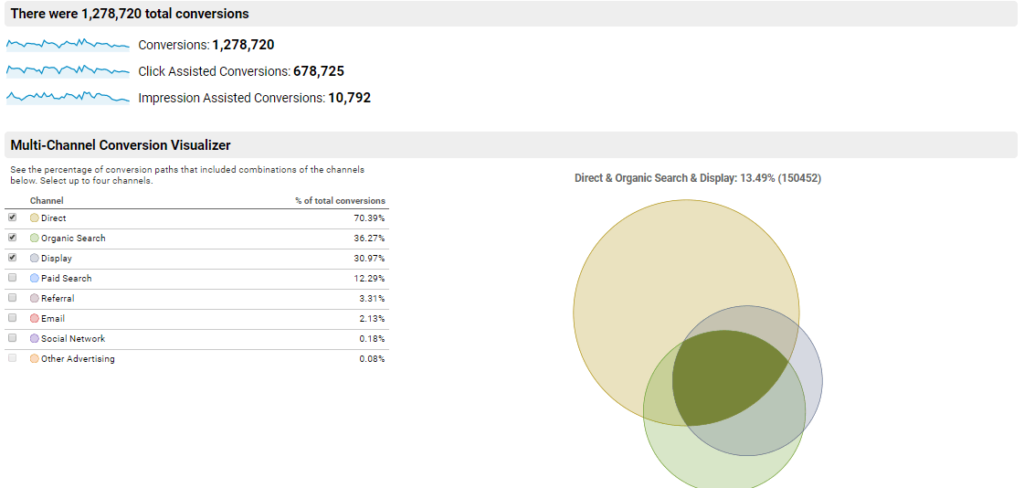
As a BFSI business, multiple channels contribute to any converted user. And it is very important to identify the mode and contribution of each channel. Here is the sample report of the multi-channel attribution.

Your institution must be dealing with humongous amounts of data. As the volume of that data increases and manual treatment is given to it, it’s probable that you’re unable to make sense of your data and take complete advantage of it. 

A Data Studio dashboard can help you fill that gap. By making available data easy to analyse and use those findings, you can gain impactful insights of how well processes are doing. These dashboards can be extremely helpful in decision making. 

How Can a Dashboard/Report help?

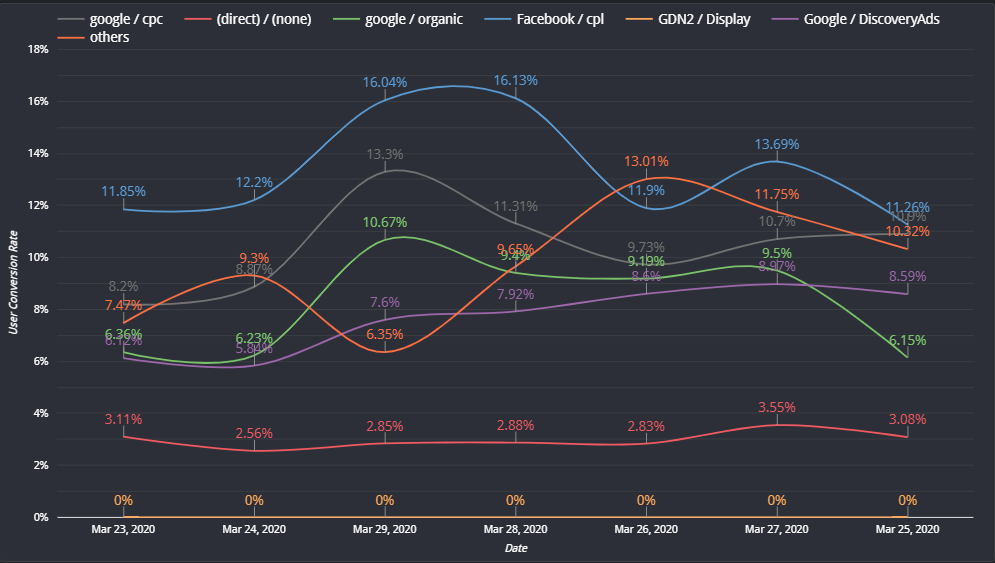
User conversion rate is one of the important metrics you can look at while calculating ROI for your campaigns or source/medium. Here is the sample report of the user conversion rate trend over a period of time in the Data Studio.

It can give you useful insights on how well your new products are performing and effectiveness of pricing policies

It can display almost next to real-time operational information. It can provide insights on credit risk, sales team performance and service use. 

You can analyse your profitability and perform margin analysis

It’ll help you with periodic reporting

Further it can help you with past and present performance of your institution. That can help you set up predictive analytics. 

Data

One of the most important aspects of a BFSI Data Studio report is that it can show bank authorities places where they lack and get useful data. If you have problems selecting useful data, Google Data Studio can show you how. Here are a few places you can start with

  1. Understanding customer behaviour 
  2. How fast are transactions processed?
  3. Are there any emerging areas of concern?
  4. Do your products and services need changes? Is there something specific your customers are looking for? 
  5. Are the customer payments done on time? What is their payment history? Do you have risk clients
  6. What promotional strategies have worked the best? Are those strategies driving enough sales (ROI)

Benefits of Google Data Studio for BFSI

Risks

A report can visualise information that you need on regular intervals, helping you effectively manage the risks. It can display how healthy the finances are and how smoothly your business is running. With these insights it’s not difficult to predict upcoming problems. Your dashboard serves as a warning tool at times. 

Growth

You can expect cross sell to improve as a result of an effective dashboard that will give a better grasp on the correlation between different channels and customer segments. It can further provide visual snapshots of your achievements. With Data Studio you’ll have the ability to drill down products, departments, customer categories, among others. 

Efficiency

Data Studio can help you improve operations by bridging gaps using automation techniques. It can help you understand inefficiencies in the process. This will also provide you with next-to real time analysis of channel, sales, product permanence and many more. 

Need help making Google Data Studio reports? Or data analytics services? Shoot us a message to He***@****ic.com or schedule a call with one of our agents here.

For OTT Platforms & Publishers: Analyze Your Data Better with Data Studio

If you’re a publishing firm or an OTT platform and work with data, you exactly know the work that goes into presenting the right metrics in a clear and concise way. You love data, but you don’t love the cluttered worksheets. While your Google Analytics default dashboards are informative, they aren’t visually appealing. 

Reports can get even more complicated when you’re in the process of combining data from different sources in a single view. Want to analyse the Google Ads and Facebook advertising campaigns side by side? Want to track content-wise performance? A spreadsheet won’t cut it. 

The teams at Tatvic & Google Marketing Platform know how much work this can turn out to be. Our Data Studio experts at Tatvic put their heads together for this blog & have explained this awesome data visualization tool can help OTT Platforms and Publishers such as yourself answer their core business questions.

But are these enough to conclude business decisions?

Every decision-maker needs more granular analysis in order to make more effective decisions for the business. In the business of OTT/Publisher, there are many important factors like content consumption, spend to acquire a user & revenue generated from the user, user engagement, etc. And google analytics reports are not directly helpful for analyzing these factors effectively.

Let’s compare the Google Analytics reports & Data Studio visualizations to understand how Data Studio helps you in your analysis. These examples are segmented in the sections just like google analytics reporting. Each example consists of the use cases for both OTT & publishers.

  1. Audience
  2. Acquisition
  3. Behavior
  4. Conversions

Audience

OTT

Key Metrics Description for New and Returning Users KPI performance through Custom Report 

When you use the same data points in Data Studio Dashboard with Custom Visualization, you have a clear comparison of all your KPI’s for the same dimensions and a clear picture of the data at a look.

Publisher

Custom report with age and gender along with page views gives result something like this:

When you use the same data to visualize in the Data Studio, It will provide you the bifurcation which is clearly understandable and visually appealing. % share also can be taken instead of data labels for this visualization.

Bifurcation of Audience

Acquisition

OTT

Subscription Trend based on source/medium

*When you use the same data set in Data Studio dashboard, it gives you bifurcation of the source/medium and trend of the transactions through them which is visible and easy to understand. 

Publisher

For every Publisher, user engagement is the key to business success. A Segment(Engaged Users) is created with conditions of session count >= 5 or pageviews>= 30. In Google Analytics, custom reports of users & engaged users will look like this.

In the Data Studio, with little help of blend data, you can also get the conversion ratio for each source/medium along with its users & engaged users numbers. Further, daily, weekly or monthly trends can be identified and analyzed with help of Data Studio.

Behavior

For every OTT platform, it is necessary to understand the dates and time of the day during which the content is consumed the most and the trend in which this gets followed. In GA, even though we have all the fields in place, to have a clear understanding of those in the UI, it’s difficult to understand and requires a lot of processes.

OTT

However, In Data Studio through Visualization we can have the data in the format mentioned below which will help to understand the data at a glance. 

Publisher

In Google Analytics, you can easily get the reports of pages being read on your website or app.

What you don’t get is the kind of content being consumed on your web or app by readers. Data Studio can help you categorize your content on your conditions. Here is an example of how you can categorize your content and visualize it. Various metrics can be combined with this visualization for better analysis.

Pages by category

Conversion

OTT / Publisher

Average Revenue Per User (ARPU)

ARPU is a metric used majorly by digital media, and networking firms, defined as the total revenue divided by the number of subscribers. 

Below mentioned are the Data Studio examples where we have blended the GA data with internal CRM data and calculated the ARPU. We now have a clear bifurcation of the subscribers and their ARPU. Also, an average of weekly, yearly and other date ranges. 

Conclusion

With increasing use of Google’s Data Studio, it’s exciting to see adoption and contributions from different industries. It’s a win for digital marketers and agencies who’re used to creating reports and dashboards, the ease of use and the intuitive interface are attracting more industries and users who’ve never used a visualisation tool before. 

As the community visualisation adoption grows, we’ll be writing more explainers on how to use Data Studio in different industries like eCommerce, Leadgen & BFSI companies, Travel booking, hospitality, among others. For any feedback, feel free to drop in your comments in the section below. 

Bot Icon
Bot Icon

Tatvic Bot

Explore About Tatvic and Services