Hello There!

Lorem ipsum dolor sit amet, consectetur adipiscing elit,

Exit Intent Popups technology guide to prevent Page Abandonment

Exit Intent Popups: Here’s how to Prevent users from leaving your website

Exit Intent Popups: Here’s how to Prevent users from leaving your website

Pop-ups are now used on most websites. However, they are difficult to appreciate. Today, they are more annoying and out of sync with a user being interrupted and spammed.

While they can also be a powerful way to change user focus and provide suggestions that work, they can do more harm than good to your brand. Unfortunately, you can find more instances where popups are being poorly implemented. They often convey the wrong information at the worst possible time with terrible design and offer.

People catch on quickly if you look to be a shady company asking them to signup for a mailing list.

In this blog, we’ll be discussing everything on the exit-intent popups and how they can help you become better at lead gen.

What is an exit-intent pop-up?

The term exit intent has become increasingly popular in recent years. It helps to track a user’s movements so that when the user exhibits the behavior of leaving your website, we can draw their attention back.

In this post, we’ll show you the broader context of the entire thought process behind this lead generation strategy. You will also find some relevant use cases that will be easy to implement. we will help you to introspect how similar use cases can be used for your process and yield better results.

Why do we need the exit-intent pop-ups?

Exit Intent has helped marketers improve their conversion rates significantly. This technology has the potential to convert 10 to 15 percent of abandoning site visitors.

Marketers use this technology to enhance their sales conversion and customer base. The technology additionally helps design more targeted ads for specific site visitor segments, improving their conversion chances.

The Exit Intent pop-up allows marketers to engage potential customers again by presenting compelling information and making sure they don’t leave the site without seeing the best, or by providing a better feedback mechanism that could not have been captured otherwise.

How exit-intent pop-ups work?

The technology applies algorithms to detect the movements of the user while interacting with your site. It can be a mouse cursor moving to an exit option, an address bar, a new tab, or just a close button. 

When the visitor’s actions match this user interaction behavior, the technology triggers a dialog box on the user’s screen with a custom message so that they stick to your site.

In other words, these algorithms can detect when a visitor is about to leave your site. it will help you re-engage visitors and prevent them from leaving their websites.

Where can you implement these exit-intent pop-ups?

It will provide you the benefits of the technology, which ultimately focuses on converting the user. Below are some use cases where this technology can be implemented:  

  • Redirect the visitor to other engaging content
  • Recover abandoned carts in an eCommerce website
  • Promote an important event
  • Grow your subscriber’s list
  • To target specific visitor segments
  • Collect feedback from form abandoning users 
  • Translate your popups for different audiences
  • Inform new visitors of products or services
  • Increase Sales with specific campaigns
  • Target Visitors with relevant messages based on geography
  • Use Scarcity to increase the conversion rates for time-based campaigns

Let’s take a closer look at this case and how pop-ups with exit intent can come to the rescue. The main purpose of exit intent for the form abandoner was to collect feedback from the users who planned to leave the lead/form submission page after spending a certain amount of time on the page (for example,> 30 seconds).

How exit intent helped in collecting feedback from form abandoner? 

Exit Intent helped determine the cause of the user who wanted to leave the website after spending some time on the lead/form submission page. Perhaps the user thought the premium was high, got a better deal from the competitor, or was unhappy with the UI. User feedback helps to gain actionable insights and understand customers’ needs.

How exit intent pop up blogs can save abandonment rate

Conclusion 

As we’ve portrayed, having a viable and thorough marketing strategy for applying exit-intent pop-ups that can make your website thrive and stop visitors from leaving. We know that every business is different, so we’ve presented a rather universal approach covering just the most essential cases.

Want to implement this solution on your platform? Know how we helped the likes of ICICI, UpGrad, among others. Contact us today!

Google Tag Manager Variable setup Guide for Google Analytics

Finally!!! This time Google Tag Manager(GTM) has amazed us and in true sense we can say, It has blessed us with the most needed feature “Google Analytics Setting variable”. Google tag manager sends to data to analytics based on the tag configurations. Due to unique tracker deploying functionality with each tag, GTM tags carry separate configurations for all the universal analytics tags. This will be eliminated with newly launched “Google Analytics Settings variable.”

On page implementation gives us support for accessing different plugins like Enhanced eCommerce, advertising feature, Linker for cross domain tracking implementation. However advanced implementation like cross domain tracking, Enhanced eCommerce tracking requires more care while implementing with GTM. It needs duplication of configurations with each tags that uses these plugins… Whether it is about fields to set or custom dimension/custom metrics like configurations available in tag, you have to configure it manually for each tag.

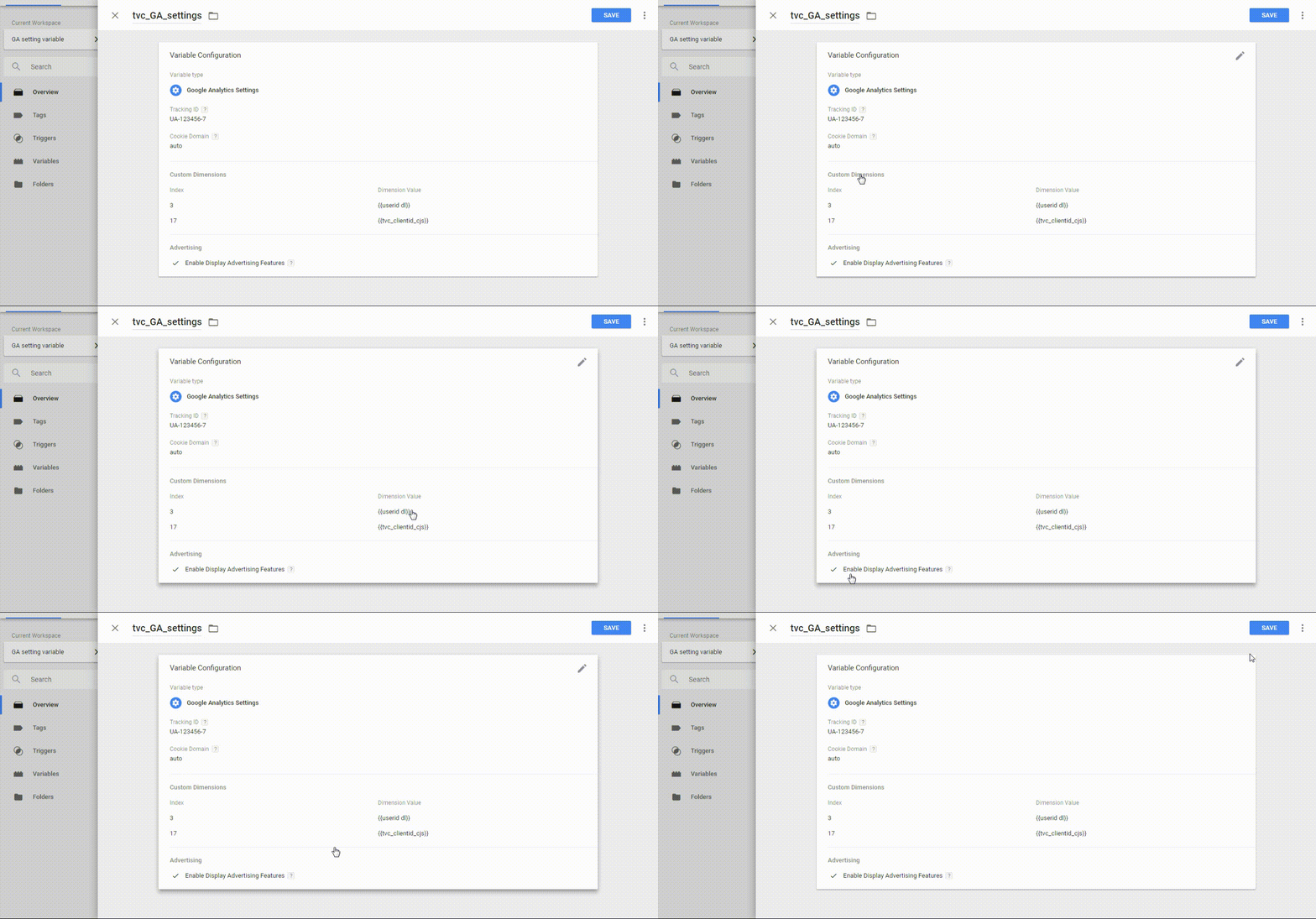
Image: Google Analytics Setting variable


Google Analytics Setting variable will solve all these problems. It will store all GA configuration in one single variable and it can be used with each and every tag. It will have following included in it:

  • Fields to set
  • Custom Dimensions
  • Custom Metrics
  • Content Groups
  • Display Advertising Features
  • Enhanced Ecommerce
  • Cross Domain Tracking
    • Auto Link Domains
    • Use Hash As Delimiter
    • Decorate Forms
  • Advanced Configuration
    • Global Function Name
    • Use Debug Version
    • Enable Enhanced Link Attribution
    • Set Tracker Name

It is available for UA tags in your GTM web container as well as your android and iOS container of firebase. But this variable is not available for AMP containers or any android(legacy) or iOS(legacy) Container.

If you prefer not to use the new settings variables, simply check the override box and do not select a variable when creating or modifying a tag. It act as template which can be configured and used across multiple tags.

There’s no cap on the number of Google Analytics settings variables you can have, allowing you to preset any setting combinations you regularly need. Individual tags can also be set by just click to simple checkbox to override individual settings that don’t apply from setting variable .

Note :  You can set these as you wish, but remember that they will be applied to all the tags that uses this variable.

In order to create new GA settings variable user need to follow below given steps :

  • Create new variable from user defined variable or you can create this variable from UA tags also, by selecting new Variable in GA settings drop down.
  • Provide the appropriate name and choose variable type GA settings variable from utilities section.
  • Now provide the Tracking ID and apply necessary setting as per the requirement.

Image: Inherited values from Google Analytics variable

How to find which tag have inherited their values from Google Analytics setting variable & which haven’t :

In order to find which tag have inherited the GA setting variable, follow below steps:

  • Edit the UA tag which include GA setting variable.
  • Check the checkbox of Enable override setting variable, if not checked by default.
  • Click to more settings and look to each and every steps to find ‘Inherited from settings variable’.

When a UA tag is config to use GA settings tag all the settings including field to set , custom dimension, custom metrics, etc. inherit value from GA setting variable until the values are manually override.


Use cases where you can use this setting:

  1. Basic Settings: There are multiple things that you can have for every tag such as tracking ID, cookie domain, client ID, User id, custom dimension of hit scope.You must use Tracking ID in GA setting variable which makes staging and live traffic bifurcation easy.

Here is basic implementation for GA setting variable in tag which include tracking ID, clientID and few custom dimension required to pass with each and every pageview event.

  1. Advanced Settings: An another generic GA setting variable template for all the EE tags which include some custom dimension along with it.

  1. Remarketing Settings:  Well a remarketing audience is a list of User ID cookie and advertising ID which shows the interest of the user, using them we can re - engage the user to drive back to over site. Thus we can Enable Display Advertising Features for Advertising ID and pass custom dimension for the User ID in GA setting variable.

  1. Track limited users setting: There may be a case where you want to track specific percent of users. You can include Sample Rate to field to set in GA setting variable. Below example will track only 60% of traffic from total traffic.


Conclusion

This is simply a feature that leaves you awestruck with as it saves times and creates the impact you desire. Now you do not need to switch Universal Analytics tags for the cross-domain tracking. You can now be relaxed from repeating manual efforts for multiple times as this latest GTM updates works in favor of data analysts.

Bot Icon
Bot Icon

Tatvic Bot

Explore About Tatvic and Services