Hello There!

Lorem ipsum dolor sit amet, consectetur adipiscing elit,

Facebook (Ads) Advertising Techniques & Strategies

Facebook ad strategies for holiday season

During the holidays, the promotion of products and services on Facebook can become highly competitive as advertisers and marketers strive to draw their target audience’s attention with their most attractive deals.

In such a scenario, raising the ROI with Facebook Ads becomes challenging. 

A lot of you must be considering targeting your competitors’ fan base, as they would more likely be interested in your products and/or services as well. 

In this article, we will provide insights on how to help you target your competitor’s followers and increase the chances of Ad conversions by using an often overlooked, but highly effective tactic.

1. Locating the Facebook Pages You Want to Target -

Making a list of the exact competition pages you want to target is your first step. There are several ways to locate these pages. 

  • Competitor Pages: 

List down all your significant rivals and look at their Facebook accounts. You would be able to access the company’s Facebook pages or the pages of the founders. Who are their followers, and what do they put out? 

  • Brands or Public Figures:

Consider popular brands and individuals in your sector and them to your list by finding their Facebook sites. Identify influencers and brands that are aligns with your marketing activities.  

  • Keyword Research:

When it comes to keyword research, you should begin by typing related phrases into the Facebook search bar. This will generate a list of pages that are related to your industry. Additionally, it’s important to keep an eye out for trends, popular content, and the type of information users are seeking through these pages.

  • Related Pages:

Utilize the sidebar to look for “Related Pages” or “Pages Liked by This Page” By making use of these options, you may discover pages that you would not have considered otherwise.

  • Community Tab:

On any Facebook page, the Community tab will offer a list of the most committed users. If you add “/likes” at the end of the page’s URL, you can view their profiles and also explore the pages that they have liked.

  • Youtube Users:

To find out who has the most popular videos on YouTube, enter your relevant keywords. Also, look for their Facebook profiles. They most likely have a worthwhile, high-quality audience you can target. - Interlink the youtube videos to the Facebook profile/pages

  • Audience Insights:

When you are using Facebook Audience Insights, make sure to include interests related to your business. If you click the Page Likes tab, you will be able to view pages that people with similar interests have liked. Facebook will categorize the list based on the affinity score, which will tell you which pages are most important. Keep a tab on pages with a high-affinity score.

After gathering a selection of potential audiences, you can channel your advertising activities and expenditures to the correct target audience.

2. Identify the most responsive audiences -

Begin by building potential audiences using different targeting options, key phrases, and interests. You will get more accurate results if each audience and their sources are specified more precisely. 

Test your ad on different audiences to determine which one responds best. There is, however, a limit to how many audiences and variables you can evaluate based on your budget.

If you have a tight budget (under Rs 4 lakhs, for example), you may be able to evaluate 10 to 20 ad variables with five varied audiences. On the other hand, a bigger budget enables continuous evaluation, which eventually helps you to keep refining your Ad strategies.

FB ads Optimization

The winning ad variant is the one that has the lowest cost per outcome (like cost per link click or cost per video view). 

When running a test on Facebook, we‘ll often show confidence or power percentage to help represent the likelihood of a causal result from your test. - Facebook Tutorial

You can derive the most optimized Ad variant with a split test. The procedures for developing a split-test campaign are as follows:

Steps:

- On the Create button on your Ads Manager dashboard, click (green)

- Decide on Quick Creation Workflow.

- Select Video Views from the Campaign Objective dropdown menu by going to that tab (since we are using video views for this example)

- To access the variable selection box, turn on the Split Test switch.

- Check which audiences you want to test & set it up in respective ad sets.

3. Utilize Facebook page insights to research the content - 

From the Audience Insights dashboard, you can gain access to a multitude of potential content ideas and research information by simply navigating to the Facebook pages of your competitors. Observe your competitors’ website content and user activity.

Facebook Page Insights Analysis

                                                                                         Source: Facebook Tool 

Content sections such as About, Posts, Photos, Instagram, Videos, and Communities, will be visible. Investigate each of these links further to see what kind of interaction your intended audience is receiving. 

You can devise techniques to modify your effective Facebook Advertising strategy in accordance with the sort of engagement (good or negative) your rivals are receiving. To have further clarity on the process, ask the following questions

  • What sort of material do they release? Do they speak to the concerns and interests of their audience?
  • What subjects evoke the most interest from the fans?
  • Existing historical data that validates your current  advertisement strategy 
  • Are your competitors using Facebook to advertise their events?

With these action-oriented insights, you will be better able to formulate a data-driven approach to engage their end audience and push the down the funnel.

4. Learn more about the intended audience - 

An alternate method to discover your rivals’ pages is to “like” their pages and associated interests. There is a strong likelihood that your competitors’ commercials/Ads will begin showing up in your newsfeed.

In this case, you may use the “Why am I seeing this” choices found on the sides of each advertisement to learn more about the intended audience and other goals of the rival.

                                                           Feature: Why am I seeing this ad feature on Facebook

                                                                                     Source: Facebook Tool

Tools to help you out - 

There are many tools available for analyzing Facebook competitors. Some of our favorites are as follows:

1. Social Status - 

Social Status is a powerful tool for social media marketing and has the ability to analyze and compare the involvement of your competitors on multiple social media platforms, such as YouTube, LinkedIn, Facebook, Twitter, and Instagram.

2. BigSpy - 

BigSpy is a Facebook competition analysis tool made especially for social media advertisements. It boasts of integrating more than 6 major social networks, including Facebook, and has a vast database of more than 1 billion ads.

You may quickly see the newest commercials being utilized by other companies in your industry using it, and you can gain ideas for your own ads. With its robust search tools, you may find and exclude advertising based on a wide range of criteria, including countries, sectors, CTAs, dates, and more.

3. Sprout Social - 

Another social media monitoring company that offers a Facebook competitor analysis tool is Sprout Social. With its social listening capabilities and competitor reports, you can quickly gauge the industry’s pulse and determine how you stack up against your rivals.

Final tips - 

It is important to ask the right questions at the outset to make the most of this opportunity:

What demographic are your competitors targeting?

What are the types of ads they are using?

What words are they using, and how successful are they?

How much engagement do their ads get?

What objectives are their advertising campaigns trying to accomplish?

Do not forget to continually evaluate and alter your own ads while you are putting in the hard work to analyze your rivals’ advertisements. The Facebook Pixel provides you with all the information required to monitor your ads.

Facebook ADs: Billing and Services 101

In September 2021, a large number of Indian marketers experienced a setback due to the RBI’s e-mandate, which paused their conversion-driving campaigns and caused them to set up multiple accounts in an effort to reactivate the campaigns.

Facebook’s billing experience continued to be affected for a few weeks as more banks and payment partners become compliant with the mandate.

This blog is meant to give insight into billing and payment for those marketers already using or considering using Facebook Ads in order to keep their campaigns running without any interruption.

‘Billing & Payments 101 - Facebook Ads’ guide will uncover 

How Facebook Ads fees are calculated?

What is the best payment method for Facebook, automatic or manual?

What is the new RBI e-mandate for Facebook advertisers?

How Facebook Ads fees are calculated?

The amount of money Facebook Ads charge is determined by:

  1.       How often the adverts are seen by people
  2.       How many people click on the ads

What is the best payment method for Facebook, automatic or manual?

Some advertisers may prefer the convenience of automatic payment, while others may prefer the control and flexibility of manual payment. Let’s help you understand the two

Automatic Payments:

With Automatic Payment, marketers need to add a debit/credit card to their ad account and set a billing threshold amount. The threshold amount is a set amount that an advertiser can spend before Facebook ads bills the advertiser. 

Whenever the ad costs reach the billing threshold amount, Facebook charges the marketer for that amount.

Initially, the billing amount is set to a modest amount but gets revised depending on the advertisers’ payment history. If the payment history is satisfactory, the spending limit will eventually increase.

The advertisers are charged on per month-on-month basis. Most Facebook advertisers opt for automatic payment as it allows them to easily manage their advertising costs and ensure that their ads are always running.  

However, it has been observed, often time the advertisement campaigns are put on hold, especially at the end of the month, when the deducted amount reaches the threshold limit.  

Marketers can prevent any possible disruption to their advertisement campaigns by recognizing problems and sticking to the provided solutions.

1. Ensure sufficient funds 

Because the pricing of Facebook ads is based on an auction system, it is important for advertisers to make sure that their payment methods have sufficient funds to support their upcoming transactions and that their campaigns are not disrupted due to insufficient funds. Additionally, advertisers should regularly monitor their campaigns and adjust their bids and budgets as needed to ensure that their ads are performing well and achieving their desired objectives.

2. Check for the Credit Card Limit:

In instances when the cards or the linked account have a maximum deduction limit, the billing threshold can be adjusted to prevent payment failures.

3. Check for any Processing or Verification issues:

Marketers must frequently review the date of expiry and validate the billing details of the credit/debit cards related to their advertisement account. This will guarantee that their payment information is current and that there are no problems with processing their payments.

Manual Payment:

This is the prepaid method of Payments, where the advertiser adds funds to the account. The amount is deducted from the fund as per the campaign spending. 

With manual payments, there is no payment threshold like the one in automatic payments. Once the advertiser chooses Manual Payments, they cannot switch to automatic payments and Vice-Versa.

In India, manual payments can be processed through the following methods.

  • Online Transfer: Net Banking and UPI
  • Wallet: Paytm

Advertisers can adopt the same by

- Opting for Monthly Invoicing:

The Monthly Invoicing method doesn’t consider the billing threshold, which prevents the ads from being paused in case of payment failure.

At the end of the month, the advertiser receives an invoice for the amount spent on the ads and will have 30 Days to pay the balance. With monthly invoicing, Facebook provides ad credits that the advertisers can redeem to clear the dues accrued by running the ads.

Monthly invoicing reduces the hassle of multiple transactions since it consolidates all the charges for a month in a single invoice, which the advertiser can clear in a single go.

- Opting for Prepaid Payment Option:

When the funds are already added to the ad account, as soon as the account reaches the billing threshold, the amount is automatically deducted from the account. This helps to prevent payment failures and ensures that the advertiser’s campaigns are not disrupted due to insufficient funds.

Facebook supports various payment methods that can be used to clear the bills as below:

  • Credit Cards and Debit Cards
  •  PayPal
  •  Bank Account
  • Payment Methods specific to Advertiser’s Country

Following are the details of the ones applicable in India:

  • Credit Cards and Debit Cards:
  •  American Express
  • Mastercard
  • Visa
  • Payment Methods specific to Advertiser’s Country:
  • Net Banking
  • Paytm Wallet
  •  UPI
  • No-Cost EMI

What is the new RBI e-mandate for Facebook advertisers?

With the new e-mandate from RBI, the following are the accepted Indian Banks Cards that can be linked to the ad account:

The thing to note here is that Manual Payment can only be enabled if the advertiser selects the same while creating the Ad Account for the first time and the ad account currency is set as INR

Lastly, the advertisers wonder: “What if I fail to pay on stipulated time?”

Facebook suspends the Ad Account until the advertiser clears the payment and all the active campaigns stop running.

The biggest repercussion of this can be losing the learnings that campaigns have accumulated over the period of time and the performance being impacted since the Ads will start from square one, once the campaigns are reactivated

Hence, what we recommend is keeping a check on Ad Account Spends and Payment history details in the Billing Section of the Business Manager and ensuring timely payment of the funds to avoid this.

Data Analytics Helps in Enhancing Customer Experience: Here’s how

In today’s hyper-connected world, data is at the center of almost everything. However, all this data is of little or no use if not analyzed, as it will remain idle without having any positive effect on how a business is operated. 

This is where data analytics consulting services comes in!

Data analytics has been transforming the way business providers look at customer experience. While the latest technological disruptions today are focusing more and more on personalization and optimizing the user experience, data mining and analysis offer great potential in further improving the processes for better business outcomes.

An increasing number of businesses are embracing this shift and implementing more data analytics solutions to optimize their business offerings. It also allows companies to understand their customers’ needs better and deliver accordingly. 

To this end, this post aims to explore data analytics solutions and the importance of the same in enhancing customer experience (CX) and driving ROI for businesses.

The correlation between data analytics and customer experience


Data analytics refers to the collection and detailed study of data or information to derive meaningful value from it. Businesses use various data analytics solutions and techniques to review, assess, and analyze data to improve their decision-making and customer experience.

Customer experience analytics, on the other hand, is a data-driven process that takes into consideration every interaction between a business and its customers. This kind of analysis helps businesses understand their customers better and improve customer experience and brand loyalty.

How Data Analytics enhances customer experience?


Here are some key ways data and analytics services can help improve customer experience and business ROI.

1. Personalize the User Experience:

Collecting data from multiple users across platforms and demographics allows you to notice several repeating patterns and themes. These themes then help you build a customer persona for.

A recent study by McKinsey estimates that personalizing the customer experience can enhance the company’s revenue by a good 5-10%.

Crafting a user persona or profile plays a key role here as it helps marketers and customer support agents adjust their offerings to suit customers’ expectations with a specific user profile in mind. 

A customer profile describes your current customers based on their demographics, locations, purchasing habits, or likelihood of using certain products. Leveraging data analytics consulting services ensures that businesses can accurately interpret these customer insights.

2. Identify Trends:

Decision-makers in any business are continuously looking for ways to assess key performance indicators (KPIs) across business functions. Data and analytics services makes it simpler to identify customer behavior and future market trends.  

A powerful data analytics solution includes detailed dashboards and visualization techniques that allow you to conveniently explore areas that require greater analysis.

Besides, it helps in identifying trends as it shows businesses how to leverage massive chunks of information or data to understand how the company is operating and how various areas are performing.

This, in turn, makes it easier for businesses to strategize, make plans, reassign resources, and identify better opportunities to generate higher ROI.

 3. Segment high-intent audience:

Having built a user persona along with identifying the main pain points allows marketers to accurately predict consumer behavior with near precision and group them in the high-intent audience segment for better personalization. 

Big names such as Apple and Amazon fully leverage this kind of customer experience data, a key reason users trust these companies more in helping them solve specific problems or pain points.

4. Offer Deeper Analysis:

Data analytics solutions also allow you to dig deeper into your customer service data and analyze the feedback. They help you understand the various aspects of your customer service platform that are working and isolate the factors that are leading to undesirable outcomes.

Further, they data analytics allows you to better measure overall industry sentiment and product-based trends to clearly identify areas where customer feedback levels could be improved.

This kind of deeper data analytics, where you can see how a service request is addressed throughout its lifecycle, also allows you to better gauge the specific customer service areas that require closer attention.

Offer more convenient and responsive customer support:

Another advantage of using data analytics consulting services and data-driven systems is that they can work with almost all existing channels, including SMS, chat, voice, WhatsApp, Slack, etc., without necessarily requiring human intervention.

This helps businesses provide customers with a more convenient and responsive support system across their preferred platforms. 

Further, customer interactions also become much faster because the latest technology helps correctly interpret what customers are saying and respond appropriately without wasting any time.

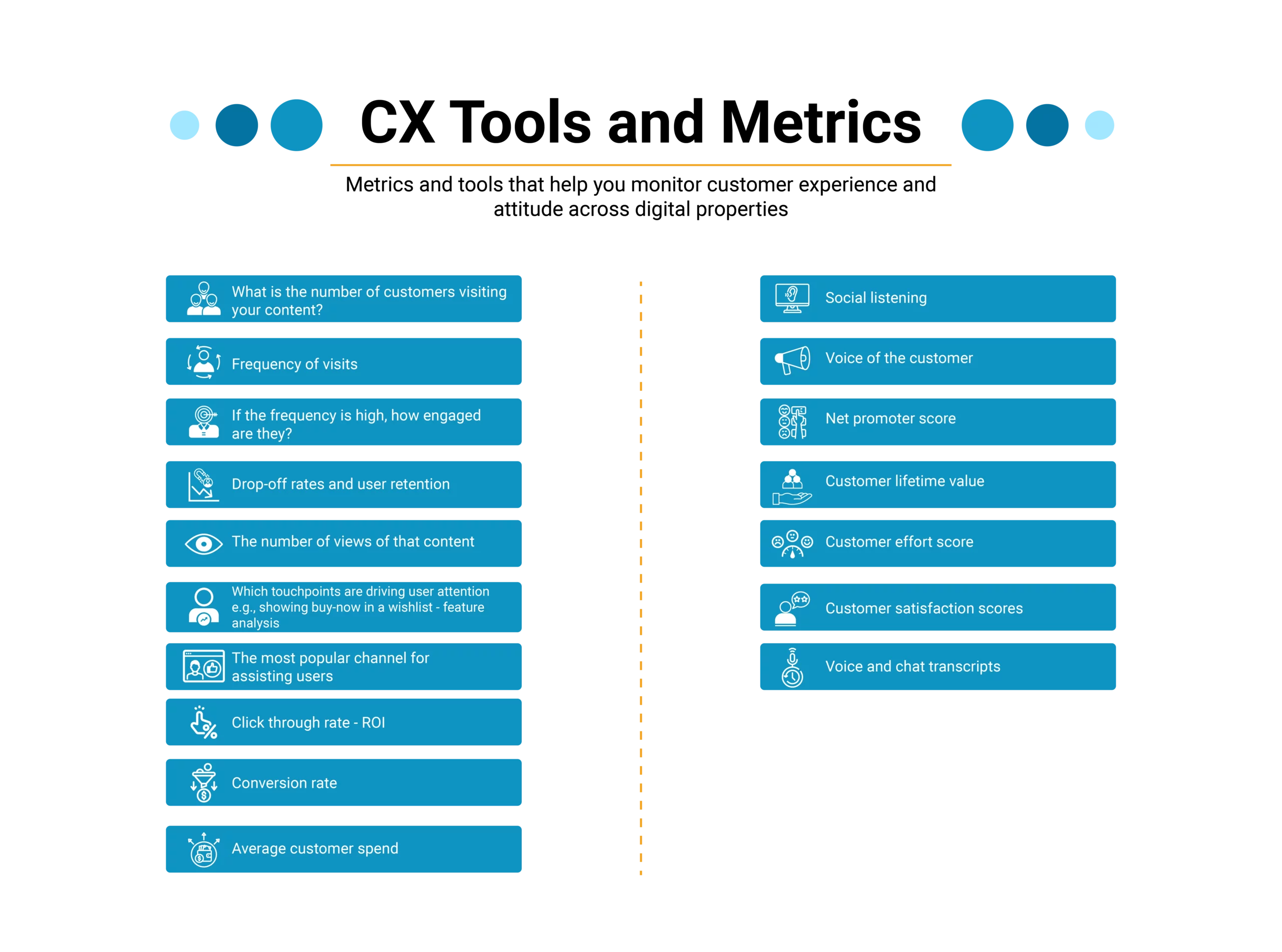
Best Practices to enhance customer experience with data analytics

Businesses rely on data and analytics services to understand customer behavior, anticipate needs, and deliver personalized experiences. 

Below are some best practices to maximize the impact of data analytics on customer experience:

 - Being precise on the end goal:

It is essential to define the end goal for companies to track the right customer experience metrics. For instance, to reach digital maturity, the ultimate objective may be to enhance user engagement on digital platforms and monitor user interaction and all touchpoints, to set up a reliable measurement system. On the other hand, when it comes to the gaming industry, the end goal could be in-app purchases, retention, clicks on ads, and conversions.

- Choosing the right data analytics tool to make a data-driven decision:

Making data-backed decisions can be a challenge without the right data analytics tools. Data collection is key to uncovering customer insights, and there are a variety of methods to do this. From session tracking and event tracking to session replay and heatmaps, you can gain valuable information about user behavior. Utilizing quantitative solutions like Google Analytics in combination with an A/B testing tool, you can form an effective user engagement analytics strategy.

- Optimizing the Page Load Time:

Your website page load time is critical to improving customer experience. Websites that load slowly have a direct correlation with poor search engine rankings.

Some of the ways you can use to optimize page load time include:

-Reduce the size of images 

-Use speed-optimized widgets

-Remove unnecessary files

 Leveraging Data and Analytics Services for Improved Customer Experience

An increasing number of businesses today have become customer-centric for a valid reason.

Whether it’s assessing and catering to specific customer needs or driving personalization, data analytics plays a key role in helping brands enhance customer experience by connecting with users on an emotional level.

It is, therefore, safe to say that customer service and data analytics today go hand-in-hand. Without reliable and accurate customer-centric data, businesses cannot think of making successful and impactful decisions that drive growth and RoI, as well as boost user satisfaction.

Bot Icon
Bot Icon

Tatvic Bot

Explore About Tatvic and Services