

Majority of websites you visit (including this) are gathering data and loading content both in front of you and on the back-end. This is done through third party tags, which are fragments of code that can collect important analytics data for marketing and even provide frameworks for your prospects to write reviews.
As these tags represent much of the page’s weight and are difficult to manage, they can cost a fortune to page load times, user experience, productivity and the overall bottomline.
At Tatvic we’ve observed that if you manage a large enough website:
- The tags are not configured on your website properly
- There are unauthorised tags on your website
- Tags are missing on your platform
- There might be a case of duplicate tags too
Broken tags can lead to:
- Broken paths on your website
- Unauthorised access to your personal data
- Slow page load
- Inaccurate analytics data
It’s of utmost importance that you fix this. But with millions of instances of analytics and a ton of marketing tags on your website, where do you even begin?
Implementing a proper Tag Governance program, with the right solutions, is what you need.
What do we mean by governance?
It’s exactly what you think - Control, authority, direction and oversight. This is what software programmers, developers, analysts want for their tags.
It’s a discipline of data governance, aiming specifically on the data collected by digital marketing, analytics tags and sent over via network requests.
It’s similar to tag management - a software powered discipline. In the way tag management relies on TMS, tag governance requires the use of a governance framework.
What exactly can Tag Governance do?
Tag governance solutions can scan the network for requests sent through the websites and apps in various stages of development in order to point out tagging inaccuracies.
How?
Let’s go through the stages
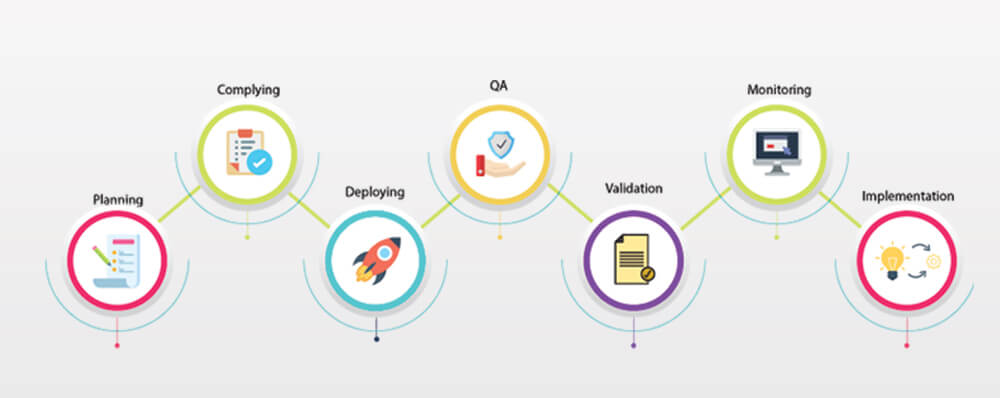
Tag governance solutions move around platforms scanning for network requests sent by the tags deployed. Whenever the data is sent by the tags, the tag governance solution takes the data and deciphers it onto its component values. These values are further checked against those predefined rules to see if they’re right or not
The companies deploying tags to their website or apps should ideally do it in early stages, as early as the development phase.
An ideal tag solution should be able to perform platform, web and app, scans within pre-production environments. Practising this can help your development team resolve the issues before the website or app even goes live.
A tag error is moving away from tagging best practices or firm’s predefined rules. When a tag management identifies any errors it notifies the relevant stakeholders.
Can you do it manually?
Speaking theoretically - you can spot check the network logs in search of tagging errors but this process is highly inefficient and prone to errors. Manual checks are like the casual medicines you take, the benefits are there but they’re insignificant when the side effects hit.
It’s a known practice to adopt automation and avoid cardiac arrest on your tagging deployments.
Afterall…
With the right solutions in place governing tags at scale gets easy. You’ll be able to trust your data, realise the ROI on the spend and do it more efficiently than doing it manually.

Tatvic has developed a solution, DLAT, that encloses all the essential elements of an efficient Tag governance program. This is a cross-team, multi role effort, but will be worth it.
Planning Stage
Instead of your team deploying tags randomly, you need a plan in place. This plan will document your needs - measurement and marketing strategy, giving an overview of what the tag is doing and why.
This planning enables you to map your business questions against the variables that collect the data you need. The same thing applies to tags that add features to your platform - you need to have a plan of when and where to implement them.
Complying
GDPR compliance have incited panic on the data privacy and protection regulations. Instead of protecting data because the authorities told us to, we should be protecting customers data that we’re trying so hard to acquire.
Many firms are excited to see the sort of data they can collect about people, but don’t want the same to happen with them, on an individual level. This kind of mentality can be pretty dangerous for companies not just in terms of legality but as a matter of brand optics and ethics too.
Your tagging plan should know what type of variables you should collect and which you should never collect. Using tag governance solution you can always track the tags and variables for a pattern.
Deploying
A firm that applies tag governance in the initial stages can always fix tag errors before they get expensive.
Developers are not ground-zero - there should be planning that goes into measuring data and marketing strategy before developers even set steps inside the office.
A good product manager will always ensure the developer knows exactly what kind of QA measurement requirements should be met with every feature. So that when the developers create a data plan for implementation, they have specific lines to follow.
Finding problems in the development stages is less risky because the data is a mock data - you’re not working with real customers with real data, just test accounts. You can ensure tags are working as expected and also test for non-compliant data before you go to the production stages and upset your users.
QA
Analysts and Digital Marketers were historically taking it upon themselves to test for tagging errors in a production environment because it was their data that was at stake.
The problem with this process is that tagging errors in production are expensive and difficult to locate. Companies now have responded and have started deploying more engineers to test against measurement requirements during QA
As the final gate before the website moves into the production stages, QA engineers have an important role in testing analytics and other marketing tags.
Tag governance helps them automate the iterative tests so that they can make sure the tags are working well under various environments and conditions. This keeps the website cycle agile, also minimising the broken codes at the same time.
Validation
You’ve just published a new release on the production environment. Now what you want to do is to ensure nothing broke down when you went live.
When making a website live, tagging errors are pretty common. To counter the problem technology stakeholders take it upon themselves to check for errors. It’s an uphill battle. The sheer size of the website makes an audit unrealistic. Moreover, we, as humans, aren’t equipped to mass scan data for errors.
People believe in shortcuts and make exceptions. They aren’t systematic like a program. Even if you have the resources, many people, looking for tagging errors you wouldn’t have bulletproof results versus an automated test.
Replacing manual checking with tag auditing, monitoring and validation can help you test your tag implementations in a much faster and with more accuracy.
Monitoring
What you need to do next is to monitor your tag performance in regular intervals. When the tagging errors assemble, you want to be the first one to know.
Guess what? Websites break down
In an ideal world a functioning website in production would never have any problems. But it’s not an ideal world. Somewhere somehow volatile data makes its way into analytics variable, or an additional tag pops up from an ad-serving tag.
You need to continuously test the production environment to ensure everything falls in place with the tagging plan you create at the beginning.
Tagging errors always come up in the production stages. You can’t have someone monitoring tags, all the time, to ensure smooth running. A tag governance solution can do the heavy lifting for you here, periodically checking your platforms for any tag errors.
Implementation
Digital analytics and marketing technologies present significant value to your firm when implemented properly, of course. These techs rely on tags and tags rely on proper implementation. By using an automated solution to govern tags you can achieve greater accuracy.
So, how many broken tags do you have on your website? Schedule a call with Tatvic rep to get a first hand look at your entire tagging system.


