Hello There!

Lorem ipsum dolor sit amet, consectetur adipiscing elit,

Quick Steps To Recover Deleted Google Analytics Profile/Account

Deleted GA Account

In the last few weeks we have received a no. of queries from Google Analytics (GA) users asking for help in recovering their deleted GA account. Some of them even lost their GA accounts’ log in credentials and now are no longer able to access their “Precious” account. These queries prompted me write down this literature which can provide users guidelines on how to regain the access of deleted GA account.

The issues faced by the users can be classified into three categories.

  1. GA account is accidently deleted  by the user

  2. GA view accidently deleted by user

  3. GA account access is revoked. Here the user looses the ‘Managed User and Edit’ access.

Before I begin let me assure you that if you fall in any of the above category, all is not lost. Your ‘precious’ data is still recoverable. Let me explain in detail how you can recover access to your deleted GA Account/View

If Your Account Is Linked To Adwords

If you are using Google Adwords and if it is linked to your GA account than the process of recovery becomes very easy. You just need to follow simple steps as mentioned below:

  1. Log in to your Adwords account
  2. Go to Adwords Support and ask for help on Google Analytics. Here you can contact Google support via Phone or email
  3. You need to send some information to Google regarding your GA account.
    • GA Account (X) and Web Property (Y) (UA-XXXX-YY)
    • Login Email Address(For the email address experiencing the issue)
    • The web site domain
    • Date of deletion of your Account/Profile
    • GA Account/View Name(Required for Account/View Recovery respectively)
    • In addition to this, you also need your Adwords account number
  4. Send request to Google support team

Google will verify your information and will grant you access within few days, but however there is no guarantee of it.

2. If Your Account Is Not Linked To Adwords

Don’t worry if you are not using Adwords. You need to contact any GACP partner and they will put forward account restoration request on your behalf. Only thing they need from you is information that is mentioned above in Step 3. You can contact GACP partners even if you are using Adwords and wants help from experts.

And it so happens that you are not a GACP partner, we can help you get in touch for the required help. Feel free contact us anytime via email or phone in case you have lost access to your GA account/profile .

But as wise man once said “Prevention Is Always Better Than Cure”, you can always take following steps so that you don’t run in to such trouble:

  • First and foremost, avoid sharing GA access to personal email ids (gmails, yahoos) of company’s employees. Always make sure that you give access to employees on official ids so that your company has full control.

  • Among all the request we got from GA users to regain GA access, one thing that stood out is that all these companies did not revoke the GA access of employees after they left the company. In all such cases someone had deleted the admin access. So always make sure that once any employee leaves your company, you revoke GA access from his/her email id.

  • Share ‘Admin’ access to only those users who actually need it. All other should be given ‘View’ only access.

I hope that this blog post help you in recovering your GA account. But please make sure that you contact Google or GACP partner-

  • Within 14 days from the date of your account deletion, if your GA account has been deleted

  • Within 90 days from the date of View deletion if any of your View is deleted.

Once that time period has lapsed, there are very less chances that you can recover your account. So please act swiftly.

How to make tagging plan for Google Analytics| Google tag manager

tagging plan for ga/gtm

A Tagging plan is a running document that web analysts and implementation teams use to keep track of data collected from respective web analytics tools. When starting some engagement for Google Analytics, many times, I have seen enthusiastic developers firing GA events everywhere and the possible claim being we are tracking everything, but when asked why it is getting tracked, most of them lack proper reason. The standard Google Analytics tracking code works great for basic tracking. And most online businesses can benefit from careful planning and using advanced tags, such as Events or Custom Variables, Custom Dimensions, etc. Documentation in such cases is very very important to keep good control over your web analytics tool.

Why A Good Tagging Plan Is Important?

1. Data Quality & Testing

All your great data analysis & reporting is a function of good data. Good data will enable your team to take fruitful(in our case ROIData Quality generating) data-based decisions. As a web analyst, I see this as a huge win for carrying out other heavy-duty analyses.

In the absence of good documentation support, what tags are firing, and what data points are collected will not be coherent. Often as an analyst, you will not know/remember what tags are firing on what page and eventually, lose the track of data collected and its meaning.

Moreover, with a good tagging plan, you can use tools like Hubscan to make it easy for tools to carry out automated testing of data collection & improve the quality of data collected by Google Analytics/Adobe SiteCatalyst.

2. Smoother Entry To Your Analytics Team

A good tagging plan ensures that every analyst/developer within the organization will know which tag fires on what pages related conditions for it.

This ensures smoother entry for any new analyst. Quite often analyst would have backgrounds in statistics & data analysis theoretically but not how to practically carry out data analysis and what tools or techniques facilitates the same. This sort of plan helps them understand what data is available and how they can make use of this data for their analysis.

3. Agency CollaborationAgency Collaboration

When you have many agencies working for you on different campaigns, having different teams follow one standard practice of data collection is of huge advantage. With a good tagging plan & standard guide, you can just ship it over to the agency that is launching a new site so that the Agency IT team exactly knows what are they supposed to do for different tags.

What Is The Content Of a Good Tagging Plan?

1. Analysis And Regular Reporting

A tagging plan must have background information on what analysis & reporting is required. This way tagging plan can ensure that the required data is being collected in the desired format. A tagging plan must have report samples and current & future analysis planned so that data collection is smooth.

2. Coverage Of Domains, Pages

A good tagging plan must have coverage defined in the form of which all domains a given tagging plan covers & what are pages (URI)are covered for customization. This should be generally in the form of a spreadsheet that has at least the following details.

3. Naming Convention & Standards For Custom Implementation

A standard naming convention helps in ensuring that the data collected is consistent across multiple sites. For e.g. when we work with clients, we have following global rules that we follow:
a. Never use space in passing values
b. Always use lowercase values for variables
c. Always use names with less than 30 characters
d. Always use names rather than IDs (e.g. use product name vs. product id)

When such global rules are set as an analyst, it is easy for a new developer to develop new tags, or a new analyst to start a new analysis project.

4. Configuration Details

Often what & how your data is available in your web analytics tool is decided by some configuration parameters e.g. if you use filters & profiles in Google Analytics, you can see the entire URL of the page vs. the path that you normally see in content reports. Having a centralized repository for knowing the configurations, helps analysts to know in exact detail as to what data he/she is seeing. Generally, to start with Google Analytics it should contain the following:

List of goals & the URLs associated with it
List of profiles & associated filters with a purpose for each filter/profile
Settings summary (different settings for GA)

5. Campaign Tags

Most successful online businesses run a variety of campaigns e.g. AdWords campaigns, email campaigns, and publisher-driven campaigns. Very likely these campaigns would run via different agencies or different internal teams. But data collection happens at a central place i.e. your web analytics tool. To ensure that all the campaigns are tagged properly so that campaign ROI is successfully measured, it is imperative that your tagging plan includes the details as to how different campaigns should be tagged. If you are using Google Analytics, this boils down to how you use the UTM parameters to track different pieces of incoming traffic to your website. A generic policy that we use is as follows:

Medium: This should be the simplest way to describe the general channel being used to draw visitors.
CPC (as a proxy for “paid search”), display, content-text (for contextual text ads), social, email, affiliate, pse (product search engine), video, local
Source: This should be a clear indication of where the traffic originated from. Should not include www. or .com (for consistency)
Campaign: Should describe the common feature(s) of a marketing effort, such as the name of the media campaign, target audience or geography, or the desired outcome
Content: Should provide any additional valuable context that could be used for optimization: ad copy and format, time sent (for social media or email), etc.
Term: Should only be used for paid search, but could include category targeting for display

To automatically append bulk URLs with these parameters, you can use this tool.

Lead Generation form Analysis Guide using Google Analytics

leads in GA

leads in GA

If you are in B2B business the best way to check the performance of your site is to check how many leads it generates. But it is not at all easy for any lead gen sites to convert visitors in to leads and get business. To attract more visitors and generate potential leads you invest heavily in the appearance of your website, hire best developers and use best web site technologies. And still, you find that you are not generating enough leads to grow your business. Its because sometimes business owners ignore one very important part of the web site, which is lead gen forms. Lead gen forms are one of the prime way to grow your business. That’s why as a B2B site owner, it is imperative to check the performance of the lead gen forms.

Pic1

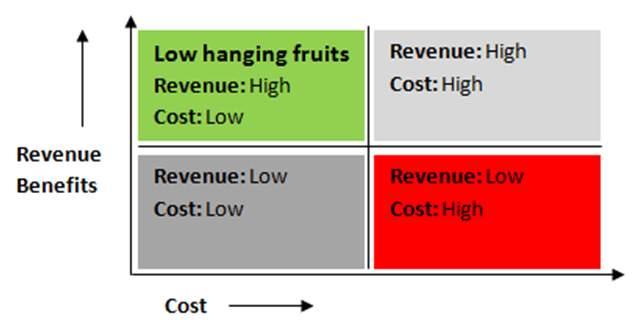
Another reason why it is advisable to check the performance of forms and fix the issues is that leads gen forms are ‘Low hanging fruits’ for the business. ‘Low hanging fruits’ are those opportunities for business where you achieve high ROI without incurring much cost. Lead gens forms belong to this category due to the impact it can cause on the revenue. Benefits derived from optimization of forms can yield great financial benefits to the business as it can directly impact the no. of leads submitted. But question is how to check the performance of the forms using form field analysis.

In this blog post i am sharing with you one interesting case study of the lead gen forms’ analysis that we have carried out for one of our client. I will now try to to lay down the road map in a simple and systematic manner so that it will become easier to understand and execute as well. I hope that this blog post will give you a clear idea on how to check the performance of your lead gen forms.

Objective of the analysis

Our objective behind carrying out this analysis is to identify if there are any anomalies in forms fields or forms positioning that is leading to extra-ordinary drop-off rate during the form filling process. Along with it we also want to understand whether it is required to restructure the order of certain set of forms to have them understandable & easy to navigate to ensure higher form fill up rate.

Data collection/Methodology

To carry out any analysis it is utmost important to gather right data. It was not possible for us to get the data required to carry out this analysis in GA so we implemented advanced tracking mechanism to track all the necessary data points. Implementation of tracking was easier for us as we already had GTM implemented on the client’s site. GTM made all the tagging easier. If you wish to carry out this analysis after reading this blog post, I would strongly suggest you to implement GTM as it will make your dev. team’s life much smoother. (Here is a blog post on why I love GTM)

Now, since GTM was implemented, we customized JavaScript to track different steps (fields of forms) using virtual page views in Google Analytics. Virtual Pageviews get fired whenever user completes any field and moves to the next field or perform any other action. This implementation ensures that we track the interaction of user with each form field.

pic2

Using virtual page views, we built different funnels for each form to learn the number of users starting the funnel & understanding users’ abandonment at different forms fields. We created funnel goal for each form and ensured that funnel steps match the sequence of fields in the form. It ensures that we track the user flow from the first field of the form to form submission. One example of such funnel is shown here. This funnel shows the no. of users abandoned the form from each field. In this figure, the steps of the funnel describes the name of the form fields and no. on the RHS describes no. of users who abandoned the form from each field.

We also collected data of form positioning on different pages, no. of fields in forms, no. of errors occurring while filling the form, no. of visits distracted towards form sidebar links.

At the page level we considered Pageviews, Avg. page load time, avg. time on page and exit rate as primary set of dimensions and metrics which give us clear idea on the form pages.

So this was about what data points needs to be collected to carry out this analysis. I have divided this blog post in to two parts. In the second part, I will explain about how we carried out data analysis and set of action items that has generated from this analysis.

(Part 2: Lead gen form Analysis using Google Analytics)


Bot Icon
Bot Icon

Tatvic Bot

Explore About Tatvic and Services