Hello There!

Lorem ipsum dolor sit amet, consectetur adipiscing elit,

How to use GA URL Query Strings & Parameters to track a Site’s User Behavior?

event action data

One of our client has an e-commerce store which sells mobile phones. We suggested to enable query parameter event tracking so that they can identify what brands of mobile visitors are looking for most.

For all websites which are having non-SEO friendly URLs or URLs which have query parameters to control the website’s content dynamically, it’s important to know how user is navigating through the site.

We can track such parameters with human friendly information in GA interface that can be used in many ways.

How we did it?

In the case of the mobile phone selling website, we uploaded a small javascript file which split query parameter string in array and we tracked required parameters with event tracking.

After we did it for our client, we decided to keep it open for all. Here’s how you can achieve it too:

How you can use it?
  1. You can download the script.
  2. You may need to modify the script for the parameter “name” in switch case to assign with appropriate assignment of “Event Category”, “Event Action”, and “Event Label” values. Additionally you may append multiple parameters in one category/action/label to include more than 3-4 parameters at once. Note: Appropriate group of category, action and label value will be needed for helpful GA reporting.
  3. Include the javascript after your asynchronous GA code and before the </head> tag of your pages.
  4. You’re done!!

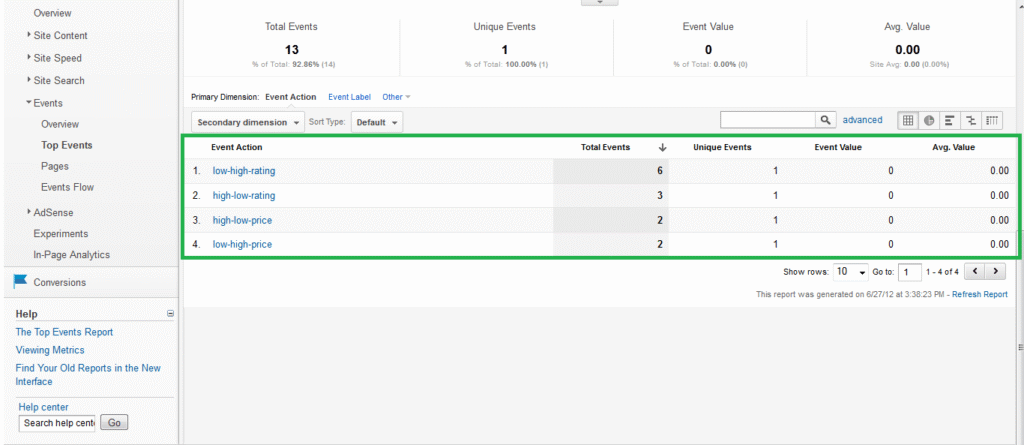
Here are some sample screenshots of the data collected in GA interface for a test on our client’s site.

URLs which were parsed with script are:

  1. products.html?category=mobile&sort=high-low-rating&type=os
  2. products.html?category=mobile&sort=low-high-rating&brand=samsung
  3. products.html?category=mobile&sort=high-low-rating&brand=sony


1. Event category data

2. Event Action Data

3. Event Label Data

With the help of additional enhancement in query parameter tracking, we were able to identify what kind of phones users are looking for. Additionally we got to know what brands and price range user is looking for over other phone categories.

Let us know in comments how this script helped you.


Shopping Cart Value Vs. Page Depth in Google Analytics

Page depth vs Cartvalue

I have been quite interested in machine learning and how the data visualization is expanding using different machine learning languages like R & Octave.

In a recent e-commerce project, one of the needs was to understand how people add & remove product to the cart. The more important question is how often & when the engagement with the site leads to the increase in the cart value.

To understand this we had added to the custom variable which contained cart value that gets fire on each page. That seems like below:

var _gaq = _gaq || [];
_gaq.push([‘_setCustomVar’,
2, // This custom var is set to slot #1. Required parameter.
‘cartvalue’, // The name of the custom variable. Required parameter.
‘0’, // Sets the value of ‘Cart’ depending on status. Required parameter.
2 // Sets the scope to page-level. Optional parameter.
]);

Above code ensure that a custom variable will fire a call on every page containing value of the shopping cart at a given page.

And we had page depth which is a pseudo indicator of how people progress towards the site.

To understand the relationship between cart value & the page depth, we extracted following data i.e. what is the value of page depth & cart value for different visits.

The data looked like below:


Relationship between cart value & the page depth

(note: we are using R & ggplot2 to analyse the data)

If we plot the chart with page depth as horizontal axis & cart value as verticle axis, It summarizes that after page depth is  20, cart value increases but after 30 till 40, the rate of increases is significantly faster. Also if you notice the brown colored cover around the line is an indicator of variability at that point in axis.

Page depth vs Cartvalue

Interestingly when you plot this chart along the actual revenue vs. page depth chart, you start seeing the difference.  Addition to the cart is a happening after 20 page depth but that doesn’t seem to be translating to the actual revenue.

Page depth vs Cartvalue 2

So is it to conclude that lot of products are getting added to cart after specific amount of pages being viewed but that doesn’t get translated into revenue?

I’d differ here as I unearthed more  relationship of pagedepth & visits as depicted below:


Page depth vs Cartvalue

The drop if you see from 5th Page depth to 20th is significant but that is not as fast a drop that you would see in revenue when you do this. This means that the visitors that are between 10-30th page depth are best of your visitors who are great at getting themselves converting from browser to buyer.

Bot Icon
Bot Icon

Tatvic Bot

Explore About Tatvic and Services