Hello There!

Lorem ipsum dolor sit amet, consectetur adipiscing elit,

Fresh Look at Multi Channel Funnels of Google Analytics Version 5

Multi Channel Funnel Path Length Report

It’s been a few months since Google Analytics got a makeover and everyone’s enjoying the new look with improved usability. There are a lot of new and improved features we’ve had since then.

We couldn’t resist writing about the latest feature.

Multi-Channel Funnels

As a web analytics consulting firm, it had been imperative for us to be able to communicate how different acquisition sources interact with each other and how to look at them in a sequencing view of them.

This is the very latest feature added by Google in GA version 5. Till now, you knew which of your marketing channels are contributing to the total conversions, with numbers. Google Analytics showed you only the last traffic source, which contributed to sales. But it’s not the case every time. The customers might have seen an ad on Facebook or Google, clicked on it but didn’t buy. After 15 days, they visited the website directly and purchased. The credit for conversion will go to Direct visits. But that’s not the case now. With Multichannel funnels in Google Analytics, you’ll be able to know which was the initial source of visitors for your final conversion. It shows you how people traveled through your different marketing channels to make purchases. It’s an eye-opener for marketers who spend a lot on marketing campaigns. They’ll know which marketing channels are actually contributing to the sales.
The multichannel funnel provides four important reports, which give great insights to help you optimize marketing campaigns.

Here are the Reports this feature provides:

1. Path length Report:
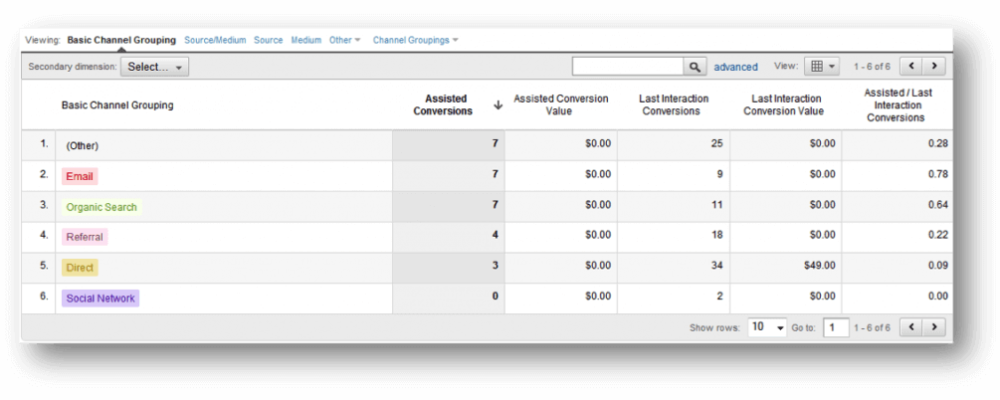
Multi Channel Funnel Path Length Report

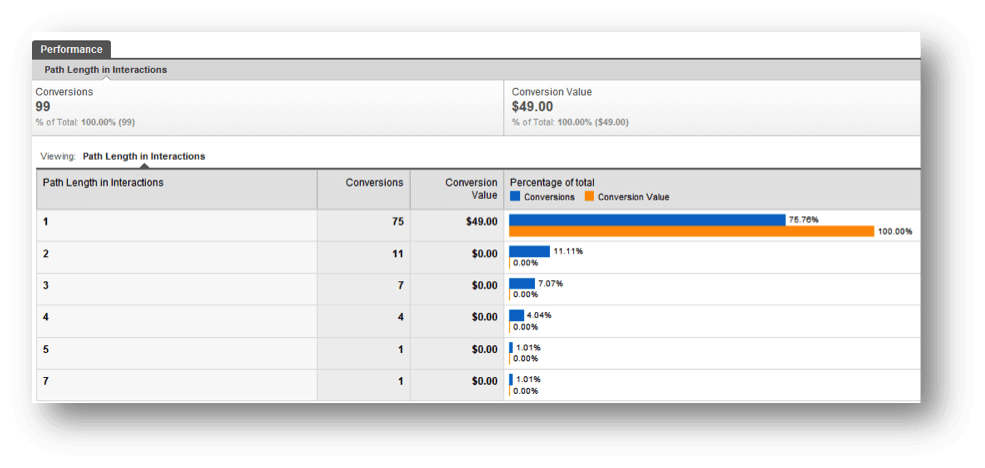
This report shows you a number of channel interactions your customers had before making the purchase. You can know whether the path with 2 or 3-channel interactions is working better for you.

2. Time Lag Report:
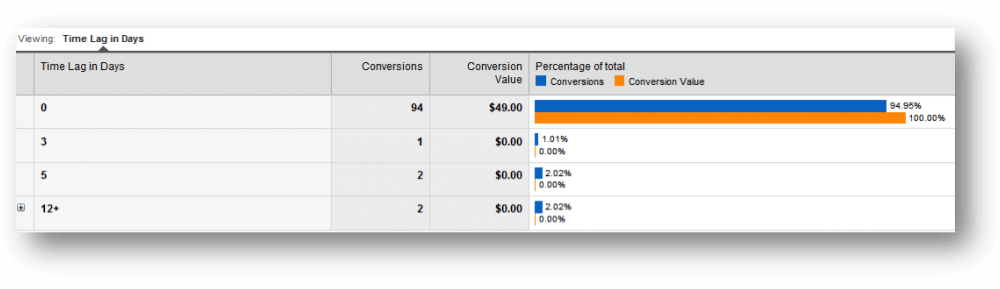
The Time Lag report looks similar to the Path length report, but this one tells you how long your customers take from the first channel interaction to conversion.

3. Top Path Report
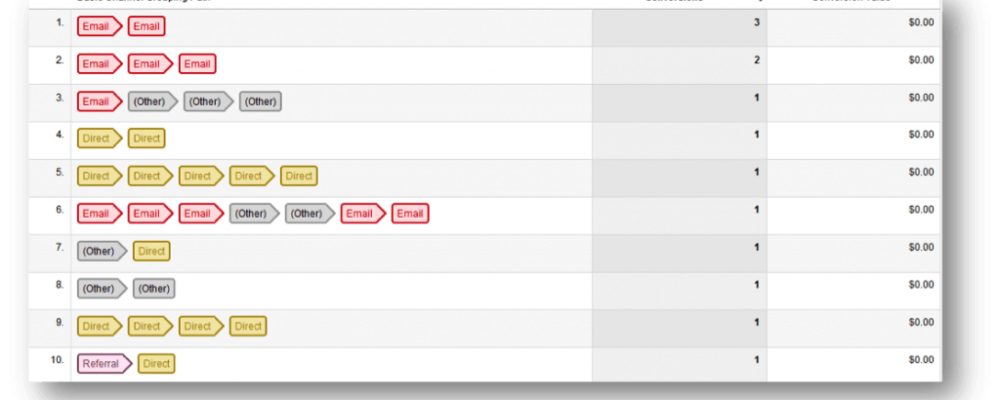
Multi Channel Funnel Top Path Report

It gives you the top routes your customers took before conversion. It also tells you how your channels and in which order, are converted for you.

4. Assisted Conversions Report
This one tells you an additional number of conversions your channel is involved in.

So this was about Multi-Channel Funnels. Here are other important features that are around since the new look. It’s now easier to get important analyses of your business.

Like this, people at Google Analytics keep adding new features to make our life more and simpler and get better business insights. Waiting eagerly for more exciting additions like this.

Google Analytics v5 Dashboards

Email Marketing Dashboard

It’s been a long time since we’ve seen the new look of Google Analytics, called “version 5″. There’ve been a lot of changes since it was introduced in Feb 2011.

While working with many different clients, there are some features we liked a lot.

Let’s see these important changes, which eased the way we look at our data in Google Analytics.

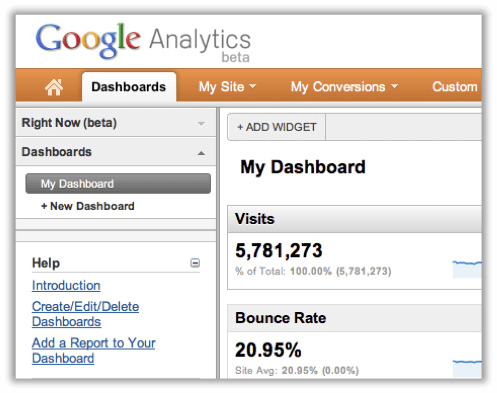
“Dashboard” is now “Dashboards”

In the new version, we can see “Dashboards” as a tab. We can now have more than one Dashboard in Google Analytics. You’re now allowed to create 20 such dashboards with a maximum of 12 widgets per dashboard. You can easily add/edit/delete widgets.

Widgets
Google Analytics Dashboard Widgets

You can now have 12 widgets per dashboard. Plus, it’s easy now. Previously, to add any widget to your dashboard, you had to go to a particular report, let’s say “Traffic Sources”. You first go to the Traffic sources report and then click on a small “Add to Dashboard” button and it added that widget to your dashboard. Now, just click on “Add widget” in the header of your dashboards, and it provides an easy way to create your fully customizable widget. You can create 4 types of widgets now. Metric, Pie chart, Timeline, and Table.

New fresh look

The ease of use has increased in v5. Here are things we liked a lot,

  • With the new fresh look, the Google team adds a lot of usability to it. Especially, the new dashboard is much more user-friendly than the older one.
  • Add any widget from any of your dashboards.
Add widgets easily
Add widgets easily
  • It’s now more flexible. You can drag and drop your widgets anywhere you want. You can now choose how your dashboard should look.
Google Analytics - Drag and drop widgets
  • Click on the Settings button on any widget to edit/delete it. Very swift!
Google Analytics Visits Widget
  • You can rename your dashboard with a click.
Google Analytics Rename Dashboard
  • The “timeline” which was a default in the dashboard, is not compulsory. The new dashboard is cool! You can customize it the way your want. E.g., create a dashboard with only “Pie charts” of your marketing campaigns or a dashboard with only timelines of your different traffic sources. No mandatory sections, all yours!
Google Analytics Dashboard Timeline
  • The right sidebar is sometimes annoying and takes up unnecessary space. Now you can remove it with one click. Your dashboard is spread on the entire screen, reducing destruction.
Google Analytics Dashboard Righside
Google Analytics Dashboard Overview

Overall, The new Dashboard in Google Analytics 5 is now more smooth, good-looking, and easy to use.

Check out these sample Dashboards we’ve created for Email marketing and PPC campaigns.

Google Analytics Dashboard - Email Marketing

Email Marketing Dashboard

This dashboard shows the performance of the Email campaigns. We’ve added these customized widgets in this dashboard:

Email Visits Shows a number of visits came from mailer campaigns.

Effective landing pages indicate the performance of the landing page with respect to clicks and unique purchases; it’s helpful in deciding which landing page is more effective in mailer campaigns.

Most Visited Countries shows the most visited countries by unique purchases. It’s useful to understand in which geographic location you’re campaign is more successful.

Day on Purchased shows the information on which date users purchased the most, out of people visited by mailers. It helps in analyzing which days are generating more/fewer revenues.

PPC Dashboard

We’ve created this google analytics dashboard for the pay-per-click campaign.

Pay Per Click Dashboard

We’ve added the below Performance indicators (widgets) in the PPC dashboard to measure the effectiveness of the PPC campaign.

Unique purchases by a country shows in which geographic location the campaign is generating the highest revenues. As you can see in the above screenshot, people in the US do most of the purchases. These are the people who click on a PPC ad and buy.

Ad groups with CTR & Clicks indicate the performance of ad groups in terms of how many clicks and CTRs are generated by ad those groups.

Campaign with the clicks & revenue gives the performance of the campaign in terms of clicks and revenue.

CPC vs. RPC is a timeline showing a comparison between cost per click and revenue per click.

Benefits of creating customized Dashboards

1 ) Google Analytics Dashboards are very useful and handy for marketers, let’s say you’ve created 4 to 5 different kinds of dashboards to measure the performance of marketing campaigns. It will help you to get an idea about the performance of your marketing campaigns without looking much into detailed data.

2) Google Analytics Dashboards now have a more powerful graphical representation that can be easily understood by the top management team or by any non-technical person.

With this, we’d love to know from you how you are taking advantage of this cool and completely customizable dashboard. Please share your experiences in the comments.

Bot Icon
Bot Icon

Tatvic Bot

Explore About Tatvic and Services