Since the launch of Google Analytics API, we hear many applications and mashups being built around it using it in a multitude of ways.
One such usage of Google Analytics API is Dynamic Funnel Dashboard based on Tatvic Excel Add-in. It uses the Previous and Next page functions of API.
Google Analytics Funnels - Why one would require this Analysis?
- This Analysis Dashboard generates dynamic funnels in MS Excel on the fly even if you haven’t set any funnel in Google Analytics admin settings.
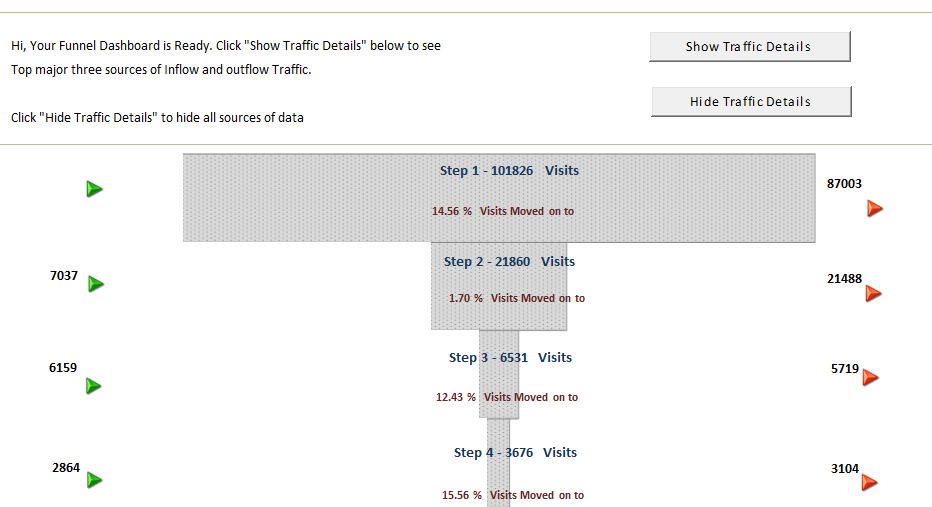
- The Dynamic Funnel Dashboard provides visits to pages that visitors have traversed in the form of a funnel.
- Moreover, it also provides popular sources of inflow and outflow traffic to any given step in the funnel.
- A brilliant addition to this entire integration is the ability to apply Advance Segmentation to funnel data.
To illustrate how useful this can be, here’s a screenshot showing the dynamic funnels in action:


You can simply punch in the input parameters as shown in the screenshot after Registering for Tatvic Google Analytics Excel Add-in.
After defining the profiles, dates, & path users just need to hit refresh and wait for data to get collected.
Have fun, update data of your e-commerce shopping funnel, or identify visitor movements on articles of your Content site. We are all ears to your Suggestions, comments & feedback : )