

 About Durga Chouhan
Before we dig deeper into how data analytics help with insights, let us first understand ‘What is data analytics?’
Data analytics translates raw data into usable information to act upon. It is the process of examining, exploring and analyzing huge data sets to identify trends, correlations and patterns to unleash insights and make valuable data-backed predictions for your business to make informed decisions. Data may be historical or fresh extracted from an ad campaign, a marketing initiative, first-party data or third-party data etc.
Data can give you insights like what time of the day your sales/conversions spike, changes in traffic or channel from which the change happened, the effectiveness of a particular ad campaign, and understanding the personalized needs of customers. Today every industry and every department in your organization, be it marketing, human resources, information technology, supply chain, etc., uses data analytics for business decision-making and strategic thinking.
Data analytics services also promote collaboration and connection between multiple departments of your company.
What are the benefits of GA4 Data Analytics to help Business Decision Making?
Data analytics services play a pivotal role in empowering businesses to make informed, data-driven decisions, and Google Analytics 4 (GA4) significantly enhances this capability. Here’s how:
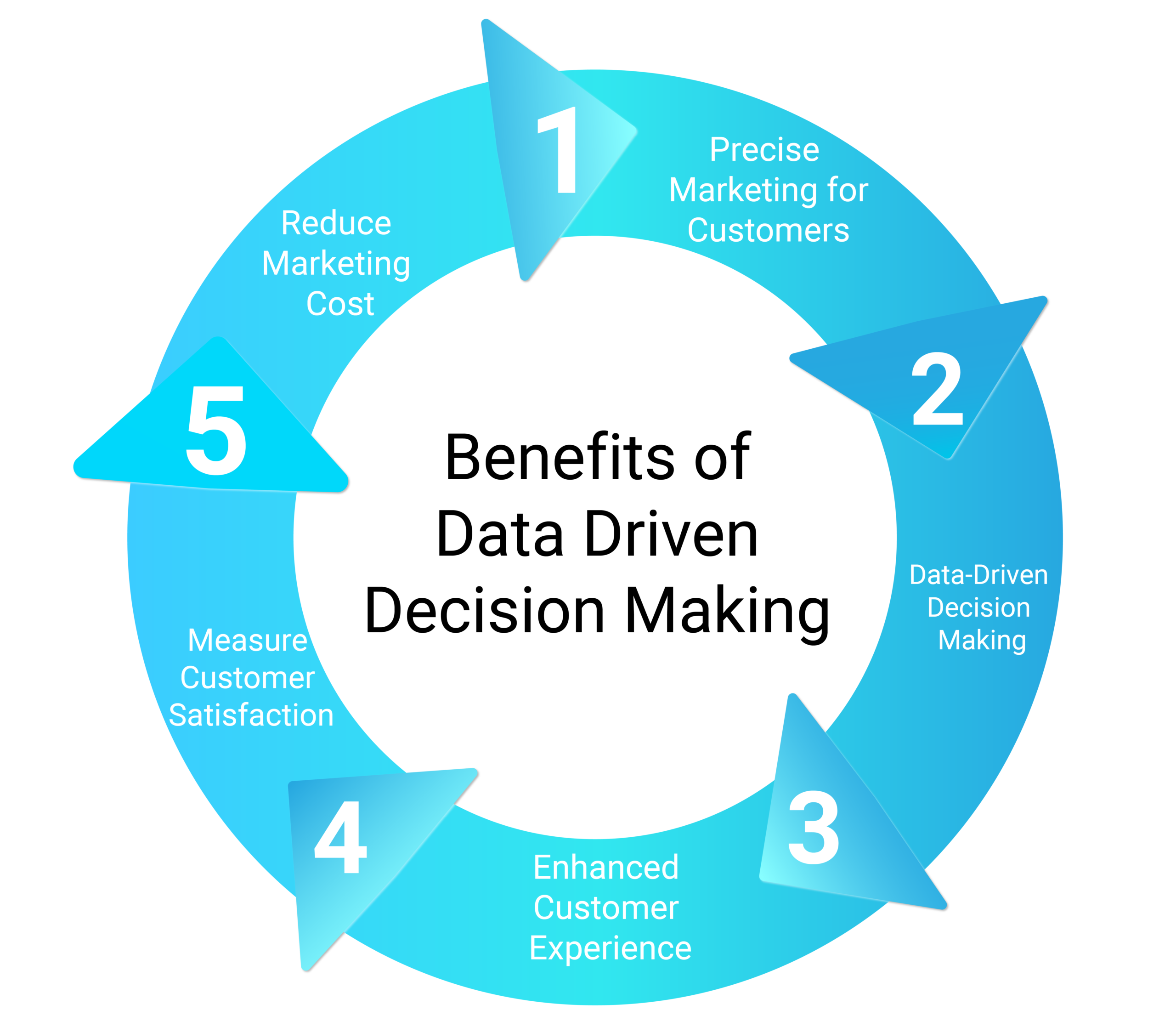
1. Precise Marketing for Customers
Become acquainted with your target audience and their customized needs to generate personalized campaigns for them.
2. Data-Driven Decision Making
As mentioned in the previous point, businesses can understand the needs of their audience and improve their decisions based on valuable insights by leveraging effective data analytics solutions.
3. Enhanced Customer Experience
Data analytics improves customer experience. Provides in-depth insights on what your customer wants and behaves with your business. This helps you serve your customers better knowing their preferences and what they expect from your website/business. You will also be able to track customer interactions so that if an issue is faced during a particular interaction, it can be easily addressed.
4. Measure Customer Satisfaction
Analyzing customer feedback, and survey responses can help your team understand where your business needs improvement. This can also help you with churn and measuring customer satisfaction.
5. Reduce Marketing Cost
Identifying collected data for cost-cutting areas can help you reduce extra costs for your business. Be it an ineffective marketing strategy, a product that is not generating any revenue, etc. This information can help you increase revenue and outwit competitors.
6. Data-driven culture
‘Data-driven’ culture is the new buzzword these days. Ever heard ‘Companies should follow a data-driven culture as a part of their growth strategy’?
Let us better understand, why?
A data-driven culture or a data-driven organization is one which is built on powerful numbers, data, and analytics. The data-driven organization is where data is being completely leveraged and embraced for commercial growth. These companies collect as much data as they can and benefit from the same deriving useful insights. They utilize meaningful data behind every decision they make from minor to their investment plans and which direction they should take for their business.
Organizations must effectively work towards a common goal of constructing a cultural framework where every member of the company revolves around data for discovering new patterns, data-driven use cases, experimenting with analytical solutions, management of quality of data, etc. in order to make efficient decisions.
Let’s look at a few advantages of a data-driven approach for your business.
a) Continuous growth
Data-driven insights empower companies to make consistently intelligent decisions leading to long-term success. Without a systematic approach to data, you cannot trust your intuition or opinions to make decisions and feel confident about them whereas a data-backed decision will always
b) New opportunities
A data-driven strategy ensures your marketing efforts are strong and are based on rational facts. It will help you with new products, marketing initiatives, services, etc. by investigating historical data and understanding previous performances and what you should change in order to compete and improve.
c) Efficient operations
Every member of the company is aligned on making data the foundation of its business decision-making, digging out best practices, and highlighting scenarios in order to unify all departments and operations.
d) Identify your business requirements
Just making data available will not help you reach your desired goal. You may need to understand what data analytics tools and system integrations are required to make full use of the available pool of data. A drop in connectivity might lead to reduced operational efficiency and indirectly it will affect your decision-making. Understanding what data is available and integrating it in a systematic manner will help your business thrive.
Data alone is not enough to provide you with valuable information, you need to understand data for successful guidance in your growth and business strategies.
How can GA4 help your business with data-driven insights?
Data analytics solutions like GA4 empower businesses to leverage intelligent insights that drive smarter decisions and future-ready strategies. Here’s how:
1. Predictive metrics -
There are advanced functionalities within GA4 that can help you with additional analysis to fully understand your potential future actions:
-
Purchase probability:
The probability that a user active in the previous 28 days will log a conversion event in the next seven days
-
Churn probability:
The probability that a user action on your site or app or site within the last seven days will not be active within the next seven days
-
Revenue prediction:
Revenue expected from all purchase conversions within the next 28 days from a user action in the last 28 days
These probability metrics will help your business target ads and remarket ads accordingly to increase ROI.
2. Machine Learning capabilities
One of the important features of GA4 for better data analysis is its capability in machine learning and artificial intelligence which can help in predicting customer behavior and probability of conversion or sales, predict the probability of customer churn so that you can better target them to retain, find anomalies in any report, identify unique trends or patterns in data completely based on ML algorithms.
3. Data-driven attribution
GA4 allows you to set your default attribution model as data-driven which then uses machine learning algorithms to assign credit to the customer journeys. DDA helps with extensive information on marketing campaigns, channels etc. giving a wide view of which marketing initiatives and platforms work the best in order to bring customers for sales and conversions. Investment becomes easy for marketers and companies after looking at results through multiple channels.
4. Big Query
Big Query allows you hit-by-hit data analysis for your business by querying large data very quickly. Integration of this tool enables rapid and efficient data analysis. GA4 offers a free integration whereas, in GA, this was available only in paid versions.
With your GA4 data stored in Big Query, you can easily share your data to CRM or ERP software to store and make use of all data in one place.
When data lies in one place altogether, this can open the possibility of using machine learning to perform user journey mapping, statistical modeling, and forecasting conversions or sales.
5. Improved marketing insights
GA4’s advanced capabilities provide marketers with a complete look into their customer’s journey. It not only tracks campaigns but also accurately measures conversions. With the help of artificial intelligence and machine learning, it collects data and delivers intelligent insights for growth :
- You can visualize your funnels in GA4 by adding customized steps
- Understand drop-offs in order to improve sales/conversions
- Remarket abandoned customers by creating segments and creating audiences for retargeting
- Know where your users exactly come from
GA4 offers a new way of collecting, processing, modeling, and analyzing data. The number of features it has makes it easy for businesses to interpret and make crucial decisions about their marketing strategies. GA4’s most talked about feature is “Data-Driven Attribution” which gives deeper insights into your customer journeys taking into account every marketing effort and platform.
Whether you’re looking for actionable insights on your marketing efforts or how your customers are behaving on your website, GA4 is the ultimate data analytics tool for all kinds of data analytics.

 Defining KPIs:
  Set up tracking correctly:
  Configuration settings:
  Adequate filters and segments:
 Create useful custom dimensions and matrices:
  Follow data privacy regulations:
  Leveraging machine learning for Anomaly:
  Periodic Audit: