Hello There!

Lorem ipsum dolor sit amet, consectetur adipiscing elit,

Programmatic Ad Revenue: Why Publishers Lose It Silently

Why Media Publishers Are Losing Programmatic Ad Revenue Without Knowing It

Every publisher knows that programmatic ad revenue is the engine of their digital business. Most publishers also know that CPMs fluctuate, fill rates vary, and some revenue loss is just part of how the ecosystem works. What far fewer publishers know is how much of that lost programmatic ad revenue is not a market problem. It is a data problem. One that is entirely preventable.

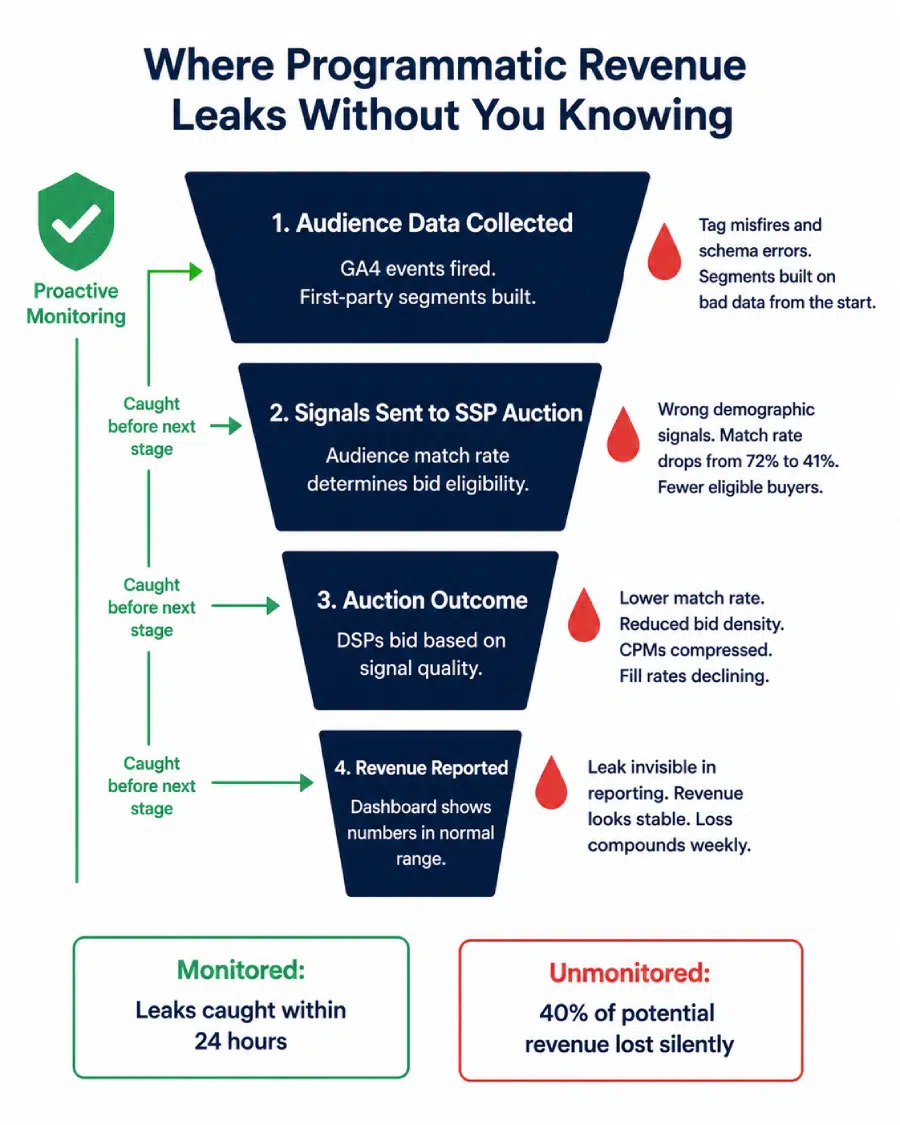
The mechanics of programmatic advertising are unforgiving when it comes to data quality. An advertiser’s DSP decides what to bid on your inventory based on the audience signals your pages send. Those signals come from your first-party data, your GA4 setup, your audience collection tags, and the behavioral data your analytics stack captures.

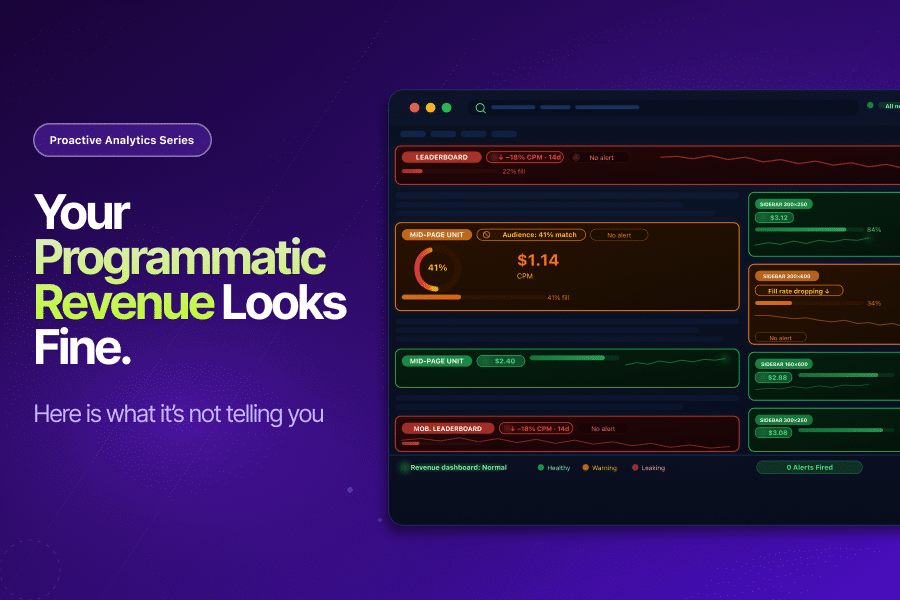
When any part of that data chain breaks silently, your inventory looks less valuable than it actually is. CPMs drop. Fill rates decline. And your revenue dashboard shows numbers that look normal, because they are only slightly lower than they were last week, and slightly lower the week before that.

By the time anyone notices, weeks of compressed programmatic ad revenue have already been lost.

The Revenue Stakes Are Too High to Accept Passive Monitoring

The numbers put this in context.

According to the IAB/PwC Internet Advertising Revenue Report for Full Year 2025, the digital advertising industry reached nearly $300 billion in revenue in 2025, a 13.9% year-over-year increase and the highest level in the report’s 30-year history. Programmatic is the dominant mechanism through which publishers access this market.

eMarketer forecasts that programmatic ad sales on properties owned by digital publishers will reach $22.69 billion by 2027. For most publishers, programmatic ad revenue is not a secondary revenue stream. It is the primary one.

At this scale, even a silent 10% compression in effective CPMs across a publisher’s inventory translates to significant annual revenue loss. The problem is that a 10% CPM compression over four weeks rarely looks like a crisis in a dashboard. It looks like normal market volatility. It gets attributed to seasonal slowdowns or advertiser budget cycles. The data problem underneath it goes unfound.

How Data Failures Silently Drain Programmatic Ad Revenue

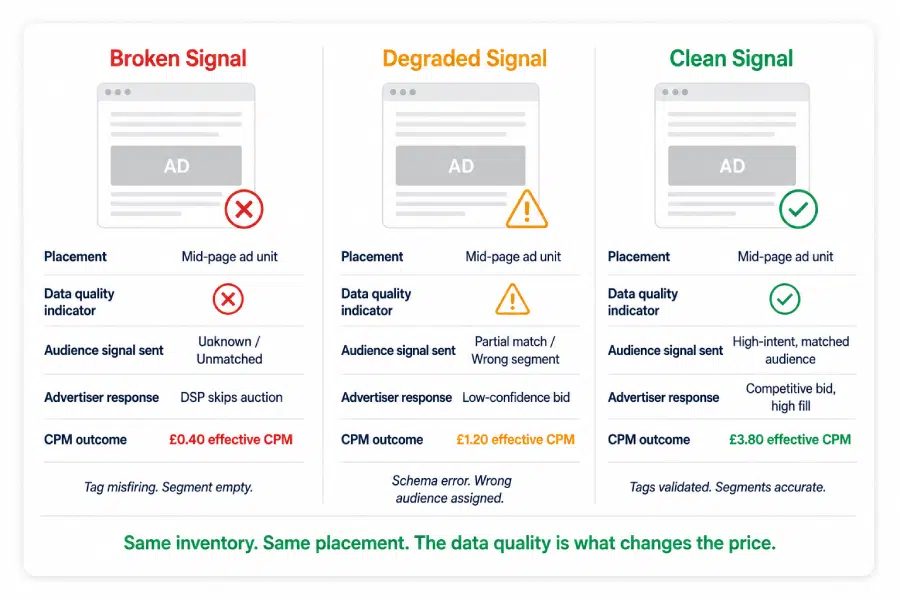
Programmatic ad revenue does not just depend on traffic volume. It depends on the quality and accuracy of the signals your inventory sends to advertisers. Those signals come from your data stack. When the data stack has problems, the signals degrade, and the programmatic revenue follows.

Here is how that happens in practice:

Audience Segment Tags Misfiring

Your first-party audience data is one of the primary signals that determines what advertisers bid for your inventory. When tags misfire, send incorrect values, or stop firing altogether, they feed bad data into your audience segmentation - causing teams to build targeting strategies on inaccurate signals.

An advertiser looking to reach 25-to-34-year-old users with purchasing intent does not lower their bid. Advertisers simply stop bidding on your inventory because the signal that should have identified their target audience never reached them correctly. The auction happens without them. Your programmatic ad revenue reflects that absence without ever explaining it.

GA4 Data Collection Errors Corrupting Audience Quality

GA4 is increasingly the source layer for first-party audience data in publisher environments. Configuration errors in GA4, parameter mismatches, and event schema issues do not just corrupt your analytics reports. They corrupt the behavioral signals that flow from GA4 into your audience building and monetisation stack.

A page category parameter passing incorrect values will cause users to be placed in the wrong content segments. Users in incorrect segments attract the wrong advertisers at lower CPMs. The programmatic ad revenue impact is real, but it is invisible in standard reporting because the impressions are still being served and the revenue is still coming in. Just at a lower rate than it should be.

CPM Floor Price Anomalies Going Undetected

Publishers set floor prices to protect the value of their inventory. When teams misconfigure floor prices - setting them too high and reducing fill rates, or too low and compressing CPMs - programmatic ad revenue takes a direct hit. In reactive monitoring environments, teams often uncover these issues during monthly revenue reviews instead of catching them in real time.Weeks of suboptimal floor pricing pass before anyone investigates.

Viewability Drops Eroding Advertiser Confidence

Advertisers increasingly buy on viewability standards. When a technical change, a layout update, or a lazy-loading configuration causes viewability to drop below buyer thresholds, affected placements start losing bid density. CPMs fall. Some buyers apply exclusions. The programmatic ad revenue impact compounds over time as the inventory’s perceived quality deteriorates in DSP algorithms.
Why Reactive Monitoring Is Not Enough for Programmatic Publishers

Most publishers monitor their programmatic ad revenue reactively. They review weekly revenue reports, compare CPMs against prior periods, and investigate anomalies when someone flags a number that looks wrong.

The problem is that programmatic revenue problems rarely look obviously wrong in aggregate reporting. A 12% drop in CPMs across mobile placements over two weeks, caused by an audience tag misconfiguration, will be visible in detailed SSP reporting but easily explained away as mobile market seasonality. A fill rate decline from 78% to 64% over three weeks, caused by a floor price error introduced during a CMS update, looks like normal programmatic variance until it doesn’t.

This is the same pattern we identified in the context of proactive analytics across marketing analytics. Data problems look like market problems until someone investigates the data. By then, the revenue has already been lost.
The Data Quality Connection

The IAB’s State of Data report found that 71% of brands, agencies, and publishers are currently growing or planning to grow their first-party data sets, nearly double the rate from two years earlier. The shift toward first-party data is accelerating because the industry recognizes that audience signal quality is the primary driver of programmatic ad revenue in a privacy-first world.

But collecting more first-party data does not help if the collection infrastructure is unreliable. More data collected incorrectly is more incorrect audience signals sent to the programmatic ecosystem. The investment in first-party data strategy only returns value when the data quality layer beneath it is sound.

What Proactive Monitoring Looks Like for Programmatic Publishers

Protecting programmatic ad revenue requires monitoring at the data layer, not just at the revenue reporting layer. Waiting for revenue reports to surface a problem is waiting for the 100x cost stage, as covered in Tatvic’s proactive analytics series.

Here is what proactive monitoring looks like specifically for publisher programmatic environments:

Anomaly detection on CPM and fill rate by placement, device, and content category.

Rather than monitoring aggregate programmatic ad revenue, set intelligent baselines for CPMs and fill rates at the segment level: by device type, by content category, by ad placement. When mobile CPMs drop 15% over 48 hours without a corresponding market-wide shift, that is an anomaly worth investigating immediately. Tatvic’s anomaly detection solution applies this logic to publisher-specific KPIs, not just marketing metrics.

Continuous validation of audience segment tags.

The tags that collect first-party audience data need the same continuous validation as conversion tags in an e-commerce environment.

  • Are they firing on the right pages?
  • Are they passing the correct values?
  • Are they populating the intended segments?

Data sanity automation catches parameter-level errors in audience collection before they corrupt segment quality and suppress CPMs.

GTM health monitoring for publisher environments.

Publisher sites typically run complex GTM containers with audience tags, analytics tags, ad tech tags, and consent management scripts all coexisting. Tag conflicts, ghost tags, and misconfigured triggers in publisher GTM containers directly affect the accuracy of audience data collection. Continuous GTM health monitoring catches these issues as they develop, not during an annual ad tech audit.

An alert playbook specific to programmatic revenue signals.

As covered in the analytics alerting system blog, an alert without a named owner and a defined response is just noise. For publishers, P1 programmatic alerts (significant CPM drop, fill rate collapse, audience match rate decline) need a response workflow that connects the analytics team, the ad operations team, and the technical team quickly enough to limit revenue loss.

Is Your Programmatic Revenue Being Protected?

Before accepting the next CPM dip as normal market variance, run through this:

  • Are audience segment tags validated continuously or only audited periodically?
  • Is CPM monitored by placement and device type with intelligent anomaly detection?
  • Does your fill rate tracking account for expected baselines, or is it compared against a single prior period?
  • Has your GTM container been reviewed for audience collection accuracy in the last 90 days?
  • When a programmatic revenue anomaly is flagged, is there a named owner and a defined response time?
  • Are your GA4-sourced audience segments reconciled against SSP audience match rates regularly?
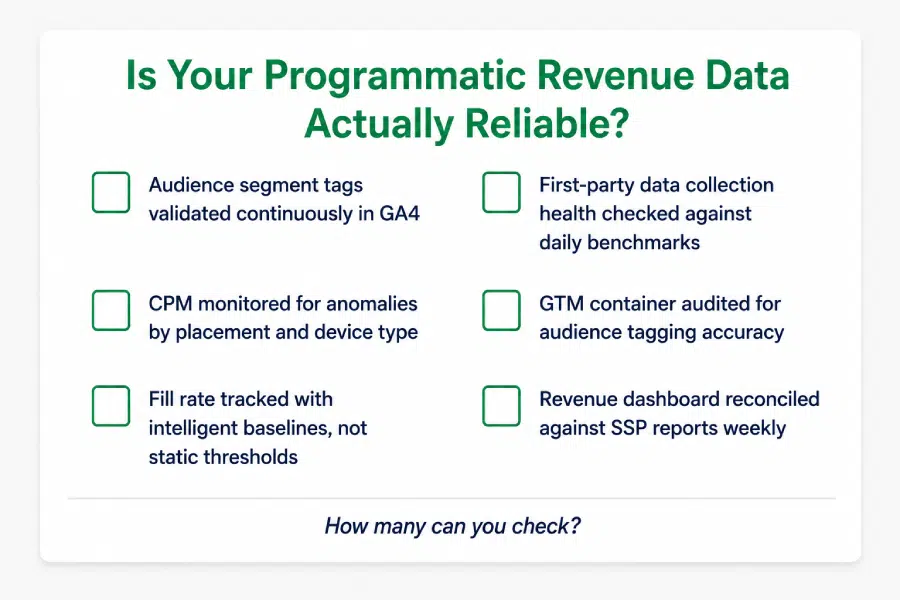
If two or more of these are not in place, your programmatic ad revenue is being managed reactively. Market conditions will always fluctuate. Data quality issues should not be allowed to compound on top of them.

The Takeaway

Programmatic ad revenue at scale is a data quality problem as much as it is a market problem. The signals your inventory sends to DSPs, the audience data feeding your first-party segments, and the behavioral data your analytics stack collects are all points where silent failures reduce what advertisers bid for your inventory.

Proactive monitoring does not change the market.But it ensures teams investigate genuine market shifts - not data failures that slipped through, went unnoticed for 24 hours, and quietly compressed programmatic ad revenue for weeks.

In a market that reached nearly $300 billion in 2025 and is still growing, the publishers who protect their programmatic revenue most effectively will not necessarily be the ones with the most traffic. They will be the ones whose data is most reliably telling advertisers the truth about their audiences.

Want to understand where your programmatic ad revenue may be leaking silently? Tatvic’s team can audit your GA4 setup, audience collection tags, and GTM configuration to identify exactly where data quality issues are suppressing your CPMs and fill rates. Schedule a call with Tatvic’s experts today.

AI Analytics: Why Bad Data Gets Worse When AI Gets Involved

When AI Makes Bad Data More Dangerous: The Case for Data Quality AI Analytics

Every blog in this Proactive Analytics series has built toward this point.

We’ve covered why reactive monitoring fails businesses in Proactive Analytics, how to extend your detection layer in Anomaly Detection in GA4, and how to build alerts that actually drive action in Building an Analytics Alerting System. The thread running through all of it has been simple: bad data caught late costs far more than bad data caught early.

But there’s a new dimension to that argument now. One that makes data quality AI analytics not just a best practice but a business survival question.

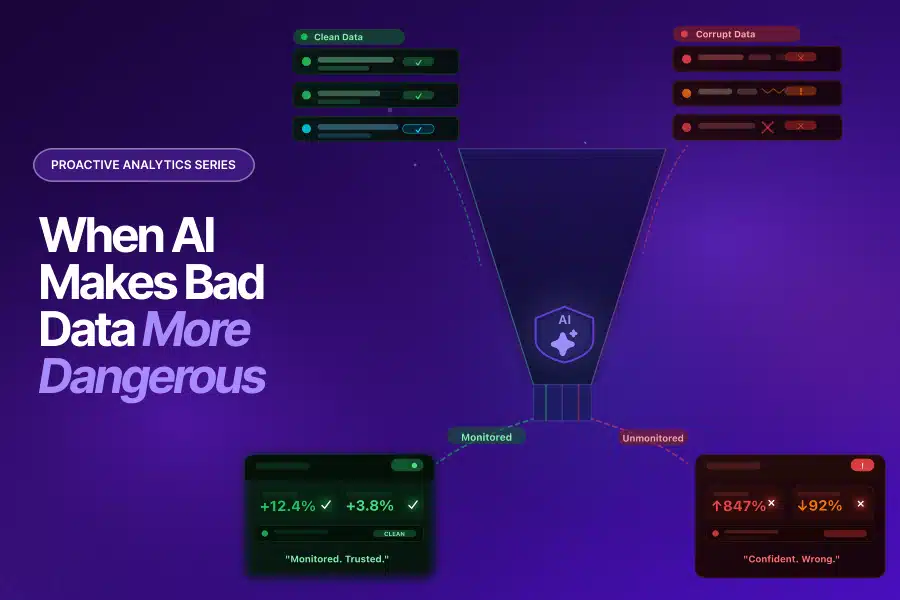
AI doesn’t catch bad data. It amplifies it.

AI Is Already in Production. And It’s Hungry for Your Data.

Let’s be clear about where things stand. Data quality AI analytics isn’t a future problem to prepare for. It’s a present one, happening right now, inside organizations that have already deployed AI models in marketing and analytics.

Gartner’s April 2026 research surveyed 353 data and analytics leaders and found something telling:

  • Organizations with successful AI initiatives invest up to 4x more in data quality, governance, and AI-ready foundations than those with poor outcomes
  • Only 39% of technology leaders are confident their current AI investments will deliver a positive financial impact

That gap between investment and confidence isn’t a technology problem. It keeps coming back to the same root cause: the data feeding these AI models isn’t ready for them. Data quality AI analytics is where the gap lives, and most organizations haven’t closed it yet.

And what exactly is that data? It’s your GA4 data. Your attribution data. Your campaign performance data. The same data this series has shown can be quietly corrupted by GTM misconfigurations, UTM parameters stripped in redirects, cross-domain tracking gaps, and parameter-level schema mismatches that nobody catches for weeks.

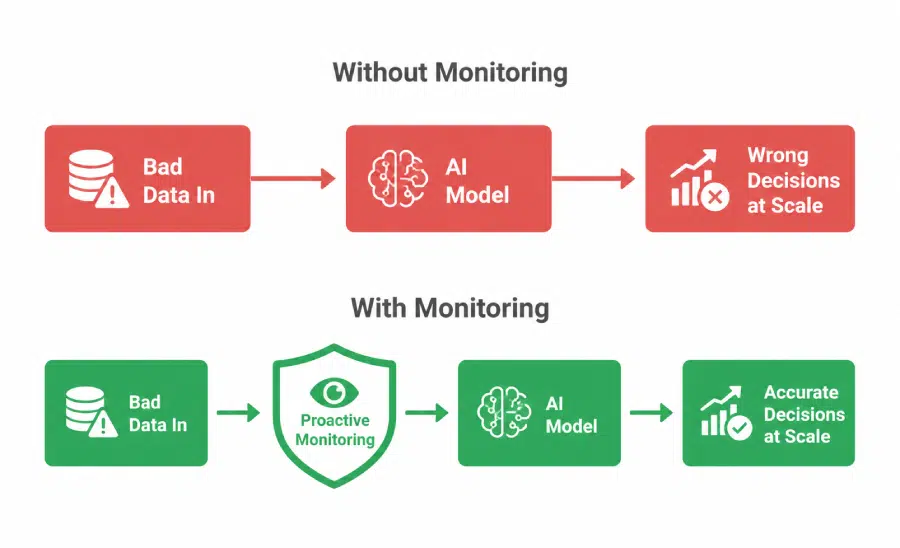
When that data lived only in reports, the damage was contained. A bad report informed a bad decision. When that same data feeds an AI model, one bad input becomes thousands of bad outputs.

Here’s What Nobody Tells You About AI and Data Quality

Most conversations about AI failure focus on the model. Wrong architecture, wrong training approach, not enough data. That’s rarely where the real problem is, and it’s why data quality AI analytics deserves its own conversation entirely.

Think about what an AI model actually does.

  • It takes what you give it, finds patterns in it, and applies those patterns to new situations.
  • It doesn’t have intuition.
  • It can’t look at a number and think “that seems off.”

A human analyst reviewing a GA4 report might notice that revenue looks inflated, trace it back upstream, and find a double-firing purchase event. An AI model won’t. It’ll learn that inflated revenue is normal, build its patterns around that assumption, and confidently produce outputs based on it.

That’s not a flaw in the AI. It’s working exactly as designed. The failure is upstream, in the data quality layer that was never built to support it.

Here’s what poor data quality AI analytics looks like in practice:

When predictive models train on bad data, they predict badly at scale.

Say a purchase propensity model trains on GA4 data where conversion events were double-firing for three weeks. It learns those inflated patterns as its baseline. The high-value audiences it identifies are built on fictional behaviour. Campaigns targeting them underperform, and even after the data issue is fixed, the model needs time to unlearn what it was taught.

When attribution models get corrupted channel data, they misallocate budget systematically.

An AI-driven attribution model fed two months of data where paid social conversions were misattributing to direct traffic will learn to undervalue paid social. Every budget recommendation it produces carries that bias forward. The error doesn’t stay static, it compounds across every campaign cycle.

When personalisation engines get the wrong behavioural signals, they deliver the wrong experiences.

A personalisation model running on product interaction data corrupted by parameter schema errors optimises for signals that were never accurate. Users get recommendations built on behaviour that was never correctly recorded. Engagement drops. The team looks at the model, not the data.

In each of these scenarios, the AI model isn’t making mistakes. It’s faithfully processing exactly what it was given. The problem was never the model. It was the data quality AI analytics foundation that was never properly built beneath it.

What the Numbers Say

Gartner has been direct about this, and the research comes straight from their own published reports, not interpretation.

Gartner’s February 2025 survey of 248 data management leaders found:

  • 63% of organizations either don’t have or aren’t sure they have the right data management practices for AI
  • Through 2026, Gartner predicts organizations will abandon 60% of AI projects that aren’t supported by AI-ready data

The 2026 Gartner Magic Quadrant for Augmented Data Quality Solutions puts a forward-looking number on the response: by 2027, 70% of organizations will adopt modern data quality solutions to support their AI adoption. The market is moving toward data quality AI analytics investment because it has to.

Most recently, Gartner’s May 2026 research predicted that 40% of organizations deploying AI will implement dedicated observability tools by 2028 to monitor model performance, bias, and outputs continuously. Gartner’s recommendation is explicit: mandatory monitoring policies for all production deployments, with continuous tracking of data quality metrics.

Meanwhile, poor data quality already costs the average organization $12.9 million annually according to Gartner. That’s before you factor in AI. Once AI is in the mix, decisions made on bad data happen faster, reach further, and carry more confidence behind them. The cost of weak data quality AI analytics doesn’t stay the same. It scales.

What “AI-Ready Data” Actually Means in Practice

Gartner defines AI-ready data as data that is aligned to specific use cases, actively governed at the asset level, supported by automated pipelines with quality gates, and continuously quality-assured.

That last word, “continuously,” is where most data quality AI analytics setups break down. Traditional data management works in cycles: quarterly audits, annual governance reviews, periodic pipeline checks. AI models in production need data quality signals measured in hours, not quarters. That mismatch is exactly where most data quality AI analytics failures originate.

The proactive monitoring capabilities covered across this series address each layer of that gap directly:

  1. Continuous parameter validation makes sure what enters GA4 is accurate before it becomes a training signal for anything downstream. A purchase event passing the wrong currency code doesn’t just corrupt one report. It corrupts every model trained on that data, potentially for months. This is data quality AI analytics at the collection layer.
  2. Anomaly detection on AI input metrics watches for shifts in the data patterns that feed your models. When paid social’s share of attribution credit drops sharply without a corresponding spend change, that’s not just an attribution problem. It’s a signal that your attribution model’s training data is being distorted. Catching it in hours rather than weeks stops the model from learning the wrong lesson.
  3. GTM health monitoring protects the collection layer everything else depends on. Tatvic’s anomaly detection solution works at this layer, making sure the events and parameters feeding your analytics and AI tools are collected accurately and consistently.
  4. A response playbook with defined SLAs closes the loop. Detecting a data quality issue and not acting on it before the next model training cycle is the same as not detecting it at all. Good data quality AI analytics means the alert triggers a response fast enough to matter.

Building the Stack That Protects Your AI Investment

Getting data quality AI analytics right isn’t a single project. It’s a sequence of capabilities, each protecting the layers above it. The order matters.

Start with data collection integrity.

Everything else sits on top of this. Validate event parameters, monitor GTM health continuously, and run automated sanity checks on what enters GA4. If this layer is unreliable, your entire data quality AI analytics foundation is compromised before any model sees it.

Add anomaly detection on your model input data specifically.

Don’t just monitor headline KPIs. Identify the exact metrics, dimensions, and attribution signals that your AI models use as inputs and set intelligent monitoring on those. A shift in these signals that goes undetected becomes a corrupted training dataset. It’s that straightforward.

Build alert-to-action workflows for data quality issues.

When something breaks, the response has to happen before the next model training cycle. Define who owns data quality alerts that affect AI inputs, what the SLA is, and how it escalates. If that’s not documented before the alert fires, it’ll be negotiated under pressure after the fact.

Reconcile AI outputs against ground truth regularly.

Once a month at minimum, compare what your AI models are recommending against a verified external source: CRM data, finance records, e-commerce backend figures. This is how you catch model drift before it compounds into months of systematically wrong budget decisions.

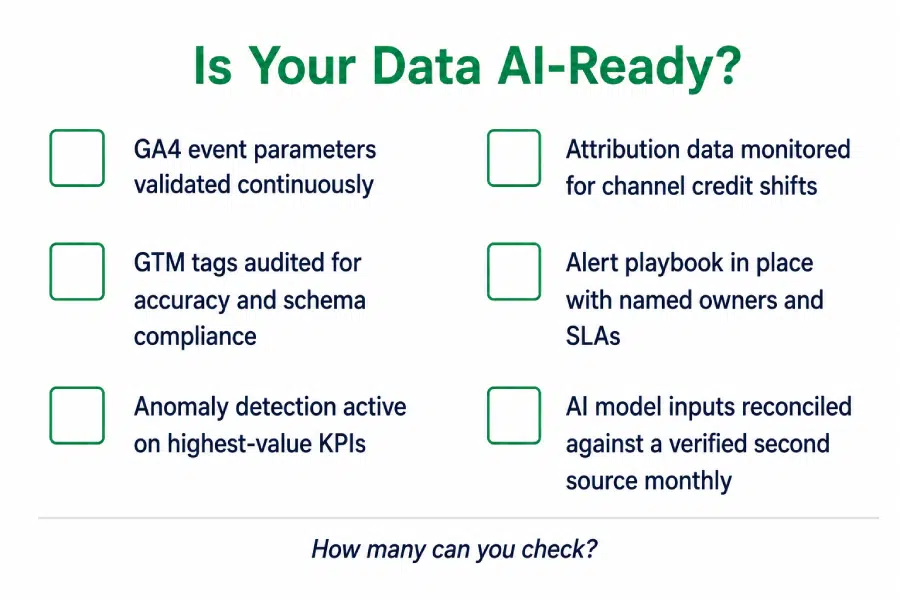
Is Your Data Actually AI-Ready?

Before the next AI analytics investment gets signed off, it’s worth being honest about what your data quality AI analytics foundation actually looks like:

Two or more gaps here means your AI investment is building on a data quality AI analytics foundation that wasn’t designed to support it. The models might be excellent. The underlying problem is upstream.

The Takeaway

AI doesn’t make data quality less important. It makes it the thing everything else depends on.

Every capability in this Proactive Analytics series, detecting anomalies, validating data at the collection layer, monitoring attribution patterns, building alert playbooks, now has a second job. It’s not just protecting your reports. It’s protecting the integrity of every AI model that learns from your data.

The organizations that will get the most out of AI analytics over the next two years won’t necessarily have the most sophisticated models. They’ll have the most reliable data quality AI analytics foundation feeding them. That’s what separates AI that earns trust from AI that quietly misleads.

Proactive analytics isn’t just a measurement best practice anymore. In an AI-enabled business, strong data quality AI analytics is the foundation every intelligent decision runs on.

Investing in AI analytics and want to make sure your data is actually ready for it? Tatvic’s team can assess your current data quality setup across GA4, GTM, attribution, and monitoring layers and identify exactly where the gaps are. Schedule a call with Tatvic’s experts today.
 

Analytics Alerting System: Why Alerts Fail and How to Fix It

An Alert Without a Playbook Is Just Noise: Building an Analytics Alerting System That Works

In this Proactive Analytics series, we have covered the foundation (Proactive Analytics), the detection layer (Anomaly Detection in GA4), and a high-stakes use case. All three end at the same place. Something is detected. An alert fires. And then what?

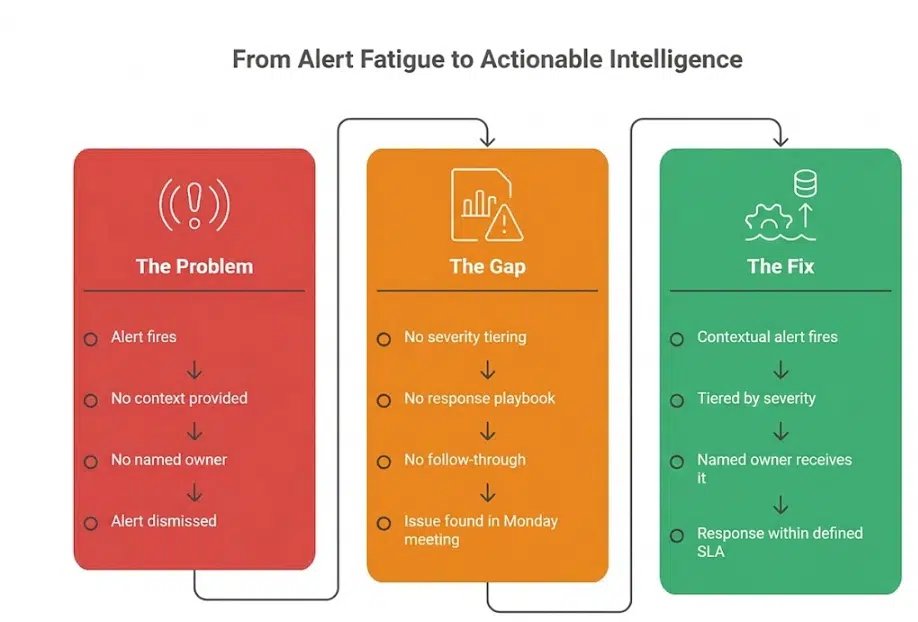
For most analytics teams, the honest answer is: not much. The alert lands in an inbox. Someone glances at it. It gets marked as read without action. Or it does not get read at all.

This is not a technology problem. It is a design problem. And it is the most common reason proactive analytics setups fail to deliver their full value.

The Alert Fatigue Problem Is Real, and It Is Not Limited to IT

Alert fatigue is widely documented across operations teams. Splunk’s State of Observability 2025 report, surveying 1,855 ITOps and engineering professionals, found that 73% of organizations experienced outages directly linked to ignored or suppressed alerts. The same research found that 59% say they have too many alerts, and 55% deal with too many false positives. The AI SOC Market Landscape 2025 report by SACR found that 40% of alerts are never investigated, and 61% of teams admitted to ignoring alerts that later proved critical.

These figures come from security and operations contexts. But the dynamic is identical in analytics:

  • A GA4 custom insight fires daily because the threshold is set too low
  • An anomaly alert triggers during a known promotional period because baselines have not been calibrated
  • A data quality alert lands in a shared inbox with no named owner and no expected action
  • A team that has been burned by false positives stops treating alerts as actionable signals

The result is an analytics alerting system that runs in the background, generates notifications, and influences nothing. The monitoring is in place. The detection is working. The value is lost at the last step.

Why Analytics Alerts Get Ignored

Understanding why alerts fail is the first step toward designing a system that works. The reasons are consistent across analytics teams:

No Context in the Alert Itself

An alert that says “sessions dropped by 23%” gives you a number. It does not tell you which pages, which segments, which device types, which time period, or what the likely cause is. Without context, the recipient cannot assess severity or take action without conducting their own investigation first. Most do not. They dismiss the alert and move on.

No Severity Tiering

When every alert looks the same, a revenue-impacting conversion failure competes for attention with a minor informational fluctuation. Teams learn quickly that most alerts are low severity. They apply that assumption to all of them. The critical ones get caught in the same net as the noise.

No Named Owner

An alert sent to a team, a shared inbox, or a distribution list has no clear owner. Everyone assumes someone else will handle it. This is not a behavioural failure; it is a structural one. Alerts without owners get resolved at the speed of the slowest person who reads them, which is usually never.

No Defined Response Expectation

Even when an alert reaches the right person, if there is no defined response protocol, the recipient has to decide in the moment what to do, when to do it, and who to involve. That decision overhead is often enough to push the response to “later,” which becomes never.

Static Thresholds Generating Predictable Noise

As covered in the Anomaly Detection in GA4 blog, static sensitivity settings produce alerts during expected peaks, known seasonal patterns, and normal day-of-week variation. When a team receives enough of these, they stop trusting the system. A well-calibrated analytics alerting system is the foundation of alert trust. Without trust, the system is decorative.

Already experiencing alert fatigue in your analytics setup? Tatvic’s team can help you audit your current alerts and identify what to keep, recalibrate, and remove. Get in touch.

What a Working Analytics Alerting System Actually Looks Like

An effective analytics alerting system is not defined by how many alerts it generates. It is defined by how many alerts drive action. The design principles that separate the two are straightforward.

Alerts Carry Context, Not Just Numbers

Every alert in a working analytics alerting system answers four questions immediately:

  • What changed: the specific metric, event, or parameter affected
  • By how much: the magnitude of the deviation and the expected range
  • Since when: the precise time the anomaly began
  • Which segment: the dimension combination where the deviation is isolated (browser, region, device, channel)

This context is what turns a notification into a brief. The recipient knows what they are looking at before they open the dashboard. Response time drops significantly when the investigation has already been done by the system.

Severity Is Tiered by Business Impact, Not Metric Size

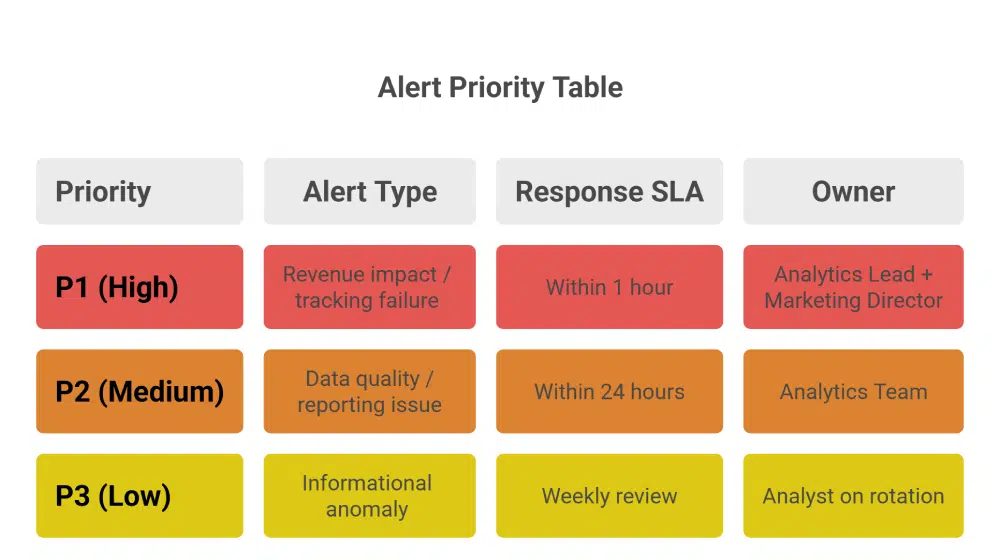
A working analytics alerting system does not treat all anomalies equally. It routes alerts based on their proximity to revenue and decision-making:

  • A conversion tracking failure is a P1. It affects the accuracy of every marketing decision made from that point forward.
  • A parameter-level data quality issue is a P2. It affects reporting accuracy but not necessarily in real time.
  • An informational anomaly with no immediate business impact is a P3. It is worth knowing about, but it does not need to interrupt anyone’s day.

Tiering prevents the critical from being buried by the routine. It also gives recipients a rational basis for prioritisation rather than asking them to judge severity from a raw notification.

Every Alert Has a Named Owner and a Defined SLA

High-performing analytics alerting systems remove ambiguity before alerts even fire. Teams define ownership in advance, mapping every alert type to a named role or individual with a clear response time expectation.

  • P1 alerts: analytics lead responds within one hour, marketing director informed within two
  • P2 alerts: analytics team responds within 24 hours
  • P3 alerts: reviewed in the next weekly analytics meeting

This structure removes decision overhead from the recipient. They know what they are expected to do and by when.

How to Build an Analytics Alerting System That Drives Action

Building an analytics alerting system that works is a four-step process. Each step addresses one of the failure points described above.

Step 1: Audit your existing alerts and remove the noise.

Start by listing every alert currently active in your GA4 setup, your anomaly detection configuration, and any third-party monitoring you have in place. For each one, ask: has this alert driven a response in the last 60 days? If not, it is noise. Disable it or recalibrate it before adding anything new. A smaller set of high-trust alerts is more valuable than a comprehensive set of ignored ones.

Step 2: Build a tiered alert hierarchy.

Map your alerts to three priority levels based on business impact:

  • P1: Revenue impact, conversion tracking failure, data collection break
  • P2: Data quality issue affecting reporting accuracy, parameter-level anomaly, attribution signal change
  • P3: Informational anomaly, dimension-level shift, informational trend change

Assign each tier a response SLA and a named owner. The tier system only works if the definitions are agreed upon by the team before an alert fires, not negotiated in the moment.


Step 3: Add context to every alert.

Work with your anomaly detection and monitoring setup to ensure every alert includes: what changed, by how much, since when, and in which segment. This may require configuring alert templates in your monitoring solution or using Tatvic’s anomaly detection solution, which surfaces this context automatically. Without it, your alerts will generate activity but not resolution.

Step 4: Build and distribute a response playbook.

For each alert type, document:

  • The first action the owner is expected to take
  • The diagnostic questions to answer within the first 30 minutes
  • The escalation path if the issue cannot be resolved at the owner level
  • The communication template for notifying stakeholders when a P1 is active

This playbook does not need to be long. A single page per alert tier is sufficient. The system removes the decision overhead that pushes teams to deprioritize alerts. When the next step is obvious, the response happens. You can read more about how Tatvic’s anomaly detection solution surfaces contextual intelligence that feeds directly into this kind of response workflow.

The Alert Playbook in Practice: What Good Looks Like

Here is what a P1 response looks like in a team that has built this system:

6:45am: Anomaly detection flags a 67% drop in mobile purchase events, isolated to iOS users, beginning at 6:10am

Alert routes to analytics lead with context: affected segment, magnitude, start time, and a link to the relevant GA4 exploration

Analytics lead opens the alert, has enough context to begin investigation immediately

By 7:15am: GTM configuration issue identified on an iOS-specific tag after a previous night’s deployment

By 8:00am: Fix deployed, tracking restored, stakeholders notified via a pre-written P1 communication template

Total time from anomaly onset to resolution: under two hours

Without a working analytics alerting system, the same issue surfaces in a Monday morning meeting. The team spends the first hour of the week diagnosing a problem that started the previous Friday. Three days of corrupted mobile conversion data have already fed into weekend campaign optimisation.

The difference is not the detection. As covered across the previous blogs in this series, the detection capability is available. The difference is what happens the moment the alert fires.

The Takeaway: Detection Is Only Half the System

This series started with a simple observation: reactive analytics finds problems after they have already done their damage. The blogs that followed showed what proactive monitoring looks like across anomaly detection, attribution, and data collection.

But proactive analytics is only complete when the detection layer connects to an action layer. An analytics alerting system that detects everything and acts on nothing is a more sophisticated version of the same reactive problem.

The full picture looks like this:

  • Detect: Anomaly detection across metrics, parameters, dimensions, and attribution patterns
  • Validate: Data sanity checks that confirm the signal is real before the alert reaches a human
  • Alert: Contextual, tiered notifications routed to named owners with defined response expectations
  • Act: A playbook that tells the recipient exactly what to do and by when

When teams connect all four layers: Detect, Validate, Alert, and Act - proactive analytics begins to deliver its full value: faster problem resolution, decisions backed by trusted data, and teams that act on alerts because the system has earned their confidence.

That is what a complete analytics alerting system looks like. And that is the standard worth building toward.

Ready to turn your analytics monitoring into a system that actually drives action? Tatvic’s team can audit your current alerting setup, identify the noise, and help you build a response playbook tailored to your business. Schedule a call with Tatvic’s experts today.
Anomaly Detection in GA4: How to Get More Out of It

This is the third blog in Tatvic’s Proactive Analytics series. In the first blog , we established why reactive analytics is costing businesses more than they realise. In second blog, we applied that thinking to marketing attribution. This blog focuses on the capability that sits at the heart of proactive analytics: anomaly detection in GA4.

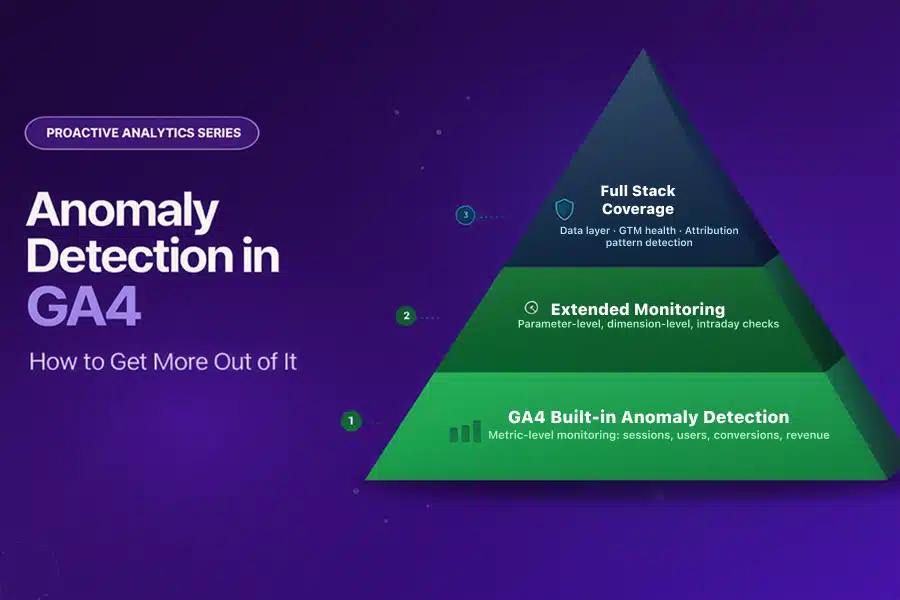
We have written about anomaly detection before from a technical standpoint. This blog takes a different angle: what GA4’s built-in anomaly detection already does well, and how extending it across additional monitoring layers makes your entire analytics setup significantly more powerful.

GA4’s anomaly detection is a strong starting point. The question worth asking is: how much further can you take it?

What GA4 Built-in Anomaly Detection Already Does Well

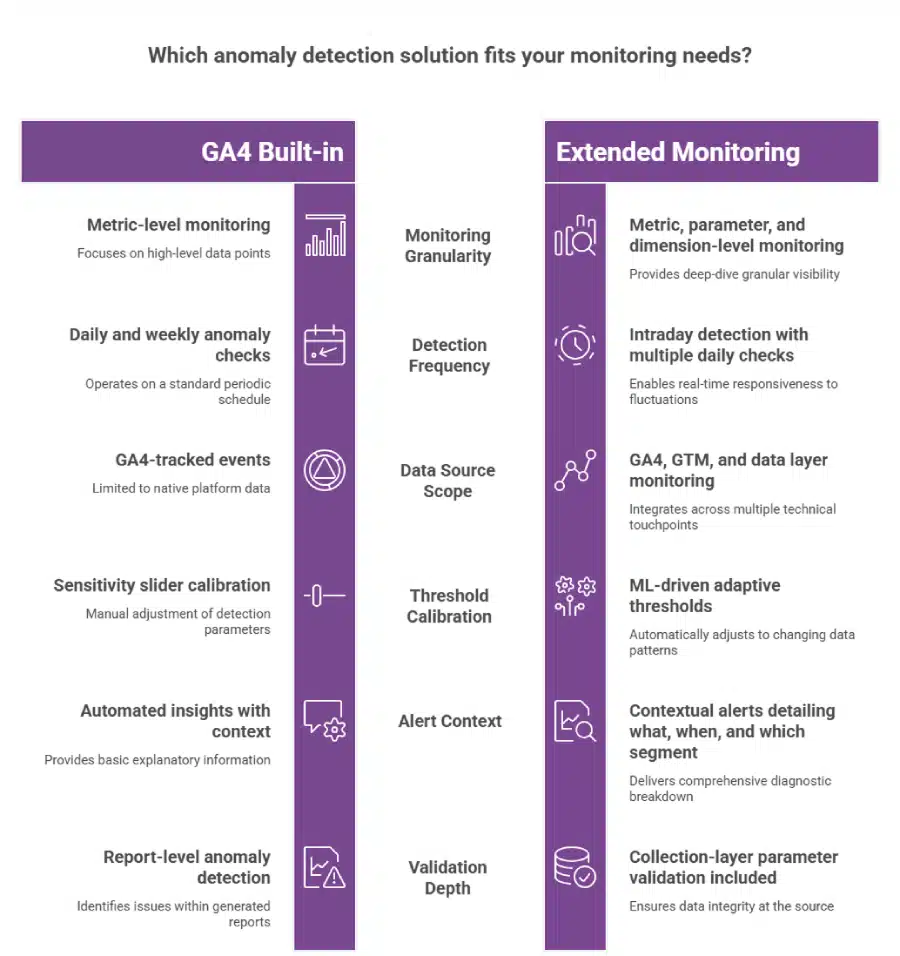
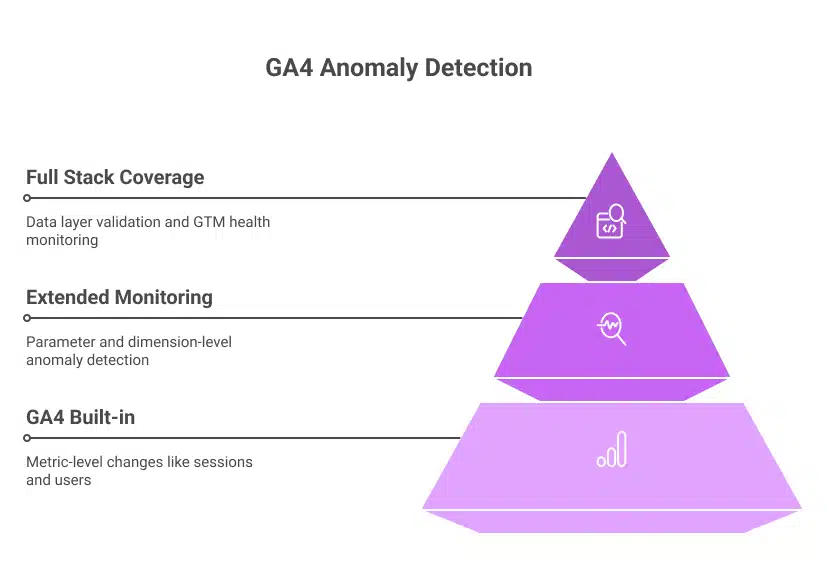
GA4’s approach to anomaly detection in GA4 is genuinely sophisticated. It uses a Bayesian statistical model that learns from your historical data to establish expected ranges for your metrics:

  • Hourly anomalies: Based on 2 weeks of historical data
  • Daily anomalies: Based on 90 days of historical data
  • Weekly anomalies: Based on 32 weeks of historical data

The September 2024 GA4 update added anomaly detection directly into detail reports, surfacing unexpected spikes or dips as visual indicators on your charts without any manual setup. Custom insights extend this further, allowing you to define specific conditions that trigger alerts for the metrics that matter most to your business.

This is a meaningful capability. It surfaces significant metric-level shifts automatically, reduces the manual monitoring burden, and gives analysts a starting point for investigation when something in your data changes. For teams that have not yet enabled GA4’s built-in anomaly detection, doing so is the right first step.

The opportunity is in what comes next.

Taking Anomaly Detection in GA4 Further

GA4’s built-in monitoring operates at the metric level: sessions, users, conversions, revenue. This is the right layer to start with. But business anomalies rarely live only at the metric level.

They live in the data underneath the metrics:

  • A conversion event firing correctly but passing the wrong parameter value
  • A revenue drop isolated to one browser version while all others remain stable
  • A checkout parameter schema mismatch introduced by a developer change that does not affect the headline conversion count

At the metric level, these look normal. At the parameter, dimension, and data collection layer, they are anomalies with real business consequences.

Extending anomaly detection in GA4 across these deeper layers is what separates a monitoring setup that catches the obvious from one that catches the costly.

Three Layers That Make GA4 Anomaly Detection More Powerful

Layer 1: Parameter-Level Monitoring

GA4’s built-in anomaly detection watches whether a metric has moved. Parameter-level monitoring watches whether the data feeding that metric is accurate.

In practice, this means:

  • Validating event parameters against expected schemas on a continuous basis
  • Flagging null values, type mismatches, or unexpected value ranges at the point of collection
  • Detecting when an event fires more or fewer times than expected within a session
  • Catching currency code mismatches, null transaction IDs, or malformed product arrays before they populate your reports

This is where Tatvic’s GTM health monitoring operates: at the collection layer, validating data before it reaches the metric level where GA4’s anomaly detection watches. Together, they create a complete monitoring chain from data entry to report.

Layer 2: Dimension-Level Anomaly Detection

Business anomalies are rarely uniform. A revenue drop might be specific to:

  • Users on a particular browser version after a site deployment
  • Users in a specific geographic region after a payment provider outage
  • Users on a particular device type after a mobile UX change

When this happens, the aggregate revenue metric may remain within its expected range while the dimension-level collapse goes undetected. Dimension-level anomaly detection monitors specific combinations of metrics and dimensions simultaneously, surfacing the signal that the aggregate hides.

Tatvic’s in-house anomaly detection solution allows monitoring across dimension combinations such as revenue by browser and region simultaneously, flagging the isolated drop before it is absorbed by a healthy aggregate. You can see how this works across real client scenarios in the anomaly detection safeguards business performance blog.

Layer 3: Intraday Monitoring on High-Value Events

GA4’s daily anomaly model is well-suited to identifying overnight or multi-day shifts in your data. For time-sensitive business events, intraday monitoring adds an additional layer of speed.

Consider the scenarios where timing matters most:

  • A new campaign launches with a tracking misconfiguration at 9 am. Intraday monitoring catches it within hours.
  • A payment flow breaks during peak trading. Conversion data drops. An intraday alert fires the same morning.
  • A flash sale drives traffic that exceeds infrastructure capacity. Bounce rates spike sharply. The alert arrives before the sale ends, not after.

Tatvic’s anomaly detection runs checks multiple times per day, giving teams hours rather than a full day to respond to time-sensitive issues. The faster the detection, the smaller the window during which bad data influences decisions.

Adaptive Baselines: Making GA4 Anomaly Detection Smarter Over Time

GA4’s custom insights include a sensitivity slider that lets you calibrate how easily anomalies are flagged. This gives you control, and it also creates an ongoing calibration responsibility:

  • Promotional periods that double your typical traffic can trigger alerts for spikes that are entirely expected
  • Seasonal patterns require manual threshold adjustment before each peak period
  • Day-of-week variation can produce false alerts on naturally slower traffic days

ML-driven adaptive baselines solve this automatically. Rather than a fixed sensitivity setting, adaptive models continuously learn your business patterns, including seasonality, campaign cycles, and day-of-week variation, and adjust expected ranges accordingly.

The result: anomaly detection in GA4 that produces actionable alerts during campaigns, not noise. Expected peaks are recognised as expected. Genuine deviations stand out clearly because the baseline already accounts for normal variability.

Extending Anomaly Detection to Attribution Patterns

One of the most valuable extensions of anomaly detection in GA4 is applying it to attribution data rather than just traffic and conversion volume.

When paid social’s share of conversion credit drops by 30% over 48 hours without a corresponding change in spend, that is an anomaly in your attribution chain, not your traffic volume. GA4’s built-in monitoring watches metric totals. Attribution pattern monitoring watches how credit is distributed across channels over time.

As explored in the proactive attribution blog, this layer of anomaly detection catches UTM failures, cross-domain tracking breaks, and channel misattribution while there is still time to act, before budget decisions are made on a distorted performance picture.

The Market Signal: Why Businesses Are Extending Beyond Built-in Tools

The investment trend in anomaly detection reflects how seriously businesses are treating this. The global data anomaly detection market is expected to reach $33.32 billion by 2035, growing from $5.61 billion in 2025 at a CAGR of 19.5%, according to Market.us research. The ML and AI segment is growing fastest, at 18.7% CAGR.

This growth is driven by one consistent business insight: native platform monitoring, while valuable, is the starting layer. The organisations investing in extended anomaly detection are the ones treating data reliability as a business priority, not just an analytics function.

How to Extend Your GA4 Anomaly Detection Setup

Building on GA4’s strong foundation is a layered process. Start with what is already available and add depth systematically.

Step 1: Enable and configure GA4’s built-in anomaly detection fully.

  • Activate custom insights for your highest-value metrics: revenue, purchase events, lead form completions
  • Set evaluation frequency to daily for core KPIs
  • Review and act on automated insights weekly as a starting discipline

Step 2: Add intraday monitoring on your most time-sensitive events.

  • Identify the three to five events where a same-day detection matters most
  • Configure intraday anomaly checks on purchase events, payment initiations, and primary conversion actions
  • Set contextual alerts that include what changed, by how much, and which segments are affected

Step 3: Layer in dimension-level monitoring on your top segments.

  • Map your three to four highest-value dimension combinations: top browsers, key markets, primary device types
  • Set anomaly detection specifically on these combinations
  • Use these alerts as the early warning system for localised failures that aggregate metrics conceal

Step 4: Validate your data collection layer continuously.

  • Anomaly detection in GA4 at the report level depends on accurate data collection
  • Pair your monitoring setup with continuous GTM health checks and parameter-level validation
  • This ensures the data GA4 watches is reliable before anomaly detection begins

Step 5: Extend anomaly detection to your attribution patterns.

  • Monitor direct traffic share and channel attribution distribution alongside volume metrics
  • Set alerts for shifts in attribution credit that do not correspond to spend changes
  • This closes the loop between proactive analytics and proactive attribution monitoring

The Takeaway

GA4’s built-in anomaly detection is a genuine asset. It gives analytics teams automated, ML-powered monitoring without additional tooling, and it has improved significantly with each GA4 update.

Extending it adds three meaningful capabilities:

  • Parameter and data layer monitoring that validates what GA4 watches before it is watched
  • Dimension-level detection that surfaces localised anomalies that aggregate conceal
  • Intraday intelligence that reduces detection time from days to hours on your most critical events

The goal is not to replace what GA4 provides. It is to build a monitoring setup that is as complete as the business decisions that depend on it.

Every analytics setup benefits from anomaly detection. The deeper the monitoring goes, the more reliable the data it protects.

Want to understand how your current GA4 anomaly detection setup can be extended? Tatvic’s team can map your monitoring coverage across metric, parameter, dimension, and collection layers in a structured review. Schedule a call with Tatvic’s experts today.

Marketing Attribution Analytics: How to Detect Silent Failures Before They Drain Your Budget

In the previous blog in this series, we covered what proactive analytics means and why reactive monitoring costs businesses more than they realise. This blog goes one level deeper into one of the most financially damaging places where reactive measurement fails: marketing attribution analytics.

Here is the core problem:

  • Attribution tells you which channels, campaigns, and touchpoints drove a conversion
  • When it works, it is one of the most powerful tools a marketing team has
  • When it breaks silently, and it breaks far more often than most teams acknowledge, it becomes one of the most expensive problems in digital measurement

The critical issue: marketing attribution analytics does not fail loudly. No error is thrown. No warning appears in GA4. Your reports still populate. Your dashboards still update. The numbers just quietly stop reflecting reality.

The Attribution Confidence Gap Is Larger Than Most Teams Admit

The data on this is striking:

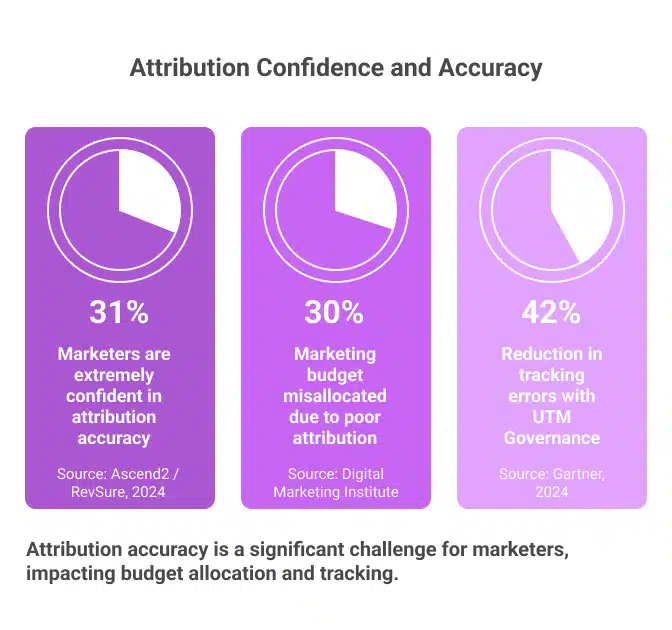
  • A 2024 survey by Ascend2 and RevSure found that only 31% of marketing professionals are extremely confident in the accuracy of their attribution data
  • Nearly 7 in 10 marketers are making budget decisions on data they are not fully confident in
  • McKinsey’s 2024 Digital Marketing Survey found that 76% of marketers still struggle to determine which channels deserve credit for conversions
  • Research from the Digital Marketing Institute puts the cost at up to 30% of total marketing budget misallocated due to poor attribution

For a team spending $500,000 per quarter on paid media, that is $150,000 allocated based on flawed or incomplete attribution.

These are not niche problems affecting underfunded teams. They are systemic failures that exist inside sophisticated, well-resourced marketing organisations.

How Attribution Breaks Silently

Marketing attribution analytics breaks in predictable ways. None of them surface as obvious errors in your reporting. Understanding where the breaks happen is the first step toward catching them proactively.

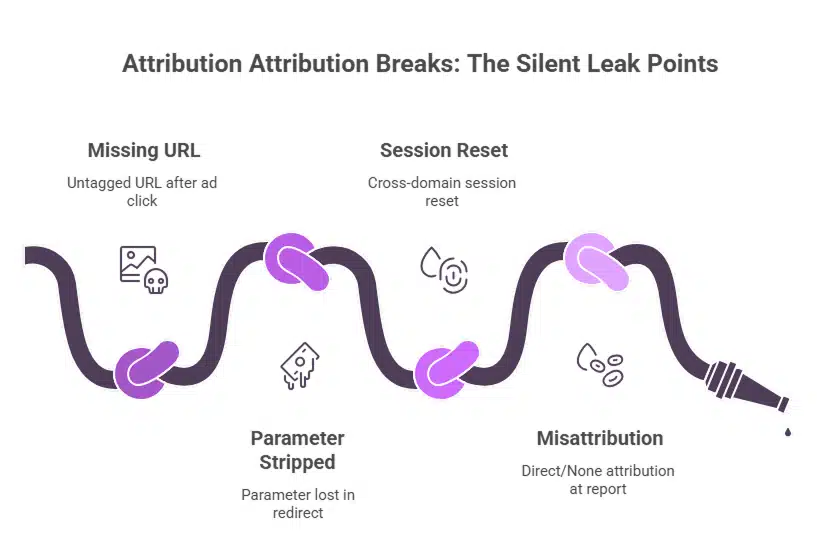
UTM parameters go missing or inconsistent.
  • Campaign launches without properly tagged URLs
  • Traffic lands in GA4 as “direct/none” with no campaign credit
  • According to a SEMrush 2024 study, 42% of companies implement UTMs without a clear strategy
  • Only 58% of marketing teams have a documented naming convention
  • The same LinkedIn campaign can appear as “LinkedIn,” “linkedin,” and “LI” in three separate reports, fragmenting data across three false sources
UTM parameters get stripped in redirects.
  • Campaign URL is tagged correctly at launch
  • Landing page involves a redirect and UTM parameters are dropped during it
  • Session lands as direct traffic with no recoverable attribution
  • Common failure point: domain migrations and cross-subdomain tracking setups
Cross-domain tracking gaps misroute sessions.
  • User clicks a paid ad, lands on a campaign page, then moves to the main site to purchase
  • If cross-domain tracking is not configured correctly in GA4, the session resets at the domain boundary
  • The purchase attributes to “direct” instead of the paid campaign that started the journey
Channel self-competition distorts spend decisions.
  • Paid and organic results for the same brand terms compete for attribution credit
  • A conversion from organic search after an earlier paid click may attribute to organic entirely
  • Neither channel gets an accurate picture, and neither budget gets optimised correctly
Privacy changes are widening the gaps further.
  • 56% of marketers say privacy regulations have made attribution harder
  • iOS14’s App Tracking Transparency reduced observable mobile conversions by 18 to 32%
  • Cookie deprecation is expected to impact 78% of existing attribution setups by 2026
  • These are structural signal losses that passive monitoring cannot compensate for

Why Reactive Attribution Monitoring Fails Here

In reactive marketing attribution analytics, failures are typically discovered in one of three ways:

  • A finance reconciliation shows GA4 revenue does not match backend sales
  • A channel’s ROAS inexplicably drops and someone investigates retroactively
  • A quarterly audit finds a campaign that has been running untagged for weeks

By the time any of these discoveries happen, the damage is already compounded:

  • Budget has been reallocated away from channels that were actually performing
  • Channels that looked strong were benefiting from misattributed credit
  • Leadership has made strategic decisions on a picture of performance that was never real

This is the 100x cost principle from Blog 1 applied directly to attribution. Finding a UTM tagging error before campaign launch costs almost nothing. Finding it six weeks later, after it has shaped budget decisions, costs orders of magnitude more.

What Proactive Marketing Attribution Analytics Looks Like

Proactive attribution monitoring does not wait for a finance discrepancy or a quarterly review to surface problems. It continuously watches the signals that indicate attribution is breaking, and flags them in near real-time.

1. Monitoring direct traffic spikes proactively.
  • A sudden, unexplained spike in direct traffic is almost always a symptom of attribution failure, not genuine behaviour change
  • Proactive marketing attribution analytics sets intelligent baselines for direct traffic by channel, device, and landing page
  • When direct traffic spikes beyond expected variance, an alert fires with context: which pages, which segments, and since when
  • The team investigates a tracking gap, not a phantom behaviour change
2. Validating UTM parameter coverage continuously.
  • Proactive systems scan incoming traffic for untagged or inconsistently tagged sessions in real time
  • When a campaign drives traffic with missing or malformed parameters, the monitoring layer flags it within hours of launch, not weeks after data has been permanently misfiled
  • This is where Tatvic’s data sanity automation plugs directly into attribution health
3. Detecting cross-domain tracking failures at the session level.
  • Proactive monitoring tracks session continuity across domain boundaries
  • When a known cross-domain journey starts producing sessions that reset at the transition point, a break in the tracking chain is flagged immediately
  • This is caught before it inflates direct traffic figures and before budget decisions are influenced by the distorted picture
4. Running anomaly detection on channel attribution patterns.
  • Proactive marketing attribution analytics uses anomaly detection not just on volume metrics but on attribution patterns themselves
  • When paid social’s share of conversion credit drops sharply over 48 hours without a corresponding spend change, that is an anomaly
  • When organic search suddenly claims attribution credit for conversions that previously traced to email, that is a signal worth investigating
  • Tatvic’s anomaly detection framework applies this logic to attribution data, not just traffic and conversion volume
5. Monitoring the GA4 data layer and GTM for tracking integrity.
  • Attribution in GA4 is only as reliable as the data collection layer beneath it
  • Tatvic’s AI-powered GTM health monitoring continuously checks that conversion tags, GA4 configuration tags, and event parameters are firing correctly
  • A misconfigured conversion tag does not just break conversion data. It breaks the entire attribution chain downstream

Signs That Your Attribution Has Already Broken

Run through this list quickly:

  • Direct traffic has grown as a percentage of conversions over the last 90 days without a clear explanation
  • Two or more channels show overlapping conversion credit for the same campaigns
  • GA4 revenue and backend/CRM revenue differ by more than 5% consistently
  • Your paid campaigns show ROAS figures your finance team cannot reconcile
  • A campaign launched in the last 60 days without a UTM audit before go-live
  • Your team has not tested the cross-domain tracking setup since the last site update.
  • You discovered a UTM error from a completed campaign only after reviewing its performance

If three or more of these apply, your marketing attribution analytics setup has active gaps. Each one is fixable, but only if detected before it compounds.

Where to Start with Proactive Attribution

The order of intervention matters. Starting with the wrong layer wastes effort and still leaves spend leaks open.

Step 1: Audit and automate UTM governance.
  • Standardise naming conventions across all channels and teams
  • Automate UTM generation where possible to eliminate manual errors
  • Add a pre-launch validation step to every campaign workflow

A formal UTM governance framework reduces tracking errors by 42% on average (Gartner 2024)

Step 2: Set anomaly detection on direct traffic and channel attribution shares.
  • These two signals catch the widest range of attribution failures
  • When either moves outside expected ranges, something in your tracking chain has broken
  • Intelligent, ML-driven alerts on these signals surface problems before data propagates into decisions
Step 3: Validate conversion and GA4 configuration tags continuously.
  • Attribution is downstream of data collection
  • A broken conversion tag disrupts attribution accuracy, regardless of how well you structure your UTMs.
  • Continuous monitoring of your GA4 tagging layer creates the foundation for reliable marketing attribution analytics.
Step 4: Reconcile GA4 attribution against a second source monthly.
  • Use your CRM, e-commerce backend, or media mix model as the comparison point
  • Regular reconciliation catches attribution drift before it becomes attribution blindness
  • Teams that build this into a monthly workflow catch errors an average of three weeks earlier than those that wait for discrepancies to surface in reporting

The Takeaway

Marketing attribution analytics is not a set-and-forget configuration. It is a living system that breaks in predictable, silent ways, and those breaks compound the longer they go undetected.

Proactive attribution monitoring does not add complexity to your stack. It adds:

  • A monitoring layer that watches for signals indicating your attribution chain is failing
  • Near real-time alerts that surface issues while there is still time to act
  • A foundation for budget decisions that are based on real performance data, not a distorted picture

The difference between reactive and proactive attribution is not just operational. It is the difference between a marketing budget allocated on truth, and one allocated on a fiction your reporting has been quietly telling you.

If your attribution is reactive today, the spend leaks have already started. The question is how long they go undetected.

Not sure if your attribution setup is telling you the truth? Tatvic’s analytics team can run a full attribution health check across your GA4 setup, GTM configuration, and UTM governance in one structured review. Schedule a call with Tatvic’s experts today.

What Is Proactive Analytics And Why Reactive Is Costing You

Your analytics setup might be lying to you right now, and you will not know until it is too late.

Here is what that looks like in practice:

  • A tag fires incorrectly for two weeks, and no one notices
  • A conversion event starts doubling due to a misconfiguration
  • A campaign runs on corrupted attribution data for an entire month

None of these issues sends an alert. You find them when a stakeholder asks why the numbers look strange in a Monday morning review.

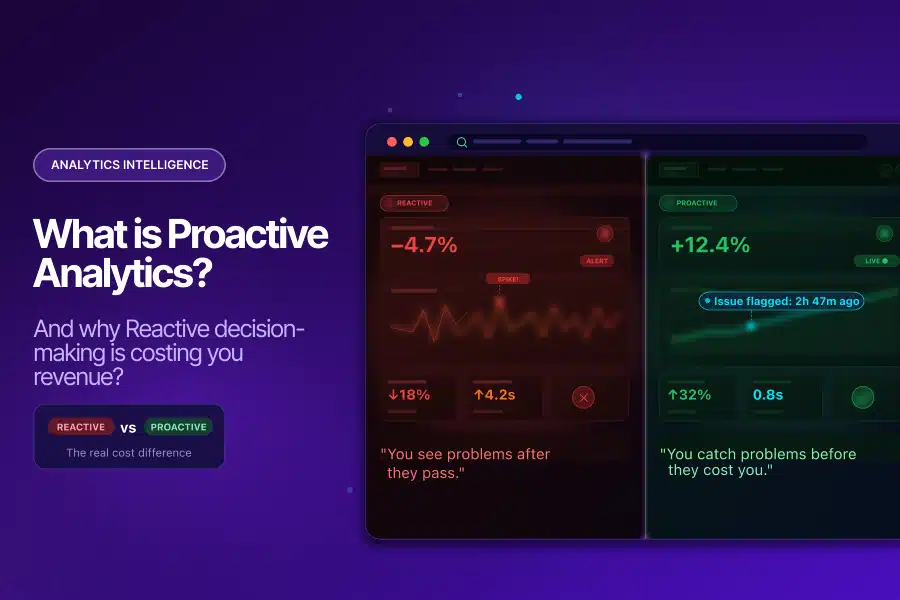
That is reactive analytics: discovering problems after they have already done their damage. Proactive analytics flips this model entirely, and in 2026, the cost of not making that switch is becoming impossible to ignore.

Why Reactive Analytics Is the Default (And Why That Is a Problem)

Most analytics teams are reactive by default. The pattern looks the same everywhere:

  • Check dashboards after the fact
  • Run audits on a quarterly schedule
  • Investigate issues only when someone notices something that looks wrong

This is not a failure of effort. It is a structural flaw in how traditional analytics is designed.

Traditional BI tools are fundamentally retrospective. They surface what happened, not what is currently going wrong. By the time a reporting lag resolves and data appears in your dashboard, a pipeline error has already propagated through your BigQuery tables, your attribution models, and every decision made from them.

The Financial Reality of Bad Data

The numbers make this hard to dismiss:

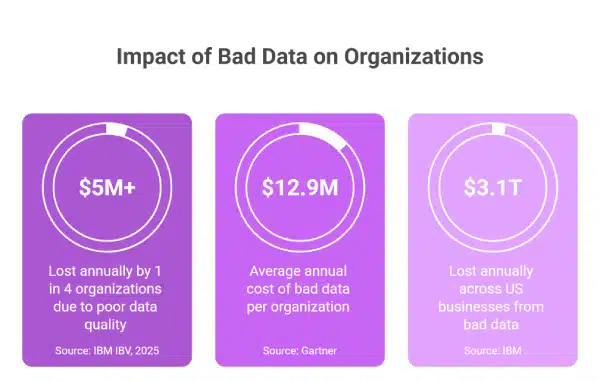
  • A 2025 IBM Institute for Business Value report found that more than a quarter of organizations lose over $5 million annually due to poor data quality
  • A Gartner study puts the average financial impact at $12.9 million per organization, per year
  • IBM’s broader research estimates that US businesses collectively lose $3.1 trillion annually from bad data.

These are not abstract figures. They represent:

  • Campaigns run on inflated conversion data
  • Budgets optimized against fabricated ROAS
  • Strategic decisions made from reports that were never accurate to begin with

The 1-10-100 Problem Nobody Talks About

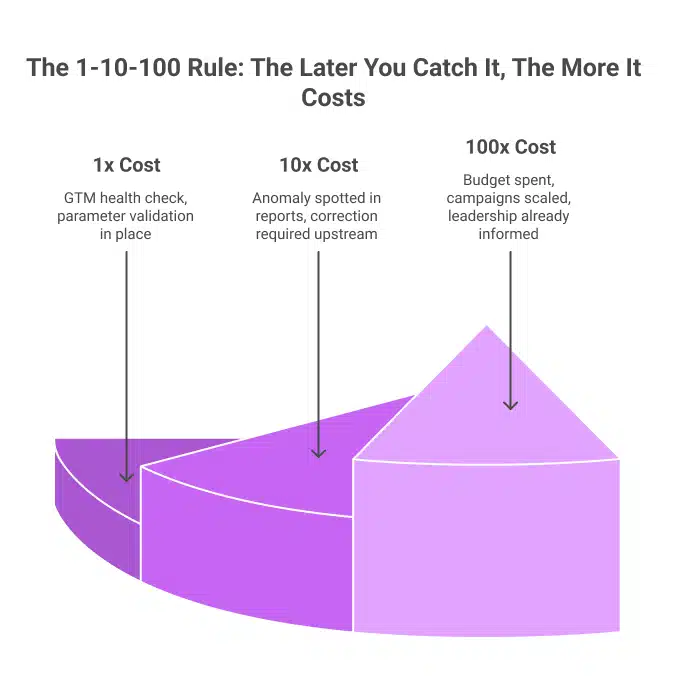
There is a well-documented principle in data management called the 1-10-100 rule:

  • 1x cost to fix a data quality issue at the point of entry
  • 10x cost to catch it midway through the pipeline
  • 100x cost once bad data has reached the decision-maker

Reactive analytics almost always catches errors at the 100x stage. An analyst notices something strange in a report, traces it upstream, and discovers the issue began weeks ago. By then:

  • Budget decisions have already been made
  • Campaigns have been scaled on false signals
  • The data that influenced those calls cannot be recovered

What Is Proactive Analytics?

Proactive analytics is an approach to data monitoring where issues are identified and flagged before they reach your reports and influence your decisions.

Instead of waiting for something to look wrong, proactive systems:

  • Continuously monitor your data streams
  • Learn what normal behavior looks like for your specific metrics
  • Alert your team the moment something deviates

This is meaningfully different from setting static alert thresholds in GA4. Static thresholds:

  • Miss anomalies that fall just below the trigger level
  • Generate false positives that cause alert fatigue
  • Cannot adjust for seasonal patterns or business cycles

True proactive analytics uses machine learning to:

  • Continuously learn the baseline behavior of every metric being monitored
  • Detect deviations that static rules would miss entirely
  • Alert teams in near real-time with context: what changed, by how much, and since when
  • Distinguish between genuine anomalies and normal variability, reducing noise

Why Reactive Analytics Is Getting More Dangerous

The complexity of modern digital measurement has grown considerably. The average marketing team now pulls data from 12 to 15 different sources: Google Ads, Meta, LinkedIn, CRM systems, email platforms, and analytics tools, each generating data in its own format, with its own quirks and failure modes. When these sources feed into a central analytics setup without automated quality checks, the result is not insight. It is noise disguised as insight.

Two dynamics are making this worse.

Data volume is outpacing human capacity. The global datasphere stood at over 147 zettabytes in 2024, with projections exceeding 175 zettabytes in 2025, according to IDC. No analytics team, regardless of skill, can manually monitor every metric, dimension, and event parameter at this scale. Reactive monitoring breaks down under this volume before it ever gets started.

AI tools are amplifying bad data. Organizations are investing heavily in AI-powered analytics, predictive models, and ML-driven attribution. However, AI trained on bad data produces bad outputs consistently. Research by Adverity found that CMOs estimate 45% of the marketing data their teams use is incomplete, inaccurate, or outdated. Nearly half the data feeding your AI models may be actively working against you.

What a Two-Week Detection Delay Actually Costs

Here is a scenario that Tatvic’s clients encounter more often than most would expect:

  1. A GTM misconfiguration causes purchase events to fire twice per transaction
  2. Conversion data doubles overnight
  3. ROAS looks exceptional, so the team scales the budget
  4. Two weeks later, a finance reconciliation reveals that the revenue numbers do not match
  5. The team traces the error back to the tag

Two weeks of corrupted data have already influenced budget allocation, campaign strategy, and leadership reporting. A same-day fix would have cost a fraction of the damage. This is not a hypothetical risk. It is the predictable outcome of reactive measurement.

What Proactive Analytics Looks Like in Practice

Shifting from reactive to proactive analytics does not require rebuilding your entire stack. It requires adding the right monitoring layer on top of what you already have.

Here is what the shift looks like in practice:

Reactive Proactive
Traffic drop found in the Monday review Anomaly alert fires within 3 hours
Conversion parameter error found in the quarterly audit Automated data sanity check flags it within 24 hours
GTM bloat discovered in annual performance audit Continuous GTM monitoring catches it as it builds
An analyst spends 4-6 hours running a GA4 audit Automated audit completes in minutes

The operational improvement is clear. Tatvic’s AI-powered GTM health monitoring is one example of how continuous intelligence replaces periodic manual review, catching tag conflicts, ghost tags, and container inefficiencies before they affect data collection or site performance.

Is Your Analytics Setup Reactive? Check These Signs

Run through this quickly:

  • Data issues are discovered in meetings, not in real-time alerts
  • GA4 audits happen quarterly or only when something looks wrong
  • Analysts spend more time validating data than analyzing it
  • There is a known discrepancy between your CRM and GA4 that has existed for more than two weeks
  • Your static threshold alerts either trigger daily (noise) or never trigger (blind spots)
  • Your GTM container has not been reviewed in over 90 days

If two or more of these are true, your analytics posture is reactive. Each gap maps directly to a specific capability within a proactive analytics framework.

Where to Start: A Practical Order of Operations

The most common mistake when shifting to proactive analytics is trying to monitor everything at once. A smarter approach is to start where the risk is highest and build outward.

Step 1: Secure data collection integrity first. Your entire analytics stack is only as reliable as the data coming in. Start with GTM health monitoring and automated data sanity checks to ensure what reaches GA4 is accurate before it is ever analyzed.

Step 2: Add anomaly detection on your highest-value KPIs. Revenue, purchase events, and primary acquisition sources are where a silent anomaly does the most damage. Intelligent, ML-driven monitoring on these metrics gives you early warning where it matters most.

Step 3: Build a response workflow. An alert without a playbook is just noise. Define who receives each alert type, what action is expected within the first hour, and how issues escalate. This is what turns proactive analytics from a monitoring tool into a business protection system.

The market is already moving in this direction. Grand View Research values the global predictive analytics market at $18.89 billion in 2024, projecting growth to $82.35 billion by 2030. The organizations driving that growth are not waiting for problems to show up in weekly reports.

The Takeaway

Reactive analytics is not a strategy. It is what happens when an analytics setup built for a simpler era meets the complexity of modern digital measurement. The volume of data, the number of sources, and the speed of decisions have all outpaced the pace of manual monitoring.

Proactive analytics does not demand a complete overhaul. It demands the right monitoring layer, the right alerting logic, and a team or partner who understands how to build them for your specific data environment.

Every analytics setup has issues. The question is whether you are finding them before or after they influence a decision that matters.

Not sure where your analytics setup sits on the reactive-to-proactive spectrum? Schedule a call with Tatvic’s analytics experts today!

The Real Cost of US Tech Hiring in 2026: What to Do About It

Every open technical role costs you $500 a day. The average hire takes 44 days. That is $22,000 gone before your new hire completes a single task. And in 2026, the talent market is not getting any easier.

The dedicated FTE model is how mid-sized US brands are breaking out of this cycle. Pre-vetted analytics and data talent, fully integrated into your team, at 40 to 70% of US hiring costs.

Here is the full picture, backed by tier-1 data.

The US Tech Talent Market Is at a Crisis Point

The scale of the problem is hard to overstate.

The Bureau of Labor Statistics projects the US developer shortage will exceed 1.2 million unfilled roles by 2026. IDC estimates that the global IT skills gap will result in $5.5 trillion in losses for organizations this year alone.

It is not just about numbers. It is about who is available to hire.

Robert Half’s 2025 Building Future-Forward Tech Teams report found that 87% of US tech leaders currently face challenges finding skilled talent. Another 76% say a tech skills gap is already visible inside their own departments.

  • 1.2M Unfilled US developer roles by 2026       -Bureau of Labor Statistics
  • $5.5T Projected global losses from the IT skills gap in 2026     -IDC
  • 87% US tech leaders are struggling to find skilled talent      -Robert Half 2025

Tech unemployment sits at just 2.8%, well below the national average of 4%. In practical terms, you are not hiring from a pool of available candidates. You are competing to pull employed workers away from other companies.

For mid-sized brands without the brand pull of Big Tech, that is a fight that is hard to win on salary alone.

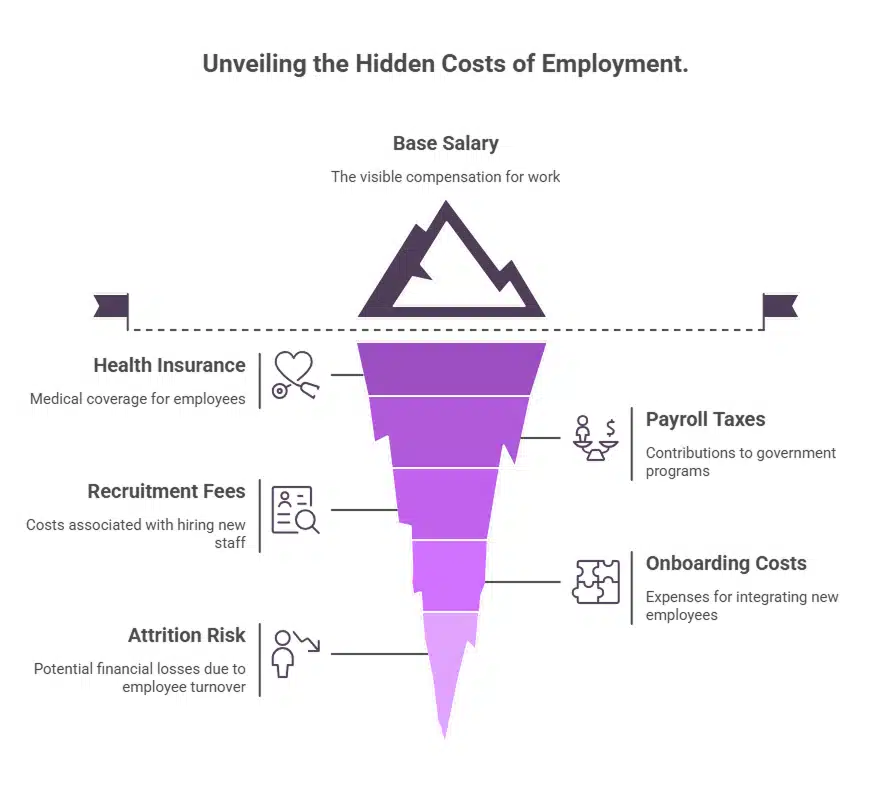
The True Cost of a US Tech Hire Is Not the Salary

The multiplier most budgets miss

Base salary is just the starting point.

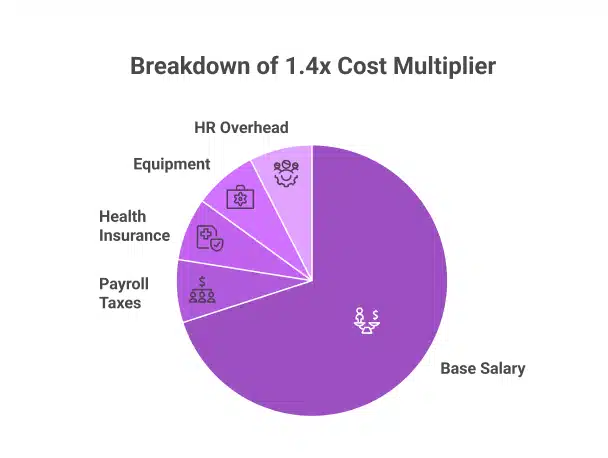
The U.S. Small Business Administration and SHRM confirm that the true annual cost of a US employee runs 1.25x to 1.4x their base salary, once payroll taxes, paid leave, equipment, software licenses, and HR overhead are factored in.

On a $120,000 base, that adds up to $48,000 in overhead before the hire completes their first sprint cycle.

Healthcare alone is a budget line

Mercer’s 2026 projection puts average employer health insurance at $17,496 per employee per year. For a five-person analytics team, that is $87,480 annually, purely in healthcare. That number is rising every year. (CompTIA 2025)

Median tech worker wage is 127% higher than the US national median wage. (Mercer 2026)

Employers pay an average of $17,496 per year in health insurance for each tech hire

If a hire leaves in year one, which Gartner data suggests is likely, given that only 29% of IT workers intend to stay long-term, you absorb every dollar again. Plus the cost to replace them.

Vacancy Is Not Neutral. It Costs $500 Every Day.

The daily drain

Deloitte’s Recruitment Efficiency Report puts the cost of an unfilled technical role at $500 per day in lost productivity, delayed projects, and increased load on existing team members.

SHRM benchmarks the average time-to-fill a technical position at 42 to 44 days.

At $500 a day over 44 days, that is more than $22,000 lost before a new hire clears onboarding.

Carrying three open roles through a standard 44-day cycle costs over $66,000 in vacancy losses alone, before a single recruiter invoice arrives.

It is getting worse, not better

One source tracking the 2026 hiring environment puts the average time to fill a senior engineering role at four to six months through traditional channels. Compensation has risen 12% since 2024, with median US developer salaries now above $130,000.

Top candidates are fielding multiple offers simultaneously. The window between posting a role and losing your preferred candidate to a faster-moving company has never been tighter.

Recruitment Overhead Adds Another $8,000 Before Day One

Most hiring budgets forget the cost of finding the candidate in the first place.

  • SHRM’s 2025 Benchmarking Report puts the national average cost-per-hire at $5,475 for non-executive roles
  • ScoutLogic’s 2025 analysis puts technical and engineering roles at $6,200 to $8,000, driven by candidate scarcity
  • For five analytics hires in a fiscal year, that is more than $35,000 in recruitment overhead alone

A single mis-hire restarts the entire clock. Every dollar spent, spent again.

Global IT Outsourcing Has Hit $660 Billion for a Reason

US companies have already voted with their budgets.

Global IT outsourcing spending reached $660 billion in 2025, up from $520 billion in 2023. Nearshore and offshore outsourcing grew 21% year-over-year in 2025 alone. Deloitte’s 2024 global survey found that 80% of executives planned to maintain or increase third-party talent investment, a trend that has held firm into 2026.

“The organizations that succeed are those that build inclusive systems and embrace the full potential of a global workforce.” - X-Team Global Talent Report, January 2026

The infrastructure has caught up with the ambition. Shared dashboards, real-time collaboration tools, and async-friendly workflows mean that a dedicated FTE in Ahmedabad can operate as a genuine part of your US team, not a distant vendor.

The savings are real and well-documented. Offshore talent hubs like India consistently deliver 40 to 70% cost savings compared to equivalent US hiring.

What a Dedicated FTE Model Actually Means in Practice

Not outsourcing. An extension of your team.

One named professional. Assigned exclusively to you. Not rotated across accounts or pulled off mid-sprint.

They attend your standups, used your tools and report to your leads.

  • Productive in 7 to 14 days, compared to the 42 to 180-day window of US hiring in 2026
  • Zero recruitment cost and zero payroll tax complexity
  • Pre-vetted expertise in your specific stack, with no skill discovery on your budget
  • Flat monthly billing with no surprise benefit surcharges
  • A managed replacement path if performance falls short

The accountability of an in-house hire. At a cost structure, mid-market brands can actually sustain.

Why Tatvic, and Why Now

Most FTE providers offer generalist talent. Tatvic is purpose-built for data and analytics teams.

Over a decade of client engagements has produced deep expertise across GA4, BigQuery, Looker Studio, and marketing data infrastructure. Every professional deployed through Tatvic’s FTE model has worked on real client projects, not internal training exercises.

Who benefits most in 2026

  • E-commerce and DTC brands scaling GA4 or CDP implementations
  • Mid-market companies that need senior analytics capacity without US salary overhead
  • Agencies expanding delivery without growing domestic headcount
  • Growth-stage companies where time-to-insight is a direct competitive advantage

The 12-Month Cost Comparison

Cost Category US Full-Time Hire (2026)
Base Cost $110,000 to $140,000
Health Insurance $17,496 (Mercer 2026)
Payroll Taxes and Benefits (1.4x) $44,000 to $56,000 extra
Recruitment Cost $6,200 to $8,000 (SHRM 2025)
Vacancy Loss $22,000 over a 44-day cycle
Attrition Risk High. Full cost restarts on exit.

Sources: SHRM 2025, Mercer 2026, Deloitte 2024, U.S. SBA, IDC, Robert Half 2025, Bureau of Labor Statistics

Over 12 months, a Tatvic FTE typically delivers 40% to 60% total savings versus the fully loaded cost of an equivalent US hire. That gap widens with every recruitment cycle avoided, and every attrition event eliminated.

Stop Absorbing Costs That Are Optional

The BLS projects 1.2 million unfilled tech roles in the US this year. IDC puts the financial damage at $5.5 trillion globally. Robert Half confirms 87% of tech leaders are already feeling it.

This is not a blip. It is a structural shift in where technical talent lives and what it costs to access it.

A dedicated FTE model gives you pre-trained, specialized professionals who work as part of your team. Transparent pricing. Up and running in two weeks. Savings from month one.

Tatvic’s model is built specifically for analytics, data engineering, and marketing technology teams in the US market.

See what a dedicated analytics FTE would cost your team in 2026.

Share your role requirements, and we will walk you through who would be assigned, how onboarding works, and what the monthly engagement looks like. No vague proposals. No sales pressure.

Book a consultation with Tatvic ↗

Creative Intelligence in Marketing: Why Winning Creatives Don’t Scale

If Your Creative Worked Once… Why Can’t You Make It Work Again?

You launch a few creatives, and one clearly outperforms the rest. It drives higher clicks, better engagement, and stronger conversions. Naturally, you scale it, expecting similar results across audiences and campaigns.

But the performance doesn’t hold. The next iteration underdelivers, and what once seemed like a “winning creative” suddenly feels inconsistent. At that point, most teams go back to testing - new hooks, new formats, new variations - hoping to find the next winner.

The real issue isn’t the lack of testing. It’s the lack of clarity.

Most teams don’t actually know why the first creative worked. They only know that it did. And that distinction is what separates repeatable growth from inconsistent performance.

The Illusion of a “Winning Creative”

Marketing teams today are highly data-driven, but that data is often interpreted at a surface level. Performance is measured through metrics like CTR, conversions, engagement rates, and ROAS, and based on those numbers, a creative is labeled as “winning.”

This approach answers an important question: what performed better?
But it doesn’t answer the more critical one: what made it perform better?

That gap becomes visible when you try to scale. Without understanding the drivers behind performance, scaling becomes repetition rather than optimization. And repetition without context rarely produces consistent outcomes.

Why Performance Doesn’t Repeat

A creative is not a single variable. It is a combination of elements working together - messaging, visuals, structure, timing, and audience context. When a creative performs well, it’s usually because a specific combination of these elements aligns effectively.

However, when teams treat the creative as one unit, they miss that nuance. Any attempt to replicate it often changes key variables unintentionally. The hook might shift slightly, the audience might differ, or the context might change.

As a result, performance drops - not because the idea was flawed, but because the underlying drivers were never clearly understood.

This Isn’t a Data Problem. It’s a Clarity Problem.

Most organizations already have access to abundant data. Campaign dashboards, attribution tools, and analytics platforms provide detailed visibility into performance across channels and audiences.

But visibility alone does not create clarity.

As discussed earlier in the series, simply having access to data does not mean teams can instantly understand it. (Read more in What if you didn’t have to explore data to understand it?.)

Even today, most workflows rely on manual analysis - segmenting performance, comparing trends, forming hypotheses, and validating assumptions. This process is time-intensive and often inconsistent, especially when applied to creative performance.

What Creative Intelligence Actually Means

Creative intelligence goes beyond identifying high-performing creatives. It focuses on breaking down performance into meaningful components and understanding how each element contributes to outcomes.

Instead of evaluating an ad as a single unit, creative intelligence analyzes it at a granular level. It looks at how specific hooks, formats, tones, and calls-to-action influence engagement and conversion across different audiences.

This shift changes the core question teams ask. Instead of asking “Which ad worked?”, the focus moves to “What within this ad worked - and where else can we apply it?”

That is where optimization becomes intentional rather than reactive.

From Creatives to Patterns

When performance is analyzed at the element level, patterns begin to emerge. These patterns often remain hidden when looking only at campaign-level metrics.

For instance, certain messaging styles may consistently drive higher engagement among new users, while user-generated content formats may outperform polished creatives for specific segments. Similarly, emotional hooks may increase interaction, but not always lead to conversions.

These are not isolated observations. Over time, they form repeatable patterns that can be applied across campaigns. This is what turns creative performance from unpredictable outcomes into structured insights.

Why This Matters More Than Ever

The importance of understanding creative drivers has increased significantly in recent years. Marketing environments are more dynamic, audiences are more fragmented, and content fatigue sets in faster.

At the same time, expectations around personalization continue to rise. According to McKinsey & Company, 71% of consumers expect personalized experiences, yet most brands struggle to deliver them consistently.

The gap exists because personalization is often applied at a superficial level. Without understanding what truly resonates with different audience segments, personalization becomes difficult to scale effectively.

Creative intelligence addresses this by linking content patterns directly to audience response, making personalization more actionable and less dependent on guesswork.

Why Traditional Workflows Break at Scale

Most creative workflows follow a familiar cycle: launch, measure, identify a winner, and scale. While this approach works in controlled scenarios, it begins to break down as complexity increases.

Modern campaigns operate across multiple channels, audiences, and formats. Each variable introduces additional layers of complexity, making it harder to isolate what actually drives performance.

As highlighted earlier in the series, analytics systems today are largely built for investigation rather than real-time understanding (explored in Analytics today is built for investigation-not detection).

This limitation extends to creative analysis as well. By the time insights are derived, the opportunity to act on them has often passed.

How Agentic AI Enables Creative Intelligence

This is where agentic AI changes the equation. Instead of relying on manual analysis, it continuously evaluates creative performance at a deeper level and connects multiple data points in real time.

Rather than focusing only on outcomes, it links creative elements to performance signals and identifies patterns across campaigns. It breaks down creatives into components such as hooks, visuals, messaging, and calls-to-action, and maps each component to engagement and conversion metrics.

Over time, this creates a structured understanding of what drives performance. Instead of isolated campaign insights, teams gain access to reusable patterns that can be applied across contexts.

This shift transforms the workflow. Teams no longer start with exploration. They start with insight - clear, contextual, and actionable.

What Gets Measured &Why It Changes Decisions

To support this approach, measurement frameworks need to evolve beyond campaign-level metrics. Creative intelligence introduces new dimensions of analysis that focus on element-level performance.

This includes evaluaitng:

  • Which hooks capture attention
  • Which messaging resonates with specific audience segments
  • Which formats perform best across different channels
  • How individual creative elements contribute to overall outcomes

By shifting measurement to this level, teams move from observing performance to understanding it. Decisions are no longer based solely on outcomes but on the drivers behind those outcomes.

From Testing More to Learning Faster

Many teams believe that increasing the number of tests will lead to better performance. While experimentation is important, the real advantage lies in how quickly teams can learn and apply insights.

Creative intelligence shortens this cycle by making insights more accessible and actionable. Instead of running multiple tests without clear direction, teams can focus on refining elements that are already proven to work.

According to McKinsey & Company, organizations that effectively use data and AI in marketing can improve ROI by 20-30%. These improvements are not driven by more testing alone, but by faster and more informed decision-making.

The Compounding Impact of Understanding

The benefits of creative intelligence extend beyond individual campaigns. Over time, every campaign contributes to a growing repository of insights.

These insights do not remain isolated. They compound.

As a result, future campaigns start with a stronger foundation. Testing cycles become shorter, performance becomes more predictable, and resource allocation becomes more efficient.

This is where marketing shifts from reactive execution to strategic optimization.

The Role of Human Creativity

Despite the increasing role of advanced analytics, human creativity remains central to the process. Creative intelligence does not replace human judgment; it enhances it.

By providing clearer insights, it allows teams to focus on strategy, storytelling, and innovation rather than spending time on repetitive analysis. Teams still define the narrative and direction, but they do so with greater confidence and clarity.

This combination of human creativity and structured insight leads to more effective outcomes.

The Real Shift in Marketing Analytics

Analytics has already evolved significantly over the years. It has moved from enabling basic measurement to providing deeper visibility into performance.

Now, it is entering a new phase - one that focuses on understanding.

Instead of simply showing what happened, analytics is beginning to explain why it happened. When this capability extends to creative performance, it unlocks a new level of optimization.

Performance is no longer reactive. It becomes repeatable.

Closing Thought

If your team is still scaling “winning creatives” without understanding why they worked, the problem isn’t execution - it’s insight.

Repeating outcomes without understanding their drivers leads to inconsistent performance and missed opportunities. Over time, this creates inefficiencies that are difficult to measure but expensive to sustain.

The real advantage today lies in understanding what drives engagement and conversion at a deeper level. When that understanding becomes part of your workflow, you move from guessing what might work to confidently applying what already does.

That is the difference between testing for results and building for repeatable growth.

Landing Page Optimization in 2026 Has Two Audiences. Most Brands Are Only Optimizing for One.

Right now, a shopper is asking ChatGPT to find the best running shoes under $120. Another is asking Perplexity to compare skincare serums for sensitive skin. A third is asking Google’s AI Mode to build a sustainable gift set under $80.

Your brand either shows up in those answers or it doesn’t.

This is the new reality of landing page optimization. And most e-commerce teams are only solving half the problem. They’re building pages for humans who arrive. They’re not building pages for the AI systems that decide whether to send those humans in the first place.

That gap is where revenue is being lost right now.

The Funnel Has a New Front Door

For two decades, e-commerce started with Google. You optimized keywords, earned backlinks, bought ads, and drove traffic to your pages. The playbook was consistent, well-understood, and it worked.

That formula is breaking down faster than most teams realize.

McKinsey‘s AI Discovery Survey found that 50% of consumers now use AI when searching online. Among those who’ve tried it:

  • 44% say AI has become their primary way to search
  • Only 31% still prefer traditional search

This isn’t a slow, gradual shift. It’s already the majority behavior among high-intent, high-spending shoppers, exactly the audience ecommerce brands work hardest to reach. These are people with purchase intent who are actively looking for product recommendations, comparisons, and trusted sources.

Gartner‘s forecast: Traditional search engine volume will drop 25% by 2026 as AI chatbots take over queries that once ran through Google and Bing. Their analyst put it plainly: companies will need to rethink their entire marketing channel strategy as generative AI becomes embedded across every aspect of commerce.

Organic Traffic Is Already Sliding

BCG‘s research adds an uncomfortable reality check for brands still focused entirely on traditional SEO:

  • Nearly 10% of businesses are already seeing year-over-year organic traffic decline
  • Traditional organic search traffic in the US is falling at roughly 10% annually
  • Traffic to retail sites from generative AI sources grew 4,700% year over year in July 2025 alone

That last number isn’t a trend to watch. It’s a signal that landing page optimization now means something fundamentally different than it did 12 months ago. The channel driving the fastest growth in qualified e-commerce traffic is AI.

Brands still treating landing page optimization as a purely human-facing discipline are optimizing for a shrinking pool of traffic while the fastest-growing pool passes them by.

Your Landing Page Now Serves Two Audiences

Here’s what most ecommerce teams haven’t fully processed yet.

When a consumer asks an AI assistant to recommend a product, the AI doesn’t just Google it. It pulls together information from your product pages, your reviews, your structured data, third-party citations, forums, and comparison sites. It evaluates credibility, consistency, and clarity.

Then it decides whether your brand belongs in the answer.

That decision happens before any human ever lands on your page.

As McKinsey puts it: “In an agentic world, your customer may no longer be a human with a browser; it is just as likely to be an autonomous agent, acting on that customer’s behalf.”

This means landing page optimization in 2026 has two distinct jobs:

Job What It Means
Job 1 Convert the human who arrives
Job 2 Be clear, trustworthy, and recommendable to the AI that decides to send them

Most brands are doing Job 1 reasonably well. Job 2 is almost entirely ignored, which means the AI gatekeeping the recommendation never sends the human in the first place.

What the Second Job Actually Requires

Deloitte’s 2025 Digital Media Trends puts it plainly:

“We are moving away from optimising for clicks and toward optimising for understanding. When an AI system generates a response, it draws on content it can interpret and trust.”

Effective landing page optimization for AI audiences requires a specific set of structural changes most brands haven’t made yet:

  • Rich product schema and clean metadata
  • Descriptive content that language models can actually parse
  • Consistent, current information across all channels
  • FAQ content that answers real shopper questions
  • Pricing, delivery windows, and return policies in machine-readable formats
  • Third-party citations and review signals that establish credibility

Deloitte is specific about why this matters: metadata, taxonomy, and signals of expertise now play a significant role in whether a brand’s content gets surfaced accurately by AI systems. This isn’t optional polish; it’s the foundation of landing page optimization for the current environment.

Brands that skip this work don’t just miss an optimization opportunity. They become invisible to the fastest-growing discovery channel in ecommerce history.

What AI Agents Look for When Comparing Products

When AI agents compare products on a shopper’s behalf, BCG’s research shows they rely on a narrow and specific set of signals:

  1. Price - Is it clearly visible and machine-readable?
  2. Reviews - Are aggregated scores structured and prominently surfaced?
  3. Delivery speed - Is the fulfilment window stated explicitly?
  4. Return policy - Is it clear, accessible, and easy to parse?

Brands whose landing page optimization surfaces all four signals in structured, machine-readable formats have a clear structural advantage over brands presenting the same information in ways only humans can interpret.

This is not a one-time technical fix. It’s an ongoing discipline. Every product page, FAQ section, and comparison document needs to be structured for AI comprehension, not just human readability. As your inventory, pricing, and policies change, those updates need to flow consistently across every channel where AI systems might pull your information.

Why This Matters for Your Revenue

The commercial case for better landing page optimization is now impossible to ignore.

Adobe Analytics studied over a trillion visits to US retail sites during the 2025 holiday season. Shoppers arriving from generative AI assistants significantly outperformed every other traffic source:

Metric AI-Referred Shoppers
Conversion rate +31% vs all other traffic
Thanksgiving conversion +54%
Black Friday conversion +38%
Bounce rate 33% lower
Time on site 45% more
Pages viewed per visit +13%

Revenue per visit from AI-referred shoppers increased 254% year over year during the 2025 holiday season. That’s not a rounding error. That’s a different category of visitor entirely, one that only arrives if your landing page optimization has done the work of earning the AI recommendation upstream.

The Highest-Intent Traffic on the Internet

Salesforce data reinforces the same story from a different angle.

In the first six months of 2025, conversion rates from AI channels were 700% higher than traffic referred from social media. That puts AI-referred traffic in its own category, more intent-loaded than paid search, more purchase-ready than any other digital acquisition channel currently available.

These visitors didn’t stumble onto your site. They arrived because an AI system evaluated your brand, found it credible and relevant, and recommended it by name. They came pre-qualified.

Proper landing page optimization is what earns that recommendation in the first place. Without it, the pre-qualification never happens, and the high-intent visitor never arrives.

The Stakes Are $5 Trillion

McKinsey’s agentic commerce report, published in October 2025, laid out what’s commercially at stake globally:

  • AI agents could mediate $3-5 trillion in global consumer commerce by 2030
  • US B2C retail alone could see up to $1 trillion in AI-orchestrated revenue

Their framing was deliberate: “This is not just an evolution of e-commerce. It’s a rethinking of shopping itself.” They compare this transition to the web and mobile revolutions and project that it will move faster than either one did.

How Much Time Do You Actually Have?

Deloitte’s Agentic Commerce research puts a concrete deadline on the urgency:

  • 63% of global retailers believe companies without an AI strategy will fall behind within two years
  • By 2030, 55% of digital consumers will start product research on LLM platforms
  • 25% of global e-commerce sales will be enabled by AI agents by 2030

Brands investing in landing page optimization for AI audiences now are locking in positions in the recommendation layer that will be hard for slower competitors to displace.

BCG’s research makes the compounding effect explicit: once a brand becomes an established, authoritative source that AI systems trust and cite, it tends to get cited more often, creating a visibility advantage that grows over time. Brands waiting for this to be “fully proven” before acting will find those positions already taken.

One Page. Two Audiences. One Strategy.

Here’s the good news: optimizing for AI agents and optimizing for human visitors are not competing priorities. They reinforce each other.

The same qualities that make a page convert real people are the qualities that earn AI recommendations:

  • Clear, well-structured product information
  • Honest reviews surfaced prominently
  • Transparent delivery and return policies
  • FAQ content that answers real questions shoppers actually ask

Effective landing page optimization in 2026 doesn’t mean choosing between SEO and AIO. It means treating both as one coherent strategy: get found before the visit, convert after it.

Your Quick Action Checklist

Before your next product launch, run your landing page against these questions:

[ ] Is pricing visible in a machine-readable format?

[ ] Does the page include FAQ schema for common shopper questions?

[ ] Is the delivery window and return policy explicitly stated?

[ ] Is product metadata consistent across all channels?

[ ] Are credible third-party sources citing or reviewing this page?

If you answered no to two or more, your landing page optimization is only serving one of your two audiences and leaving the highest-converting traffic source on the table.

Ready to Close the Gap?

The brands winning in 2026 aren’t choosing between old and new. They’re doing both with infrastructure built for both audiences from the ground up.

Tatvic works with e-commerce brands to close the gap between traffic and revenue through agentic AI-powered landing page optimization and customer experience strategy.

Curious what your current pages are leaving on the table? Let’s find out.

Bot Icon
Bot Icon

Tatvic Bot

Explore About Tatvic and Services