Hello There!

Lorem ipsum dolor sit amet, consectetur adipiscing elit,

5-Google E-commerce Shopping Ads campaign optimization tips

Google Shopping ads, also known as Product Listing Ads (PLA), are a form of ad that appears at the top of search results in a retailer-specific box. Google rolled out this ad format back in 2010 and it has been steadily growing in popularity ever since. Today, these types of ads are essential for many leading brands as it plays an important part in their strategies for improving brand awareness and increasing sales!

When it comes to implementing eCommerce advertising tactics on Google, the success of all campaigns isn’t guaranteed. While the team at Tatvic has deep experience, there are always multiple dimensions at play.  Each campaign begins on tested hypotheses, and it quickly learns optimization for effective ROIs 

If you have an online eCommerce Google Shopping campaign but want to make it even more effective, we’re sharing proven strategies that will help improve your return on ad spend (ROAS). Of course, every business is different, but if one has the best chance of these strategies working for your shop, here are a few proven pointers.

As an e-commerce marketer, these 5 tips have provided great ROI for my clients, time and time again.

1. Enhance your product feed to help your Shopping ads stand out

When it comes to Google Shopping campaigns, eCommerce business owners don’t cut corners. These are the first products that customers see when searching for items, and if your results look anything less than professional, you could be missing out on clicks.

When most people think about optimizing their Google Shopping ads, they focus on their campaigns, bid strategy, and execution. While this is important, we’d argue that the more significant wins actually come from optimizing your merchant center feed.

  • Use high-quality, product-first visuals.
    Why: Close-up product shots with white backgrounds make it easy for customers to see product details, helping you drive more engagement. 
  • Ensure your product data is accurate and up-to-date.
    Why: Accurate data is key to ensuring your ads showcase the information your customers are looking for. Upload rich product descriptions and update product prices and availability if they change often.
  • Cater to consumers’ demand for convenience.
    Why: Shoppers are increasingly looking for great deals, fast delivery times, and easy returns. Use annotations to stand out to them when they’re looking for convenient ways to purchase.
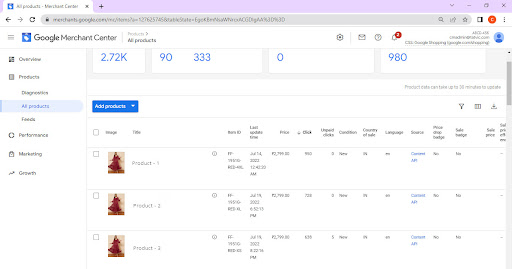
Google merchant center: Products List
(Google merchant center: Products List)

2. Use Dynamic Remarketing 

Remarketing allows you to show ads to people who have previously visited your website or used your mobile app. Dynamic remarketing takes this a step further. It lets you show previous visitor’s ads that containing products and services they viewed on your site. These ads are targeted with specific items visitor was browsing before so it can help create leads and sales by bringing back previous visitors to complete what they started.

More reasons to use dynamic remarketing

  • Ads that scale with your products or services: Pair your feed of products or services with dynamic ads, scaling your ads to cover your entire inventory.
  • Simple, yet powerful feeds: Create a basic .csv, .tsv, .xls, or .xlsx feed. The Google Ads product recommendation engine will pull products and services from your feed, determining the best mix of products for each ad based on popularity and what the visitor viewed on your site.
  • High-performance layouts: Google Ads predicts which dynamic ad layout is likely to perform best for the person, placement, and platform where the ad will show.
  • Real-time bid optimization: With enhanced CPC and conversion optimizer, Google Ads calculates the optimal bid for each impression.
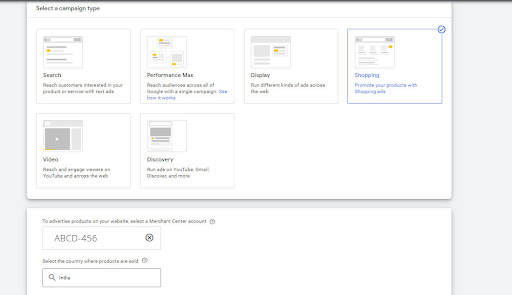
select-campaign-type

3. Use Ad Scheduling

Ad scheduling is something no busy marketer can afford to overlook. It may not always be effective right off the bat but learning about what works for your business and using data for guidance will give you a more targeted approach that in turn can boost your ROI in the long term. We’ve seen from experience that creating separate campaigns with different schedules tied to different targeting criteria can be beneficial because it allows you to target specific audiences at their most favorable times. It’s very useful if you’re promoting two different products or brands because each product or brand can get maximum exposure during its respective optimal timeframe. To get the most out of your campaigns, you can also apply bid modifiers to them. By knowing how well your ad performs at different hours of the day, you can pay more for traffic during high converting days/times - or decrease bids on days/times when conversions falter.
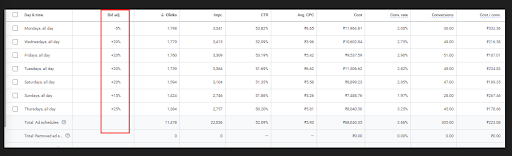
Ad scheduling
(Ad scheduling )

4. Use Location Targeting

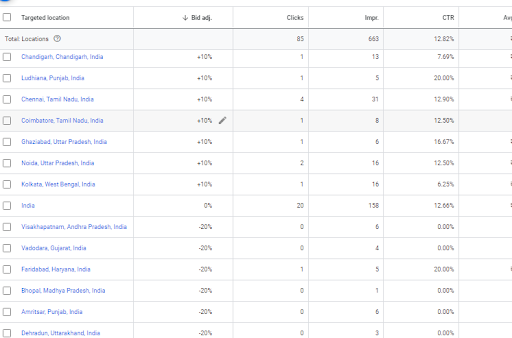
Select the geography view to see how your campaign performs by countries, regions, metro areas, cities, or any other location available. Once you have determined what regions are performers, you can apply geo-targeting bid modifiers to adjust for higher bids from top-performing areas, and lower bids from poor performers. You can exclude the locations which are not bringing any sales. This way you give more budget to the top-performing city and can improve your sales.

Target bid adjustments are a great way to help ensure that you’re running the most profitable campaigns. You can use this feature to change bids based on the search results location, including country, state, city, postcode, and other factors important to your business like traffic and days of the week.

  • Specify where you want your ads to be shown 
  • Allow the campaign to run for at least a few weeks
  • Access the locations report to assess how each bid is performing
  • Adjust bids based on results

5. Use Device Targeting

The Google AdWords performance can be broken by Desktop, Mobile, and Tablet. Google breaks down your performance into three categories of devices. Each device has different results. It is important to understand this breakdown because that means that you may get different types of results based on the type of device where your ads are viewed.

Adjusting bids on the basis of device type is a powerful way to design Google AdWords campaigns that perform more efficiently. While you may be ignoring more economical options, like Cost Per Click, by using this method you’re targeting your ads at specific types of devices rather than wasting money with AdWords ads on devices where they won’t draw as much visitor attention as they should. Make sure your team/contractor is knowledgeable about which group(s) of devices a customer’s most likely to use depending on the type of website (gaming or news site for example).
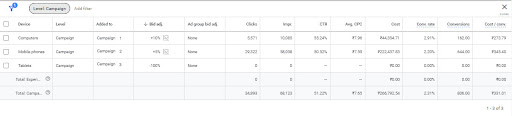
device-targeting

Summing It Up

Hopefully, these 5 tips have helped you learn what it takes to be successful.

To recap, 5 tips are:

  1. Enhance your product feed to help your Shopping ads stand out
  2. Dynamic Remarketing 
  3. Ad Scheduling
  4. Location Targeting
  5. Device Targeting

If you have any other ideas on how to increase sales from Google ads, share them with us in the comments below. Consider sharing this post if you found it valuable with your peers!

If you would like to get in touch with us regarding our marketing consulting services, or if you might be of assistance to anyone looking for digital marketing or social media management you can contact us from here.
Interpreting Marketing Data Couldn’t Get Easier: Introducing GA4 Custom Insights

Interpreting-marketingdata


The marketing industry is ever-evolving and there is a heap of data collected every minute of a day. We are surrounded by a ton of information from varied sources but have no idea how to put them into action. This is precisely what GA4 is designed for - to help us gain insights from our data on our conditions relevant to our business. Do not wait and plan your migration and/or set up with us today.

A lot of exceptional features of GA4 have been covered in our blog series, like Data exploration, Subproperties, and Predictive Audiences. Let’s look at another powerful feature of GA4 this time - Custom Insights.

With GA4 custom insights, we can now generate insights and uncover anomalies for those metrics that may otherwise go unnoticed. How does this directly help you? By providing expert recommendations on what to do next based on the insights and eliminating the need to spend hours going through mountains of data yourself. Custom Insights in GA4 lets you utilize the power of machine learning along with your data-driven skills.

Types of Insights:

1. Automated Insights:

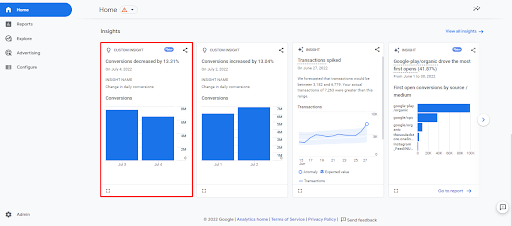
Automated insights are the built-in Analytics intelligence that detects unusual changes or emerging trends in collected data and notifies you accordingly. The Insights dashboard in the GA4 console visualizes the trends for important metrics based on machine learning.

Insights Dashboard - Home Page

2. Custom Insights:

Custom Insights is also based on Analytics Intelligence that detects changes but on conditions that you will define. The insights are visible on the Insights dashboard when the user-defined conditions are triggered. You can optionally receive notification alerts on your email while creating custom insights if your user id has property-level access.

Apart from using Custom Insights for data quality, they can also be used to quickly and accurately answer everyday questions about your data. Like how Organic Search is performing compared to Paid Search and what conversion events are driving the most conversions this week compared to last week. Custom Insights can be informative and can provide early or emergency warnings for anomalies in your data.

The configuration limit for Custom Insights is 50 per property so it becomes important to use these slots strategically. It is not recommended to create Custom Insights for every metric but the ones important to your business.

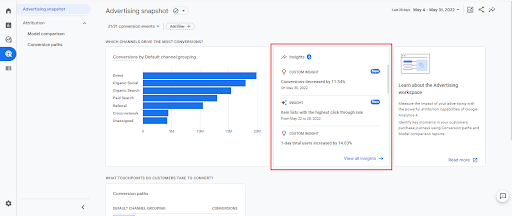
These insights once automated will be visible on the bottom of the home page and the advertisement snapshot.

To see a full list of insights, manage insights, or create new custom insights, click View all insights. You need Editor or Analyst level access to create or edit custom insights. Follow this link for steps to create custom insight.

Insights Dashboard - Home Page


Insights Dashboard - Advertising Snapshot


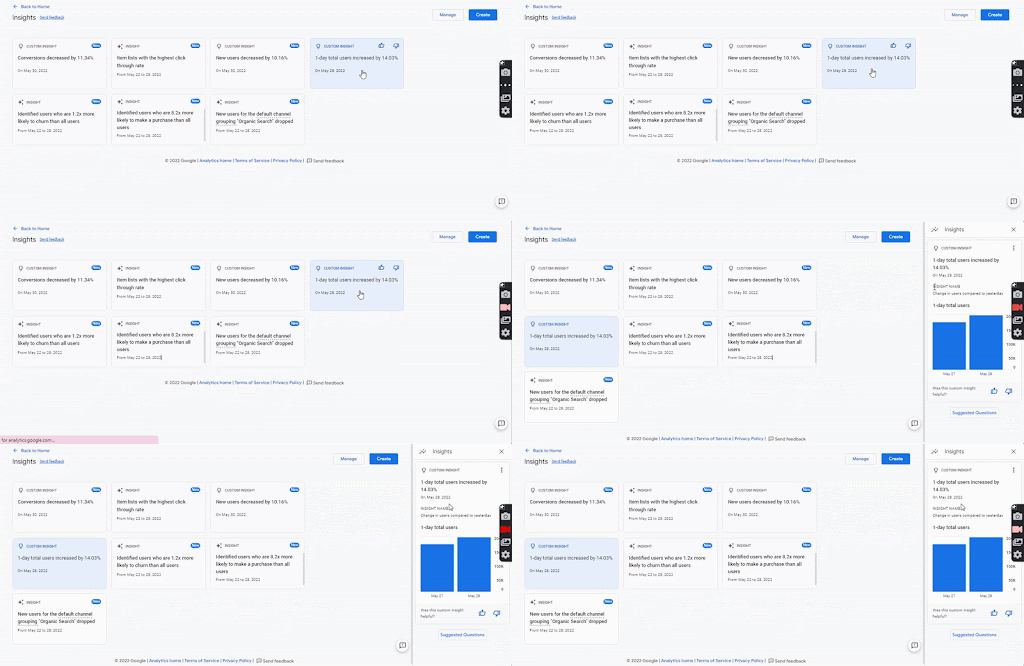
The Insights dashboard shows a summarised view of all recent automated and custom insights. Click on the card to see more details for any specific insight. Every time you interact with an insight card, Analytics Intelligence learns which one is important to you and sorts these cards accordingly.

Insights Dashboard - Detailed View

Some Use Cases

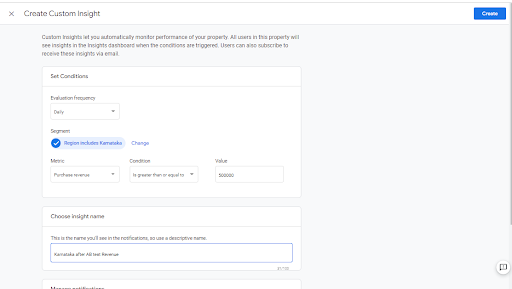
1.   Let’s say you are running an experiment for Karnataka users and your daily Karnataka revenue is around 3 lakhs which you are now expecting to reach 5 lakhs. You can utilize Custom Insights to receive a notification once your revenue for Karnataka users goes 5 lakhs or beyond.

Screen to create Custom Insights


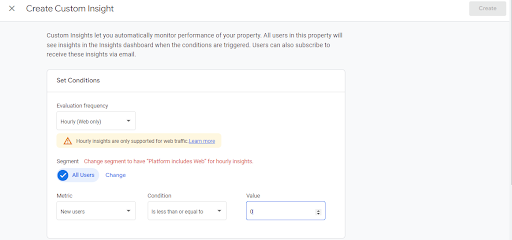
2.   Consider a scenario where you have launched a campaign and expecting a good number of new users per hour. You could create a Custom Insight for Anomaly Detection for Hourly New users so that the system intimates you as soon as there are 0 users recorded for an hour. This helps you take instant action and rectify any issues that might be causing the drop.

Screen to create Custom Insights


3.   You are running a remarketing campaign on users who have added products to your cart but never purchased. This is a high-intent audience and you are expecting a good number of purchases in the next 15 days.

While you do have an option to create Custom Insight on Conversions, the default setting allows you to configure it for all Conversions and not a specific Conversion event (purchase event in our case).

Quick Hack:

The audience feature in GA4 allows you to segment your users based on the dimensions, metrics, and events. Let’s create one to achieve our case

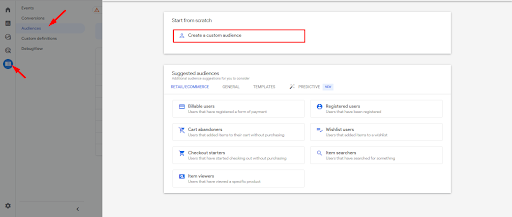
  • Navigate to Configure >> Audiences and click on “New Audience” in the top right corner.
  • Click on Create a custom audience

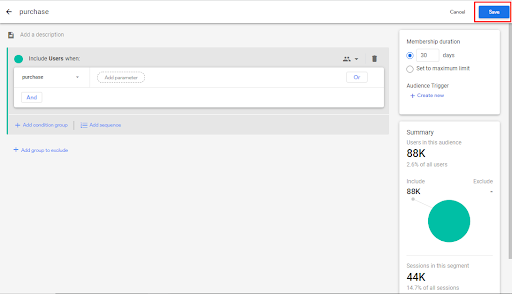
  • Create a purchase audience and select the purchase event
Screen to Create a Custom Audience


  • Now head back to your Custom Insight configuration and use this audience as a segment to create purchase event-specific Custom Insight as below:
Screen to create Custom Insights

Conclusive Thoughts

We hope that along with collecting data, you will explore GA4 for its insightful features and use Custom Insights to its full capabilities. The data is here, you just need to create insights and review them to make data-driven decisions. Custom Insights is also very helpful in monitoring positive changes and tracking issues. 

So how are you planning to use this powerful feature of GA4? Let us know in the comments section and reach out for any questions.

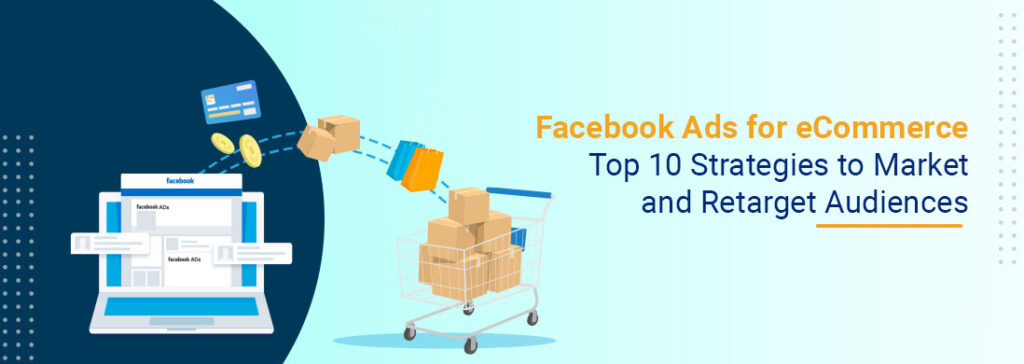
Facebook Ads for eCommerce: Top 10 Strategies to Market and Retarget Audiences


Table of Contents

  • Facebook Ads for eCommerce
  • How to Choose the Right Facebook Ad campaign objective?
    • Drop-offs in eCommerce Funnels: How are they reduced?
  • Which Facebook Ad Strategies can help Scale eCommerce Business campaigns
  • How to Remarket or Retarget Audiences
    • Facebook Ads Hacks For Increasing Remarketing Audiences

The Indian eCommerce industry that observed stagnant growth pre-covid; is all set to grow by 84% to $111 billion by 2024. The pandemic proved to be a blessing in disguise as there is an immense increase in the number of eCommerce stores in recent times. 

And while the competition is growing, everyone may be wondering: How can Facebook Ads grow their eCommerce business?

Facebook Ads for eCommerce

Among various digital platforms, Facebook has proved to be an effective and incredible tool for eCommerce businesses when done right. These platforms are extremely effective for brand awareness and conversions. This article will help you identify the best optimization strategies to scale up your eCommerce business. 

Did You Know?

Facebook has now enabled the ‘shop’ section for Indian users to help customers buy products directly from there. Whereas, the Instagram shop feature is not currently available in India. It is only available for brands that have been selected as ‘Managed Clients’ by Facebook depending on their brand popularity, transparency, and ad content.

How to Choose the Right Facebook Ad campaign objective?

Marketing Funnel with AIDA principle

Each campaign has different KPIs (Key Performance Indicators) and deliverables. According to their performance parameters, campaigns fall under different levels of marketing funnels. 

1.  Awareness: In this funnel, businesses educate their prospects about key offerings and value propositions. They promote their brands or products in such a way that fulfills the ‘Awareness’ funnel. 

To achieve this pre-buzz, the Facebook platform has different campaign objectives such as Brand Awareness, Reach. 

This objective optimizes the campaign on the following events Ad-recall lift, Reach, and Impressions. The communication at this funnel should aim to portray the unique features of products, key service deliverables and focus on ‘selling’.

2.  Interest and Desire. At this level, businesses try to seek the prospects’ attention by creating engaging content and creating a desire to make purchases.

To increase the post-engagement, Facebook platform has different campaign objectives such as Traffic, Engagement, App Installs, Lead generation, Messages, and Video views.

You can optimize the campaign on the following events Link Clicks, Daily Unique Reach, App Installs, Post-Engagement, ThruPlay, Leads, and Page views.

3.   Action or Conversion. At this level businesses drive customers to take action by mentioning clear CTA’s (Call To Action) on Facebook Ads. They advertise with promotional content (such as discounts, offers, and benefits). 

To improve and enhance conversions, Facebook has different campaign objectives such as Conversions, Catalog Sales, and Store Traffic. 

You can optimize the campaign on the following events- Conversion, Value, Conversion events, and Impressions.

Drop-offs in eCommerce Funnels: How are they reduced?

eCommerce Conversion Funnel

“Conversion rate” is the percentage of site visitors that take the desired action. Final conversion events (Purchases, leads) are preceded by Macro and Micro conversions (Page view, View content, Add2cart). To track conversion on Facebook, Facebook Pixels are implemented on the website.

Funnel Drop Offs:-

(a)  Add to Cart Rate: This indicates the % of visitors who placed at least one item in their cart during the session after visiting the product detail page. 

Ways to Optimize Add2Cart Rate: Add more customer reviews on product pages, offer discounts to first-time consumers, and introduce a live chatbot.

(b)  Cart abandonment rate: This indicates the % of the audiences who add items to an online cart but abandon the cart before completing the purchase.

Ways to Optimize Cart abandonment Rate: Mention clear CTA’s (Call To Actions). Include details like ‘Free Shipping’ and ‘Checkout Discount Code’ in the Description. Use the current product price rather than the listed price in catalog creative format and send persistent reminders of Cart contents.

(c)  Initiate Checkout rate: This indicates % the visitors who proceeded to the checkout page after adding an item to the cart. 

Ways to Optimize Initiate Checkout Rate: Allow default guest checkouts wherein the customers are not required to create accounts before checkout. Avoid latent and hidden charges. Use creatives that are attractive and have clear communication. Optimize the page loading time and segregate device-wise targeting and the user interface. Mention the CTA that has a sense of urgency.

(d)  Checkout conversion rate: This refers to the % of users who begin the checkout process, then complete it over a given time. 

Ways to Optimize Checkout conversion Rate: Simplify the checkout process. Add multiple checkout buttons. Secure the checkout process. Minimize details to fill in the checkout form, and Skip the mandatory sign-up.

What Facebook Ad Strategies can help you scale your eCommerce business?

Full Funnel-Facebook Ads Optimization Strategies

Prospecting Audiences

The audiences that aren’t aware of your business and products. Hence, they fall in the Top Funnel of marketing where businesses need to be aware of their existing offerings. You can target such audiences in the Facebook Ads manager using specific targeting methods, such as

1. Interest audiences 

Target them based on their personas, liking, interests, and behavior. Facebook collects ‘consumer insight data’ from the user’s personal information or activities performed on the platform to create these audience segments. These insights are available under the ‘Audience Insights’ and ‘Facebook Analytics’ sections of Ads manager. Facebook recommends targeting prospecting audiences when businesses want to drive traffic to their website with low CPCs (Cost per click).

2. Lookalike Audiences 

These are built upon the similar characteristics of our existing seed audiences (audiences that have already interacted with the brand or business). The seed audiences are the ‘Custom audiences’ created from Facebook Pixels. Pixel audiences are the First-party data audiences collected by Facebook from the ‘Meta Sources’ (Facebook, Instagram, Messenger) and ‘Own Sources’ (Website, Apps, Customer List, Offline activities).

Facebook Ads Hacks For Increasing Prospecting Audiences:-

  • Brands can target two completely unrelated interests and reflect the same in their ad copies. This has been observed to get more CTR. 
  • Brands can narrow down their interest targeting with the ‘Must Have’ option, where they can select the interest that is necessary or must for their business. (Like ‘Online shopping’ for their eCommerce business)
  • ‘Saved Audiences’ cannot be excluded from any audience set. Hence, analysing the ‘Audience overlapping rate’ is necessary to reduce the chances of the same ads being shown to the repeated user. (Example:- Interest audiences are a subset of Open audiences)
  • Different Ad sets can be created targeting different Interest audiences. For example, for eCommerce business, the interests that could be targeted are- 
    • Bargain Hunters (Interested in Discount and sales)
    • MediaNEnt (Interested in Entertainment, movies, web series)
    • EcommNLabel (Interested in Fashion and Designer brands)
    • CompDress (Interested in Direct competitor’s offerings)
  • ‘Lookalike Audiences’ can be further narrowed down by adding additional interest, age, and geography targeting.
  • Multiple ‘Lookalike audiences’ can be added in a single set unlike ‘Saved audiences’ which can’t be merged. The decision to add various LAL audiences in the same ad set should be taken based on their potential audience reach.
  • Ideally 1%-2% Lookalike audience should be used because it has relatively more similarities and the audiences are narrow. Whereas  >3% Lookalike Lookalike creates a vague and unrelated audience.
  • Lookalike of value-based custom audiences have always been successful in generating higher ROAS or Return on Average spent.
  • Different ad sets can be created for LAL audiences. Some of the LAL audiences that can be useful for an eCommerce business are as follows:-
    • LAL of website visitors
    • LAL of customer list (Converted and purchased audiences)
    • LAL of Add2cart audiences, Initiate Checkout audiences.

How to Remarket or Retarget Audiences 

This includes targeting the audiences that have already interacted with the business and are aware of the business offerings. Specific targeting methods that can be used in Facebook ads manager to approach such audiences are:-

  1. Use Custom Audiences which are created through Facebook Pixels. The pixels implemented on the website help in identifying the users that had visited your website. Or viewed content, abandoned specific products, initiated checkout, and made final purchase. The pixel also identifies the one that has dropped off in the middle of the funnel. So, we can retarget them from the point where they left off by creating different custom audiences.

Facebook Ads Hacks For Increasing Remarketing Audiences:-

    1. Use ‘Dynamic Remarketing’ to retarget the audience with the particular product they left while making the final purchase. The campaign objective that needs to be selected for it in Ads manager is ‘Catalog sales’. Shopify (or any CRM) feed needs to be linked at the campaign level.
    2. Always select the ‘Product Tag’ feature for Dynamic Ads. In dynamic ads, the creatives will take the product name and price from the feed. Also, the Landing URL is dynamic to the specific product detail page.
    3. Different creative tools can be used in the catalog such as the use of Frame (Brand, discount), and strikeout price (in sale catalog). This can help to connect with the users more.
    4. The use of a proper ‘Primary Text’ and ‘Headline’ is very important in Dynamic Remarketing and Remarketing campaigns. The primary text should have a sense of urgency and should induce the users to complete the pending purchase’. An example of one of the Primary texts that are used in ads is:-
      • “We Know You’ve Been Eyeing These Products, So let’s Continue From Where You Left Off ❤”
    5. There is also an option to ‘Upsell’, or ‘Cross Sell’ in Dynamic Remarketing campaigns which help to promote products to customers who have made certain purchases or abandoned one because of price. 
    6. ‘Custom combination’ of products can also be done in Dynamic Remarketing for specific audiences as per their interaction with the category of products.

Hence…

It is imperative to have a strong and measurable strategy when advertising on Facebook. So the business gets the most value out of it.

Also, a high engagement and conversion rate is observed for brands where they have created ads that are highly targeted. They can be based on the demographic characteristics, interests, and online behavior of their business’ ideal customers.

Get a Filtered Reporting View of Your Data with GA4 360 Subproperties


It’s been a while since Google announced a new version of Analytics - describing it as the new default version of its famous data collection and web traffic analysis tool. In case you are new to GA4 - check it out, what it is and why it is so important!). The existing Universal Analytics version will expire by July 2023, so now is the time to migrate to GA4 to have at least one year of data on the new property.

GA4 360 Subproperties Feature

GA4 360 enables premium features compared to a standard GA4 property. One such feature is Subproperties. This allows you to customize the structure and data distribution of your parent property in order to meet data & user governance needs. Let’s understand subproperties in detail, how to create them, pricing, usefulness, and detailed comparison with GA 360 views.

What are Subproperties?

In GA4 360, subproperties allow the administrators to manage filtered data and settings i.e., integrations, audiences, and custom dimensions at a subproperty level. Subproperties will enable you to replicate some of the functionality of Views in Universal Analytics. Let’s dig deeper to understand the hows and whys of a Ga4 360 subproperty.

About GA4 360 Subproperties

GA4 Subproperties
GA4 Subproperties

A subproperty is a property that gets its data from the source property. The data in a subproperty is mainly a subset of the data processed in the source property. The subproperty can be used primarily for:

  • Controlling the user access to data
  • Creating a filtered property based on the events from the source property

How to Create and Edit Subproperties?

The process to create a subproperty in GA4 is simple and hassle-free. You can simply navigate to the Admin section and click on the Subproperty option in the Admin section, all you need to do is follow these steps and you are all set and the sub-property is created. The sub-property is created on the basis of the filters Include/ Exclude events filters from a list of the available dimensions list. Once the sub-property is created, you can edit the filters and the setting options available in the admin panel.

Steps for GA4 Subproperties

Once the subproperty is created, the next question is “Can we delete or restore the subproperty?” The answer to this is, Yes. To delete a subproperty:

  1. Click Admin.
  2. In the Property column, click Subproperty management.
  3. In the row for the subproperty, click More > Move to Trash.

Deleted subproperty will be accessible in Trash for the next 35 days, after which Google Analytics will delete it permanently.

What is the Cost for a GA4 360 Subproperty?

The cost of events in each subproperty is one-half the cost of the events in the source property, per the terms of your GA4 360 contract. You are not charged for source-property events that you filter out per the configuration of the subproperty.

How are the GA4 360 Subproperties Useful?

Unlike Views in GA360, subproperties in GA4 are full-fledged properties. They have their individual settings at the property level for integrations for Google Ads, audiences, custom dimensions, Google Signals, and others. Administrators can choose whether the subproperties are centrally administered or locally controlled. 

You can create a sub-property if you need a filtered reporting view. Or if you want to give access to a subset of the data collected in the source property to some users. And then each subproperty can have its own Google Ads linking, exporting its own set of audiences (which are more relevant for a specific region, for example) and can be better managed overall in terms of separate yet integrated datasets.

For example: 

Let’s say you own a global food chain; due to data governance issues, you shouldn’t be sharing the Global property’s data with the regional teams. In this case, you can simply create a subproperty that filters the data for India so that an individual region does not have access to others’ data. In this way, the users for India property can target the users through Google Ads creating

Create multiple subproperties

Is GA4 360 Subproperties Replacing the Views in GA360?

No, subproperties in GA4360 are not replacing the views in GA360. They can substitute views to some extent but are not a complete replacement. 

Here’s how the GA4 360 subproperties are different from Views in Google Analytics 3:

Description Universal Analytics Views GA4 Subproperties
Product Linking Can be done only at the property level and not at the view level. It will remain the same for all the views Different Product Accounts can be linked to different sub-properties
Data Import Can be done only at the property level and not at the view level. It will remain the same for all the views Each sub-property will have separate Data Import limits
Audience Can be done only at the property level and not at the view level. It will remain the same for all the views Create audiences for each sub-property
Filters There are various filters available like search & replace, lower case, Advance filters, etc. All are available at the view level There are just the event-based filters available for GA4 sub-property
Custom Definitions You can create up to 200 CDs in GA3 You can create 125 events scoped CD and 125 User scoped CD
Goals/ Conversions You can configure goals at the view level You can mark events as Conversions at the sub-property level

Hence…

Sub-properties in GA4360 help to create a branched property out of a global source property. This will act as an individual view where you could control the data access to certain groups of users. You should create GA4 360 subproperties if you have data governance and need a separate reporting property as per business KPIs. This ensures that different teams or partners, like advertising agencies, can access the data they need following your policies. Cheers to data analysis but with privacy and security at the highest priority! Have a sneak peek into the Why You Should be Migrating To Google Analytics 4. Now! (Infographic) 

Bot Icon
Bot Icon

Tatvic Bot

Explore About Tatvic and Services