Hello There!

Lorem ipsum dolor sit amet, consectetur adipiscing elit,

Change the dimensions of your digital marketing funnel with DV360

If you trace business pressure in digital marketing, it is closely associated with the dawn of acronyms; which got increasingly obscure and confusing. It started with the good old PPC. Remember it was CPC and CPA morphed TROAS and ACOS. And then we have a dollop of ROS, RON, DMA, and IAB which we must deal with. While the conversation has become more interesting as we try to look more involved with each acronym; we should not blur out the fundamental problem. (Oh, by the way, there is a new acronym: DV360)

There is - the funnel - which we all have learned to love and live with. The funnel determines a lot of our marketing actions. The example of a funnel is shown here.  I do not think I have to even write a single line of description to tell anyone what this is all about. But, I will talk about DV360 in the later stages and how it can change the funnel.

A typical conversion funnel

This funnel is in a box. The box in which the funnel is determines the way we plan our marketing. We all know, that irrespective of how much we want to step outside the box, there is plenty of action in the box. It is this, which keeps us busy and active as we make Reports and Analysis. This is more valid when we are a small and medium agency.

One of the other challenges is that the small and medium agencies, at times do not have the resources, funds, or in some cases courage to step into the unknown areas.

What it takes to change the dimensions of the marketing funnel 

No marketer wants to fight hard at the bottom of the funnel, nor does she wants to spend millions with random targeting in the top end of the funnel.

Marketers do not want to handle multiple tools, platforms, and reporting to get anywhere. It gets them into a situation like this.
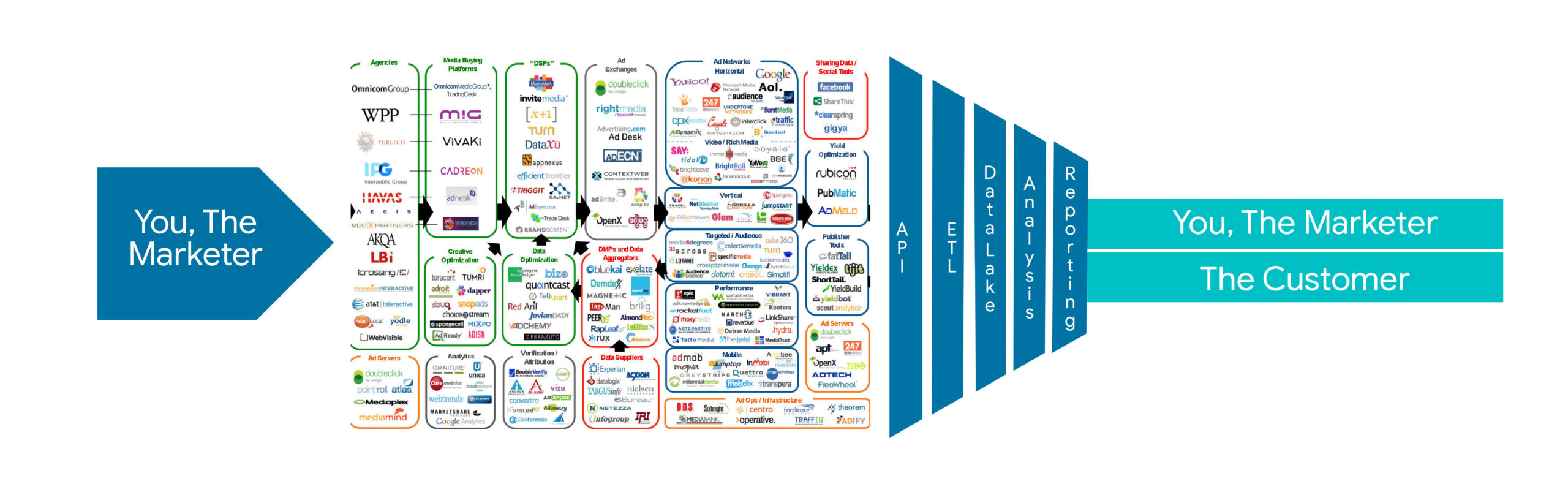
Display advertising network ecosystem

We are a bunch of folks who are so busy trying to solve the customer’s problems and getting their sales right - and this is why we strongly suggest DV360!

Why we suggest DV360 - Redefine the acquisition funnel
Redefine the acquisition funnel

Change the size and shape of the funnel with DV360

Welcome to the world of powerful DSP with Display and Video 360.

While browsing, you must have noticed those inviting banner ads. That appear at random, persuading you to buy something you didn’t know existed? That’s what display ads are - and DV360 is exactly what marketers need to make this happen.

Did you know, that more than 90% of sites are accessible through DV360? And it is said to serve 90 billion impressions a day. We don’t know what counts as effective reach for advertising if that doesn’t.

This is the path to the largest inventory and more, including a reservoir of audiences, targeted marketing, private auctions, and programmatic guaranteed deals. You can fine-tune the pace and frequency, and choose formats from video to native…you just need one platform to provide value to the customer. All under your control and power.

Imagine, all those acronyms dissolving away with one single ‘red button’.

On a serious note, DV360 offers a large-scale reach so that your advertisements are visible to a wide audience whether your goal is to acquire new customers or increase brand awareness. 

The final conversion may take place through a click which may not get a direct attribution to this platform, but once the dimensions of the funnel are changed, you will visibly notice more conversions.

Check out our recent case study on DV360 - How our client achieved more than 10x growth in organic & direct traffic.

This is where we come in

The path to getting access to DV360 is strewn with hurdles like a commitment to spend a huge amount. Yes, a real huge amount which is a challenge when you are running a hyper-local campaign for a salon franchise in three states and twenty locations.

Tatvic, as one of the top Google Partners, provides you access and training to Display and Video 360 with no complex prerequisites or commitment to large budgets. The best part is we get you up and rolling in a short time…how does a week sound to you from the day you make the first call to us?

Good? Here is the email address where you can start from he***@****ic.com

Firebase AB Testing Services for Smarter Android App Experiments

With Firebase, you can perform A/B testing in applications with minimal effort and better results. It’s a mighty easy platform.  

This is the second part of the series to guide you through set and Testing! Part 1- Ways to implement A/B tests in Firebase.

How to configure the A/B test?

We are starting with Firebase A/B testing using the Remote Config feature.

1. Set up the A/B test in the Firebase console. 

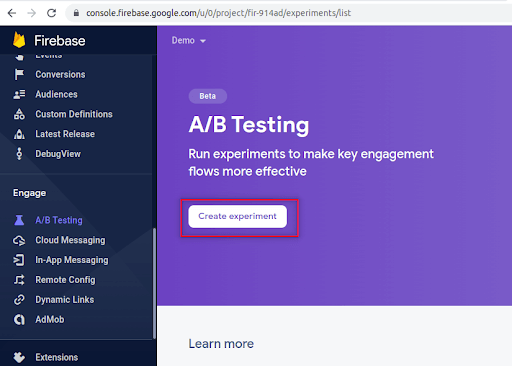
2. Click the A/B testing item from the left side menu and click the Create Experiment button.

Step 1 to configure AB Testing Console -  Click the A/B testing item from the left side menu and click the Create Experiment button.
Firebase A/B test console

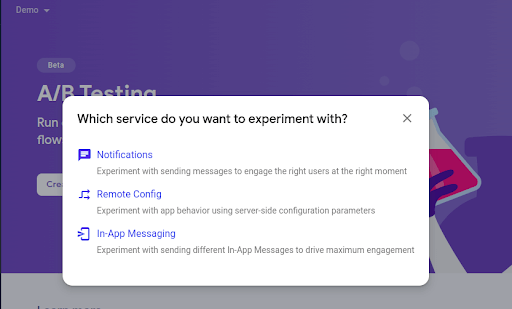
3. The Popup box will ask to choose from- Remote Config, Notifications, or In-App Messaging to configure an A/B test. Since we will be configuring the test via config parameters select the Remote Config option.

Step 2 to configure AB Testing Console -  Click the A/B testing item from the left side menu and click the Create Experiment button.
Firebase A/B test experiment types

4. Create an experiment via Remote config:  

In the A/B test configuration screen, allow users to define and set up the A/B test with a couple of conditions and parameters to be satisfied. 

Here we’ll use the same parameters that were created in the “Set up Remote Config in Firebase console” section.

How to configure the A/B test in the Firebase console using Remote Config?

To configure the Firebase A/B Testing using Remote Configuration, follow the below step-by-step process:

Step 1: Provide the Experiment name and details: 

Create firebase remote config experiment

Step 2: Condition to target users

In this section, we need to select the app in which we need to activate this experiment.

Target Audience Apply for firebase A/B test


Here, for targeting, take All users to be eligible for an experiment based on the conditions we use.

Activation Event(Optional): 

An event that activates the experiment for a user. All targeted experiment users will receive an experiment variant treatment from the start of the experiment. Only those users who trigger the activation event will be included in the experiment measurement.

Firebase A/B test Activation event

Here, select Continue_Shopping(custom event) as an activation event to track how many users are clicking the shopping button, then click Next.

Step 3: Define Goals

Firebase A/B Test Primary Metric

By utilizing goal metrics (such as Crash-free users and user retention) plus maximum occurrences of events (such as daily user engagement, app_remove, first_open, and custom events). 

The goal will be deemed a metric that can be chosen for the variant that best achieves the experiment leader as the primary goal. Click Next.

Firebase A/B test Additional Metrics
  • Types of metrics to track 

Same as goals, there is a list of metrics available in the above screencap, at max 5 metrics can be used per A/B test. Distinct metrics as additional metrics (secondary goals) can be configured as compared to goals as secondary goals.

E.g. for the test experiment, we have set Purchase revenue as the primary metric and in additional metrics, we’ve selected other metrics

Firebase A/B Test Goal setup

Step 4: Select variants

By using the parameters that are defined in Set up Remote Config in the Firebase console section, multiple parameters are applied for variant setup with values for Control Group and Variants. Also, the A/B test has been configured as an alternative text and color shade for the shopping button.

  • Types of variants

The baseline indicates the App’s original view, whereas variants define the different variations to accomplish the goal. At max 7 variants are allowed for configuration.
Multivariate A/B tests can be achievable by adding parameters/clicking Choose or creating new.

Firebase A/B Test variants
  • Adjust variant weights

Variant weight refers to the distribution of variants to users. It will be in the form of a ratio among all variants.

Firebase A/B Test variants traffic allocation

Step 5: Click the Review button.

4.  Save the draft review it and test it in the testing environment

Test A/B test in Testing Environment

1. It’s the cherry on the cake.

Firebase leverages users to verify A/B tests in the device before making it live. Click AB test tab -> Select your AB test from the drafted section -> Open settings using 3 dots  -> Click

Manage test devices.

Run Firebase A/B testing on test device

2. Provide the device instance ID and select the variant that you want to test. To get Instance IDs for Android and iOS:

     a. Android snippet to fetch Instance ID as below:

    b. iOS snippet to fetch Instance ID as below:

3.  Add ID in the token box, and select the variant that you want to verify. Click on Save.

Run Firebase variant A/B test on test device

4.  Below are our example screens with changes visualized:

Firebase A/B Test Variant vs Baseline

Deploy Experiment in Live Environment

Yeah! It’s time to make experiments live across all users to provide easy access and engagement. It’ll help us in deciding whether to roll out the variation in the live environment or not.

  1. In the Firebase console, on the left side menu clicking the A/B Testing option will show a list of running experiments, drafted versions that are in review/testing environment, and completed A/B tests in case any.
  2. Our experiment will be visible in the Draft section as it is not yet published. Click the experiment title and open it. Experiments can start in two ways directly: one is from the Drafted section. Then, click the start menu.
  3. Firebase A/b Test starting to experiment
    Firebase A/b Test starting to experiment
  4. With this, we come to an end of our PART-2 of the Firebase: A/B testing series. In the next part, we will be covering Notification set-up, In-App messaging and exploring Multivariate A/B testing. Meanwhile, you can start implementing and reach out to us in case of additional queries at he***@****ic.com. And we would be, as always, happy to help.

Leverage GA4 for Ecommerce Reporting & Tracking: Make the Best Decisions!

ECommerce reporting and insights with Google Analytics 4-

GA4 eCommerce reporting provides a detailed understanding of a user journey through your sales funnel. They also measure the impact of promotions and product placement on revenue and conversion rate.

If you run an eCommerce business, it is important to map your sales data against the average time spent on various sections of the website/app. Additionally, Google Analytics helps map product-wise categorizations to further analyze the eCommerce reports for website optimizations.

Google Analytics (GA4) will help you get these must-have insights sorted with its default reports. However, with a few schema differences between Universal Analytics and GA4, we recommend going through the Google Developers Guide first to ensure accurate set-up and data tracking.

Once you have high-level insights on revenue, you would also want to understand how users behave on your website before purchasing a product. For instance, ‘Did a user drop out of the journey after adding a product to the cart or before adding to the cart?’ What if you also want to understand some micro-level details - ‘Are users transacting more from mobile devices as compared to the desktop  in the evenings?’ 

Let us see how to use Google Analytics 4 to generate those insights. If you are aware, you can start planning your ga4 migration journey today!

Analyze Shopping Journey:

On arriving at your eStore, a user starts his journey by viewing a list of products/categories/items → navigating to item detail → adding an item to the cart → making a purchase.

Check the funnel, which can help you analyze the ratios like product-view to transactions, add-to-cart to transactions, and such.

Google Analytics: Shopping Behavior Funnel
Shopping Behavior Funnel

Did you notice an additional dimension of the Device category? It helps generate insights like users with desktop devices have the highest completion rate of 24% and this is true for all the funnel steps.

Some strategic insights on remarketing can also be obtained via this Google Analytics report. For example, we can run specific campaigns to nudge users to add items in the cart through additional deals, if the ‘item-view’ to ‘add-to-cart’ ratio is low.

Once the user reaches the checkout stage, the probability of him purchasing increases. This is the time when you should focus on decreasing the time he spends on the checkout journey and make an immediate decision to purchase. The question is how do you understand which user goes through all steps of checkout or leaves it midway? To assess this, you might want to look into the checkout journey steps in detail.

Now let’s see how we can generate such insights with an eCommerce reporting feature.

Analyze Checkout Journey:

Let’s say we have analyzed shopping behavior and our cart additions have increased at a higher rate as compared to transactions. In this scenario, we need to analyze a user’s checkout behavior. 

There are several steps that a user takes between checkout and final purchase. These steps include adding personal information, shipping details, reviewing filled details, etc. The following funnel would give you a deeper understanding of the user’s checkout behavior:

eCommerce Reporting: Checkout Behavior Funnel
Checkout Behavior Funnel

The funnel here shows that maximum users are dropping off from step 3 - Review step. Based on this, we can decide if it is the number of steps in the checkout process hampering a user’s purchase intent or poor user experience. 

Decisions based on the funnel data can directly impact transactions and/or revenue.

When we look at the funnels above, one important point of consideration is user drop-off. There would be stages where you see huge drop-offs creating bottlenecks for the next steps. What would be your next action on this data?

Analyze Drop-offs:

Identifying a point from where a user drops off is an important area to look at. It creates a roadblock in the conversion/purchase journey. Each step will let you create a segment and then analyze those users or retarget them in marketing campaigns.

Google Analytics: Drop off Analysis
Drop off Analysis

Additionally, you can use other parameters (secondary dimensions) to dig deeper into the funnel. This will give you granular insights.

You might be interested in device-wise breakdown to analyze drop-off. Let’s consider that the completion rate of step 1 is the highest for desktops. Based on this, you can target customers for desktop with a higher campaign budget as compared to mobile. You can take a similar approach to the abandonment rate which is higher for mobile by adjusting your campaign spending or running more retargeting campaigns to improve overall performance.

The next important thing for a business is to be able to improve ROI based on optimized user targeting. For example - ‘How do you segment a customer as a loyal customer, is it based on frequency or value?’, ‘How would a particular segment of users impact the overall revenue?’ and so on.

Let’s understand the capabilities of GA4 in eCommerce Reporting.

Predictive Insights:

Predicting the effectiveness of your marketing spend is an important aspect and so is keeping an eye on the revenue. What if Google Analytics 4 makes your work easier? With the implementation of the purchase event in GA4, we can unlock the predictive metrics and machine learning capabilities. 

What benefits do we get by unlocking the predictive metrics?

  • Purchase Probability: The probability that a user who was active in the last 28 days will log a specific conversion event within the next 7 days.
  • Churn Probability: The probability that a user who was active on your app or site within the last 7 days will not be active within the next 7 days.
  • Revenue Prediction: The revenue expected from all purchase conversions within the next 28 days from a user who was active in the last 28 days.

With this, we will be able to set up predictive audiences.  For example, likely purchasers in the next 7 days and use them for remarketing. This eventually will help us optimize the marketing spend.

You can use these audiences for remarketing, directly. These audiences can be seen under Configure → Audiences tab

Google Analytics: Predictive Audiences
Predictive Audiences

You would also be interested in knowing what is the Customer Lifetime Value (CLV). User lifetime is a technique used to show how a user behaved on the website during his engagement period. Through eCommerce reporting, you can find insights like

  • Source/medium of users who contributed to the highest revenue
  • Active campaigns that brought more high-intent users in to make any adjustments in the campaign or run a new one on this segment
  • User insights like when a user was last engaged/purchased on app/site
eCommerce Reporting: User Lifetime Value
user-lifetime-value

Conclusion:

Google Analytics 4 lacks some standard eCommerce reports available in Universal Analytics. But, the built-in techniques available in the ‘Explore’ section come with more flexibility in measuring users’ journeys across various dimensions. It uses its predictive learning capabilities and machine learning to give you in-depth insights into the high-intent users eventually improving your Conversion Rate.

While Enhanced eCommerce for GA4 is constantly evolving, there is a rollout of a few basic reports but some advanced capabilities that users can start exploring for their business today.

Here’s a sneak peek of how eCommerce reporting in Google Analytics 4 is here to transform your overall business strategies and customer experience.

How to Enhance A/B Testing Reports with Google Analytics

To understand how to enhance A/B testing reports with Google Analytics, let’s briefly cover what A/B testing is and how Google Optimize will help us in A/B Testing.

Define AB Testing:

A/B Testing, also known as split testing, is an experiment for comparing two or more versions of web pages or apps to understand which version is performing better.  A/B testing is a method where two or more variants of a page or screen are shown to users on the basis of Audience definitions. Once the test is sent, statistical analysis determines which variant is performing better for a conversion goal defined.  

A/B testing will help us enable the data-backed decision for testing the website optimization and shifting the business decision from “This might help us achieve the goal” to “This will help us achieve our goal” 

So the major question now is, how do we proceed with A/B testing? There are various tools that help us with A/B Testing. This article focuses on one such tool called Google Optimize. 

We will cover: 

  • Brief on Google Optimize
  • How we enhance A/B testing and reporting with Google Optimize and Google Analytics linking.

How will Google Optimize help us in A/B Testing 

Google Optimize is an online A/B Testing tool that enables us to run experiments with various approaches to delivering content. Optimize allows us to 

  • Test variants of web pages and see how they perform against a specific objective
  • Monitor the results of your experiment and identify the leading variant 
  • Work on conversion rate optimization. 

There are four types of tests or experiments that can be performed in Google Optimize:

  1. A/B Testing
  2. Multivariate Test
  3. Redirect Test
  4. Personalization

1) A/B Testing

A/B testing is a randomized experiment using two or more variants of the same web page or app screen (Variant A and Variant B). Variant A is the original page and Variant B contains at least one variant that is modified from the original web page or screen.

2) Multivariate Testing

The test helps you understand the interactions between multiple sections of a page by testing them together in a coordinated way. 

In multivariate tests, testing is done for two or more variant elements simultaneously to see which combination creates the best outcome. It identifies the most effective variant of each element as well as analyzes the interactions between those elements.

3) Redirect Test

The test allows you to test separate web pages against each other. In redirect tests, variants are identified by URL or path instead of an element(s) on the page. It is useful when you want to test two very different landing pages or a complete redesign of the page.

4) Personalization Test

It includes a set of changes made to your website for a specific group of visitors. Unlike experiments, personalizations can run forever and don’t have variants. They’re a single set of changes served to anyone who meets the targeting conditions. 

Once we have found a leader in an experiment, we can deploy it to all of your visitors permanently, or use Optimize’s powerful targeting capabilities to tailor your website to a specific group of visitors.

How to read Optimize Reports?

With the Optimize interface, we can read reports of Conversion Rate (CVR) for both the original and variant versions with regard to each goal set. This particular data set is linked to Google Analytics.

Optimize Analysis Interface helps us with the probability of each variant to be best and decide the probability of variants to win

Let us proceed on understanding how we can enhance our A/B testing with Google Analytics (GA)

Use of Google Analytics Audiences for Google Optimize Experiments:

Google Optimize has the capability to target audiences based on Device category, User behavior, Geography, technology, and such. Then why should we use Google Analytics Audiences if we already have so many targeting options in Google Optimize? 

Let us take a use case to understand this better.

If we are targeting audiences directly from the Google Optimize interface, it will be based on the next actionable step taken by the users. For instance, if we are targeting web users from the Ahmedabad city location, Google Optimize will target the audiences based only on the current location (Ahmedabad)  and will not consider the past location. 

What if the users were in Ahmedabad in the past 30 days but their current location is now Mumbai? In such cases, Google Optimize will not show the experiment to such users. 

With Google Analytics Audiences, we can target audiences on the basis of past behavior with a 30 to 90 days lookback window. For instance, creating an audience for users who were in Ahmedabad in the past 30 days and then targeting them will serve the requirement. 

How to analyze Google Optimize experiments with Google Analytics Data? 

Optimizing reporting is fine but what if I want to analyze some more metrics for any micro business KPI?

Optimize provides us with an opportunity to analyze each variant’s data on GA. All you need to do is create a segment from the Optimize interface and use it in GA.


Once the segment is imported in GA, it can be used on all reports as per requirement, like user journey, interactions/clicks, pages, source/medium, etc. 

As an alternative, Google Analytics also has some session-scoped dimensions for optimizing tests which can be used for creating segment or custom reports.

  1. Experiment Name - User-generated name entered during experiment creation. e.g. “My Optimize Experiment”.
  2. Experiment ID - A unique ID is available in the information panel on the Optimize experiment details page. E.g. IzxbYxEfTeuq3bQqIAHB9g
  3. Experiment ID with Variant - The Experiment ID with the Variant ID appended to it. Available in the information panel on the Optimize experiment details page. e.g. IzxbYxEfTeuq3bQqIAHB9g:1

Let’s take an example to understand what Google Analytics is capable of when it comes to analyzing user journeys for any eCommerce transaction or specific conversion event.

For eCommerce conversion, finding drop-offs is quite easy with just an application of experiment segments on funnel reports. But what if you want to measure the conversions and drop-offs from a sticky CTA (that you have placed on the home page as your A/B test), how do we do that? 

Let’s see how we do that. 

Create a custom funnel with steps as per the journey and then apply the segment of experiment id with variant or Create sequential segments and apply them on the reports or charts.

When we talk about all tests, we see their reports on Optimize Interface and GA both. But with the Personalization test, optimization reports show no reports. So then how do we measure the impact of personalization tests? Google Analytics again!

Just use the audience that you have imported in Optimize as a segment in Google Analytics and analyze various reports’ basis hypotheses. All we need to do is replicate the conditions of tests in GA and we have the data with us.

Signing off…

We hope this clears up a few of your queries on how to enhance and analyze Google Optimize experiment reports from Google Analytics UI as well as Google Optimize UI. We have additional useful information if you need to deep dive further, Tatvic’ has a Solution from Google Marketing Platform for Google Optimize 360. You may also comment and send queries.

Bot Icon
Bot Icon

Tatvic Bot

Explore About Tatvic and Services